
8. Immersed-boundary queries
An immersed-boundary solver needs more than the sign of each cell. For every ghost point, a solid node next to the fluid, it needs the wall point, the wall normal, the body it belongs to and an image point in the fluid. This chapter finds the ghost points of a 41³ grid and asks for all of that in one batch.
use fossil, only : surface_stl_object, SIGN_FAST_WINDING_NUMBER, FEATURE_FACE, FEATURE_EDGE, FEATURE_VERTEX, &
                  THICKNESS_MEDIAL
use penf,   only : I4P, R8P
use vecfor, only : vector_R8P, ex_R8P, ey_R8P, ez_R8P

implicit none
integer(I4P), parameter       :: n = 41                         ! grid points per direction
type(surface_stl_object)      :: surface, wrap
type(vector_R8P), allocatable :: points(:), ghosts(:)
real(R8P),        allocatable :: d(:), foot(:,:), normal(:,:), image(:,:), thickness(:), gap(:), area(:)
integer(I4P),     allocatable :: feature(:), body(:), region(:)
logical,          allocatable :: ambiguous(:), visible(:)
real(R8P)                     :: h
integer(I4P)                  :: i, j, k, p, m

call surface%load_from_file(file_name='dragon-placed.stl', guess_format=.true.)
h = 1.2_R8P / (n - 1)
allocate(points(n**3), d(n**3))
p = 0
do k = 1, n ; do j = 1, n ; do i = 1, n
   p = p + 1
   points(p) = (-0.6_R8P + (i - 1) * h) * ex_R8P + (-0.6_R8P + (j - 1) * h) * ey_R8P + (-0.6_R8P + (k - 1) * h) * ez_R8P
enddo ; enddo ; enddo
call surface%distance_many(points=points, distances=d, is_signed=.true., is_square_root=.true., &
                           sign_algorithm=SIGN_FAST_WINDING_NUMBER)
ghosts = pack(points, d < 0._R8P .and. d > -h)                  ! inside, within one spacing of the wall
m = size(ghosts)- The ghost points are the grid points inside the dragon and within one spacing of the wall, selected from one
distance_manybatch with the fast winding number sign (chapter 5).
allocate(foot(3, m), normal(3, m), image(3, m), feature(m), body(m), ambiguous(m), visible(m))
deallocate(d) ; allocate(d(m))
call surface%query_many(points=ghosts, distances=d, closest_points=foot, features=feature, normals=normal, bodies=body, &
                        sign_algorithm=SIGN_FAST_WINDING_NUMBER, ambiguous=ambiguous)
print '(A,I0,A,I0,A,I0)', 'ghost points ', m, ', shells ', surface%get_shells_number(), ', bodies ', surface%get_bodies_number()
print '(A,I0,A,I0,A,I0)', 'feature: face ', count(feature == FEATURE_FACE), ', edge ', count(feature == FEATURE_EDGE), &
                          ', vertex ', count(feature == FEATURE_VERTEX)
print '(A,I0)', 'ambiguous foot points ', count(ambiguous)
print '(A,3F9.5)', 'ghost 1      ', ghosts(1)%x, ghosts(1)%y, ghosts(1)%z
print '(A,3F9.5)', '  wall point ', foot(:, 1)
print '(A,3F9.5)', '  normal     ', normal(:, 1)
query_many(points=, distances=)is the rich batch. Every output afterdistancesis optional and caller-allocated:closest_points(3, n),normals(3, n), andfacets(n),features(n),feature_indexes(n),bodies(n). Unlikedistance_many, it is signed and not squared by default (is_signed=.true.).featurestells where the wall point lies on its facet:FEATURE_FACE(inside it),FEATURE_EDGEorFEATURE_VERTEX, with the local edge or vertex index infeature_indexes. The normal is the pseudo-normal of that feature: the facet normal on a face, an angle-weighted average on an edge or at a vertex.bodiesis the body of the closest facet.analyzegroups the facets into shells (edge-connected sets) and the shells into bodies (an outer shell with its cavities);get_shells_number()andget_bodies_number()count them.ambiguous(n)flags the points with a second foot point, on another facet, as close as the first within a relative 1e-6: points on the medial axis, or in a thin gap.second_foot_pointsreturns it; the caller decides what to do.query_pointis the one-point form;query_many_deviceruns the batch on the device (chapter 12).
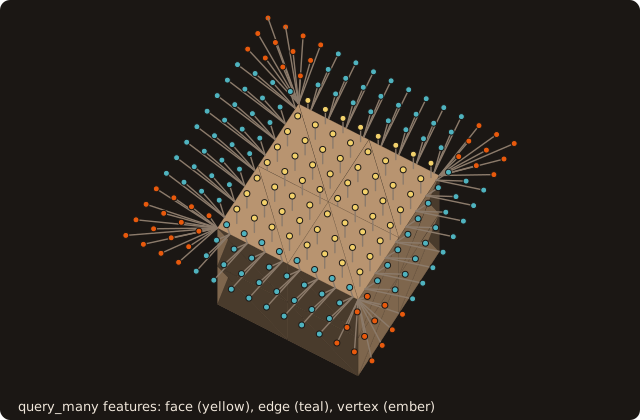
The features are easiest to see on a cube: the same call on a sheet of points above it splits them into the face, edge and vertex regions.
call surface%image_points(points=ghosts, images=image, visible=visible)
print '(A,3F9.5)', '  image      ', image(:, 1)
print '(A,I0,A,I0)', 'images visible from their wall point ', count(visible), ' of ', m
image_points(points=, images=)mirrors each point through its wall point, 2·foot − x.visible(n)is true when the segment from the wall point to the image crosses no facet, that is when the image is a usable fluid point.probe_many(points=, lengths=, probe_points=, visible=)places probes at a given distance along the normal from the wall point (positive outward), with the same visibility test.
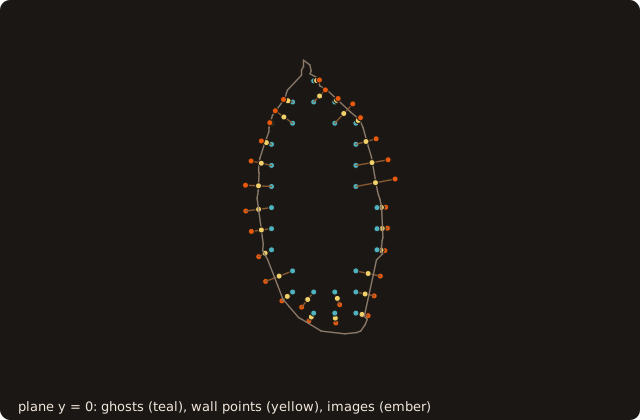
The view is along y: the wall points are the closest points in 3-D, so some lie off the plane and project off the section, and an image point can project inside it.
call surface%alpha_wrap(alpha=0.03_R8P, offset=0.003_R8P, wrapped=wrap)   ! one closed surface (chapter 11)
call wrap%thickness(thickness=thickness, gap=gap, method=THICKNESS_MEDIAL)
call wrap%thin_regions(thickness=thickness, gap=gap, h=h, factor=1._R8P, region=region, region_area=area)
print '(A,ES9.2,A,ES9.2,A,F6.3)', 'wrap: thinnest wall ', minval(thickness), ', narrowest gap ', minval(gap), ', h ', h
print '(A,I0,A,I0,A,I0,A,F7.4)', 'under h: ', count(region > 0), ' of ', size(region), ' facets in ', size(area), &
' regions, the largest of area ', area(1)- A wall or a gap thinner than a cell is where an immersed boundary goes wrong: ghost points with an ambiguous wall point, image points behind another wall.
thickness(method=THICKNESS_MEDIAL)measures, before any grid, the diameter of the largest ball tangent to each facet inside the body (thickness) and outside (gap). - The dragon is first wrapped into one closed surface (
alpha_wrap, chapter 11). The raw file is 76 overlapping shells, and a ball inside it would stop on the inner shells. thin_regions(h=, factor=)groups the facets thinner thanfactor * hinto connected regions, largest first. For AMR,build_thinandtag_block(thin_factor=, ...)turn the same values into refinement tags (chapter 9).
Running it
$ tut08_ib_queries
ghost points 1368, shells 76, bodies 37
feature: face 1051, edge 303, vertex 14
ambiguous foot points 2
ghost 1        0.00000 -0.33000 -0.33000
  wall point   0.00005 -0.33150 -0.33212
  normal       0.01806 -0.57622 -0.81709
  image        0.00009 -0.33299 -0.33424
images visible from their wall point 1330 of 1368
wrap: thinnest wall  3.92E-05, narrowest gap  2.92E-04, h  0.030
under h: 2856 of 7226 facets in 305 regions, the largest of area 0.0908- 1368 grid points are ghost points. For 1051 of them the wall point is inside a facet, for 303 on an edge, for 14 at a vertex. Two have an ambiguous wall point.
analyzefinds 37 bodies, not one: the open, non-manifold dragon splits into 76 edge-connected shells. On a clean closed mesh of one solid there is one body.- The image of 1330 ghost points is visible from its wall point. The other 38 images lie behind another part of the surface, and a stencil there needs another closure.
- On the wrap, 2856 of 7226 facets are thinner than one grid spacing (h = 0.03), in 305 regions: the legs, the tail and the creases of a coarse 41³ grid. Those are the places to refine before trusting the ghost points there.
With named patches (an STL with several solid blocks), query_many(patches=), probe_many(patches=) and image_points(patches=) also give the patch of each wall point: which boundary condition the ghost point closes.
What you learned
query_many gives the wall point, feature, normal and body of every point in one call; image_points and probe_many build the fluid-side points with a visibility test. Reference: Immersed-boundary queries.
Next: 9. AMR tagging.