

18. The studio on a cluster
A real case lives on a cluster: its input, its multi-gigabyte results, the solver and the queue are there, and copying the results to a laptop to look at them is the slowest part of the day. In remote mode the studio runs on the cluster's node, next to its files, and draws its interface in a web browser on your machine: no display, no GPU and no X server on the node; only the frames travel.
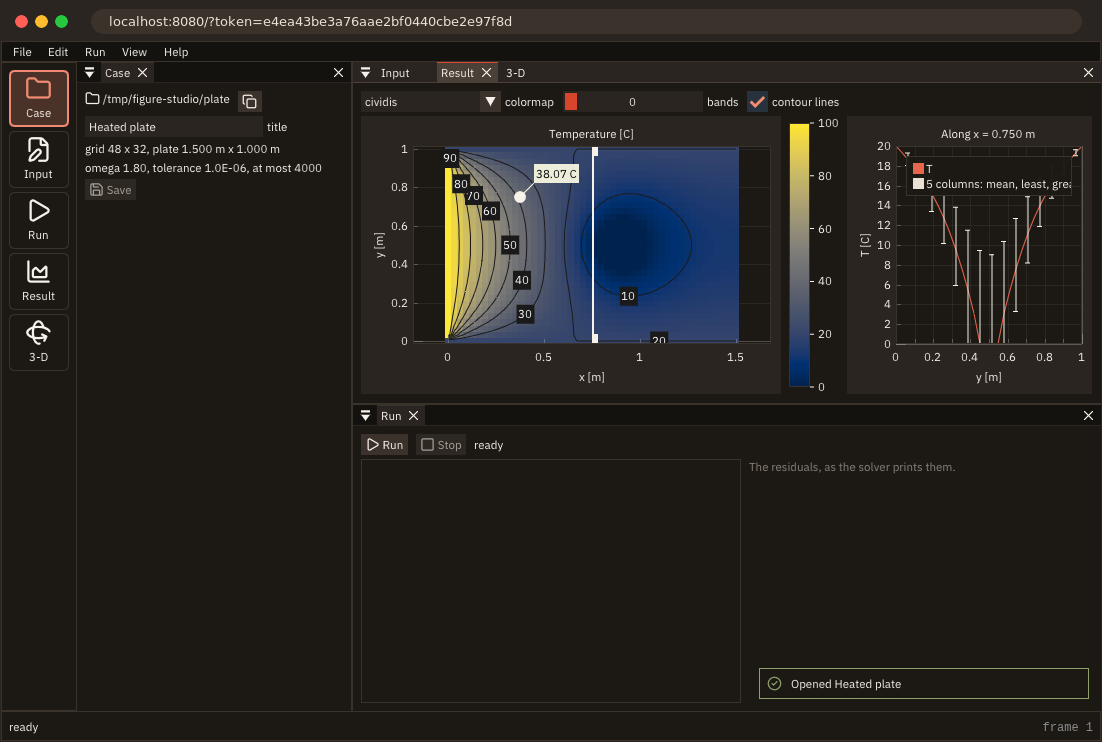
The whole program: tut18_remote.F90.
What this chapter adds to chapter 17's program, tut17_tested.F90:
- changed:
draw_case,draw_panels,open_window,write_examples
One option
if (remote) then                                  ! no window, no display, no GPU: a cluster node will do
   call app%init_remote(port=port, width=1100_int32, height=680_int32, max_fps=30.0_real64, compress='auto', &
                        quiet=.true., url=url, stat=stat) ! the address to open, with its access token
   if (stat /= FIG_OK) then
      write(output_unit, '(A)') 'tut18_remote: '//figure_last_error() ! a port in use, say
      stop 1, quiet=.true.
   endif
   call app%set_title('FIGURE studio')            ! the browser's tab shows it
else
   call app%init('FIGURE studio', 1100_int32, 680_int32, decorations='figure', ini_file='tut18_remote.ini')
   call app%set_icon(ICON_FLAME, stat=stat)
   if (stat /= FIG_OK) write(output_unit, '(A)') 'no window icon here: '//figure_last_error()
endifapp%init_remote(port=)creates the contexts and serves the interface onhttp://127.0.0.1:PORT/instead of opening a window (Remote mode). Everything after it is the studio as it was: the samedraw_studio, the same loop; widgets, plots, the 3-D view and the file browser are drawn the same way, and the browser's mouse and keyboard reach them.set_iconis not called: there is no window; the browser's tab shows the title.- The address carries an access token, 128 random bits made at each start: without it the page and its connection are refused, so the other users of a shared node cannot take the studio over (Access token).
if (remote) then                                     ! printed once the case is open: the browser finds it ready
   write(output_unit, '(A)') 'FIGURE: open '//trim(url)//' in a web browser'
   flush(output_unit)
endif
quiet=.true. keeps init_remote from printing the address, and url= returns it: the studio prints it once the case is open, so the browser finds it ready. A program started by a batch job writes it to the job's output.
Reaching the node
Start the studio on the node, then open a tunnel from your machine and the printed address in your browser:
tut18_remote --case ~/cases/plate --remote 8080          # on the node: prints FIGURE: open http://localhost:8080/?token=...
ssh -L 8080:localhost:8080 user@node                     # on your machine; through a login node: ssh -J login -L ...
The studio listens on 127.0.0.1 only, the node itself; SSH carries and encrypts the traffic. Closing the browser does not end the studio: open the address again later, and it is where you left it (A program on a cluster node).
What a browser allows
The studio is the same program; the browser is not a desktop, and a few of the studio's habits change:
- Files: the system's dialog does not exist (
open_folder_dialogis refused withFIG_ERR_STATE), and the studio already opens FIGURE's file browser then (chapter 10). It lists the node's files, which is what the studio works on (Opening and saving files). - Drops: a browser gives a page the contents of the files dropped on it, never a path on the node, so the page refuses them. The Case panel says so:
if (remote) then                               ! a browser gives no paths of the server: no drops
   call ig_text_wrapped('Open one with File > Open case: the browser lists the files of the machine the '// &
                        'studio runs on.')
else
   call ig_text_wrapped('Open one with File > Open case, or drop its folder (or its heat.inp) on the window.')
endif- The clipboard: the copy button puts the case's path on the clipboard, to paste it in a terminal (
cd,sbatch). In remote mode the page writes it to the browser's clipboard, which browsers allow athttp://localhost(the tunnel) or over HTTPS; elsewhere the text stays in the program, and a paste inside the studio still gets it (The clipboard and drops).
call ig_same_line()
if (ig_button(ICON_COPY//'##copy the path')) then ! to paste it in a terminal: cd, or sbatch
   call ig_set_clipboard(case_dir)                ! remote: the page writes it to the browser's clipboard
   call app%notify('The case''s path is on the clipboard', kind='info', seconds=3.0_real64)
endif
call ig_tooltip('Copy the case''s path')- Shortcuts: ctrl combinations go to the studio, not to the browser: ctrl+s does not save the page, ctrl+o opens the studio's browser. On a Mac, cmd is sent as ctrl.
- No frame: the browser's window is the window; the menus are drawn along the top of the page.
Bandwidth
A frame carries the interface's draw lists, not pixels, and only when it changed: an idle studio sends nothing, the pointer moving over it a few MB/s, and a frame waits for the previous one to leave, so a slow link gets the newest frame and never a backlog (Bandwidth). The studio asks for at most 30 frames per second (max_fps), and compress='auto' deflates the frames while the link cannot keep up. What it draws decides the rest:
- the heatmap and the 3-D surface draw chapter 15's coarse copy, at most 200 nodes a side, whatever the grid;
- the 3-D view sends its image only when it renders again (the camera moved, a mesh changed);
- the log draws only the lines in view, however long the run.
A field of millions of cells sent as a heatmap would be megabytes per frame; the coarse copy keeps it to what the browser's pixels can show.
What you learned
The same program in a window and in a browser, by one call; the access token and an SSH tunnel to a cluster node; what a browser allows of files, drops, the clipboard and shortcuts; and what keeps the traffic down. Reference: Remote mode, Performance: remote mode.
Run it: build it as chapter 7 shows (with tut12_heat beside it), then ./tut18_remote --examples /tmp/studio --case /tmp/studio/plate.
This is the end of part two. Next: 19. Mistakes reported, keys that respect the focus, the first chapter of part three, where the studio grows the features of FIGURE v0.4.0.