

Remote mode
app%init_remote replaces the window with a small web server: the program draws its interface as usual, and a web browser shows it and sends the input back. The program needs no display, no GPU and no window system, so it can run where computations run, a cluster node or a workstation without a screen, and keep everything native (OpenMP, MPI, GPUs); the browser only draws.
if (remote) then                                  ! no window, no display, no GPU: a cluster node will do
   call app%init_remote(port=port, width=1100_int32, height=680_int32, max_fps=30.0_real64, compress='auto', &
                        quiet=.true., url=url, stat=stat) ! the address to open, with its access token
   if (stat /= FIG_OK) then
      write(output_unit, '(A)') 'tut18_remote: '//figure_last_error() ! a port in use, say
      stop 1, quiet=.true.
   endif
   call app%set_title('FIGURE studio')            ! the browser's tab shows it
else
   call app%init('FIGURE studio', 1100_int32, 680_int32, decorations='figure', ini_file='tut18_remote.ini')
   call app%set_icon(ICON_FLAME, stat=stat)
   if (stat /= FIG_OK) write(output_unit, '(A)') 'no window icon here: '//figure_last_error()
endif
(The tutorial's studio with a --remote PORT option, chapter 18: everything after this call is the program as it is in a window.)
Try it with the example: exe/examples/figure_hello --remote 8080, then open the address it prints (with its ?token=...).
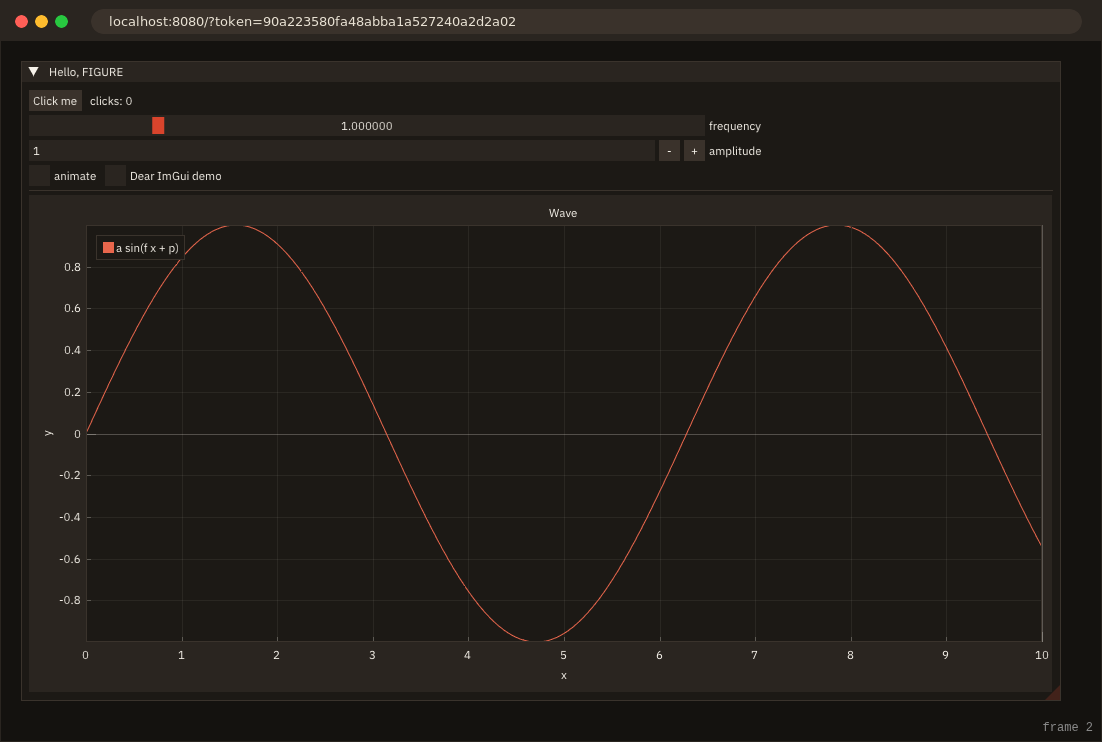
init_remote
app%init_remote([port] [, host] [, width, height] [, port_used] [, quiet] [, max_fps] [, compress] [, lossy] [, token] [, url] [, stat]):
| Argument | Meaning |
|---|---|
port | port to listen on (default 8080); 0 takes any free port, returned in port_used |
host | address to listen on (default 127.0.0.1, this machine only) |
width, height | display size until a browser connects and sends its own (default 1280 x 800) |
port_used | the port listened on |
quiet | do not print the address to open |
max_fps | most frames per second, real64 (default 60; 0: no cap): a browser has no vsync to pace the program |
token | the access token the address must carry (default: 32 random hex digits; '': none, below) |
url | the address to open, with the token: http://localhost:8080/?token=..., into a character variable of your length, blank-padded (trim it); at most 16 + len_trim(host) + len(token) characters plus the port's digits, 61 with the defaults (localhost, 8080, 32 digits); a shorter variable gets it cut |
compress | deflate frames and textures: 'auto' (default) only while the browser cannot keep up, 'always', 'never' |
lossy | an image that changes in consecutive frames goes as JPEG while it changes, exact once it is still (default .true.); .false.: always exact (Changing images) |
stat | FIG_ERR_FAILED if the port cannot be opened (in use, not permitted); FIG_ERR_ARGUMENT for a bad port, size, compress or token; FIG_ERR_STATE if FIGURE is already initialized |
Everything else is unchanged: widgets, plots, heatmaps, textures (sent to the browser when they change), lazy redraw (the loop sleeps on the network instead of the window's events, and wakes up on the browser's input).
Access token
The program prints the address to open, with an access token in it:
FIGURE: open http://localhost:8080/?token=95f45b3f811f0d5505f5f227eb9be619 in a web browserThe page and its connection are refused (403) without the token, so only who has the address controls the program: on a shared machine, the other users logged into it can reach the port, but not guess 128 random bits. The token is made anew at each start from the system's cryptographic generator (/dev/urandom, rand_s on Windows); init_remote(token='...') sets your own (letters, digits, -._~, at most 256), token='' turns the check off: anyone who reaches the port then controls the program, on a shared machine every user logged into it. Reloading the page keeps the token (it is in the address); url returns the address for a program that prints it elsewhere (a log, a job's output).
The token does not encrypt anything: the traffic is plain HTTP. Keep the default host, 127.0.0.1, and reach a remote machine through SSH, which encrypts it.
A program on a cluster node
Reach the node through an SSH tunnel from your machine, then open the printed address there:
ssh -L 8080:localhost:8080 user@node # then open http://localhost:8080/?token=... on your machineThrough a login node, chain the hops (ssh -J login -L 8080:localhost:8080 node). Do not set host='0.0.0.0' on a shared machine: the token would then travel unencrypted over the network.
Behaviour
- One browser at a time. A new one replaces the previous one; the browser can be closed, reloaded or opened later while the program runs: it receives the textures again, then the frames. The page reconnects by itself, a second after the connection drops. So a second page opened with the address takes the program over, and the first page, disconnected, takes it back a second later: two open pages take turns. Close the one you leave.
- The program does not wait for a browser. Without one, frames are drawn and dropped; the computation goes on.
- Closing the browser does not end the program:
next_framekeeps returning.true.; the program ends itself. - Frames are paced. At most
max_fpsper second, and a frame is sent only once the previous one has left the program: on a slow link the newest frame goes and the ones drawn meanwhile are skipped, so the interface lags by one frame at most, never by a growing queue. - Latency. An input event goes to the program as a short text message, Dear ImGui sees it at the next frame, and that frame's draw lists come back: a click shows after one round trip and one frame, plus the time the frame takes on the link.
- Input: mouse (position, buttons, wheel), keyboard (navigation and editing keys, Ctrl/Shift/Alt/Super, typed characters), and the size of the browser's window, which becomes the display size.
- Shortcuts stay in the page: with the interface focused, ctrl (cmd) combinations go to the program, not to the browser (ctrl+s does not open the browser's save dialog), except copy, paste and cut. On a Mac the client sends cmd as ctrl, so the program's
ig_shortcut('ctrl+s')is cmd+s there, as in a window on macOS (Menus and shortcuts). Some chords never reach a page (ctrl+w among them), and the function keys act in the browser too: Shortcuts in a browser.
Browsers
The page draws with WebGL 1, which every current desktop browser has; where the browser offers none (hardware acceleration and its software fallback both off), the page cannot draw. The browser tested is Chromium: the documentation's remote pictures are taken with headless Chromium, and figure_test_remote talks to the server with a client of its own, not a browser. Firefox and Safari are not tested; what is known to differ there is the chords they keep, the pop-ups they allow and the clipboard (Shortcuts in a browser, Links in a browser, The clipboard and drops).
High-DPI screens. The page sends the size of its canvas in CSS pixels, which becomes the program's display size, and app%content_scale() is 1: the program lays out in CSS pixels, as on a standard display. The page draws each frame at the screen's resolution, scaled by the browser's devicePixelRatio (2 on most high-DPI screens, and changed by the browser's zoom): text and anti-aliased edges are magnified from their 1x rendering, softer than in a native window on the same screen.
Not in remote mode
What a window has and the browser's page does not:
- The window's frame: no title bar is drawn in the page, and
init_remotehas nodecorations(The window's frame);app%set_titleis kept (read back byapp%title) and shown nowhere. - The window's icon:
app%set_iconis refused withFIG_ERR_STATE. - Size limits:
app%set_size_limitsdoes nothing: the browser's window decides the display size. ini_file:init_remotehas none, so Dear ImGui keeps no window places between runs.- The content scale:
app%content_scale()is 1 (above). - The system's file dialogs: refused (below); FIGURE's file browser takes their place.
- The system's light or dark setting: unknown, so
palette='auto'is dark (Styles).
The clipboard and drops
What the browser allows decides what crosses between the page and the program:
- Copy, from the program to the browser: a copy in a field, or
ig_set_clipboard, goes to the page, which writes it to the browser's clipboard. Browsers allow it only in a secure context: a page athttp://localhost:...(an SSH tunnel, as above) orhttps; athttp://node:portthey do not, and some browsers (Safari) allow it only within a click or a key. When the browser refuses, the page's status line (bottom right) says "copied in the program only" and why, for 8 seconds, beside the frame counter: the program keeps the text, and a paste inside the interface still gets it. - Paste, from the browser to the program: a page reads the browser's clipboard only when the user pastes. On ctrl+v (cmd+v) the page takes the text from the browser's paste event and sends it to the program before the key, so the field pastes what the user copied on their computer;
ig_get_clipboardreturns it from then on. The program cannot read the browser's clipboard at any other time. - Drops: files dropped on the page are on the browser's computer, and a browser gives the page their contents, not a path: the page refuses them (its status line says so, for 8 seconds) and
app%droppedstays.false.. Open the server's files with the file browser (below).
Clipboard and Drops have the rest; what differs between browsers is in Known issues.
Opening and saving files
The program's files are on the machine it runs on, which the browser's computer cannot see; and there is no desktop to show the system's file dialog (app%open_file_dialog is refused with FIG_ERR_STATE). FIGURE's file browser, app%open_file_browser and app%save_file_browser, is drawn by the program like the rest of its interface: it lists the server's folders and returns the server's paths, answered through app%file_dialog_result as the system's dialog is (File dialogs). Nothing is uploaded or downloaded: the program reads and writes its own files.
Bandwidth
How the cost of what you draw carries over to the network, and what to do about it: Performance.
A frame carries the complete draw lists, in a compact form: 12 bytes per vertex (position to 1/4 pixel, texture coordinates to 1/65535) instead of Dear ImGui's 20. A window of widgets and a 1000-point line is about 71 KB; the font atlas (256 KB) goes once per connection. What keeps the traffic down:
- A frame equal to the last one sent is not sent again: the server says "unchanged" at most once per second, so the browser knows the program is alive. An idle interface costs nothing.
- Frames are capped at
max_fps(60) per second, and one frame at most is queued: a slow link gets the newest frame, never a backlog. - Deflate, when the link is the bottleneck (
compress='auto'): frames shrink 2.5 to 3.5 times more, for about 7 ms of CPU per MB (0.4 ms for that 71 KB frame). On a fast link it stays off, since it would only cost CPU. - Textures (
texture_object) are sent only whentex%updatechanges them, with the next frame that goes out: on a slow link the newest pixels go, the updates in between are skipped with their frames. - JPEG while an image changes (
lossy, on by default): see below.
Measured with scripts/measure_redraw.py (the program figure_bench_redraw, remote mode on the same machine, 8–10 s per case), from the first version of remote mode to now:
| what the program does | first version | now | now, deflated |
|---|---|---|---|
| nothing (idle, refreshing twice a second) | 216 KB/s | 1 byte/s | |
| the user moves the pointer over it | 25.8 MB/s (238 frames/s) | 3.1 MB/s (60 frames/s) | 1.2 MB/s |
| live data, 10 updates per second | 1.07 MB/s | 0.71 MB/s | 0.28 MB/s |
| live data, 60 updates per second | 6.6 MB/s | 4.2 MB/s | 1.7 MB/s |
| a 100 000-point line, 10 updates per second | 9.2 MB per frame | 6.0 MB | 1.7 MB |
| a 256 × 256 heatmap, 10 updates per second | 6.0 MB per frame | 3.9 MB | 1.2 MB |
Through an SSH tunnel from an office to a cluster node (about 9 MB/s on that link), with the defaults: live data at 60 updates per second arrives at 60 frames per second (4.2 MB/s, no deflate needed); interacting, 45 frames per second; the 100 000-point line at 5 frames per second, deflated (1 frame per second without deflate), always the newest. Large data stays large on the wire: on a slow link, decimate what you plot, or show a big field as a texture at the size it is displayed (a 3840 × 2160 texture is 33 MB per update before deflate).
Changing images
A 3-D view while the user turns it, or any texture the program updates frame after frame, would send its whole image at every frame: 4 * width * height bytes, 1.6 MB for an 800 x 500 image, 96 MB/s at 60 frames per second. So a texture updated in two consecutive frames goes as a JPEG (quality 75) for as long as it keeps changing, and once it has been still for 150 ms its exact pixels replace it, with the next frame or on their own. A still picture, a capture and a texture updated now and then are always exact; the browser shows a JPEG only while the image moves, with JPEG's artefacts (blur around edges and grid lines, banding in smooth gradients: Known issues).
- Exact when:
lossy=.false.; an image with transparent pixels (JPEG has no alpha); a JPEG that would not be smaller; the first update after a still period (a change is not yet a motion). - Cost: encoding with
stb_image_write(bundled, Third-party), 2 to 5 ms per 800 x 600 image on one core (7 to 16 ms at 1600 x 1000); the browser decodes it natively. - The page: decodes the JPEG (
createImageBitmap) before the next message, so the order of textures and frames is kept.
Measured with scripts/remote_client.py --measure, which drags the left button across the view for 5 s (60 moves per second) and counts the bytes per message kind: the program cb_view3d (3-D views) served by init_remote, on the same machine, the view rendered at half resolution while the camera moves (its default). The fitted body leaves most of the view background; zoomed in, its grid lines fill it, JPEG's worst case:
| The view (the image while moving) | exact, compress='never' | exact, deflated | JPEG (the default) |
|---|---|---|---|
| 964 x 553, fitted (482 x 276) | 520 KB per frame, 30 MB/s | 6.6 KB, 0.38 MB/s | 5.0 KB, 0.29 MB/s |
| 1604 x 1013, fitted (802 x 506) | 1585 KB, 91 MB/s | 29 KB, 1.7 MB/s | 14 KB, 0.81 MB/s |
| 1604 x 1013, zoomed in on the grid (802 x 506) | 1585 KB, 91 MB/s | 267 KB, 15 MB/s | 118 KB, 6.8 MB/s |
KB and MB are of 1024 bytes; 59 frames per second in every case. Besides the JPEGs, a drag sends its first image exact (it is not yet a motion) and, once it ends, the view rendered at full size, exact: 2.0 MB raw for the first row, 36 KB deflated. Deflate (compress='auto', the default) starts only once the browser falls behind, so before JPEG a moving view went raw until then. On these images JPEG is 1.3 to 2.3 times smaller than deflate, and costs less CPU: deflate takes 8 to 56 ms per 1600 x 1000 image (3-D views). Busier images deflate worse: in the spike of issue #3, on an OverSet grid's faces coloured by a field, JPEG was 6 to 18 times smaller than deflate.
How it works
The native layer contains a minimal HTTP and WebSocket server (RFC 6455, one client, non-blocking sockets on POSIX and Winsock). GET /?token=... answers the client page, embedded in the library; GET /ws?token=... upgrades to a WebSocket; both answer 403 without the token. After each frame the server sends, as binary messages, the textures Dear ImGui or the program created or changed (RGBA, with their filtering, or JPEG while they change) and the draw lists (12-byte vertices, or 20-byte ones for a list reaching beyond ±8191 pixels; 16-bit indices; commands with clip rectangle, texture, index range and vertex offset, so a window may hold more than 65 536 vertices, as a long plotted line does), unless they equal the last ones sent, deflated when compression is on; on connection, and when the style changes, it also sends the background colour. The page draws them with WebGL, exactly as the OpenGL backend draws a window, and sends input events back as short text messages. The protocol is described at the top of native/figure_remote.cpp.
src/tests/figure_test_remote.F90 tests it end to end without a browser: it serves on a free port and runs scripts/remote_client.py, a WebSocket client that checks the page and the refusal of a missing or wrong token, the handshake, every message byte by byte (including a draw list over 65 536 vertices), a resize, that an image changing in consecutive frames arrives as JPEG of its size and then exact, that an idle interface sends no frame (only "unchanged"), then clicks a button the program must see clicked once. It needs python3 (3.11+).