

Heatmaps and images
Two ways to show 2D data: a heatmap colours the cells of a field f(i, j) through a colormap, inside a plot; a texture is an RGBA image the program composes itself or reads from a PNG or JPEG file, uploaded to the GPU and drawn in a window (ig_image) or in a plot (ip_image). Both read Fortran's column-major arrays as they are: no copy, no transpose.
Heatmaps
A heatmap draws each cell as vertices, rebuilt every frame; past a few hundred cells a side a texture costs a fraction of it, in a window and over the network (Performance), and ip_field_image colours a field into one in a single call, on a linear, log or symlog scale.
x = [((real(i, real64) - 0.5_real64) * 1.5_real64 / real(NX, real64), i = 1_int32, NX)]
y = [((real(j, real64) - 0.5_real64) / real(NY, real64), j = 1_int32, NY)]
do j = 1_int32, NY
   do i = 1_int32, NX
      f(i, j) = exp(-((x(i) - 0.25_real64)**2 + (y(j) - 0.75_real64)**2) / 0.02_real64) ! peak at top left
   enddo
enddoif (ip_begin_plot('f(x, y)', width=700.0_real64, height=-1.0_real64)) then
call ip_setup_axes('x', 'y')
call ip_heatmap('f', f, 0.0_real64, 1.5_real64, 0.0_real64, 1.0_real64, scale_min=0.0_real64, &
scale_max=1.0_real64, colormap=ImPlotColormap_Viridis)
call ip_image('image', tex, 1.2_real64, 1.4_real64, 0.05_real64, 0.25_real64) ! row 1 at the bottom
call ip_end_plot()
endif
call ig_same_line()
call ip_colormap_scale('##f scale', 0.0_real64, 1.0_real64, height=-1.0_real64, colormap=ImPlotColormap_Viridis)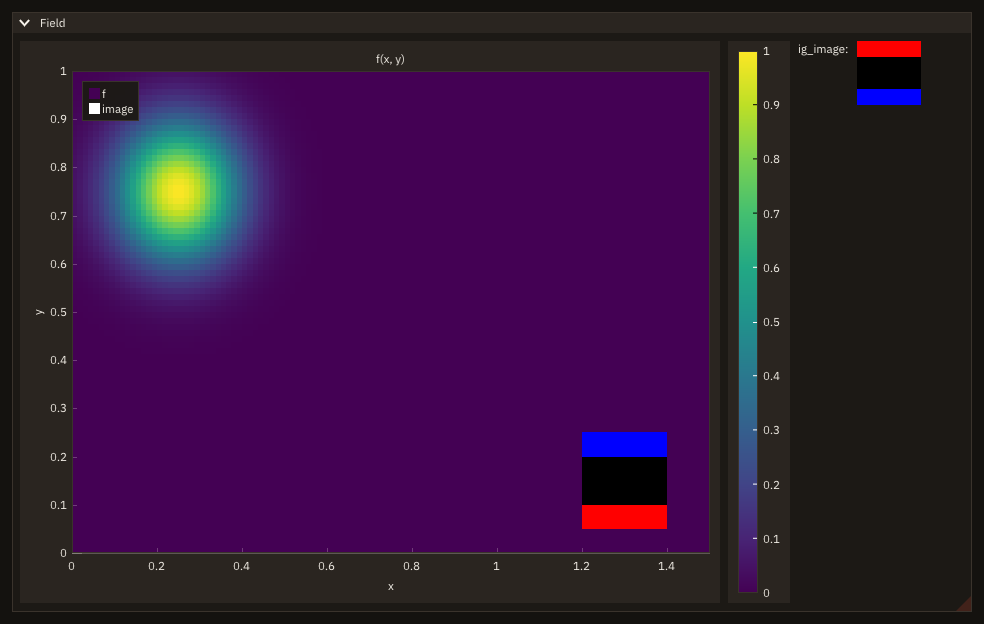
ip_heatmap(label, f, xmin, xmax, ymin, ymax [, scale_min, scale_max] [, label_format] [, colormap] [, spec] [, stat]) draws f(:, :) (real(real32) or real(real64), contiguous) over the rectangle [xmin, xmax] x [ymin, ymax]:
- orientation:
f(i, j)is the cell in columni(along x, left to right) and rowj(along y, bottom to top): the usual layout of a field computed on a gridx(i), y(j). The array is read in place; - cells:
size(f, 1)columns of width(xmax - xmin) / size(f, 1),size(f, 2)rows of height(ymax - ymin) / size(f, 2): the bounds are the outer edges of the cells, not the centres of the first and last; - colour scale:
scale_minmaps to the bottom of the colormap,scale_maxto the top. Give both or neither (FIG_ERR_ARGUMENTotherwise); with neither, the range of the data, computed by ImPlot every frame; - labels:
label_format(a printf format of one real, e.g.'%.2f', checked: Formats) prints each value in its cell. Off by default: on a large field, formatting a string per cell every frame costs far more than drawing the cells; - colormap: an id from
ip_colormap, by name (colormap=ip_colormap('batlow'), reversed'batlow_r', in discrete bands withlevels), or one of ImPlot's constants (ImPlotColormap_Viridis, ...), for this item only; default: Viridis. An id that is not registered is refused withFIG_ERR_ARGUMENT. Which map suits which data, and why not Jet: Colormaps; - legend and fit: a heatmap is an item, as
ip_imageis:labelis its id in the plot and its legend entry (a click on it hides the heatmap; a label that starts with##has none, Items), and the axes fit its rectangle. Ofspeconly the flags act,ImPlotItemFlags_NoLegendandImPlotItemFlags_NoFit: the colours come from the colormap, and those ofip_specare not used.
ip_colormap_scale(label, scale_min, scale_max [, width] [, height] [, label_format] [, colormap] [, stat]) draws the matching colour bar. It is a widget of its own: call it outside ip_begin_plot/ip_end_plot, typically after ig_same_line, with the same scale and colormap as the heatmap. label is the widget's id and is written vertically beside the bar; a label starting with ## is hidden. width and height [pixels]: by default the bar with its tick labels, and ImPlot's plot height; a negative height fills the space left. label_format (default '%g') prints the tick labels.
- Statuses:
FIG_ERR_ARGUMENT, nothing drawn, forscale_minwithoutscale_maxor the reverse, more cells than a Cintcounts, a colormap not registered, alabel_formatrefused (Formats);FIG_ERR_STATEwith no frame open and from a task, and forip_imagea texture not initialized.statis optional (absent:error stopwith the message). Anip_heatmaporip_imageoutside a plot is not checked by FIGURE: it reaches ImPlot's own check (What is not checked). - Modes: the same in window, headless and remote mode: a heatmap's cells are vertices, rebuilt every frame; an image is a texture.
- Threads: a task does not draw (
FIG_ERR_STATE).
Textures
rgba = 0_int8
rgba(4,:,:) = -1_int8                       ! alpha 255 (int8 bit pattern of 255)
rgba(1,:,1) = -1_int8                       ! row 1: red
rgba(3,:,4) = -1_int8                       ! row 4: blue
call tex%init(4_int32, 4_int32)             ! after app%init: textures live on the GPU of the window
call tex%update(rgba)                       ! one upload; redo it only when the pixels change
A texture_object is the one resource FIGURE keeps between frames: the image lives on the GPU, so the program uploads pixels only when they change, and draws the texture every frame for nothing.
| Procedure | Purpose |
|---|---|
tex%init(width, height [, smooth] [, stat]) | create a width x height texture (after app%init); an existing one is destroyed first |
tex%update(rgba [, stat]) | upload all the pixels, integer(int8) :: rgba(4, width, height), in place: one GPU upload, no copy |
tex%load(path [, smooth] [, stat]) | create the texture from a PNG or JPEG file, its size the image's, and upload it (Reading images) |
tex%destroy() | release it; safe in any state, refused from a task. app%destroy releases the textures left |
tex%width(), tex%height(), tex%is_initialized() | size and state |
ig_image(tex [, width] [, height]) | the texture in the window, pixel row 1 at the top (default size: the texture's) |
ip_image(label, tex, xmin, xmax, ymin, ymax [, spec] [, stat]) | the texture in a plot over [xmin, xmax] x [ymin, ymax], pixel row 1 at the bottom (ymin) |
Pixels. rgba(:, i, j) holds the red, green, blue and alpha bytes of the pixel in column i and row j. In column-major order that is exactly the layout OpenGL expects (channels, then a row, then the next row), so update passes the array to the GPU as it is. Fortran has no unsigned byte: values 128 to 255 are stored as their two's-complement bit pattern, -128 to -1 (-1_int8 is 255); int(v - merge(256, 0, v > 127), int8) converts a 0-255 integer v.
Orientation. The same texture shows row 1 at the top in a window (the convention of image files and screens) and at the bottom in a plot (y grows upwards), as in the example above: build images in whichever order the data has, and pick the procedure.
Filtering. When a texture is drawn larger than its size, each pixel stays a sharp square (nearest filtering): what a scientific image needs, where a pixel is a measurement. tex%init(..., smooth=.true.) blends neighbouring pixels instead (linear filtering), better for photographs.
Lifetime. texture_object has no finaliser on purpose: an assignment or a function result would finalise a copy and destroy the texture the original still uses. Destroy textures explicitly, or let app%destroy release them. In headless mode the textures keep their pixels, and FIGURE's CPU renderer draws them (Screenshots and videos).
- Statuses:
tex%init:FIG_ERR_ARGUMENTfor a width or height not above 0,FIG_ERR_STATEbeforeapp%init*,FIG_ERR_FAILEDwhen OpenGL gives no texture (window mode);tex%update:FIG_ERR_STATEfor a texture not initialized or destroyed and beforeapp%init*,FIG_ERR_ARGUMENTfor pixels notrgba(4, width, height); bothFIG_ERR_STATEfrom a task.statis optional (absent:error stopwith the message). Beforeinitand afterdestroy,tex%width()andtex%height()are 0 andtex%is_initialized()is.false.. - Frames:
init,update,loadanddestroyneed no frame open: a texture is created and updated between two frames as well as inside one.ig_imageandip_imagedraw inside a frame, as every widget. - Modes: window, the texture on the GPU; headless, its pixels kept for the CPU renderer (transparent until the first
update); remote, sent to the browser with the next frame. - Threads: the main thread only. From a task
init,update,loadanddestroyare refused (FIG_ERR_STATE, the task asked to stop;destroykeeps the texture). Until v0.8.0destroywas not checked: from a task in window mode it deleted the texture off the GL context's thread.
Reading images
A photograph beside a field (schlieren, PIV, a camera's frame), a logo, a picture written by app%save_image read back: FIGURE reads PNG and JPEG files into the pixel array of a texture.
| Procedure | Purpose |
|---|---|
fig_read_image(path, rgba [, stat]) | decode the file path into integer(int8), allocatable :: rgba(:,:,:), allocated to rgba(4, width, height); draws nothing, so a task may call it |
tex%load(path [, smooth] [, stat]) | fig_read_image, then tex%init(width, height, smooth) and tex%update(rgba): the file on the GPU in one call, on the main thread |
type :: photo_job
   !< What the task is given (the file) and gives back (the pixels, or why there are none).
   character(len=256)         :: file = ''        !< The photograph: PNG or JPEG.
   integer(int8), allocatable :: rgba(:,:,:)      !< Its pixels, rgba(4, width, height), row 1 at the top.
   integer(int32)             :: stat = -1_int32  !< Status of the read.
   character(len=256)         :: message = ''     !< Its message on a failure.
endtype photo_job

contains
   recursive subroutine read_photo(h, data)
   !< Decode the file: fig_read_image draws nothing, so a task may call it.
   type(task_handle_object), intent(inout) :: h    !< The task's handle.
   class(*),                 intent(inout) :: data !< A photo_job.

   if (h%cancelled()) return
   select type (data)
   type is (photo_job)
      call fig_read_image(trim(data%file), data%rgba, data%stat)
      if (data%stat /= FIG_OK) data%message = figure_last_error()
   endselect
   endsubroutine read_photo
Layout. rgba(:, i, j) holds the red, green, blue and alpha bytes of the pixel in column i (left to right) and row j, row 1 the file's top row: the layout tex%update takes, so ig_image shows the picture upright (in a plot, ip_image puts row 1 at the bottom: Orientation). Every image comes out as four channels: a grey image gives R = G = B, an image without alpha gives A = 255 (-1_int8). A 16-bit PNG is reduced to 8 bits a channel, a palette PNG expanded. Bytes 128-255 are negative int8, as for textures: modulo(int(rgba(c, i, j), int32), 256) is the 0-255 value.
One copy. The decoder (stb_image) writes its own buffer; fig_read_image copies it into rgba and frees it. The copy costs a fraction of the decoding.
In a task. fig_read_image touches no state of the GUI and keeps its failure message per thread, so a task decodes a large photograph while the window keeps drawing; the main thread then uploads the pixels the task gives back (tex%init, tex%update): the cookbook's recipe does exactly this. tex%load creates a texture, so it is a drawing call: refused from a task, as tex%init is.
Modes. fig_read_image is the same in every mode: it reads a file of the machine the program runs on (in remote mode the server's, not the browser's). tex%load as tex%init: in window mode the texture is on the GPU, in remote mode it is sent to the browser with the next frame, in headless mode its pixels are kept for the CPU renderer.
Formats. PNG (any bit depth and colour type, interlaced too) and JPEG (baseline and progressive), recognised by their first bytes, not by the file's extension. Nothing else: a BMP, a GIF, a TIFF, a WebP or a text file is refused. A path is a file name, never a URL.
Statuses
| Failure | Status | Message |
|---|---|---|
| the file does not exist or cannot be read | FIG_ERR_FAILED | fig_read_image: '<path>' cannot be read: <the system's reason> |
| not a PNG or a JPEG (by its first bytes) | FIG_ERR_ARGUMENT | fig_read_image: '<path>' is not a PNG or JPEG file (the formats FIGURE reads) |
| a PNG or JPEG the decoder refuses (cut short, damaged, an unsupported variant) | FIG_ERR_ARGUMENT | fig_read_image: '<path>' is a PNG file that cannot be decoded: <reason> (JPEG), the reason the decoder's, e.g. Corrupt PNG |
| no memory for the pixels | FIG_ERR_FAILED | fig_read_image: '<path>': out of memory |
tex%load: any of the above | the same | the same, starting texture_object%load:; the texture is left as it was |
tex%load from a task, or before app%init* | FIG_ERR_STATE | as tex%init |
On a failure rgba is left unallocated. Without stat a failure stops the program with its message (Error handling).
Limits
- No colour management: a PNG's gamma (
gAMA) and an embedded ICC profile are ignored: the bytes are shown as sRGB. - No EXIF orientation: a photograph a camera stored sideways, with an orientation tag, comes out sideways.
- Damage is not always seen. stb_image does not check PNG's CRCs nor zlib's checksum, and a JPEG cut short decodes without an error, the missing part filled in: a file that decodes is not proven intact.
- JPEG is lossy: a picture written as JPEG reads back close to, not equal to, what was written (FIGURE's test: at most 3 levels of 255 apart at quality 90 on a smooth image, 8 tolerated). Compare pictures as PNG.
- Size: files of less than 2 GiB; a texture larger than the GPU's limit (often 16384 a side) fails at
init.
An explorer: the Mandelbrot set
src/examples/figure_mandelbrot.F90 puts the pieces together. ImPlot handles the interaction (drag to pan, wheel or a right-dragged box to zoom, double-click to fit) on a plot with equal axes. Every frame the program reads ip_plot_limits and ip_plot_size. When they, or the iteration count, change, it recomputes the image at the plot's resolution (OpenMP, default(none)) and uploads it with tex%update; otherwise it only draws the texture again with ip_image, so lazy redraw keeps the window idle.
fobis build --mode examples-gnu && exe/examples/figure_mandelbrot # the example modes build with OpenMPOn the development machine (WSL2, RTX 4070 through GALLIUM_DRIVER=d3d12, 16 threads) the initial 1210 x 669 view computes in about 29 ms and uploads in about 3.7 ms; idle, the window costs 0.5% of one core.
Speed: a new 4K image every frame
src/examples/figure_bench_texture.F90 measures the path this page is about: a program that shows a new 3840 x 2160 image every frame. Each frame it writes new pixels into the array (fill), hands them to the GPU (tex%update), and renders and presents the window (vsync off, lazy redraw off); 120 frames after 20 of warm-up.
| Per frame, mean of two runs | Time |
|---|---|
| fill (write the pixel array) | 2.9 ms (int8 RGBA) |
| hand-off to the GPU | 2.2 ms (tex%update) |
| draw and present | 4.8 ms (next_frame) |
| frame rate | ≈ 100 frames/s |
Measured on one machine (WSL2/WSLg, x86-64 with 16 hardware threads, RTX 4070 through D3D12, gfortran 16.2), so the absolute numbers are that machine's. The hand-off is one glTexSubImage2D reading the Fortran array in place: no conversion and no temporary copy.
To reproduce: fobis build --mode examples-gnu && GALLIUM_DRIVER=d3d12 exe/examples/figure_bench_texture 120.