

Cookbook
One task per recipe. Every snippet is part of a program in docs/examples/src, compiled against the library by docs/examples/build.sh; the outputs shown are those of the headless programs, regenerated by the same script.
The loop
Refresh data that changes on its own
call app%set_lazy(.true., max_wait=1.0_real64) ! idle: redraw at least once per second
do while (app%next_frame())
   call date_and_time(time=clock)
   if (ig_begin('Clock')) then
      call ig_text(clock(1:2)//':'//clock(3:4)//':'//clock(5:6))
   endif
   call ig_end()
enddo
When the data changes outside the program's frame loop (the clock here; a log file written by another process; a value updated by another thread), nothing tells the loop to draw. max_wait is the longest the idle loop sleeps: the data is shown at most max_wait seconds late. The default is 0.5 s; a longer period costs less while idle (what idle costs).
Redraw continuously
call app%init('FIGURE: continuous', 400_int32, 200_int32, vsync=.false.) ! do not wait for the display refresh
call app%set_lazy(.false.)                                              ! never sleep waiting for input
set_lazy(.false.) draws a frame per loop iteration, whatever the input. With vsync on (the default) the rate is the display's; with vsync=.false. the loop runs as fast as the machine draws. Both cost CPU (and GPU) while idle: for an animation that runs only some of the time, prefer request_frames.
Time a piece of work, animate by the clock
t0 = figure_time()
total = 0.0_real64
do k = 1_int32, 1000000_int32 ! the work
   total = total + real(k, real64)
enddo
step_time = figure_time() - t0 ! seconds, on a clock the system does not step
figure_time() is seconds since its first call, on a monotonic clock: under nvfortran system_clock reads the wall clock, which the system steps (by +2.56 s every 32 s on WSL2), and a timing across a step is wrong by the step. An animation takes its position from the clock, so it keeps its speed at any frame rate:
phase = modulo(figure_time() - started, 1.0_real64) ! once per second, at any frame rateThe program checks itself headless (cb_time --check):
$ ./cb_time --check
the clock never went back over 30 frames: T
a step takes more than 0 s: T
the marker is in [0, 1): T
the sum is right: T
Time has the origin, the resolution and the threads.
Size in proportion to the display scale
s = app%content_scale()
do while (app%next_frame())
   call ig_set_next_window(10.0_real64 * s, 10.0_real64 * s, 780.0_real64 * s, 580.0_real64 * s)
   if (ig_begin('Scaled')) then
      if (ip_begin_plot('Diagonal', height=400.0_real64 * s)) then
         call ip_line('y = x', x, y)
         call ip_end_plot()
      endif
   endif
   call ig_end()
enddo
init creates the window content_scale() times larger than asked and scales the Dear ImGui style; the sizes the program passes are not scaled. Multiplying them by content_scale() keeps their proportion to the window on high-DPI displays. Content scale has the details.
Remember the user's settings
call app%open_prefs('cb-prefs', file='cb_prefs.ini') ! in a window: app%open_prefs('cb-prefs'), the platform's folderfound = app%load_pref('case', case_file, default='naca0012.inp')
found = app%load_pref('cfl', cfl, default=0.8_real64)
found = app%load_pref('grid', grid, default=.true.)call app%save_pref('case', trim(case_file)) ! kept: written within 30 s and at destroy
call app%save_pref('cfl', cfl)
call app%save_pref('grid', grid)app%open_prefs names the program's file (by default in the platform's folder of preferences) and reads the last run's: the style, the window's place and size, the registered windows and the layouts come back by themselves, the program's own values with load_pref and a default for the first run. save_pref keeps a value; FIGURE writes the file every 30 s when something changed and at destroy, through a temporary file, so a crash never leaves half of it. Preferences has the details.
$ ./cb_prefs
preferences kept in cb_prefs.ini
run 1: case naca0012.inp, cfl 0.80, grid T
run 2: case rae2822.inp, cfl 1.20, grid F
cb_prefs.ini, without the arrangement:
  [figure]
  style = seal
  palette = nord

  [preferences]
  case = rae2822.inp
  cfl = 1.2E0
  grid = false
Let a failure stop the program
call app%init_headless(400_int32, 300_int32)
call app%init_headless(400_int32, 300_int32) ! already initialized: error stop$ ./cb_error_stop
FIGURE error: figure is already initialized
ERROR STOP 1
[exit status 1]Without stat, the message goes to standard error and the program ends with error stop 1. See Error handling.
Handle a failure instead of stopping
call app%init_headless(0_int32, 300_int32, stat=stat)          ! invalid size
if (stat /= FIG_OK) write(output_unit, '(A,I0,A)') 'init_headless: stat = ', stat, ', "'//figure_last_error()//'"'

call app%init_headless(400_int32, 300_int32, stat=stat)        ! succeeds
call app%init_headless(400_int32, 300_int32, stat=stat)        ! already initialized
if (stat == FIG_ERR_STATE) write(output_unit, '(A,I0,A)') 'init_headless: stat = ', stat, ', "'//figure_last_error()//'"'$ ./cb_stat
init_headless: stat = 2, "display size must be positive"
init_headless: stat = 1, "figure is already initialized"
ip_line: stat = 2, "ip_line: the series have different sizes"
ig_input: stat = 2, "ig_input: format '%d' is not a format of a real: one conversion %f, %e, %g or %a (or %F, %E, %G, %A) expected, with optional flags, width and precision"
ip_get_style_color: stat = 2, "style colour: unknown name "PlotBackground" for ImPlot (ImPlotCol_*)"With stat, nothing stops: check it against FIG_OK and read figure_last_error(). The full program also checks ip_line:
if (app%next_frame(stat=stat)) then
   if (ig_begin('Data')) then
      if (ip_begin_plot('Mismatch')) then
         call ip_line('y', x, y, stat=stat)                    ! size(x) /= size(y): nothing drawn
         if (stat == FIG_ERR_ARGUMENT) write(output_unit, '(A,I0,A)') 'ip_line: stat = ', stat, &
                                                                   ', "'//figure_last_error()//'"'
         call ip_end_plot()
      endif
   endif
   call ig_end()
endif
Used in context: chapter 16 of the tutorial.
Find a misplaced end
A table of blocks with a tree in its first cell, whose ig_tree_pop was forgotten:
subroutine grid(pop)
!< A table of blocks, a tree in its first cell; `pop` false: the tree's end forgotten.
logical, intent(in) :: pop !< Close the tree (the right code).

if (ig_begin('Grid')) then
   if (ig_begin_table('blocks', 2_int32)) then
      call ig_table_next_row()
      call ig_table_next_column()
      if (ig_tree_node('Blocks', default_open=.true.)) then
         call ig_text('inlet')
         call ig_text('outlet')
         if (pop) call ig_tree_pop()        ! only after a true ig_tree_node
      endif
      call ig_table_next_column()
      call ig_text('2 blocks')
      call ig_end_table()
   endif
endif
call ig_end()
endsubroutine grid
In mode 'report' (the default) the frame goes on and the next next_frame(stat) returns FIG_ERR_STATE, every error on its own line. The first line is the bug, the ones after it are what followed from it:
call grid(pop=.false.)                         ! ig_tree_pop forgotten
ok = app%next_frame(stat=stat)                 ! mode 'report' (the default): the errors of the frame
if (stat /= FIG_OK) write(output_unit, '(A)') 'report:'//new_line('a')//figure_last_error()$ ./cb_scope_error
report:
ig_end_table: the open scope is ig_tree_node('Blocks') (close it with ig_tree_pop before ig_end_table)
ig_end: the open scope is ig_tree_node('Blocks') (close it with ig_tree_pop before ig_end)
app%next_frame: ig_tree_node('Blocks') is still open (close it with ig_tree_pop)
app%next_frame: ig_begin_table('blocks') is still open (close it with ig_end_table)
app%next_frame: ig_begin('Grid') is still open (close it with ig_end)
fixed: no usage error
recover: stat == FIG_OK is T, the message:
ig_end_table: the open scope is ig_tree_node('Blocks') (close it with ig_tree_pop before ig_end_table)With ig_tree_pop back the frame reports nothing; in mode 'recover' the table's end closes the tree first, the program goes on (FIG_OK) and the message is in a notification. In a test, app%set_checks('abort') stops at the faulty call. Pairing and frames has every rule and message.
Windows and style
Pair begin and end, skip what is hidden
call ig_set_next_window(20.0_real64, 20.0_real64, 400.0_real64, 300.0_real64, always=.true.)
if (ig_begin('Fixed')) then                    ! false when collapsed: skip the content, not the end
   call ig_text('Placed and sized every frame: cannot be moved.')
endif
call ig_end()                                  ! always, whatever ig_begin returned

call ig_set_next_window(440.0_real64, 20.0_real64, 400.0_real64, 300.0_real64)
if (ig_begin('Expensive')) then
   y = sin(x) * exp(-x)                        ! computed only while the window is visible
   if (ip_begin_plot('##damped')) then         ! end the plot only if it began
      call ip_line('damped', x, y)
      call ip_end_plot()
   endif
endif
call ig_end()ig_endfollows everyig_begin;ip_end_plotfollows only anip_begin_plotthat returned.true..- A collapsed window returns
.false.: the expensive part (here, 100 000 evaluations) is skipped with its content. always=.true.places and sizes the window every frame; without it, only the first time.
A window the user can close
See tutorial chapter 2: pass a logical as open to ig_begin, and guard the window with it.
Repeat a label
See tutorial chapter 2: 'Reset##cfl' and 'Reset##time'.
Choose a look and a palette
call app%set_style(look='fluent', palette='nord') ! the geometry of Windows 11, the colours of Nord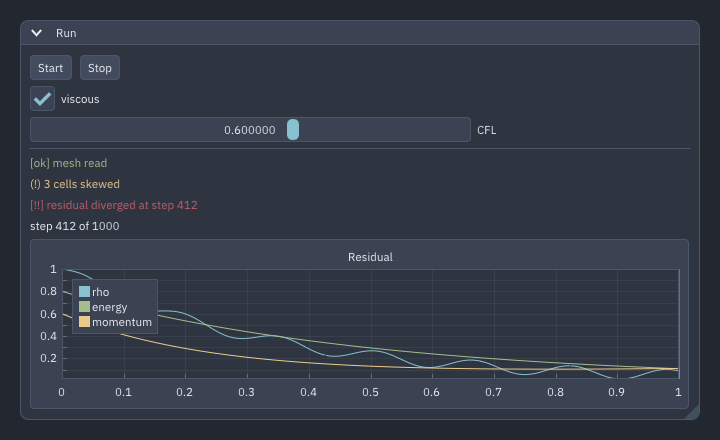
The look sets the geometry, the palette the colours; each can change without the other. To follow the system's light or dark setting, and to colour the program's own messages with the palette:
call app%set_style(palette='auto', auto_dark='nord', auto_light='solarized-light') ! follows the systemcall app%palette_color('success', ok) ! the roles of the palette in effect
call app%palette_color('warning', warn)
call app%palette_color('error', bad)call ig_text_colored('[ok] mesh read', ok) ! a mark with the colour: never colour alone
call ig_text_colored('(!) 3 cells skewed', warn)
call ig_text_colored('[!!] residual diverged at step 412', bad)Styles lists the looks, the palettes and their roles.
Used in context: chapter 9 of the tutorial.
Change one colour of the whole interface
call ig_set_style_color('Button', '#2f5d50')            ! colours: hex or [r, g, b(, a)] in [0, 1]
call ig_set_style_color('ButtonHovered', '#3d7a69')
call ig_set_style_color('SliderGrab', '#e0b04c')
call ig_set_style_color('CheckMark', '#e0b04c')
call ig_set_style_var('FrameRounding', 6.0_real64)      ! a number
call ig_set_style_var('ItemSpacing', [10.0_real64, 8.0_real64]) ! a pair
call ip_set_style_color('PlotBg', '#101820')            ! ImPlot's colours, the same way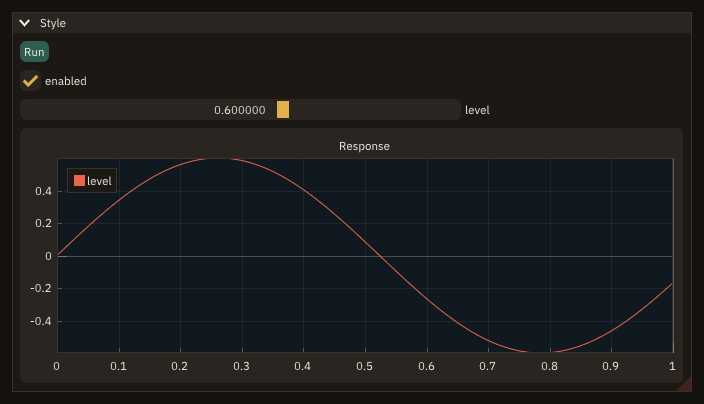
Names are Dear ImGui's and ImPlot's own (Button, SliderGrab, PlotBg, FrameRounding, ...); the change is global and lasts until it is changed again or app%set_style resets it. Styles lists them.
One red button
call ig_push_style_color('Button', '#b42d1a')         ! this button only
call ig_push_style_color('ButtonHovered', '#d9442c')
call ig_push_style_color('ButtonActive', '#e8664c')
call ig_push_style_var('FramePadding', [16.0_real64, 6.0_real64])
if (ig_button('Stop')) running = .false.
call ig_pop_style_var()
call ig_pop_style_color(3)                            ! the three colours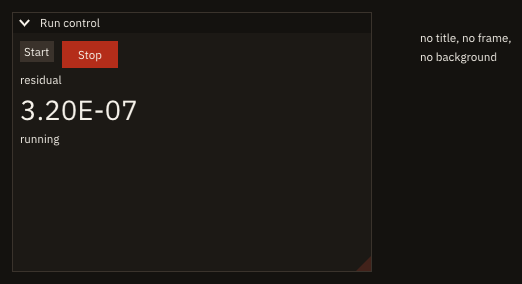
Push before the widget, pop after: the change covers only what is between. A value shown large works the same way with the font size:
call ig_text('residual')
write(line, '(ES9.2)') residual
call ig_push_font('', 36.0_real64)                    ! the current font, larger
call ig_text(trim(adjustl(line)))
call ig_pop_font()
Tune a theme in the style editor and keep it
call ig_show_style_editor()                          ! every colour and size, live
call ig_set_next_window(20.0_real64, 20.0_real64, 520.0_real64, 400.0_real64)
if (ig_begin('Sample')) then
   if (ig_button('Save theme')) then
      call app%save_style('my-theme.toml', stat=stat) ! what differs from the base, as a theme file
      if (stat == 0_int32) then
         saved = 'saved to my-theme.toml'
      else
         saved = 'cannot write my-theme.toml'
      endif
   endif
   call ig_text(trim(saved))
Dear ImGui's style editor changes every colour and size live; app%save_style writes what differs from the base as a theme file, which app%load_style (or FIGURE_STYLE=my-theme.toml) applies in any later run. Styles shows it at work.
Controls on the left, plots on the right
root = ig_dock_id('main')
if (ig_dock_layout_begin(root)) then                       ! the first frame only: no layout yet
   call ig_dock_split(root, 'left', 0.3_real64, left, right) ! controls | the rest
   call ig_dock_split(right, 'down', 0.25_real64, log, plot) ! the rest: plot above, log below
   call ig_dock_window('Controls', left)
   call ig_dock_window('Plot', plot)
   call ig_dock_window('Log', log)
   call ig_dock_layout_end(root)
endif
call ig_dock_space(root)                                   ! every frame, before the windows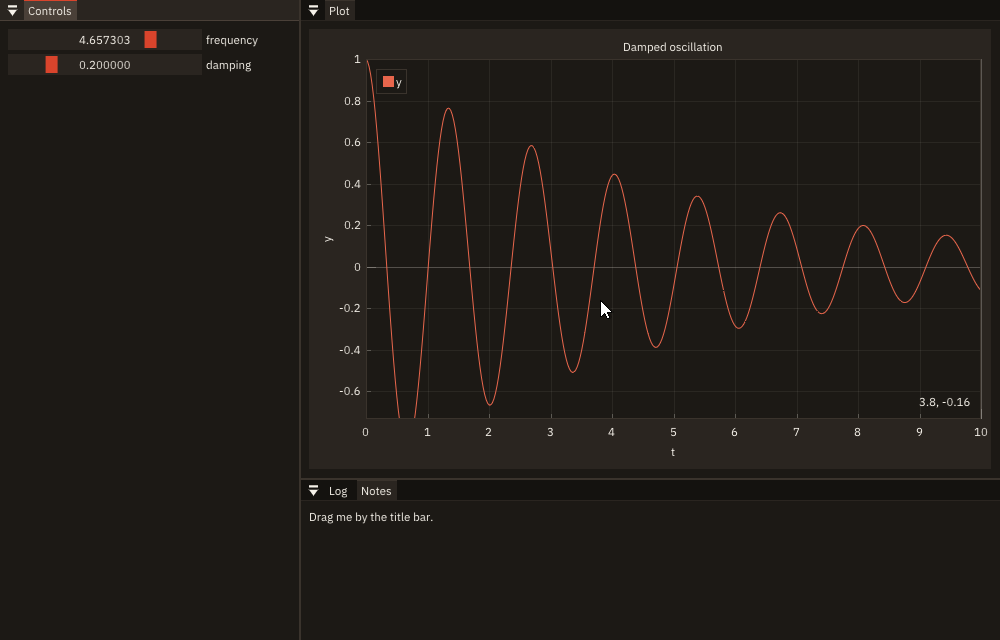
The layout is built on the first frame only (ig_dock_layout_begin); the dock space is declared every frame, before its windows. The user can rearrange everything afterwards. Docking has the details.
Used in context: chapter 9 of the tutorial.
Split a window in two panes
if (ig_begin('Files')) then
   if (ig_begin_child('tree', sizes(1), 0.0_real64, border=.true.)) call ig_text('the tree')
   call ig_end_child()
   call ig_same_line()
   if (ig_splitter('split', sizes)) continue          ! true while dragged: sizes changed
   call ig_same_line()
   if (ig_begin_child('view', sizes(2), 0.0_real64, border=.true.)) call ig_text('the file')
   call ig_end_child()
endif
call ig_end()
The bar between the two regions changes sizes when the user drags it; the regions take their widths from it. Splitters has the details.
A View menu and a reset layout
call app%add_window('Case', closable=.false.)              ! always there: no close button
call app%add_window('Residuals')
call app%add_window('Log', visible=.false.)                ! hidden at the first run
call app%add_layout('Input', windows=[character(len=9) :: 'Case', 'Log'])
call app%add_layout('Monitor', windows=[character(len=9) :: 'Case', 'Residuals', 'Log'])root = ig_dock_id('main')
if (ig_dock_layout_begin(root)) then ! the first frame, and after a switch or a reset
builds = builds + 1_int32
layout = app%layout() ! the one to build
select case (layout)
case ('Input')
call ig_dock_split(root, 'left', 0.5_real64, left, right)
call ig_dock_window('Case', left)
call ig_dock_window('Log', right)
case ('Monitor')
call ig_dock_split(root, 'left', 0.3_real64, left, right)
call ig_dock_split(right, 'down', 0.3_real64, bottom, top)
call ig_dock_window('Case', left)
call ig_dock_window('Residuals', top)
call ig_dock_window('Log', bottom)
endselect
call ig_dock_layout_end(root)
endif
call ig_dock_space(root)
do w = 1_int32, 3_int32
if (.not. app%window_visible(trim(PANELS(w)))) cycle ! draw a registered window while it is shown
if (ig_begin(trim(PANELS(w)))) call ig_text('the '//trim(PANELS(w)))
call ig_end()
enddoif (ig_begin_main_menu_bar()) then
call app%view_menu() ! the windows, the layouts, Reset layout
call ig_end_main_menu_bar()
endifRegister the windows once, after init*, and draw each while app%window_visible says it is shown; app%view_menu() in the menu bar lists them as check items, the layouts as choices, and Reset layout. The program builds the current layout (app%layout()) when ig_dock_layout_begin is .true.: on the first frame, after a switch to a layout the user has not arranged yet, and after a reset. A window's close button hides it, and the View menu shows it again. Windows and layouts has the details; with preferences the hidden windows and the layouts are kept between runs.
$ ./cb_view_menu
shown: Case, Residuals, Log: T T F
layout: Monitor
shown: Case, Residuals, Log: T T T
Log shown after View/Log: F
layouts built: 3, Log shown again: T
layout: Input
layouts built: 4
A toolbar, a dock space and a window that appears later
if (ig_begin_main_menu_bar()) then
   if (ig_begin_menu('File')) then
      if (ig_menu_item('Quit')) call app%quit()
      call ig_end_menu()
   endif
   call ig_end_main_menu_bar()
endif
if (ig_begin_side_bar('Tools', 'left', 80.0_real64)) then  ! 'left', 'right', 'top' or 'bottom'
   if (ig_tool_button('Input', ICON_FILE_PEN, selected=tool == 1)) tool = 1
   if (ig_tool_button('Monitor', ICON_ACTIVITY, selected=tool == 2)) tool = 2
endif
call ig_end()                                              ! always, as for any window
root = ig_dock_id('main')
if (ig_dock_layout_begin(root)) then
   call ig_dock_split(root, 'left', 0.4_real64, left, right)
   call ig_dock_window('Case', left)
   call ig_dock_layout_end(root)
endif
call ig_dock_space(root)                                   ! fills what the bars leave
ig_begin_side_bar begins a bar along a side of the display, a window without a title bar that the dock space leaves free: a toolbar of ig_tool_buttons here, a status bar along the bottom likewise. It is declared every frame after the main menu bar and before the dock space, and always ended with ig_end. The dock space's layout is built once, on the first frame; a window that appears later (a result computed after the start) is put in a node of it with ig_set_next_window_dock, right before its ig_begin. It lands there the first time it appears, then stays where the user moves it:
if (show_result) then
   call ig_set_next_window_dock(right)                     ! the node from the layout, the first time only
   if (ig_begin('Result')) then
      call ig_window_dock(node, docked)                    ! where it landed
      call ig_text('the result')
   endif
   call ig_end()
endif
The arrangement (where each window is docked, the sizes of the splits) goes to a file and comes back while the program runs; the comment lines are the program's own, for it to read back:
call app%save_layout('workspace.layout', comment='result = shown', stat=stat)   ! any time
if (stat == FIG_OK) write(output_unit, '(A)') 'layout saved to workspace.layout'
call app%load_layout('workspace.layout', stat=stat)                           ! applied before the next frame
if (stat == FIG_OK) write(output_unit, '(A)') 'layout loaded from workspace.layout'
cb_workspace runs headless and checks where the window landed:
$ ./cb_workspace
Result docked: T, in the right node: T
layout saved to workspace.layout
layout loaded from workspace.layout
A bar along a side, A window that appears later and Save and load a layout have the details.
A window whose frame FIGURE draws
call app%init('FIGURE: frame', 900_int32, 520_int32, decorations='figure') ! no system frame: FIGURE draws it
call app%set_icon(ICON_CHART_LINE, stat=stat)                              ! the task bar's icon, and the bar's
call app%set_confirm_quit(.true.) ! the bar's close button asks tooThe main menu bar moves into the title bar; the bar drags the window, its edges resize it, close asks first with app%set_confirm_quit(.true.). Under WSLg, where the system's frame cannot be styled, this gives the window a frame that matches the program. The window's frame has the details.
Used in context: chapter 8 of the tutorial.
Menus, keys and files
A File menu and its shortcut
if (ig_begin_main_menu_bar()) then
   if (ig_begin_menu('File')) then
      if (ig_menu_item('Save', shortcut='Ctrl+S', enabled=edited)) call save()
      if (ig_menu_item('Autosave', selected=autosave)) continue
      call ig_separator()
      if (ig_menu_item('Quit')) running = .false.
      call ig_end_menu()
   endif
   call ig_end_main_menu_bar()
endif
if (ig_shortcut('ctrl+s') .and. edited) call save()     ! every frame, outside the menu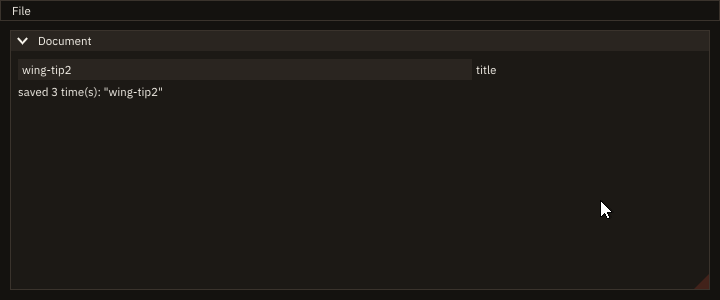
The menu item shows the shortcut; ig_shortcut, called every frame outside the menu, reads the keys (cmd+s on macOS). Menus and shortcuts has the rules.
Used in context: chapter 9 of the tutorial.
A menu bar inside a window
if (ig_begin('Case', flags=ImGuiWindowFlags_MenuBar)) then     ! the window has a bar of its own
   if (ig_begin_menu_bar()) then
      if (ig_menu_item('Reload')) continue                  ! an item in the bar, or a menu (ig_begin_menu)
      call ig_end_menu_bar()                                ! only after a true ig_begin_menu_bar
   endif
   call ig_text('the case')
endif
call ig_end()
A window begun with ImGuiWindowFlags_MenuBar has a bar of its own under its title: ig_begin_menu_bar ... ig_end_menu_bar, the end only after a true begin. It holds menus (ig_begin_menu) or, as Reload here, items straight in the bar. Menus has the rules.
Act on a row with a right click
do i = 1_int32, rows
   call ig_push_id(i)                                ! each row's menu has its own id
   if (ig_selectable(trim(names(i)), .false.)) continue
   if (ig_begin_popup_context('row')) then          ! a right click on the row just drawn
      call ig_text_disabled(trim(names(i)))
      call ig_separator()
      if (ig_menu_item('Insert below', enabled=rows < MAX_ROWS)) call ask('insert', i)
      if (ig_menu_item('Duplicate', enabled=rows < MAX_ROWS)) call ask('duplicate', i)
      if (ig_menu_item('Copy name')) call ig_set_clipboard(trim(names(i)))
      if (ig_menu_item('Delete')) call ask('delete', i)
      call ig_end_popup()
   endif
   call ig_same_line(ig_em(8.0_real64))             ! the condition in a column of its own
   call ig_text_disabled(trim(kinds(i)))
   call ig_pop_id()
enddo
call apply() ! the list changes after it is drawn, not whileEach row is followed by ig_begin_popup_context('row'): a right click on the row opens the menu, and its entries act on that row. The rows share the menu's id, so each is drawn inside ig_push_id(i). An entry does not change the list while the loop draws it: it records what to do (ask), and apply does it after the loop. The list's own menu (add a row) opens on the window's empty space, not over a row, with on='window':
if (ig_begin_popup_context('list', on='window')) then ! the window's empty space, not over a row
   if (ig_menu_item('Add a row', enabled=rows < MAX_ROWS)) call ask('add', rows)
   call ig_end_popup()
endif
call apply()
The program checks itself headless:
$ ./cb_context_menu --check
frame 12: right click on outlet, its menu open: T
frame 20: Duplicate: inlet, outlet, outlet-copy, wall, symmetry
frame 36: Delete on inlet: outlet, outlet-copy, wall, symmetry
frame 36: pointer over a row: F
frame 44: right click below the rows, the list's menu open: T
frame 52: Add a row: outlet, outlet-copy, wall, symmetry, patch-1
frame 53: pointer on outlet, tooltip shown: F, row under the pointer: 1
frame 60: pointer on outlet, tooltip shown: F, row under the pointer: 1
frame 75: pointer on outlet, tooltip shown: T, row under the pointer: 1
frame 88: help link clicked, help shown: T
frame 96: documentation link clicked, opened: https://szaghi.github.io/figure/
frame 112: Copy name on row 2, the clipboard: outlet-copy
Context menus has the places a menu opens on and when it closes.
Keys that act only where the user is
if (ig_shortcut('down')) call did('down: next block', sel + 1_int32) ! this window, not while a field is edited
if (ig_shortcut('up')) call did('up: previous block', sel - 1_int32)
if (ig_shortcut('ctrl+s')) call did('ctrl+s: the blocks saved') ! only when this window has the focusEach panel calls ig_shortcut in its own window, every frame: a chord fires only in the window with the focus, so the two ctrl+s save different things, and down moves the block list only while the list has the focus and its name field is not being edited. A key for the whole program is called outside every window, or with scope='global'; a button gets its own chord with ig_set_next_item_shortcut:
call ig_set_next_item_shortcut('f5', scope='global')               ! f5 presses Run, wherever the focus is
if (ig_button('Run')) then
   runs = runs + 1_int32
   call did('Run pressed')
endif
The program checks itself headless (cb_shortcuts --check presses the keys):
$ ./cb_shortcuts --check
frame 11: down: next block, selected: fuselage
frame 17: ctrl+s: the blocks saved
frame 47: ctrl+s: the log saved
frame 59: Run pressed
frame 71: f1: help on the command field
frame 83: f1: the general help
Shortcuts has the scopes and the rules for text fields.
One key that every panel acts on
if (ig_shortcut('ctrl+p', scope='always')) then ! fires here and in Plot, a text field edited or not
   paused = .not. paused
   call did('Run: '//merge('paused ', 'resumed', paused))
endif
Two panels both act on ctrl+p: the Run panel pauses the run, the Plot panel freezes its curve. A routed scope gives a chord to one call: with 'global', only the first call of the frame fires (f12 below reaches Run, not Plot). With scope='always' the chord is not routed: every call fires, wherever the focus is, a text field being edited included. The program checks itself headless (cb_shortcut_always --check presses ctrl+p while the note field is edited, then f12):
$ ./cb_shortcut_always --check
frame 11: Run: paused
frame 11: Plot: frozen
frame 21: Run: f12
Shortcuts compares the four scopes.
Ask a question in a box
if (app%quit_requested()) asking = .true.
if (asking) then                                         ! every frame until answered
   answer = app%message_box('quit', 'Quit?', 'The case has unsaved changes.', &
                            [character(len=10) :: 'Quit', 'Save first', 'Cancel'])
   select case (answer)
   case (0)                                              ! still open
   case (1)
      write(output_unit, '(A)') 'quit'
      asking = .false.
      call app%quit()
   case (2)
      write(output_unit, '(A)') 'save first'
      asking = .false.
      saving = .true.                                    ! a message, then the question again
   case default
      write(output_unit, '(A)') 'cancelled'
      asking = .false.
   endselect
endif
Call app%message_box every frame while the question is open: 0 until the user answers, then the button's number, once. Boxes asked while one is open stack over it, each answering its own question; one id is one box at a time. Message boxes has the details.
$ ./cb_message_box
save first
saved: OK
quit
Ask before discarding changes
if (app%quit_requested()) then                     ! the close button was clicked
   if (edited) then
      call ig_open_popup('Discard changes?')
   else
      call app%quit()                              ! nothing to lose
   endif
endif
if (ig_begin_popup_modal('Discard changes?')) then
   call ig_text('The document has unsaved changes.')
   if (ig_button('Save')) then
      edited = .false.                             ! (save here)
      call app%quit()
   endif
   call ig_same_line()
   if (ig_button('Discard')) call app%quit()
   call ig_same_line()
   if (ig_button('Cancel')) call ig_close_current_popup()
   call ig_default_focus()                         ! the safe button: enter or space presses it
   call ig_end_popup()
endif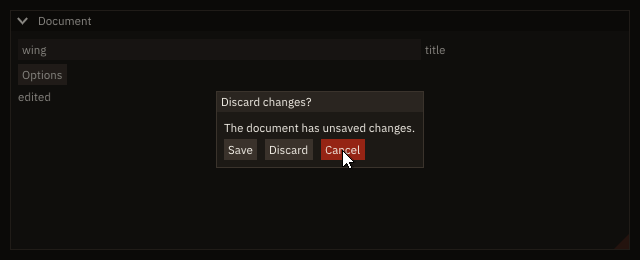
app%set_confirm_quit(.true.) makes the close button a request; the program opens a modal when there is something to lose, and quits at once otherwise. Menus, popups and shortcuts has the details.
Used in context: chapter 10 of the tutorial.
Open a file
if (ig_button('Open...')) then
   call app%open_file_dialog('open', FILTERS, stat=stat)
   if (stat /= FIG_OK) call app%open_file_browser('open', FILTERS) ! remote: no system dialog, FIGURE's browser
endif
call app%file_dialog_result('open', chosen, done, cancelled, stat=stat) ! either one answers here
if (done .and. .not. cancelled .and. stat == FIG_OK) path = chosen
The system's dialog in a window; FIGURE's file browser where there is none (remote mode: cb_open --remote PORT). Both answer through app%file_dialog_result, on a later frame: poll it every frame. To use the browser everywhere, the same in a window and in a web browser, ask the same call for it (prefer='figure'):
call ig_same_line()
if (ig_button('Open with FIGURE''s browser...')) call app%open_file_dialog('open', FILTERS, prefer='figure')
or open it directly:
if (ig_button('Open...')) call app%open_file_browser('open', [character(len=32) :: &
                                                     'Xall files|input;grd;log;dat', 'All files|*'], &
                                                     default_path=trim(cases))
call ig_same_line()
if (ig_button('Save as...')) call app%save_file_browser('save', default_path=trim(cases)//'/copy.input')
call app%file_dialog_result('open', chosen, done, cancelled, stat=stat)
if (done .and. .not. cancelled .and. stat == FIG_OK) path = chosen
call app%file_dialog_result('save', chosen, done, cancelled, stat=stat)
if (done .and. .not. cancelled .and. stat == FIG_OK) saved = chosen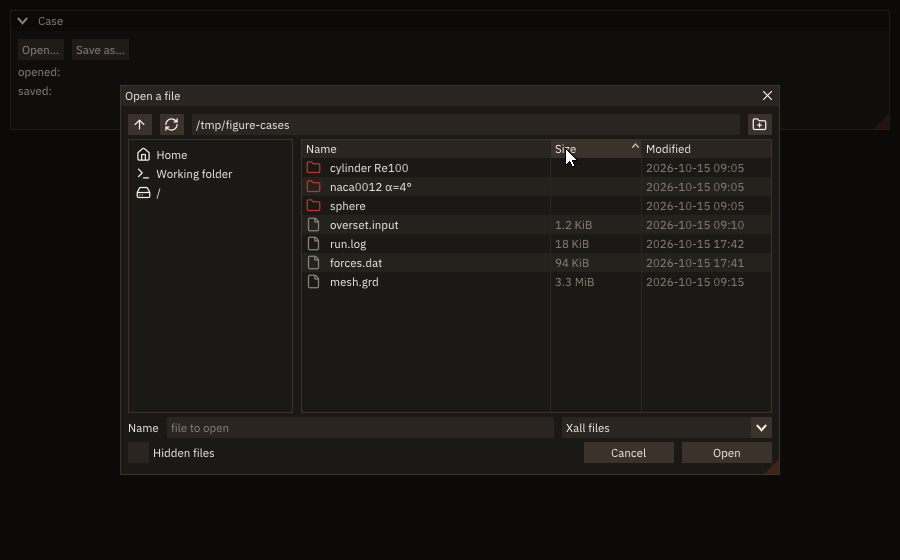
The browser lists folders first, sorts by a click on a column's header, filters by type, completes paths with Tab, keeps the recent folders between runs, makes folders and asks before a save replaces a file. File dialogs has the details.
Used in context: chapter 10 of the tutorial.
Open what the user drops
if (app%dropped(paths, x, y)) then              ! this frame only; the panes' rectangles are the last frame's
   if (inside(case_rect, x, y)) then
      case_dir = trim(paths(1))                 ! the case: the first path dropped on its pane
      copied = .false.
   elseif (inside(files_rect, x, y)) then
      do k = 1_int32, size(paths, kind=int32)   ! the files: every path dropped on theirs
         if (nfiles == MAX_FILES) exit
         nfiles = nfiles + 1_int32
         files(nfiles) = paths(k)
      enddo
   endif
endif
if (ig_begin_child('case', width=340.0_real64, height=-40.0_real64, border=.true.)) then
   call ig_text(ICON_FOLDER//' Case')
   if (len(case_dir) == 0) then
      call ig_text_disabled('drop a case folder here')
   else
      call ig_text(case_dir)
   endif
endif
call ig_end_child()
call ig_item_rect(case_rect(1), case_rect(2), case_rect(3), case_rect(4))
call ig_same_line()
if (ig_begin_child('files', height=-40.0_real64, border=.true.)) then
   call ig_text(ICON_FILE//' Files')
   if (nfiles == 0_int32) call ig_text_disabled('drop files here')
   do k = 1_int32, nfiles
      call ig_text(trim(files(k)))
   enddo
endif
call ig_end_child()
call ig_item_rect(files_rect(1), files_rect(2), files_rect(3), files_rect(4))app%dropped is .true. on the frame after a drop, with the paths and the point where they landed. The program keeps each pane's rectangle from the frame before (ig_item_rect after ig_end_child) and gives the drop to the pane under the point: a folder on the left is the case, files on the right join the list. A button copies the case path:
call ig_begin_disabled(len(case_dir) == 0)
if (ig_button(ICON_COPY//' Copy the case path')) then
   call ig_set_clipboard(case_dir)              ! pasted elsewhere with ctrl+v
   copied = .true.
endif
call ig_end_disabled()
In remote mode nothing can be dropped (the files are on the browser's computer): open the server's files with the file browser, as in the recipe above. Drops and Clipboard have the details.
Used in context: chapter 10 of the tutorial.
Make a case folder and clear old results, on every platform
call figure_make_folder(CASES//'/plate/results')     ! the case and its missing parents
open(newunit=u, file=CASES//'/plate/heat.inp', status='replace', action='write')
write(u, '(A)') "&heat title = 'Heated plate' /"
close(u)
call figure_set_file_time(CASES//'/plate/heat.inp', '2026-10-15 09:10') ! local time, as touch -t
call figure_remove(CASES//'/plate/results', recursive=.true.)          ! an earlier run's results
Standard Fortran writes the input file; it cannot make a folder, remove one or set a file's time. A shell command (execute_command_line('mkdir -p ...')) does it where a POSIX shell runs it, not on Windows, where cmd.exe refuses mkdir -p, rm -f and touch. These calls do it in FIGURE's native layer, the same on Linux, macOS and Windows, and need no window (this program opens none). figure_make_folder makes the missing parents too; figure_remove of a path that is not there is no error, so a program clears without testing first; figure_set_file_time takes a local time, as touch -t does. The program checks what it made:
$ ./cb_files
the input exists: T
its time: 2026-10-15 09:10:00
the results are gone: T
Files and folders has the statuses and what is not covered.
Lists, tables and forms
A list and a help panel
if (ig_begin_child('sections', width=160.0_real64, border=.true.)) then
   do k = 1_int32, size(SECTIONS, kind=int32)
      if (ig_selectable(trim(SECTIONS(k)), k == current)) current = k  ! the program keeps the selection
   enddo
endif
call ig_end_child()
call ig_same_line()
if (ig_begin_child('section')) then                ! the rest of the window
   call ig_text(trim(SECTIONS(current)))
   call ig_separator()
   call ig_text('grid file')
   call ig_same_line(offset=160.0_real64)            ! the values in one column
   call ig_text_disabled('CC/cc (default)')
   call ig_text('levels')
   call ig_same_line(offset=160.0_real64)
   call ig_text_colored('[!!] 0: must be at least 1', [0.90_real64, 0.35_real64, 0.30_real64])
   call ig_separator()
   call ig_text_wrapped(trim(HELP(current)))         ! wraps at the region's width
endif
call ig_end_child()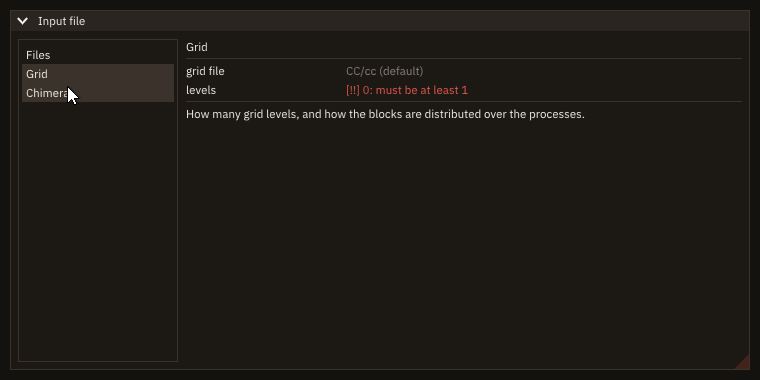
Two regions side by side (ig_begin_child, ig_same_line), each scrolling on its own: the list keeps the selection in a program variable, the values sit in one column (ig_same_line(offset=...)), the help wraps at the region's edge. Lists and regions has the rules.
Choose a scheme
call ig_separator_text('scheme')
if (ig_radio('WENO5', scheme, 1_int32)) call said('scheme')
call ig_same_line()
if (ig_radio('WENO7', scheme, 2_int32)) call said('scheme')
call ig_same_line()
if (ig_radio('TVD', scheme, 3_int32)) call said('scheme')if (scheme == 3_int32) then ! a limiter only for TVD
call ig_set_next_item_width(ig_em(10.0_real64))
if (ig_combo('limiter', limiter, limiters)) call said('limiter')
endif
call ig_separator_text('applied to')
call ig_set_next_item_width(ig_em(10.0_real64))
if (ig_list_box('block', block, blocks, height=ig_em(9.0_real64))) call said('block')Three schemes, all worth seeing: radio buttons, one per scheme, sharing scheme; a click sets it and returns .true.. The limiter, one of seven and needed only for TVD: a combo, one line until it is opened. The block the scheme applies to, one of 64 and picked again and again: a list box that stays open and scrolls; only the rows in view are drawn. The program checks itself headless:
$ ./cb_scheme --check
frame 9: scheme TVD
frame 29: block 17 (scrolled, then picked)
Choices has the rules: indices, heights, when to use which.
A vector parameter with units
call ig_set_next_item_width(width)
if (ig_drag('gravity', g, speed=0.01_real64, vmin=-50.0_real64, vmax=50.0_real64, format='%.2f m/s²')) then
   continue                                     ! g changed: the program reacts here
endif
call ig_item_rect(g_at(1), g_at(2), g_at(3), g_at(4))
call ig_set_next_item_width(width)
if (ig_input('probe', probe, format='%.3f m')) continue
call ig_item_rect(probe_at(1), probe_at(2), probe_at(3), probe_at(4))
call ig_set_next_item_width(width)
if (ig_slider_angle('wind from', wind, 0.0_real64, 360.0_real64)) continue ! radians, shown in degreesA real64 array of rank 1 is one widget with a box per component, one label for the whole vector. ig_drag changes a component by speed per pixel (here 0.01 m/s² per pixel), and stops at vmin and vmax; ig_input takes a typed value in any component, which changes only that one. The format prints the unit in every box ('%.2f m/s²'), and the drag rounds the value to what the format shows, hundredths here. The wind is kept in radians, as the program computes with it, and shown and set in degrees by ig_slider_angle. The program checks itself headless:
$ ./cb_vector --check
at the start:
  gravity    0.00    0.00   -9.81 m/s^2
  probe      1.000    0.000    0.500 m
  wind       45.0 degrees
component 3 of gravity dragged 100 pixels left:
  gravity    0.00    0.00  -10.81 m/s^2
  probe      1.000    0.000    0.500 m
  wind       45.0 degrees
0.25 typed into component 2 of the probe:
  gravity    0.00    0.00  -10.81 m/s^2
  probe      1.000    0.250    0.500 m
  wind       45.0 degrees
Numbers has the kinds, the formats and their Fortran equivalents, the speed, the bounds and the log scale.
Let the user choose a colour
if (ig_color_edit('contour lines', line_color)) then ! true on the frames the user changes it
   write(text, '(A,4F6.2)') 'changed to', line_color  ! line_color is updated: the lines below use it
endif
call ig_text(trim(text))
The editor writes line_color on the frames the user changes it; the plot reads it every frame. The swatch opens a picker; the fields are dragged, or typed after a double-click. A picker always open in a panel is ig_color_picker, as wide as the item width:
if (ig_checkbox('hue wheel', wheel)) continue           ! the picker's form, chosen by the program
call ig_push_item_width(260.0_real64)                    ! the picker's width; its height follows
if (ig_color_picker('##surface', surface, wheel=wheel)) then ! true on the frames the user changes it
   write(text, '(A,4F6.2)') 'RGBA', surface
endif
call ig_pop_item_width()
call ig_text(trim(text))wheel chooses its form, a hue bar or a hue wheel, whatever the user picked in its right-click menu. Colour editing has the rules.
An input-file editor: fields, a list, tabs and a table
if (ig_begin_tab('Boundary conditions')) then
   if (ig_begin_table('patches', 3_int32)) then
      call ig_table_setup_column('face', width=90.0_real64)
      call ig_table_setup_column('condition')
      call ig_table_setup_column('block', width=70.0_real64)
      call ig_table_headers_row()
      do r = 1_int32, nrows
         call ig_push_id(r)                     ! every row repeats the same widgets
         call ig_table_next_row()
         call ig_table_next_column()
         call ig_set_next_item_width(-1.0_real64)
         if (ig_combo('##face', face(r), FACES)) continue
         call ig_table_next_column()
         call ig_set_next_item_width(-1.0_real64)
         if (ig_combo('##kind', cond(r), KINDS)) continue
         call ig_table_next_column()
         call ig_set_next_item_width(-1.0_real64)
         if (ig_input_text('##block', block_id(r))) continue
         call ig_pop_id()
      enddo
      call ig_end_table()
   endif
   if (ig_button('add a row') .and. nrows < MAX_ROWS) nrows = nrows + 1_int32
   call ig_end_tab()
endif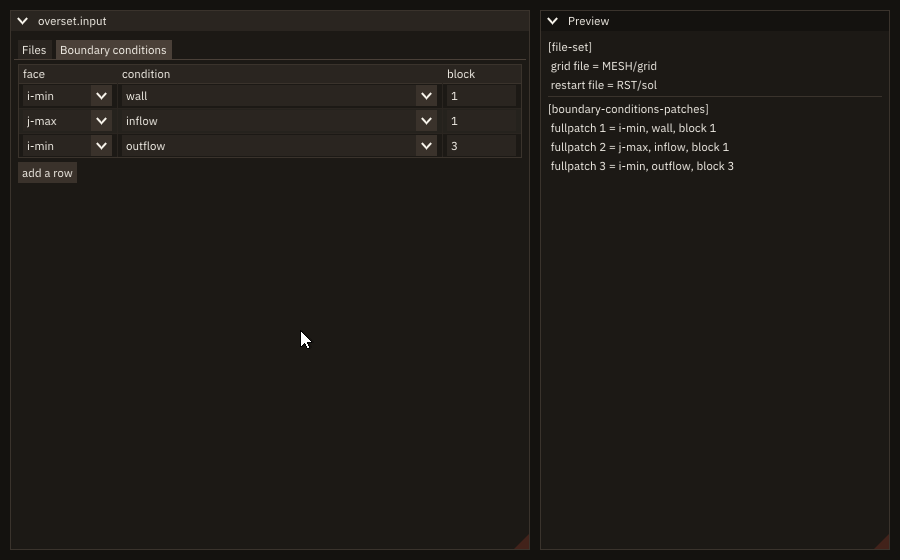
Each field edits a Fortran variable in place: a character for text (its length is the capacity), an int32 index for a drop-down list. The rows of the table repeat the same widgets, each in its own id scope (ig_push_id(r)). Tabs and tables end only when their begin returned .true.. Widgets has the rules.
Used in context: chapter 11 of the tutorial.
A hierarchy with values in columns
if (ig_begin_table('grids', 3_int32)) then
   call ig_table_setup_column('grid')
   call ig_table_setup_column('cells', width=90.0_real64)
   call ig_table_setup_column('first patch', width=110.0_real64)
   call ig_table_headers_row()
   expand = ig_shortcut('ctrl+e')                         ! ctrl+e: every body open
   do b = 1_int32, BODIES
      call ig_table_next_row()
      call ig_table_next_column()
      if (expand) call ig_set_next_item_open(.true., always=.true.) ! on this frame, whatever its state
      open = ig_tree_node(trim(BODY(b)), default_open=(b == 1_int32), span_all_columns=.true.)
      call ig_table_next_column()
      write(line, '(I0)') sum(CELLS(FIRST(b):LAST(b)))     ! the body's values, open or not
      call ig_text(trim(line))
      if (open) then
         do k = FIRST(b), LAST(b)                          ! the children: one row each
            call ig_push_id(k)
            call ig_table_next_row()
            call ig_table_next_column()
            write(line, '(A,I0)') 'block ', k
            if (ig_tree_node(trim(line), leaf=.true., selected=(k == chosen), span_all_columns=.true., &
                             clicked=clicked)) call ig_tree_pop()
            if (clicked) chosen = k                         ! a click on the row chooses, the arrow expands
            call ig_table_next_column()
            write(line, '(I0)') CELLS(k)
            call ig_text(trim(line))
            call ig_table_next_column()
            call ig_text(trim(PATCH(k)))
            call ig_pop_id()
         enddo
         call ig_tree_pop()                                ! only after a true node
      endif
   enddo
   call ig_end_table()
endif
if (chosen > 0_int32) then
   write(line, '(A,I0,A,I0,A)') 'block ', chosen, ' chosen: ', CELLS(chosen), ' cells'
   call ig_text(trim(line))
else
   call ig_text_disabled('click a block to choose it')
endifEach body is a node in the table's first column with its total in the next cell; its blocks are leaf rows between the node and ig_tree_pop. With span_all_columns, a node's row is its click area and its highlight across every column: a click anywhere on a block's row chooses it (clicked), the arrow opens the body: the two never mix. The node of 20000 blocks clips its children: Draw only the rows in view. Trees has the rules.
Used in context: chapter 11 of the tutorial.
Draw only the rows in view
if (ig_tree_node('background, 20000 blocks')) then
   if (ig_begin_child('background', height=110.0_real64)) then
      call clip%begin(BACKGROUND)                           ! children of equal height: only those in view
      do while (clip%step())
         do k = clip%first, clip%last
            write(line, '(A,I0)') 'block ', k
            if (ig_tree_node(trim(line), leaf=.true.)) call ig_tree_pop()
         enddo
      enddo
   endif
   call ig_end_child()
   call ig_tree_pop()
endif
A list of 20000 rows costs a frame what the rows in view cost when a list_clipper_object draws them: call clip%begin(n), then do while (clip%step()) draws rows clip%first to clip%last, and the loop ends by itself. The rows are of equal height (lines of text, selectables, a table's rows, leaf nodes); the clipper measures the first one (clip%item_height, in pixels). Here the 20000 children of one tree node are clipped in a region of their own (ig_begin_child), between the node and its ig_tree_pop: a whole tree with nodes open in the middle is not a run of equal rows (Trees shows how to flatten one).
A row the clipper did not draw is no item on that frame: nothing scrolls to it and nothing extends from it. The program reaches it by its place, (i - 1) * clip%item_height below the top (Reveal an item picked elsewhere), and keeps one row drawn wherever it is with clip%begin(n, keep=k): the row a shift+click extends from, sel%keep (Select many rows at once). The table below clips its 200 rows the same way. Lists and regions has the rules.
A sortable table with a fixed header
if (ig_begin_table('blocks', 5_int32, height=ig_em(18.0_real64), freeze_rows=1_int32, sortable=.true., &
                   hideable=.true.)) then
   call ig_table_setup_column('block', width=ig_em(4.0_real64), default_sort=.true.)
   call ig_table_setup_column('body', stretch=1.0_real64)
   call ig_table_setup_column('cells', width=ig_em(6.0_real64), descending=.true.) ! largest first
   call ig_table_setup_column('residual', width=ig_em(7.0_real64), descending=.true.)
   call ig_table_setup_column('patch', width=ig_em(6.0_real64), hidden=.true.)
   call ig_table_headers_row()                           ! frozen: it stays while the rows scroll
   if (ig_table_sort(column, descending)) call sort_rows(column, descending) ! a new order asked
   call clip%begin(ROWS)
   do while (clip%step())
      do i = clip%first, clip%last
         k = order(i)                                    ! the row shown i is block k
         call ig_table_next_row()
         if (residual(k) > TOLERANCE) call ig_table_row_color(WARN)
         call ig_table_next_column()
         write(text, '(I0)') k
         call ig_text(trim(text))
         call ig_table_next_column()
         call ig_text(trim(bodies(k)))
         call ig_table_next_column()
         write(text, '(I0)') cells(k)
         call ig_text(trim(text))
         call ig_table_next_column()
         write(text, '(ES9.2)') residual(k)
         if (residual(k) > TOLERANCE) then
            call ig_text('! '//trim(adjustl(text)))      ! a mark with the colour, not the colour alone
         else
            call ig_text_disabled(trim(adjustl(text)))
         endif
         call ig_table_set_column(5_int32)                ! a cell by its column: the patch
         call ig_text(trim(patches(k)))
      enddo
   enddo
   over_column = ig_table_hovered_column()               ! 0 when the pointer is over no column
   call ig_end_table()
endiffreeze_rows=1 keeps the headers row in view while the 200 rows scroll inside the table (height, in em so that it follows the font); a list_clipper_object draws only the rows in view. sortable=.true. makes the headers ask an order; ig_table_sort is .true. on the frame one is asked, the first frame included, and the program sorts. It sorts order, a permutation of the block numbers, and draws row i as block order(i): the data never move, so a block chosen elsewhere is still the same block. A row above the tolerance is coloured with ig_table_row_color and its residual marked !. With hideable=.true. a right click on the headers opens the menu of the columns, where the user hides and shows them; the patch column is hidden at first (hidden=.true.).
subroutine sort_rows(key, down)
!< Sort the permutation `order` by column `key` (`down`: largest first); the data do not move. An insertion sort,
!< stable: rows equal in `key` keep the order they had, so a second key is the column sorted before.
integer(int32), intent(in) :: key  !< Column, 1-based (0: no order, the blocks' own).
logical,        intent(in) :: down !< Descending.
integer(int32)             :: a    !< Position.
integer(int32)             :: b    !< Position.
integer(int32)             :: moving !< The index being placed.

if (key == 0_int32) then
   order = [(a, a = 1_int32, ROWS)]
   return
endif
do a = 2_int32, ROWS
   moving = order(a)
   b = a - 1_int32
   do while (b >= 1_int32)
      if (.not. before(moving, order(b), key, down)) exit
      order(b + 1_int32) = order(b)
      b = b - 1_int32
   enddo
   order(b + 1_int32) = moving
enddo
endsubroutine sort_rows

logical function before(p, q, key, down)
!< Block `p` goes before block `q` in the order of column `key`.
integer(int32), intent(in) :: p    !< A block.
integer(int32), intent(in) :: q    !< Another block.
integer(int32), intent(in) :: key  !< Column.
logical,        intent(in) :: down !< Descending.

select case (key)
case (1_int32)
   before = merge(p > q, p < q, down)
case (2_int32)
   before = merge(bodies(p) > bodies(q), bodies(p) < bodies(q), down)
case (3_int32)
   before = merge(cells(p) > cells(q), cells(p) < cells(q), down)
case (4_int32)
   before = merge(residual(p) > residual(q), residual(p) < residual(q), down)
case default
   before = merge(patches(p) > patches(q), patches(p) < patches(q), down)
endselect
endfunction before
The program checks itself headless:
$ ./cb_table_sort --check
frame 5: first frame, the default order: column 1, descending F; blocks 1, 2, 3, 4, 5
frame 13: click on cells: column 3, descending T; blocks 107, 182, 24, 73, 102
   cells of the first row: 118016, the largest: 118016
frame 21: second click on cells: column 3, descending F; blocks 25, 72, 97, 39, 58
frame 40: the wheel scrolled to row 24, the header in place: T
frame 40: the pointer over column 3
frame 50: the patch column shown, the pointer over column 5
Tables has the rules: what the program sorts, the frozen rows and columns, the hidden columns.
Select many rows at once
if (ig_begin_child('blocks', height=-60.0_real64, border=.true.)) then
   call ig_begin_multi_select(sel, box_select=.true., clear_on_escape=.true.)
   call clip%begin(BLOCKS, keep=sel%keep)           ! a shift+click extends from a line out of view
   do while (clip%step())
      do i = clip%first, clip%last
         write(line, '(A,I5,A,I7,A)') 'block ', i, ': ', cells(i), merge(' cells, frozen', ' cells        ', &
                                                                        frozen(i))
         if (ig_selectable(trim(line), sel%is_selected(i), index=i)) continue
      enddo
   enddo
   call ig_end_multi_select(sel)                    ! the clicks, keys and box are in sel
endif
call ig_end_child()
write(line, '(I0,A,I0,A)') sel%selected_count(), ' blocks selected, ', sum(cells, mask=sel%flags()), ' cells'
call ig_text(trim(line))
if (ig_button('Freeze')) frozen(sel%indices()) = .true.  ! act on what is selected
call ig_same_line()
if (ig_button('Clear')) call sel%clear()
call ig_same_line()
call ig_text_disabled('shift, ctrl, ctrl+a, a drag in the void')The user selects as in a file manager: a click, shift+click for a range, ctrl+click (cmd on macOS) to add or remove one, ctrl+a for all, a box dragged from an empty part of the list (box_select), escape to clear (clear_on_escape). The program keeps a selection_object, one flag per row (sel%resize(n), once). The rows drawn between ig_begin_multi_select(sel) and ig_end_multi_select(sel) with index=i take the clicks and keys, and after the end the flags hold what the user did; each row is drawn selected from sel%is_selected(i). The line under the list and the Freeze button read the flags back: sel%selected_count(), sel%flags() as a mask, sel%indices() as the rows to act on. The list draws only the rows in view, and a shift+click extends from the row last clicked, which may have scrolled away: keep=sel%keep keeps that row drawn. Selecting many items has the keys, the statuses, tables and trees.
Text and editors
Edit a text file
call buffer%set(read_text(trim(file)))  ! any length; CRLF line ends become LF
modified = .false.if (ig_button(ICON_SAVE//' Save')) then
call write_text(trim(file), buffer%text())
write(output_unit, '(A,I0,A)') 'saved '//trim(file)//': ', buffer%length(), ' bytes' ! UTF-8: bytes, not characters
modified = .false.
endif
call ig_same_line()
if (modified) then
call ig_text('(!) modified: '//trim(file))
else
call ig_text('saved: '//trim(file))
endif
call ig_push_font('plex-mono') ! columns line up: every character as wide
if (ig_input_text_multiline('##text', buffer, width=-1.0_real64, height=-1.0_real64, tab_input=.true.)) &
modified = .true.
call ig_pop_font()The file's bytes go into a text_buffer_object once; the field edits them in place, growing the buffer as the user types or pastes, and buffer%text() copies them out to save. IBM Plex Mono ('plex-mono'), pushed around the field, keeps the columns of the input file aligned; tab_input lets Tab insert a tab. The program reads and writes the file in stream access, so line ends stay LF. Multi-line text has the rules.
Used in context: chapter 11 of the tutorial.
Greek letters and operators in a monospace table
call ig_push_font('plex-mono')
call ig_text('field    residual   reference')
call ig_text(RHO//'        1.2e-06    '//RHO//INF)          ! Greek and the operators: Noto Sans Math
call ig_text(NABLA//'p       3.4e-05    |'//NABLA//'p|'//SQUARE) ! the superscripts: Plex Mono's own
call ig_pop_font()
IBM Plex Mono has no Greek letters and no ∇: FIGURE's bundled fallback, Noto Sans Math, gives them in every text font, with no call. A font of the program's own gives what both lack (a CJK font, a font of its own symbols):
if (file /= '') call app%add_fallback_font(trim(file)) ! after Plex, the icons and Noto Sans Math, in every text fontThe program prints which font draws each symbol (cb_fallback_font --check FILE):
$ ./cb_fallback_font --check ../../../third_party/fonts/IBMPlexSans-Regular.ttf
symbol       plex-mono                plex-sans
A            IBM Plex Mono            IBM Plex Sans
rho          Noto Sans Math           IBM Plex Sans
nabla        Noto Sans Math           Noto Sans Math
infinity     IBM Plex Mono            IBM Plex Sans
square       IBM Plex Mono            IBM Plex Sans
alpha tonos  IBMPlexSans-Regular.ttf  IBM Plex Sans
A Greek letter from the fallback keeps its own width: in a monospace column it can shift what follows by a fraction of a character. The fallback fonts has the order and the limits.
A help window from a Markdown file
type(markdown_view_object)    :: help       !< The help page.
character(len=:), allocatable :: url        !< A link clicked in this frame.
character(len=:), allocatable :: last       !< The link clicked last.
call help%init()
call help%load(trim(file), stat=stat)
if (stat /= FIG_OK) call help%set_text('# Help'//new_line('a')//new_line('a')//'The help file `'//trim(file)// &
'` cannot be read.')if (ig_begin('Help', open=shown)) then
if (help%draw('page', url, height=-30.0_real64)) last = url ! nothing is opened: the program decides
call ig_text('Last link: '//last)
endif
call ig_end()The page is a file the program ships (docs/examples/data/cb_markdown.md): help%load reads it once, help%draw shows it in a scroll area with its table of contents (from three headings) and a find bar (ctrl+f). A link to one of its headings scrolls there; any other link comes back to the program, which decides what it means: nothing is opened. A few lines of Markdown in any window go through ig_markdown, whose links come back the same way; here the program's own link help opens the help window:
if (ig_markdown('**Case** cylinder, *Re* = 100'//new_line('a')//new_line('a')//'Keys and units: [help](help)', &
                url)) then
   if (url == 'help') shown = .true.                           ! the program's own link
endif
The same page runs headless as a test: a search counted, a scroll to a heading.
call help%find('pressure')
do k = 1_int32, 3_int32
   if (.not. app%next_frame()) exit
   call draw()
enddo
write(output_unit, '(A,I0,A,I0)') "help: 'pressure' found ", help%matches(), ' times, current ', help%current_match()
call help%find('')
call help%scroll_to('Boundary conditions')
do k = 1_int32, 30_int32
   if (.not. app%next_frame()) exit
   call draw()
enddo
write(output_unit, '(A)') 'help: scrolled to "Boundary conditions", last link: '//last$ ./cb_markdown --test ../../../docs/examples/data/cb_markdown.md
help: 'pressure' found 2 times, current 1
help: scrolled to "Boundary conditions", last link: (none)Markdown has what a page may hold, and what it may not.
Edit an input file with its errors marked
subroutine start(ed)
!< The editor of an input file: its language, its text, the keys to complete, its first check.
type(code_editor_object), intent(inout) :: ed !< Editor.

call ed%init(code_language('input'))   ! [sections], keys, values, ! and # comments
call ed%set_text(CASE_FILE)
call ed%set_completions(KEYS)          ! typing "rey" offers "reynolds number"
call validate(ed)
endsubroutine startsubroutine validate(ed)
!< Check every line again and mark what is wrong: an unknown key or a value that is not a number (errors), a
!< Reynolds number that is not positive (an error), a supersonic Mach number (a warning).
type(code_editor_object), intent(inout) :: ed !< Editor.
character(len=:), allocatable :: text !< The text.
character(len=:), allocatable :: key !< A line's key.
character(len=:), allocatable :: val !< ... its value.
real(real64) :: x !< ... as a number.
integer(int32) :: n, a, b, eq, ios !< Line, its start and end, its "=", a status.
call ed%clear_marks()
text = ed%text()
n = 0_int32
a = 1_int32
do while (a <= len(text, int32))
b = index(text(a:), LF)
if (b == 0) b = len(text, int32) - a + 2_int32
b = a + b - 2_int32 ! the line is text(a:b)
n = n + 1_int32
eq = index(text(a:b), '=')
if (eq > 0) then
key = trim(adjustl(text(a:a + eq - 2)))
val = trim(adjustl(text(a + eq:b)))
if (all(KEYS /= key)) then
call ed%mark(n, 'error', 'unknown key "'//key//'"')
elseif (key /= 'grid file') then
read(val, *, iostat=ios) x
if (ios /= 0) then
call ed%mark(n, 'error', key//' is a number')
elseif (key == 'reynolds number' .and. x <= 0.0_real64) then
call ed%mark(n, 'error', 'reynolds number must be positive')
elseif (key == 'mach number' .and. x >= 1.0_real64) then
call ed%mark(n, 'warning', 'supersonic: the incompressible solver ignores the mach number')
endif
endif
endif
a = b + 2_int32
enddo
endsubroutine validatesubroutine draw(ed)
!< The window: the editor, then where the cursor is.
type(code_editor_object), intent(inout) :: ed !< Editor.
integer(int32) :: line, column !< The cursor.
character(len=48) :: where !< ... as text.
call ig_set_next_window(10.0_real64, 10.0_real64, 560.0_real64, 280.0_real64, always=.true.)
if (ig_begin('case.input')) then
if (ed%draw('editor', height=-30.0_real64)) call validate(ed) ! the user changed it: check it again
call ed%cursor(line, column)
write(where, '(A,I0,A,I0)') 'line ', line, ', column ', column
call ig_text(trim(where))
endif
call ig_end()
endsubroutine drawA code_editor_object highlights the file (code_language('input'): sections, keys, values, comments) and draws line numbers; the program's validator marks each finding on its line, with a tooltip, a tint and an icon by severity. draw returns .true. on the frame the user changed the text: the validator runs then, clears the marks and marks what it finds, so a fix removes its mark at once. set_completions gives the keys the solver reads: typing the start of one offers it, tab inserts it. The same calls run headless as a test, typing the fix and the key:
call frames()
call report('opened')
call ed%goto(2_int32, 21_int32, focus=.true.)  ! after the "-" of -15
call frames()
call test_key('backspace')                     ! as the user would fix it
call frames()
call report('after the fix')
call ed%goto(5_int32, 1_int32, focus=.true.)   ! the empty line
call frames()
call test_type(' mach n')
call frames()
if (ed%completing()) write(output_unit, '(A)') 'completion offers a key'
call test_key('tab')
call frames()
write(output_unit, '(A)') 'line 5: "'//line_of(5_int32)//'"'$ ./cb_editor --test
opened:
line 2: error: reynolds number must be positive
line 3: error: unknown key "mach numbr"
after the fix:
line 3: error: unknown key "mach numbr"
completion offers a key
line 5: " mach number"
1 key renamed
selected: "mach number"
9 lines, the word at the cursor: grd
undone: 9 lines
redone: " grid file = naca0012.grd"
line 2 in view, below line 1: T
read-only: F
at the end:Code editor has the languages, the marks, completion, find and replace.
Show what changed between two versions of a file
call code_diff_lines(OLD, NEW, added, removed)     ! no frame needed: a task may call it
write(summary, '(I0,A,I0,A)') size(removed), ' line(s) removed, ', size(added), ' added'call ig_text(trim(summary))
call ig_separator()
call code_diff('diff', OLD, NEW, side_by_side=.true., language=input)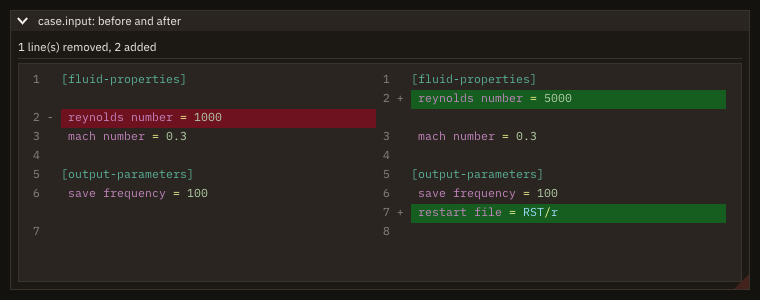
code_diff draws the two texts side by side (or in one column), the removed lines red and the added ones green, compared again only when a text changes; code_diff_lines gives the same lines as numbers, without a frame, so a task or a test can use them:
$ ./cb_diff --test
1 line(s) removed, 2 added
removed from the old file: 2
added in the new file: 2 7
The diff has the details.
Layout and item state
A tooltip with a table in it
if (ig_begin_item_tooltip()) then                ! the pointer rests on the row
   if (ig_begin_table('values', 2_int32)) then
      call cell('patch', trim(names(i)))
      call cell('condition', trim(kinds(i)))
      write(label, '(F0.1)') values(i)
      call cell('value', trim(label))
      call ig_end_table()
   endif
   call ig_end_tooltip()
endif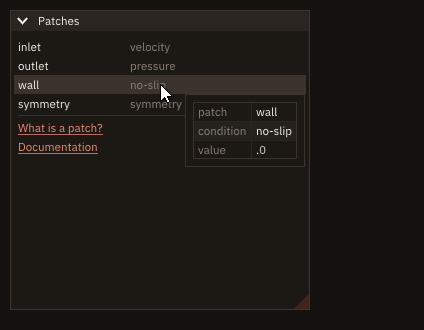
ig_begin_item_tooltip() right after the row is .true. while the pointer rests on it, after the tooltip delay; between it and ig_end_tooltip() goes any content, here a table of two columns. In the output of the right-click recipe, the pointer arrived on frame 53 and the tooltip showed by frame 75. Tooltips has the delay and ig_begin_tooltip, the tooltip without an item.
Check a value when the user leaves the field
if (ig_input_text('CFL', cfl_text)) continue           ! the text changes on every key
s = ig_last_item()
if (s%deactivated_after_edit) call commit_cfl() ! once, when the user leaves the fieldsubroutine commit_cfl()
!< The user left the CFL field after changing it: keep a positive number, or show the last good value again.
real(real64) :: value !< The number typed.
integer(int32) :: ios !< Status of the read.
read(cfl_text, *, iostat=ios) value
if (ios /= 0 .or. value <= 0.0_real64) then
call said('CFL: "'//trim(cfl_text)//'" is not a positive number')
else
cfls(opened) = value
call said('CFL of '//trim(cases(opened))//' set')
endif
write(cfl_text, '(F0.2)') cfls(opened) ! the field is not edited now: it shows this
endsubroutine commit_cflig_input_text returns .true. on every key, when the value is still half-typed. The status of the field, taken with ig_last_item() right after it, has deactivated_after_edit true on one frame: the frame the user leaves the field (a click elsewhere, tab, enter) after changing it. That is where the value is read and checked. A refused value is replaced in the variable, and the field shows it: the field is no longer edited, so the assignment holds (while the user types, the field writes its own text over the variable on every key). The program checks itself headless:
$ ./cb_commit_on_leave --check
frame 17: opened fuselage
frame 38: CFL: "abc" is not a positive number
frame 59: CFL of fuselage set
frame 74: mesh: "fuse.dat" is not a .grd file
What happened to an item has every state and the widgets that report it.
Open a row on double click
if (ig_selectable(trim(cases(k)), k == sel)) sel = k
s = ig_last_item()
if (s%double_clicked(1)) call open_case(k)          ! a double click opens the row
A click selects the row (the selectable's result); double_clicked(1), true on the frame of the second click of a double click with the left button, opens it. The first click of the double click has selected the row already. clicked(2) is a right click on the row. Take the status right after the row's widget, before the next row is drawn: the snapshot rule.
A form that keeps its proportions at any font size
call ig_push_item_width(ig_em(12))                ! every field 12 em wide
call ig_separator_text('Grid')
call label('name')
if (ig_input_text('##name', case_name)) continue
call label('cells')
if (ig_input('##cells', cells, step=16_int32)) continue
call ig_separator_text('Run')
call label('CFL')
if (ig_input('##cfl', cfl)) continue
call label('end time [s]')
if (ig_input('##t_end', t_end)) continue
call label('viscous')
if (ig_checkbox('##viscous', viscous)) continue
call ig_pop_item_width()
call ig_spacing()
call ig_align_begin('buttons', 'right')           ! at the right edge, whatever their width at this font
if (ig_button('Reset')) continue
call ig_same_line()
if (ig_button('Run')) continue
call ig_align_end()Every length that holds text is written in em, multiples of the font size: the fields start 7 em from the window's edge and are 12 em wide, the window is 24 em wide. When the user picks a larger font (app%set_font, here on ctrl+up), every em grows with it and the form keeps its shape; a form written in pixels would keep its pixels and its labels would run into the fields. The labels go through one helper, so that the column is set once:
subroutine label(text)
!< A label, then the next item 7 em from the window's left edge, level with it.
character(len=*), intent(in) :: text !< Label.
call ig_align_text_to_frame_padding()
call ig_text(text)
call ig_same_line(ig_em(7))
endsubroutine label
The window is given its width in em and height 0, which fits it to its content: the gaps between rows are the style's spacing, in pixels, so a height in em would be too small at small fonts. The buttons are a right-aligned group (ig_align_begin('buttons', 'right')): their width changes with the font, and the group follows it one frame later. The program checks itself headless, at 15 and at 24 pixels:
$ ./cb_layout --check
font 15 px: window 24.0 em wide, fields 12.0 em wide from 7.0 em, buttons end 8 px from the right edge (the window padding)
font 24 px: window 24.0 em wide, fields 12.0 em wide from 7.0 em, buttons end 8 px from the right edge (the window padding)
Layout has the rules: the em, groups, alignment and its first frame.
Reveal an item picked elsewhere
if (ig_begin_child('blocks')) then
   call clip%begin(BLOCKS)
   do while (clip%step())                                ! the rows in view, not the selected one
      do i = clip%first, clip%last
         write(label, '(A,I0,A,I0)') 'block ', i, '   body ', body_of(i)
         if (ig_selectable(trim(label), i == block)) call select(i)
      enddo
   enddo
   if (reveal .and. block > 0_int32) &                 ! row `block` starts (block - 1) rows down
      call ig_scroll_to_pos((real(block, real64) - 0.5_real64) * clip%item_height, 0.5_real64)
   if (ig_shortcut('ctrl+home', scope='global')) call ig_set_scroll(y=0.0_real64) ! the top, on the next frame
   call ig_get_scroll(scroll, scroll_max)               ! where the list is: 0 (top) to scroll_max (bottom)
endif
call ig_end_child()The user picks a block somewhere else (a 3-D view, a search, a message), and the list must show it. The program sets the selection and a flag reveal for one frame. The list of blocks draws only the rows in view, so the picked row may not be drawn: after the clipper's loop, inside the region, ig_scroll_to_pos scrolls to its place, (block - 0.5) * clip%item_height pixels below the top of the list, at the middle of the region (ratio 0.5). A list drawn whole (the bodies) needs no arithmetic: ig_scroll_here(0.5) right after the row.
if (ig_selectable(trim(label), i == body_of(block))) call select(first_of(i))
if (reveal .and. i == body_of(block)) call ig_scroll_here(0.5_real64) ! this row to the middle
The scroll happens one frame later, when the region is begun again; the program checks itself headless:
$ ./cb_reveal --check
frame 8: block 0 (body 0): not drawn, the list 0% down
frame 9: block 1240 (body 19): not drawn, the list 0% down
frame 10: block 1240 (body 19): in the middle, the list 62% down
frame 25: block 1873 (body 29): in the middle, the list 94% down
frame 50: block 333 (body 5): in the middle, the list 16% down
frame 60: block 333 (body 5): not drawn, the list 0% down
A dialog whose field takes the keys at once calls ig_focus_here() before the field, on the frame the dialog opens only:
subroutine goto_dialog()
!< The "Go to block" dialog: its field has the focus when it opens; enter goes to the block typed.
integer(int32) :: k !< The block typed.
if (ig_begin_popup_modal('Go to block')) then
   call ig_text_disabled('a block from 1 to 2000, then enter')
   if (focus_field) call ig_focus_here()                ! once: the next item takes the keys
   focus_field = .false.
   if (ig_input_text('block', goto_text)) continue
   s = ig_last_item()
   if (s%deactivated_after_edit) then                   ! enter (or a click elsewhere)
      read(goto_text, *, iostat=ios) k
      if (ios == 0 .and. k >= 1_int32 .and. k <= BLOCKS) call select(k)
      call ig_close_current_popup()
   endif
   if (ig_button('Cancel')) call ig_close_current_popup()
   call ig_end_popup()
endif
endsubroutine goto_dialog
Scrolling and focus has the rules: the one-frame delay, the clipper, focus and modals.
Draw a domain sketch with clickable boundaries
call ig_canvas('domain', 0.0_real64, 200.0_real64, ev)  ! the window's width, 200 pixels high
scale = (ev%size(1) - 80.0_real64) / 4.0_real64        ! 4 m across, 40 pixels free each side
hovered = 0_int32
if (ev%hovered) hovered = nearest(ev%mouse(1), ev%mouse(2))
if (ev%clicked(1)) selected = hovered                  ! a click on empty space clears the selection
if (hovered > 0_int32) then
   if (ig_begin_tooltip()) then
      call ig_text(trim(BOUNDARY(hovered))//': '//trim(CONDITION(bc(hovered)))//' (click to change)')
      call ig_end_tooltip()
   endif
endifdo b = 1_int32, NB
w(b) = merge(4.0_real64, 2.0_real64, b == hovered .or. b == selected)
enddo
call ig_draw_rect(px(0.0_real64), py(0.0_real64), px(4.0_real64), py(1.0_real64), &
[0.5_real64, 0.5_real64, 0.5_real64, 0.25_real64], filled=.true.)
call ig_draw_line(px(0.0_real64), py(0.0_real64), px(0.0_real64), py(1.0_real64), HUE(:, bc(1)), w(1))
call ig_draw_line(px(4.0_real64), py(0.0_real64), px(4.0_real64), py(1.0_real64), HUE(:, bc(2)), w(2))
call ig_draw_line(px(0.0_real64), py(0.0_real64), px(4.0_real64), py(0.0_real64), HUE(:, bc(3)), w(3))
call ig_draw_line(px(0.0_real64), py(1.0_real64), px(4.0_real64), py(1.0_real64), HUE(:, bc(4)), w(4))
call ig_draw_circle(px(XC), py(YC), RC * scale, [0.1_real64, 0.1_real64, 0.1_real64], filled=.true.)
call ig_draw_circle(px(XC), py(YC), RC * scale, HUE(:, bc(5)), w(5))
call ig_draw_text(px(0.0_real64) - 36.0_real64, py(0.5_real64) - 8.0_real64, 'inlet', HUE(:, bc(1)))
call ig_draw_text(px(4.0_real64) + 4.0_real64, py(0.5_real64) - 8.0_real64, 'outlet', HUE(:, bc(2)))
call ig_draw_text(px(2.0_real64), py(0.0_real64) + 4.0_real64, 'bottom', HUE(:, bc(3)))
call ig_draw_text(px(2.0_real64), py(1.0_real64) - 20.0_real64, 'top', HUE(:, bc(4)))
call ig_draw_text(px(XC) + RC * scale + 6.0_real64, py(YC) - 8.0_real64, 'cylinder', HUE(:, bc(5)))ig_canvas places an area that takes the mouse, 200 pixels high and as wide as the space left in the window (a width of 0: Canvas); its event gives the pointer in the canvas's pixels, from its top-left. The program maps its metres to those pixels (px, py, y up), finds the boundary within 6 pixels of the pointer, and draws every boundary with the primitives at the canvas's origin plus its own coordinates: the one under the pointer, or selected, thicker. Each boundary carries its condition twice, as a colour and as a word beside it. A click (ev%clicked(1)) selects the boundary under the pointer; the radio buttons below set its condition. The hit test is the program's: the canvas reports where the pointer is, not what is under it.
function nearest(cx, cy) result(b)
!< The boundary within PICK pixels of the canvas point (`cx`, `cy`), 0 if none.
real(real64), intent(in) :: cx !< Canvas abscissa [pixels].
real(real64), intent(in) :: cy !< Canvas ordinate [pixels].
integer(int32)           :: b  !< Boundary.
real(real64)             :: x  !< The point [m].
real(real64)             :: y  !< ...
real(real64)             :: d(NB) !< Its distance to each boundary [pixels].

x = (cx - 40.0_real64) / scale
y = 0.5_real64 - (cy - 0.5_real64 * ev%size(2)) / scale
d(1) = segment(x, y, 0.0_real64, 0.0_real64, 0.0_real64, 1.0_real64)
d(2) = segment(x, y, 4.0_real64, 0.0_real64, 4.0_real64, 1.0_real64)
d(3) = segment(x, y, 0.0_real64, 0.0_real64, 4.0_real64, 0.0_real64)
d(4) = segment(x, y, 0.0_real64, 1.0_real64, 4.0_real64, 1.0_real64)
d(5) = abs(hypot(x - XC, y - YC) - RC)
b = minloc(d, 1)
if (d(b) * scale > PICK) b = 0_int32
endfunction nearest
The program checks itself headless:
$ ./cb_canvas --check
the pointer 2 pixels below the top wall:
  pointer in the canvas   433.0    36.0 px
  hovered  top
  selected none
a click on the cylinder's edge:
  pointer in the canvas   190.0   100.0 px
  hovered  cylinder
  selected cylinder, no-slip wall
"slip wall" chosen:
  pointer in the canvas   365.0   214.0 px
  hovered  none
  selected cylinder, slip wall
Canvas has the coordinates, the layers and every field of the event.
Plots
Plot the columns of a matrix
if (ip_begin_plot('Columns: read in place', height=250.0_real64)) then
   call ip_line('probe 1', t, probes(:, 1))    ! contiguous section: no copy
   call ip_line('probe 2', t, probes(:, 2))
   call ip_end_plot()
endif
A column of a Fortran array is contiguous: ImPlot reads it in place. Data in place has the rows, the strides and what is copied.
Combine items and styles in one plot
signal = ip_spec(line_color=[0.85_real64, 0.10_real64, 0.10_real64, 1.0_real64], line_weight=2.0_real64)
samples = ip_spec(marker=ImPlotMarker_Circle, marker_size=3.0_real64)call ip_shaded('spread', x, y - s, y + s) ! band between two curves
call ip_line('signal', x, y, spec=signal) ! styled line
call ip_scatter('samples', x(::5), y(::5), spec=samples) ! markers only
call ip_bars('counts', real(x, real32), counts, 0.15_real64) ! real32 data, bar width in x units
call ip_shaded('to zero', x, y, 0.0_real64, spec=ip_spec(fill_alpha=0.25_real64)) ! curve to y = 0
call ip_scatter('squares', x(1:3), y(1:3), spec=ip_spec(marker=ImPlotMarker_Square))Items are drawn in call order: put shaded areas first so the lines stay visible. A spec built once outside the loop costs nothing per frame; one built inline (spec=ip_spec(...)) is rebuilt every frame, which is cheap but not free. The x(::5) sections are not contiguous: ImPlot reads them in place with a stride, or reads the compiler's copy (Data in place). Plots lists every ip_spec argument.
Compare the cost of each phase across cases
if (ip_begin_plot('cost per case', height=170.0_real64)) then  ! group g: case g; item i: phase i
   call ip_setup_axes('case', 'seconds')
   call ip_bar_groups(PHASE, COST, group_size=0.7_real64)
   call ip_end_plot()
endif
if (ip_begin_plot('cost per case, stacked', height=170.0_real64)) then
   call ip_setup_axes('case', 'seconds')
   call ip_bar_groups(PHASE, COST, stacked=.true.)
   call ip_end_plot()
endif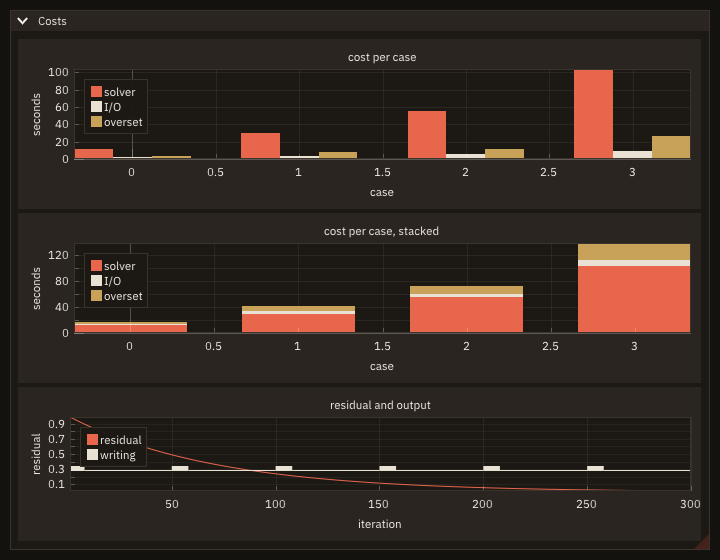
COST(g, i) holds the seconds of phase i in case g: ip_bar_groups draws one group per case, at x = 0, 1, 2, ..., its phases side by side within group_size of the unit, or on top of each other with stacked=.true.. Each phase is one item, named by PHASE(i) in the legend and coloured with the plot's line colours in order. Where the time of one run went is a pie:
if (ip_begin_plot('one run', width=280.0_real64, height=280.0_real64, equal=.true.)) then
   call ip_setup_axes('##x', '##y')
   call ip_pie_chart(['solver  ', 'I/O     ', 'overset ', 'boundary'], seconds, 0.5_real64, 0.5_real64, 0.45_real64, &
                     label_format='%.0f s', normalize=.true.)  ! the slices are fractions of the sum
   call ip_end_plot()
endif
normalize=.true. makes the slices fractions of their sum, whatever it is; equal=.true. keeps the pie round, its centre and radius being in plot units. Grouped bars and digital signals and Pies and bubbles have every argument.
Mark when the solver writes, under its residual
if (ip_begin_plot('residual and output', height=-1.0_real64)) then
   call ip_setup_axes('iteration', 'residual')
   call ip_line('residual', it, res)
   call ip_digital('writing', it, writing)                  ! 0 or 1, drawn in a band of its own
   call ip_end_plot()
endif
writing is 1 on the iterations the solver writes its output, 0 elsewhere (the third plot of the picture above). ip_digital draws it as a signal held from one abscissa to the next, in a band of its own at the bottom of the plot: the y axis does not fit it, so the band stays under the residual whatever the residual's range; the x axis does. Grouped bars and digital signals has the band's height and the strides.
Several plots sharing the x axis
if (ip_begin_subplots('##forces', 2_int32, 1_int32, height=-1.0_real64, link_x=.true.)) then
   if (ip_begin_plot('drag')) then
      call ip_setup_axes('time', 'Cx', yformat='%.4f')   ! the default would print -3781.31 on every tick
      call ip_line('Cx', t, drag)
      call ip_end_plot()
   endif
   if (ip_begin_plot('pitching moment')) then
      call ip_setup_axes('time', 'CMy')
      call ip_line('CMy', t, moment)
      call ip_end_plot()
   endif
   call ip_end_subplots()
endif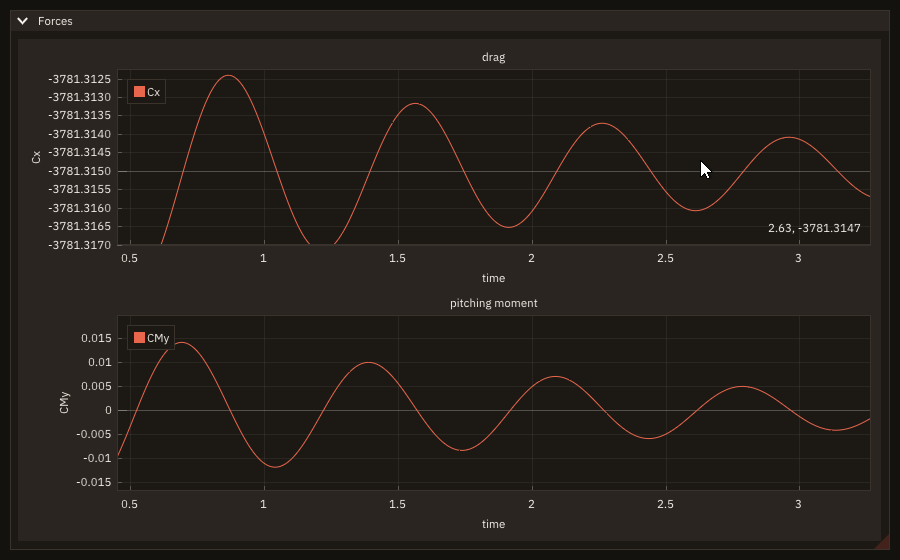
Zoom one, all follow (link_x). yformat='%.4f' prints the drag's ticks with four decimals, where the default would print -3781.31 on every tick. Plots has the details.
Two quantities with different scales in one plot
if (ip_begin_plot('Convergence', height=-1.0_real64)) then
   call ip_setup_axis('x1', label='iteration')
   call ip_setup_axis('y1', label='residual', scale='log')
   call ip_setup_axis('y2', label='coefficient', format='%.2f') ! on the right, no grid lines
   call ip_setup_legend('e', outside=.true.)
   call ip_line('residual', it, residual)                       ! on X1, Y1
   call ip_set_axes('x1', 'y2')                                 ! the next items on Y2
   call ip_line('cl', it, cl)
   call ip_line('cd', it, cd)
   call ip_end_plot()
endifA residual falls over decades and wants a log axis; force coefficients settle near 0.8 and 0.05 and want a linear one. Set up a second y axis with ip_setup_axis('y2', ...) before the items, draw the residual, then send the next items to it with ip_set_axes('x1', 'y2'). Each axis fits its own lines; Y2 sits on the right without grid lines, and dragging it pans it alone. The legend goes outside, on the east, so it covers no curve. cb_two_axes --check draws the plot headless and prints what each axis shows:
$ ./cb_two_axes --check
Y1 (log), fitted to the residual:      8.14E-09 to  1.05E+00
Y2 (linear), fitted to cl and cd:        0.0503 to    1.0960
Y2's tick labels ('%.2f'): 0.20 0.40 0.60 0.80 1.00
Axes has the six axes, the scales, fixed ticks and constraints.
Stack plots over one iteration axis
if (ip_begin_aligned('history')) then                 ! the plot areas start at the same pixel
   if (ip_begin_plot('residual', height=160.0_real64)) then
      call ip_setup_axes('', 'residual')
      call ip_link_axis('x1', 'iteration')            ! pan or zoom one: the three follow
      call ip_line('residual', it, res)
      call ip_end_plot()
   endif
   if (ip_begin_plot('cfl', height=160.0_real64)) then
      call ip_setup_axes('', 'CFL')
      call ip_link_axis('x1', 'iteration')
      call ip_line('CFL', it, cfl)
      call ip_end_plot()
   endif
   if (ip_begin_plot('forces', height=-1.0_real64)) then
      call ip_setup_axes('iteration', 'coefficient')
      call ip_link_axis('x1', 'iteration')
      call ip_line('lift', it, cl)
      call ip_hide_next_item(.not. show_cd, always=.true.) ! the program decides, every frame
      call ip_line('drag', it, cd)
      if (ip_begin_legend_popup('drag')) then         ! a right click on the entry
         write(line, '(A,F7.4)') 'last value ', cd(N)
         call ig_text(trim(line))
         if (ig_checkbox('shown', show_cd)) continue
         call ip_end_legend_popup()
      endif
      if (ip_legend_hovered('lift')) then               ! the pointer on the entry
         if (ig_begin_tooltip()) then
            call ig_text('lift: the force normal to the flow, over q S')
            call ig_end_tooltip()
         endif
      endif
      call ip_end_plot()
   endif
   call ip_end_aligned()
endifA residual, a CFL number and the forces, each a plot with its own height, legend and y axis, over the same iterations. ip_link_axis('x1', 'iteration') in each plot's setup puts the three x axes in one group: a pan or a zoom in any of them moves all three. ip_begin_aligned ... ip_end_aligned starts their plot areas at the same pixel whatever the width of their tick labels, so an iteration is at the same place down the column. On the forces' legend a right click on the drag entry opens a popup (ip_begin_legend_popup) with its last value and a check box; ip_hide_next_item(..., always=.true.) before the item hides or shows the line every frame as the check box says. The pointer on the lift entry shows a tooltip (ip_legend_hovered). Plots of one size in a grid are subplots. Plots across plots has the details, the first frame of a group among them.
Read the value under the pointer
hovered = ip_plot_hovered()
if (hovered) then
   call ip_plot_mouse(x, y)                               ! the pointer in plot units
   k = min(max(nint(x), 1_int32), N)                      ! the nearest iteration
   call ip_inf_lines('##cursor', [k], spec=cursor)        ! a line across the plot, at an integer
   call ip_scatter('##point', it(k:k), residual(k:k), spec=dot)
   write(text, '(ES9.2)') residual(k)
   call ip_tag('x1', it(k), color=AMBER)                  ! the iteration, as the axis labels it
   call ip_annotation(it(k), residual(k), trim(adjustl(text)), color=AMBER, &
                      offset=[40.0_real64, -24.0_real64])         ! the residual beside the dot
   shown = k
endifWhile ip_plot_hovered() is true, ip_plot_mouse gives the pointer in plot units; the program rounds its x to the nearest iteration and marks it: ip_inf_lines at that integer draws a line across the plot, a one-point ip_scatter a dot on the curve, ip_tag puts the iteration on the x axis (labelled as the axis labels its ticks, '%.0f'), and ip_annotation writes the residual beside the dot. A tag on the y axis would hold it too, but a tag wider than the tick labels widens the axis, and the plot would shift under the pointer as it enters. The marks are drawn only on the frames the pointer is over the plot, so they vanish when it leaves. cb_plot_readout --check moves the pointer to iteration 250 with the testing module (the pixel from ip_plot_to_pixels) and prints what the readout shows:
$ ./cb_plot_readout --check
pointer over the plot: T
nearest iteration:     250
residual shown:        1.13E-04
pixel to iteration 250 and back within a pixel: T, a data area: T
box taken: iterations 250 to 300, the x axis not zoomed: T
Reading a plot has the conversions and the box selection.
Average over a window the user drags
call ip_plot_limits(xa, xb, ylo, yhi)                    ! the window spans the plot's height
if (ip_drag_rect(1_int32, x0, x1, ylo, yhi, color=AMBER)) then
   x0 = max(x0, 1.0_real64)                               ! kept on the data
   x1 = min(x1, real(N, real64))
endif
first = max(1_int32, ceiling(x0))
last = min(N, floor(x1))
if (last >= first) then
   mean = sum(cl(first:last)) / real(last - first + 1_int32, real64)
   call ip_line('mean', [x0, x1], [mean, mean], spec=ip_spec(line_color=AMBER, line_weight=2.0_real64))
   write(text, '(A,F6.4)') 'mean ', mean
   call ip_tag('y1', mean, color=AMBER, text=trim(text))
endifip_drag_rect gives the user a rectangle to move by its centre and resize by its edges; its four values are the program's variables, updated in place. Here the top and bottom are set to the plot's y limits on every frame, so the rectangle is a window of iterations across the plot's height, and its ends are kept on the data. The program averages the samples whose iterations fall inside, draws the mean as a two-point ip_line over the window and tags it on the y axis. cb_plot_window --check drags the rectangle 100 iterations to the right with test_drag and prints the window and its mean before and after:
$ ./cb_plot_window --check
before the drag: iterations 300 to 450, mean 0.8005
after the drag: iterations 400 to 550, mean 0.7990
ImPlot's box selection (right button) chooses a window too, once: Reading a plot shows how to keep the box without the zoom. Marks in a plot has the rectangle, tags, infinite lines and text.
Drag a case onto a plot
if (ig_tree_node('cases', default_open=.true.)) then
   do c = 1_int32, CASES
      if (ig_tree_node(trim(NAME(c)), leaf=.true., selected=shown(c))) call ig_tree_pop()
      if (ig_drag_source('case', trim(NAME(c)))) continue   ! the node carries its name
   enddo
   call ig_tree_pop()
endif
if (ig_button('Bin')) shown = .false.                        ! a click empties the plot
if (ig_drop_target('case', payload)) call show(payload, .false.) ! a case dropped here leaves it
if (ig_dragging('case')) call ig_text_disabled('drop on the plot')if (ip_begin_plot('residuals', height=-1.0_real64)) then
call ip_setup_axes('iteration', 'residual', auto_fit=.true.)
do c = 1_int32, CASES
if (.not. shown(c)) cycle
res = exp(-RATE(c) * it)
call ip_line(trim(NAME(c)), it, res)
enddo
if (ip_drop_target('case', payload)) call show(payload, .true.) ! a case dropped here is plotted
call ip_end_plot()
endifEach case of the tree is a drag source (ig_drag_source, right after its node): pressed and dragged, it carries its name under the type 'case'. The plot is a target of that type (ip_drop_target, after its items and before ip_end_plot): on the frame a case is dropped on it, the call is .true. and payload holds the name, which the program finds in its own data. The Bin button is a target too (ig_drop_target, right after the button): a case dragged onto it leaves the plot. While a case is held, ig_dragging('case') is .true. and the program says where to drop it. The payload is text: the program, not Dear ImGui, keeps the cases. Drag and drop has the types and the rules; A plot as a drop target an axis or the legend as the target.
Step through saved solutions
if (ig_player('snapshots', player, labels=times)) then
   if (check) write(output_unit, '(A,I0,A,I0,A)') 'frame ', frame, ': snapshot ', player%index, &
                                                  ' ('//trim(times(player%index))//')'
endif
call ig_item_rect(at(1), at(2), at(3), at(4))
call ig_text_disabled('right click on the player: speed and mode')
if (ip_begin_plot('u(x)', height=-1.0_real64)) then
   call ip_setup_axes('x [m]', 'u [m/s]')
   call ip_setup_axes_limits(0.0_real64, 1.0_real64, -0.1_real64, 1.1_real64)
   call ip_line('u', x, u(:, player%index))     ! the snapshot the player shows
   call ip_end_plot()
endifThe program keeps its saved solutions, here forty columns of u, and a player_object with their number, a speed in snapshots per second and a mode ('bounce': back and forth); ig_player draws previous, play, next and a slider that shows each snapshot's time, and says which one to plot in player%index. While it plays, the player asks for frames itself, so lazy redraw goes on; it keeps time by the frame clock, so 8 snapshots per second stay 8 at any frame rate. A right click on the player changes the speed and the mode. cb_player --check clicks play, then pause 60 headless frames later (1/60 s each: a snapshot every 7 or 8 frames, 8 in the second), then next and previous:
$ ./cb_player --check
frame 5: play (8 snapshots per second, 1/60 s per headless frame)
frame 17: snapshot 2 (t = 0.05 s)
frame 24: snapshot 3 (t = 0.10 s)
frame 32: snapshot 4 (t = 0.15 s)
frame 39: snapshot 5 (t = 0.20 s)
frame 47: snapshot 6 (t = 0.25 s)
frame 54: snapshot 7 (t = 0.30 s)
frame 62: snapshot 8 (t = 0.35 s)
frame 65: pause
frame 69: snapshot 9 (t = 0.40 s)
frame 80: next
frame 84: snapshot 10 (t = 0.45 s)
frame 95: previous
frame 99: snapshot 9 (t = 0.40 s)
Players has the controls, the clock and the modes.
Save a plot as a PNG file
if (ip_begin_plot('history', height=-1.0_real64)) then
   call ip_setup_axes('t', 'x')
   call ip_line('x', t, x, spec=ip_spec(line_color=ink))
   if (ip_drag_line_y(1_int32, level)) level = min(1.0_real64, max(-1.0_real64, level)) ! moved: clamp it
   call ip_end_plot()
endif
call ig_item_rect(r(1), r(2), r(3), r(4))               ! the plot just drawn
if (save_now) call app%save_image('history.png', r(1), r(2), r(3), r(4), stat=stat)
call app%image_result(written, done, stat=stat)         ! every frame: done once, after the write
if (done) then
   if (stat == FIG_OK) then
      message = 'saved '//written
   else
      message = figure_last_error()                     ! FIG_ERR_FAILED: the file cannot be written
   endif
endif
save_now is the result of a button above the plot. ig_item_rect right after ip_end_plot gives the plot's rectangle; app%save_image writes that rectangle of the window as a PNG file, at the screen's resolution, when the frame is rendered. The outcome comes once, on a later frame: app%image_result, called every frame, sets done with the file written, or stat to FIG_ERR_FAILED with the reason. A button rather than a menu: a menu still open on the frame of the request would be in the picture. Save an image from the program has the modes and the rules (docs/examples/src/cb_save_image.F90).
Plot the rows of a matrix
A row of a column-major matrix is strided. When its abscissae are uniform, ip_line(label, y, row [, xscale] [, xstart]) plots it in place: ImPlot reads y(row, j) with a stride of size(y, 1) elements, no copy at all.
if (ip_begin_plot('Rows: read in place, with a stride', height=250.0_real64)) then
   call ip_line('probe 1', history, 1_int32, xscale=0.01_real64)  ! row 1, x = 0.01 (j - 1): no copy
   call ip_line('probe 2', history, 2_int32, xscale=0.01_real64)
   call ip_end_plot()
endif
With arbitrary abscissae, ip_line(label, t, history(i, :)) reads the row with its stride and copies t at that stride (ImPlot applies one stride to both x and y); a row copied by the program into a buffer allocated once draws the same:
if (ip_begin_plot('Rows with any x: copied', height=250.0_real64)) then
   call ip_line('probe 1', t, history(1, :))   ! the row in place, t copied at its stride (compiler-dependent)
   row = history(2, :)                         ! or copy it yourself, into a buffer you reuse
   call ip_line('probe 2', t, row)
   call ip_end_plot()
endif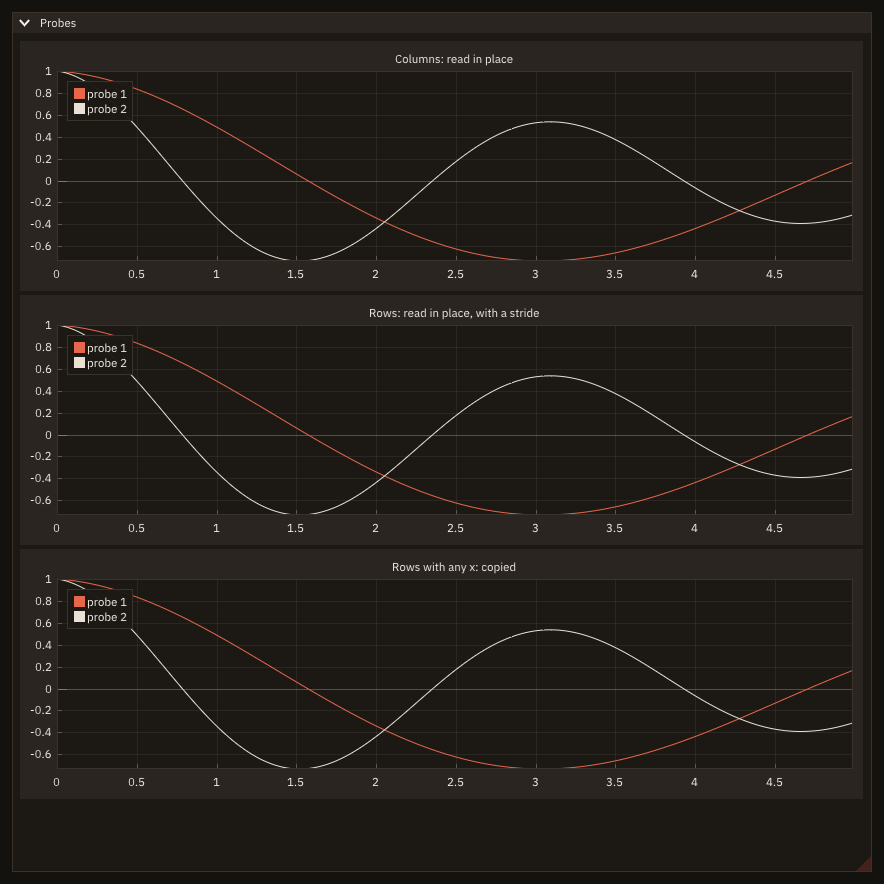
Storing series as columns avoids the question. What a compiler passes for a section, and what each way costs, is in Data in place.
Plot the history a solver keeps, in place
if (ip_begin_plot('Coefficients per iteration', height=280.0_real64)) then
   before = test_plot_copies()
   call ip_line('cl', runs%iter, runs%cl) ! integer x: converted; cl read where it is
   copies(1) = test_plot_copies() - before
   stride(1) = test_plot_stride()
   call ip_line('cd', runs%iter, runs%cd)
   call ip_end_plot()
endif
A solver keeps one record per iteration: runs%cl is a component of an array of derived types, strided by the size of a record, and runs%iter is an integer. The item reads the coefficients as the compiler passes them, with their stride, and converts the iterations into one temporary (ImPlot reads x and y of one type).
if (ip_begin_plot('Probes', height=280.0_real64)) then
   before = test_plot_copies()
   call ip_line('probe 1', time, probes(1, :))  ! a row: time is copied at the row's stride
   copies(2) = test_plot_copies() - before
   stride(2) = test_plot_stride()
   before = test_plot_copies()
   call ip_line('probe 2', probes(2, :), xscale=1.0e-3_real64, xstart=1.0e-3_real64) ! uniform x: no copy
   copies(3) = test_plot_copies() - before
   stride(3) = test_plot_stride()
   before = test_plot_copies()
   call ip_line('probe 3, every 10th', probes(3, ::10), xscale=1.0e-2_real64, xstart=1.0e-3_real64)
   copies(4) = test_plot_copies() - before
   stride(4) = test_plot_stride()
   call ip_end_plot()
endif
A row of a matrix is read with the matrix's stride; time is contiguous, so it is copied at that stride (one stride per item). With uniform abscissae nothing is copied, and probes(3, ::10) plots every tenth sample in place. cb_in_place --check prints what was copied, built with gfortran, which passes runs%cl as a contiguous copy of its own (stride 8 bytes; ifx passes it in place, with the stride of a record):
$ ./cb_in_place --check
runs%iter, runs%cl:       1 copied, stride 8 bytes
time, probes(1, :):       1 copied, stride 24 bytes
probes(2, :), uniform x:  0 copied, stride 24 bytes
probes(3, ::10), uniform: 0 copied, stride 240 bytes
What each compiler passes, and what it costs, is in Data in place.
Fields and images
Show a small field cell by cell
if (ip_begin_plot('f(x, y)', width=700.0_real64, height=-1.0_real64)) then
   call ip_setup_axes('x', 'y')
   call ip_heatmap('f', f, 0.0_real64, 1.5_real64, 0.0_real64, 1.0_real64, scale_min=0.0_real64, &
                   scale_max=1.0_real64, colormap=ImPlotColormap_Viridis)
   call ip_image('image', tex, 1.2_real64, 1.4_real64, 0.05_real64, 0.25_real64)  ! row 1 at the bottom
   call ip_end_plot()
endif
call ig_same_line()
call ip_colormap_scale('##f scale', 0.0_real64, 1.0_real64, height=-1.0_real64, colormap=ImPlotColormap_Viridis)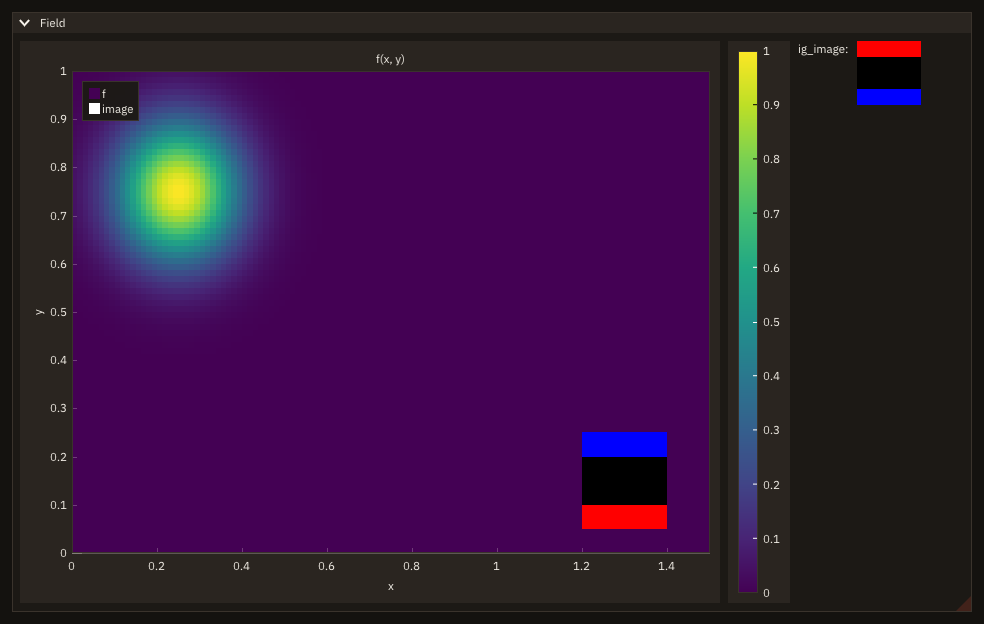
A heatmap draws each cell, and can print its value in it (label_format): for fields of up to a few hundred cells a side; larger ones are the next recipe. f(i, j) is read in place, i along x and j along y, j = 1 at the bottom; the bounds are the outer edges of the cells. Fix the scale (scale_min, scale_max) when the field changes over time, or the colours rescale every frame. Heatmaps and images has every argument.
Used in context: chapter 13 of the tutorial.
Show a 2-D field with its colour scale
if (ip_begin_plot('density', 700.0_real64, 440.0_real64, equal=.true.)) then
   call ip_setup_axes('x [m]', 'y [m]')
   call ip_field_image('rho', rho, 0.0_real64, 4.0_real64, 0.0_real64, 3.0_real64, colormap=ip_colormap('inferno'), &
                       vmin=vmin, vmax=vmax, scale='log', changed=step)
   call ip_end_plot()
endif
call ig_same_line()
if (ip_colormap_legend_edit('rho legend', ip_colormap('inferno'), vmin, vmax, height=440.0_real64, &
                            scale='log', label_format='%g kg/m3')) then
   ! vmin and vmax changed: the next ip_field_image colours the field again
endif
if (ig_button('reset range')) then
   vmin = 0.1_real64
   vmax = 100.0_real64
endifip_field_image colours the field through the colormap into a texture and draws it as one image: the colours are computed when something changes, not every frame, so a field of a million values costs a frame no more than a picture. f(i, j) is read in place, i along x and j along y, j = 1 at the bottom; the edges are the outer edges of the values. The scale is logarithmic: the legend beside it, on the same scale, has its ticks at the decades. ip_colormap_legend_edit lets the user move the range (drag) and zoom it (wheel): vmin and vmax change in place and the next ip_field_image colours the field again. A time step that rewrites rho in place says so with changed=.true.: FIGURE cannot see it. cb_field_scale --check drags the legend 60 pixels up with test_drag and prints the range before and after, and how many times the field was coloured:
$ ./cb_field_scale --check
before the drag: range  1.000E-01 to  1.000E+02, colourings since the start of the check 0
   the peak in [0, 255]: 251 254 163, textures kept 1, the last colouring under 1 s: T
after the drag: range  3.771E-02 to  3.771E+01, colourings since the start of the check 1
   the peak in [0, 255]: 252 255 164, textures kept 1, the last colouring under 1 s: T
Fields has every argument, the speed and the remote mode; Colormaps the scales.
Colour a field with a map by name, reversed or in bands
cmap = ip_colormap('vik', levels=10_int32)      ! diverging, ten bands: zero sits between two of them
if (ip_begin_plot('vorticity', width=300.0_real64, height=300.0_real64)) then
   call ip_heatmap('w', w, 0.0_real64, 1.0_real64, 0.0_real64, 1.0_real64, scale_min=-1.0_real64, &
                   scale_max=1.0_real64, colormap=cmap)
   call ip_end_plot()
endif
call ig_same_line()
call ip_colormap_scale('##w', -1.0_real64, 1.0_real64, height=300.0_real64, colormap=cmap)
ip_colormap(name) gives the id that heatmaps, fields and legends take as colormap; levels=10 cuts the map into ten bands of equal width. A signed field (a vorticity) wants a diverging map over a range symmetric about 0: with an even number of bands, 0 falls between two of them. A map of the program's own is a CSV table loaded once under a new name, and <name>_r is any map reversed:
open(newunit=u, file='ocean.csv', status='replace', action='write') ! a user map: r, g, b rows in [0, 255]
write(u, '(A)') '# deep to shallow', '8,29,88', '37,52,148', '34,94,168', '29,145,192', '65,182,196', '161,218,180'
close(u)
call ip_load_colormap('ocean', 'ocean.csv', stat=stat)
if (stat /= FIG_OK) write(output_unit, '(A)') figure_last_error()if (ip_begin_plot('depth', width=300.0_real64, height=300.0_real64)) then
call ip_heatmap('d', abs(w), 0.0_real64, 1.0_real64, 0.0_real64, 1.0_real64, colormap=ip_colormap('ocean_r'))
call ip_end_plot()
endifNames are case-sensitive. ip_colormap_names lists those known; a name that is not one of them is refused with FIG_ERR_ARGUMENT and the id -1 (cb_colormap runs headless):
call ip_colormap_names(names)
write(output_unit, '(I0,A)') size(names), ' colormaps, the first ones:'
write(output_unit, '(*(A,:,", "))') (trim(names(i)), i = 1, 6)cmap = ip_colormap('jet', stat=stat) ! names are case-sensitive: ImPlot's is 'Jet'
if (stat /= FIG_OK) write(output_unit, '(A)') figure_last_error()$ ./cb_colormap
30 colormaps, the first ones:
balance, batlow, cividis, cool-warm, curl, deep
ip_colormap: unknown colormap 'jet' (ip_colormap_names lists them)Colormaps has the bundled maps, how to choose one, the file formats and the scales.
A colour-scale legend beside a plot
if (ip_begin_plot('pressure', width=560.0_real64, height=420.0_real64, equal=.true.)) then
   call ip_setup_axes('x', 'y')
   call ip_heatmap('##p', p, -1.0_real64 - 0.5_real64 * h, 1.0_real64 + 0.5_real64 * h, -1.0_real64 - 0.5_real64 * h, &
                   1.0_real64 + 0.5_real64 * h, scale_min=-1.0_real64, scale_max=1.0_real64,                          &
                   colormap=ip_colormap('balance', levels=8_int32))
   call ip_contour('p', p, -1.0_real64, 1.0_real64, -1.0_real64, 1.0_real64, levels=[-0.5_real64, 0.0_real64, &
                   0.5_real64], color=line_color)
   call ip_end_plot()
endif
call ig_same_line()
call ip_colormap_legend('p levels', ip_colormap('balance'), -1.0_real64, 1.0_real64, levels=8_int32, &
                        height=420.0_real64)                    ! the bands of the heatmap, their edges labelled
call ig_text('the same map, continuous, horizontal:')
call ip_colormap_legend('p continuous', ip_colormap('balance'), -1.0_real64, 1.0_real64, horizontal=.true., &
                        width=560.0_real64, label_format='%.1f')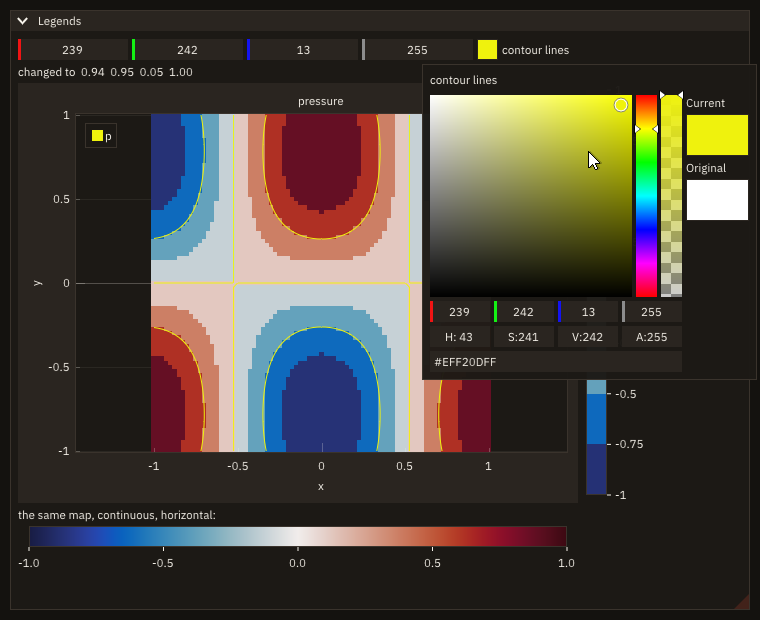
ig_same_line puts the legend beside the plot. Give it the continuous map and the heatmap's levels: its bands are then the heatmap's, labelled at their edges. A colour-scale legend has every argument.
Used in context: chapter 13 of the tutorial.
Contour lines over a field
if (ip_begin_plot('over a heatmap', width=520.0_real64, height=330.0_real64, equal=.true.)) then
   call ip_setup_axes('x', 'y')
   ! the heatmap's bounds are the cells' outer edges: half a spacing beyond the first and last samples
   call ip_heatmap('##f', f, -0.5_real64 * DX, 2.0_real64 + 0.5_real64 * DX, -0.5_real64 * DY, &
                   1.0_real64 + 0.5_real64 * DY, scale_min=-1.0_real64, scale_max=1.0_real64, colormap=cmap)
   call ip_contour('f', f, 0.0_real64, 2.0_real64, 0.0_real64, 1.0_real64, levels=levels, &
                   color=[0.1_real64, 0.1_real64, 0.1_real64, 1.0_real64], labels=.true.)
   call ip_end_plot()
endif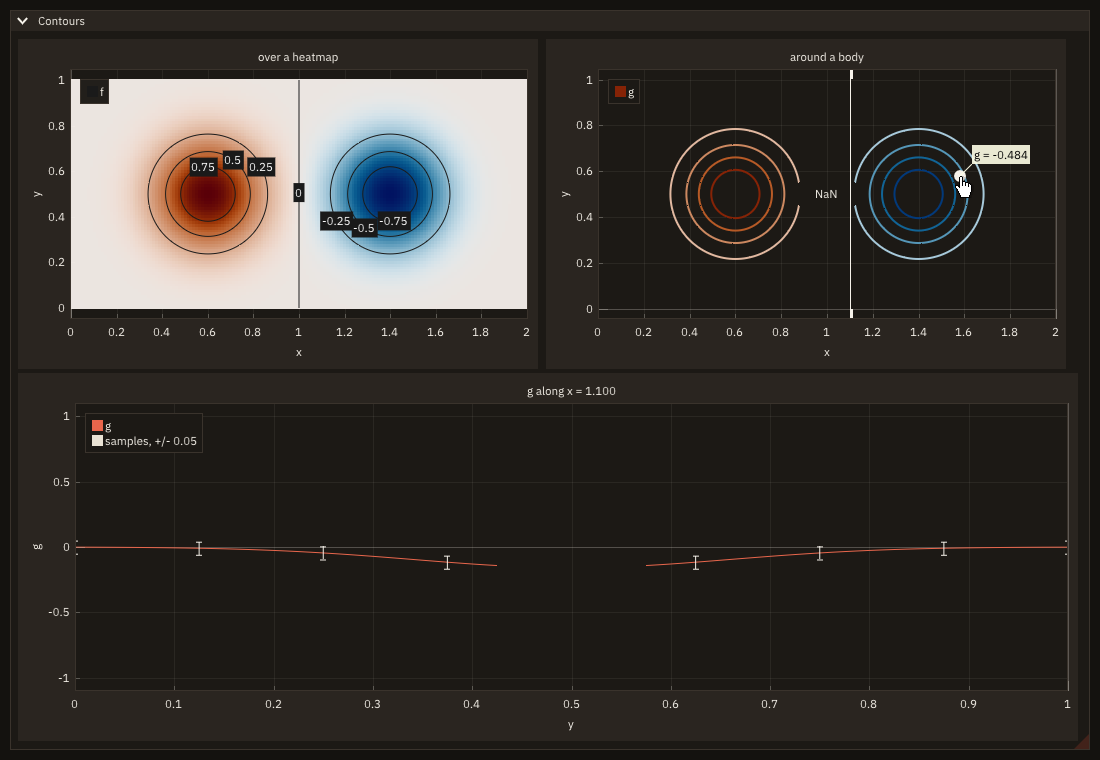
ip_contour takes the positions of the first and last samples; a heatmap takes the outer edges of its cells: give it half a spacing more on each side, and the lines fall on the colours they bound. Without levels, about nlevels round values inside the field's range are chosen. Where the field is NaN (a body, cells outside the domain) the lines stop: a hole, not a line to a meaningless value. Contour lines has every argument.
Used in context: chapter 13 of the tutorial.
Probe a field with lines and points the user drags
if (ip_begin_plot('around a body', width=520.0_real64, height=330.0_real64, equal=.true.)) then
   call ip_setup_axes('x', 'y')
   call ip_setup_axes_limits(0.0_real64, 2.0_real64, 0.0_real64, 1.0_real64)
   call ip_contour('g', g, 0.0_real64, 2.0_real64, 0.0_real64, 1.0_real64, &         ! NaNs: a hole, no lines
                   levels=[-0.8_real64, -0.6_real64, -0.4_real64, -0.2_real64, 0.2_real64, 0.4_real64, &
                           0.6_real64, 0.8_real64], colormap=cmap, line_weight=2.0_real64)
   if (ip_drag_line_x(1_int32, probe_x)) probe_x = min(2.0_real64, max(0.0_real64, probe_x)) ! moved: clamp it
   if (ip_drag_point(2_int32, px, py, radius=6.0_real64)) then
      px = min(2.0_real64, max(0.0_real64, px))
      py = min(1.0_real64, max(0.0_real64, py))
   endif
   i = 1_int32 + nint(px / DX, int32)
   j = 1_int32 + nint(py / DY, int32)
   if (ieee_is_nan(g(i, j))) then
      text = 'inside the body'
   else
      write(text, '(A,F6.3)') 'g = ', g(i, j)
   endif
   call ip_annotation(px, py, trim(text), color=[1.0_real64, 1.0_real64, 0.9_real64, 0.9_real64], &
                      offset=[12.0_real64, -12.0_real64])
   call ip_annotation(1.0_real64, 0.5_real64, 'NaN')
   call ip_end_plot()
endifi = 1_int32 + nint(probe_x / DX, int32)
ey = y(1::10)
eg = g(i, 1::10)
write(text, '(A,F5.3)') 'g along x = ', (i - 1) * DX
if (ip_begin_plot(trim(text)//'###profile', width=1060.0_real64, height=-1.0_real64)) then
call ip_setup_axes('y', 'g')
call ip_setup_axes_limits(0.0_real64, 1.0_real64, -1.1_real64, 1.1_real64)
call ip_line('g', g, i, xscale=DY) ! row i, in place; NaNs: a gap
call ip_error_bars('samples, +/- 0.05', ey, eg, ee, spec=ip_spec(size=6.0_real64))
call ip_end_plot()
endifThe drag tools update probe_x, px and py in place and return .true. while they move: clamp the values there. The profile is the row i of g, read in place with a stride (ip_line(label, g, i)); a NaN in it draws a gap. Error bars, annotations and drag tools has the details.
Used in context: chapter 13 of the tutorial.
Edit a colormap and save it
if (ig_gradient_edit('stops', 'cool-warm', width=-90.0_real64)) text = 'cool-warm changed' ! the field follows
call ig_same_line()
if (ig_button('Save')) then
   call save('cool-warm', 'my-cool-warm.csv')
   text = 'saved to my-cool-warm.csv'
endif
if (ip_begin_plot('pressure', width=480.0_real64, height=440.0_real64, equal=.true.)) then
   call ip_setup_axes('x', 'y')
   call ip_field_image('p', p, -1.0_real64, 1.0_real64, -1.0_real64, 1.0_real64, colormap=ip_colormap('cool-warm'), &
                       vmin=-1.0_real64, vmax=1.0_real64)
   call ip_end_plot()
endif
call ig_same_line()
call ip_colormap_legend('p', ip_colormap('cool-warm'), -1.0_real64, 1.0_real64, height=440.0_real64)subroutine save(name, file)
!< The map's stops as a CSV table of `x, r, g, b` rows, which `ip_load_colormap` reads back as the same map.
character(len=*), intent(in) :: name !< Colormap.
character(len=*), intent(in) :: file !< CSV file.
real(real64), allocatable :: positions(:) !< Stops: positions in [0, 1].
real(real64), allocatable :: colours(:,:) !< ... their colours, RGB in [0, 1].
integer(int32) :: u, k !< Unit, counter.
call ip_colormap_stops(name, positions, colours)
open(newunit=u, file=file, status='replace', action='write')
write(u, '(A)') 'x, r, g, b'
do k = 1_int32, size(positions, kind=int32)
write(u, '(F9.6,3(", ",F9.6))') positions(k), colours(:, k)
enddo
close(u)
endsubroutine saveig_gradient_edit edits the map by its stops: drag one, double-click the row to add one, click one to recolour or remove it. The map itself changes, so the field, the legend and anything else drawn with cool-warm follow on the same frame. ip_colormap_stops gives the stops; written as x, r, g, b rows they are a CSV that ip_load_colormap reads back as the same map, which the test checks:
$ ./cb_gradient --test
cool-warm: 13 stops
its middle stop at  0.604, colour 0.950 0.791 0.711
dragged by 3% of the row, now at  0.633
after a double click: 14 stops
saved and read back: within 0 of 255 per channel
Editing a colormap has the rules.
Show an image computed by the program
rgba = 0_int8
rgba(4,:,:) = -1_int8                       ! alpha 255 (int8 bit pattern of 255)
rgba(1,:,1) = -1_int8                       ! row 1: red
rgba(3,:,4) = -1_int8                       ! row 4: blue
call tex%init(4_int32, 4_int32)             ! after app%init: textures live on the GPU of the window
call tex%update(rgba) ! one upload; redo it only when the pixels changecall ig_image(tex, 64.0_real64, 64.0_real64) ! row 1 at the topUpload once, draw every frame: tex%update only when the pixels change (a new iteration of a computation), ig_image in the loop, or ip_image inside a plot (docs/examples/src/cb_field.F90 draws both). ig_image shows pixel row 1 at the top, ip_image at the bottom. Textures has the layout of the pixels and the sizes.
Show a photograph beside a field
type :: photo_job
   !< What the task is given (the file) and gives back (the pixels, or why there are none).
   character(len=256)         :: file = ''        !< The photograph: PNG or JPEG.
   integer(int8), allocatable :: rgba(:,:,:)      !< Its pixels, rgba(4, width, height), row 1 at the top.
   integer(int32)             :: stat = -1_int32  !< Status of the read.
   character(len=256)         :: message = ''     !< Its message on a failure.
endtype photo_job

contains
   recursive subroutine read_photo(h, data)
   !< Decode the file: fig_read_image draws nothing, so a task may call it.
   type(task_handle_object), intent(inout) :: h    !< The task's handle.
   class(*),                 intent(inout) :: data !< A photo_job.

   if (h%cancelled()) return
   select type (data)
   type is (photo_job)
      call fig_read_image(trim(data%file), data%rgba, data%stat)
      if (data%stat /= FIG_OK) data%message = figure_last_error()
   endselect
endsubroutine read_photocall t%start(read_photo, photo_job(file=arg)) ! the window draws while the file is decoded
status = 'reading '//trim(arg)//' ...'if (t%done()) then ! once: the pixels to the GPU, on the main thread
call t%result(data)
select type (data)
type is (photo_job)
if (data%stat == FIG_OK) then
call photo%init(int(size(data%rgba, 2), int32), int(size(data%rgba, 3), int32), smooth=.true.)
call photo%update(data%rgba)
status = trim(data%file)
else
status = trim(data%message)
endif
job = data
frame = 0_int32
endselect
endifh = 280.0_real64
if (photo%is_initialized()) then ! the photograph at the plot's height, its own proportions
call ig_image(photo, h * photo%width() / photo%height(), h)
else
call ig_text(status)
endif
call ig_same_line()
if (ip_begin_plot('simulation', width=-1.0_real64, height=h)) then
call ip_setup_axes('x / D', 'y / D')
call ip_field_image('d rho / dx', f, -3.4_real64, 1.9_real64, -1.76_real64, 1.76_real64, &
colormap=ImPlotColormap_Greys, vmin=-1.0_real64, vmax=1.0_real64)
call ip_end_plot()
endifThe photograph is decoded in a task: fig_read_image draws nothing, so a worker may call it, and a large JPEG does not freeze the window (the window says "reading ..." meanwhile). Once the task is done, the main thread puts the pixels on the GPU, once, with tex%init and tex%update; smooth=.true. blends pixels when the photograph is scaled, better for a photograph than the sharp squares a measured field wants. ig_image shows row 1 at the top, the file's top row, at the plot's height and in the photograph's proportions. For a small file the task is not worth it: call photo%load('schlieren.jpg', smooth=.true.) reads and uploads in one call, on the main thread. cb_photo --check FILE reads FILE headless and prints its size and centre pixel, then the refusal of a file that does not exist:
$ ./cb_photo --check ../../../docs/examples/data/schlieren.jpg
photograph: 360 x 240 pixels
centre pixel (R, G, B, A): 168 152 129 255
texture of that size: T
a missing file: stat 3, fig_read_image: 'no-such-photo.jpg' cannot be read: Couldn't open no-such-photo.jpg: No such file or directory
The picture is docs/examples/data/schlieren.jpg, a synthetic schlieren of a bow shock written by scripts/gen_photo.py. Reading images has the layout, the formats, the statuses and the limits.
3-D
A trajectory in 3-D
real(real64), target      :: path(3, NMAX)     !< The positions, a column each: path(1, :) x, (2) y, (3) z.
integer(int32) :: n = 1_int32 !< Points so far.if (ip3_begin_plot('trajectory', height=-30.0_real64)) then
call ip3_setup_axes('x', 'y', 'z', auto_fit=.true., elevation=15.0_real64, azimuth=-45.0_real64)
call ip3_scatter('now', path(1, n:n), path(2, n:n), path(3, n:n), &
spec=ip3_spec(marker=ImPlot3DMarker_Circle, marker_size=5.0_real64))
call ip3_line('path', path(1, 1:n), path(2, 1:n), path(3, 1:n), & ! rows: read in place
spec=ip3_spec(line_color=RED, line_weight=1.5_real64))
call ip3_end_plot()
endif
call ig_text('points: '//itoa(n)//' (right drag: turn; left drag: pan; wheel: zoom)')The solver keeps the path as the columns of a 3 × n matrix and the plot reads its three rows where they are: one stride (24 bytes) for the three arrays, no copy. auto_fit=.true. refits the box as the path grows; elevation and azimuth are the box's first rotation, which the user changes with a right drag and gets back with a right double click. The test runs 200 frames headless, then turns the box with a right drag:
$ ./cb_trajectory --test
points: 601, path drawn: T
rows read in place: stride 24 bytes, 0 copies
turned by a right drag: T
For meshes of many faces, a field on a body, cuts and clipping planes, take a 3-D view instead: 3-D plots has the rule.
Colour and size 3-D points by their readings
call ip3_push_style_color('PlotBg', [0.10_real64, 0.09_real64, 0.08_real64, 1.0_real64]) ! this plot only
call ip3_push_style_var('PlotPadding', [16.0_real64, 16.0_real64])
if (ip3_begin_plot('core', width=-1.0_real64, height=-1.0_real64)) then
   call ip3_setup_axes('x', 'y', 'height')
   call ip3_setup_axis('x', label='x', format='%.1f m')                ! a printf format of one real
   call ip3_setup_axis('y', label='y', format='%.1f m')
   call ip3_setup_axis_ticks('z', [0.0_real64, 0.5_real64, 1.0_real64], ['base', 'core', 'top '])
   do i = 1_int32, N                     ! cold blue to hot red; the hotter, the larger
      colors(:, i) = [(t(i) - 300.0_real64) / 90.0_real64, 0.25_real64, 1.0_real64 - (t(i) - 300.0_real64) / 90.0_real64, &
                      1.0_real64]
      sizes(i) = 2.0_real64 + 6.0_real64 * (t(i) - 300.0_real64) / 90.0_real64
   enddo
   call ip3_scatter('probes', x, y, z, spec=unlisted, colors=colors, sizes=sizes)
   call ip3_end_plot()
endif
call ip3_pop_style_var()
call ip3_pop_style_color()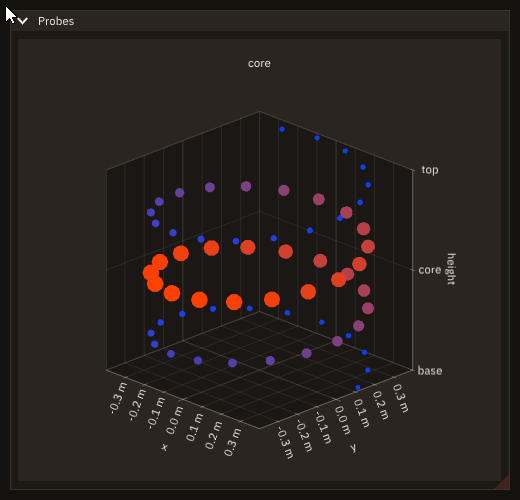
ip3_scatter takes a colour (colors(:, i), RGBA in [0, 1]) and a radius in pixels (sizes(i)) for each point: here the temperature of each probe, blue to red and small to large. ip3_setup_axis gives an axis a printf format for its tick labels ('%.1f m') and ip3_setup_axis_ticks puts its ticks at given values, with names; both come after ip3_setup_axes and before the first item. ip3_push_style_color and ip3_push_style_var change ImPlot3D's style until the matching pop: here the background and the padding of this plot only, as one red button does for a widget. 3-D plots has every argument.
Point at the floor of a 3-D plot
if (ip3_begin_plot('body over a field', height=-40.0_real64)) then
   call ip3_setup_axes('x', 'y', 'z', limits=[-1.0_real64, 1.0_real64, -1.0_real64, 1.0_real64, &
                       0.0_real64, 1.0_real64], elevation=30.0_real64, azimuth=-50.0_real64)
   call ip3_setup_box(scale=[1.0_real64, 1.0_real64, 0.6_real64])   ! a flatter box
   call ip3_setup_legend('ne')
   call ip3_image('field', floor, corners)                          ! the floor, z = 0
   call ip3_triangles('wedge', body(1, :), body(2, :), body(3, :))
   call ip3_quads('back', back(1, :), back(2, :), back(3, :))
   over = ip3_mouse_ray(o, d)                                       ! the ray under the pointer
   if (over .and. abs(d(3)) > 1.0e-9_real64) then
      t = -o(3) / d(3)                                              ! ... meets z = 0 there
      hit = o + t * d
   endif
   call ip3_end_plot()
endif
if (over .and. all(abs(hit(1:2)) <= 1.0_real64)) then
   write(line, '(A,F6.2,A,F6.2)') 'floor at x = ', hit(1), ', y = ', hit(2)
   call ig_text(trim(line))
else
   call ig_text_disabled('point at the floor')
endifA wedge of two triangles (ip3_triangles: each three points in a row are one) and its back face (ip3_quads: each four) stand on a field drawn on the floor (ip3_image, a texture on four corners in the box). ip3_mouse_ray gives the ray under the pointer, every point drawn there being o + t d, and the program meets it with what it knows: here the plane z = 0, at t = -o(3) / d(3). A marker drawn at that point would be hidden: ImPlot3D sorts each triangle by its centre, and the floor's two large triangles come nearer the eye than a point lying on them. The readout under the plot shows the point instead. 3-D plots has the items, the box and the mouse.
Show a surface coloured by a field
call view%init()                                                   ! after app%init
hull = view%surface(body, scalar=cp, colormap='cool-warm', edges=.true.) ! the arrays are read in place
stream = view%lines(axis, color=[0.9_real64, 0.75_real64, 0.2_real64])
call view%set_camera(azimuth=-55.0_real64, elevation=25.0_real64)call view%draw('view') ! the rest of the window
if (view%clicked(mesh, cell, point)) then
if (mesh == hull) then
i = int(mod(cell - 1_int64, int(NI - 1, int64)), int32) + 1_int32 ! cell (i, j) of the surface
j = int((cell - 1_int64) / (NI - 1), int32) + 1_int32
write(text, '(A,I0,A,I0,A,F6.3,A,3F6.2,A)') 'cell (', i, ', ', j, '): Cp = ', cp(i, j), ' at (', point, ')'
endif
endif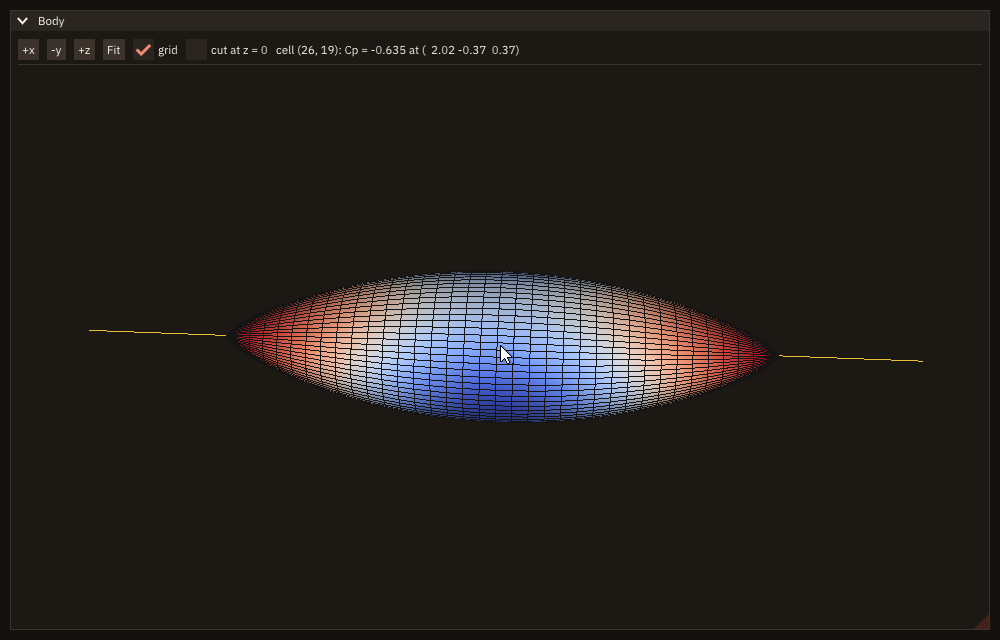
The arrays are read in place at every render: give them the target attribute and keep them allocated while the mesh exists. The yellow line, stream, is a mesh of its own (view%lines). The view is rendered only when something changed (How a view is rendered), so a still view costs nothing per frame. A click on the surface gives the cell i + (j - 1) * (ni - 1) and the point hit. 3-D views has the camera, clipping planes and the cost per mode.
Used in context: chapter 14 of the tutorial.
Place a clipping plane by hand
plane = 0.0_real64                                   ! columns: the plane's two in-plane axes, its normal, its point
plane(1:3, 1) = [0.0_real64, 1.0_real64, 0.0_real64]
plane(1:3, 2) = [0.0_real64, 0.0_real64, 1.0_real64]
plane(1:3, 3) = [1.0_real64, 0.0_real64, 0.0_real64] ! the normal: the part toward +x is kept
plane(1:4, 4) = [2.0_real64, 0.0_real64, 0.0_real64, 1.0_real64]
call outline_of(plane)
outline = view%lines(frame, color=[1.0_real64, 0.85_real64, 0.3_real64])
call cut(view)subroutine draw(view)
!< The window: the mode buttons, the plane's point and normal, the view with its cube and the gizmo.
type(view3d_object), intent(inout) :: view !< The view.
character(len=96) :: text !< The plane, as text.
call ig_set_next_window(10.0_real64, 10.0_real64, 700.0_real64, 520.0_real64)
if (ig_begin('Cut')) then
if (ig_button('Move')) mode = 'translate'
call ig_same_line()
if (ig_button('Turn')) mode = 'rotate'
call ig_same_line()
write(text, '(A,3F6.2,A,3F6.2)') 'point', plane(1:3, 4), ' normal', plane(1:3, 3) / norm2(plane(1:3, 3))
call ig_text(trim(text))
call ig_separator()
call view%draw('view') ! the rest of the window
call ig_item_rect(view0(1), view0(2), view1(1), view1(2))
call view%view_cube() ! top-right: a click on a face looks at it
if (view%gizmo('plane', plane, mode=trim(mode))) call cut(view) ! the user moved the plane
endif
call ig_end()
endsubroutine drawsubroutine cut(view)
!< The body cut by the plane: what lies behind its normal is cut away; the outline follows it.
type(view3d_object), intent(inout) :: view !< The view.
real(real64) :: n(3) !< The normal, unit.
n = plane(1:3, 3) / norm2(plane(1:3, 3)) ! a scale gizmo may have stretched it
call view%unclip()
call view%clip(n, plane(1:3, 4))
call outline_of(plane)
call view%changed(outline) ! the outline's array changed in place
endsubroutine cutThe plane is a 4x4 placement: its third column the normal, its fourth the point. view%gizmo draws handles there, over the view (after view%draw, in the same window), and returns .true. on the frames the user drags one, the matrix updated: cut again then. view%view_cube turns the camera to the face clicked. With the camera's matrices the program finds where a point is on the screen; the test drags the plane's arrow that way and clicks the cube:
subroutine to_pixel(view, p, x, y)
!< The pixel of the display where the view shows the world point `p`: projection * view, then the view's rectangle.
type(view3d_object), intent(in)  :: view    !< The view.
real(real64),        intent(in)  :: p(3)    !< World point.
real(real64),        intent(out) :: x, y    !< Pixel [pixels].
real(real64)                     :: v(4, 4) !< View matrix.
real(real64)                     :: q(4, 4) !< Projection matrix.
real(real64)                     :: c(4)    !< Clip coordinates.

call view%view_matrix(v)
call view%projection_matrix(q)
c = matmul(q, matmul(v, [p, 1.0_real64]))
x = view0(1) + (0.5_real64 + 0.5_real64 * c(1) / c(4)) * (view1(1) - view0(1))
y = view0(2) + (0.5_real64 - 0.5_real64 * c(2) / c(4)) * (view1(2) - view0(2))
endsubroutine to_pixelwrite(output_unit, '(A,3F7.3)') 'plane point before:', plane(1:3, 4)
call to_pixel(view, plane(1:3, 4), ox, oy)
call to_pixel(view, plane(1:3, 4) + [0.1_real64, 0.0_real64, 0.0_real64], ax, ay)
d = hypot(ax - ox, ay - oy)
ux = (ax - ox) / d
uy = (ay - oy) / d ! the arrow's direction on the screen
call drag(ox + 50.0_real64 * ux, oy + 50.0_real64 * uy, ox + 110.0_real64 * ux, oy + 110.0_real64 * uy)
write(output_unit, '(A,3F7.3)') 'plane point after: ', plane(1:3, 4)
call drag(view1(1) - 48.0_real64, view0(2) + 48.0_real64, view1(1) - 48.0_real64, view0(2) + 48.0_real64)
call frames(44_int32) ! the cube turns the camera over 40 frames
call view%get_camera(azimuth=az, elevation=el)
write(output_unit, '(A,2F8.2)') 'camera after a click on the cube (azimuth, elevation):', az, el$ ./cb_gizmo --test
plane point before: 2.000 0.000 0.000
plane point after: 2.709 0.000 0.000
camera after a click on the cube (azimuth, elevation): -45.00 0.00Gizmos has the modes, the matrices' conventions and the mouse.
Processes and tasks
Run a tool and show its output
call ig_begin_disabled(tool%running())                   ! one run at a time
if (ig_button(ICON_PLAY//' Run')) then
   call output%clear()
   call tool%start([character(len=512) :: me, '--tool'])  ! the program and its arguments: no shell
   started = .true.
endif
call ig_end_disabled()
call ig_same_line()
call ig_begin_disabled(.not. tool%running())
if (ig_button(ICON_SQUARE//' Stop')) call tool%kill()
call ig_end_disabled()
call ig_same_line()
if (started) then
   call tool%poll(lines)                                 ! the complete lines since the last frame
   call output%add(lines)
   if (tool%running()) then
      write(status, '(A,I0)') 'running, pid ', tool%pid()
   elseif (tool%killed()) then
      status = 'stopped'
   else
      write(status, '(A,I0)') 'ended, exit code ', tool%exit_code()
   endif
   call ig_text(trim(status))
else
   call ig_text_disabled('not started')
endif
call output%draw('output') ! only the lines in view; follows the endThe tool's arguments are an array, without a shell. Its output is read by FIGURE as the tool writes, so the window keeps answering and the tool never waits for the program; every frame the program takes the complete lines (poll) and adds them to a log view, which draws only the lines in view and follows the end while it is scrolled to the bottom. Stop asks the tool to end; a tool still running when the program ends is stopped. A run that must outlive the program is started detached=.true. with a log_file. Processes and tasks has the details.
Used in context: chapter 12 of the tutorial.
Keep the last lines of a long log
call log%set_cap(1000_int32)                                  ! keep the last 1000 lines
do i = 1_int32, 1200_int32
   write(line, '(A,I0,A,ES9.2)') 'step ', i, ' residual ', 10.0_real64**(-real(i, real64) / 200.0_real64)
   call log%add(trim(line))                                   ! or log%add(lines), as p%poll gives them
enddo
do i = 1_int32, 3_int32                                       ! every frame
   if (.not. app%next_frame()) exit
   call ig_set_next_window(0.0_real64, 0.0_real64, 500.0_real64, 300.0_real64, always=.true.)
   if (ig_begin('Log')) call log%draw('lines')                ! only the lines in view; follows the end
   call ig_end()
enddo
A log_view_object keeps lines up to a cap (set_cap, 10000 by default), the oldest going first, and draw shows them in a region of their own, only the lines in view: a log of thousands of lines costs a frame what the lines in view cost. While the view is scrolled to the bottom it follows the end as lines arrive; scrolled up, it stays where it is. A click chooses a line, shift+click extends the choice, ctrl+c (cmd+c on macOS) or the right-click menu copies it. What the view keeps and shows can be read back; after 1200 lines into a cap of 1000, headless:
call log%in_view(first, last)
write(output_unit, '(A,I0,A,A)') 'kept: ', log%count(), ', the oldest: ', log%line(1_int32)
write(output_unit, '(A,L1,A,I0,A,I0,A,A)') 'following: ', log%following(), ', in view: ', first, ' to ', last, &
                                           ', the newest: ', log%line(log%count())
write(output_unit, '(A,I0,A)') 'copied, every line kept: ', len(log%copy(all=.true.)), ' characters' ! without all: the chosen$ ./cb_log_view
kept: 1000, the oldest: step 201 residual 9.89E-02
following: T, in view: 987 to 1000, the newest: step 1200 residual 1.00E-06
copied, every line kept: 28200 charactersThe log view has every procedure; the recipe above fills one from a running tool.
A status bar
if (ig_begin_side_bar('status', 'bottom', 30.0_real64)) then ! the status bar: a bar along the bottom
   if (running) then
      write(line, '(A,I0,A,I0)') 'running: iteration ', iteration, ' of ', ITERATIONS
      call ig_text(trim(line))
      call ig_same_line(offset=260.0_real64)
      call ig_progress_bar(real(iteration, real64) / real(ITERATIONS, real64), width=200.0_real64)
   elseif (iteration == ITERATIONS) then
      write(line, '(A,ES8.2)') 'done, residual ', residual
      call ig_text(trim(line))
   else
      call ig_text_disabled('ready')
   endif
endif
call ig_end()A status bar is a bar along the bottom (ig_begin_side_bar), not a widget of its own: a line of text, and a progress bar beside it (ig_same_line(offset=...) puts it at a fixed place). The work area leaves the bar out, so dock spaces, windows placed with the work area and notifications stay above it.
Used in context: chapter 12 of the tutorial.
Tell the user a run has finished
write(line, '(A,I0,A,ES8.2)') 'Run finished: ', ITERATIONS, ' iterations, residual ', residual
call app%notify(trim(line), kind='success')     ! the user may be looking elsewhere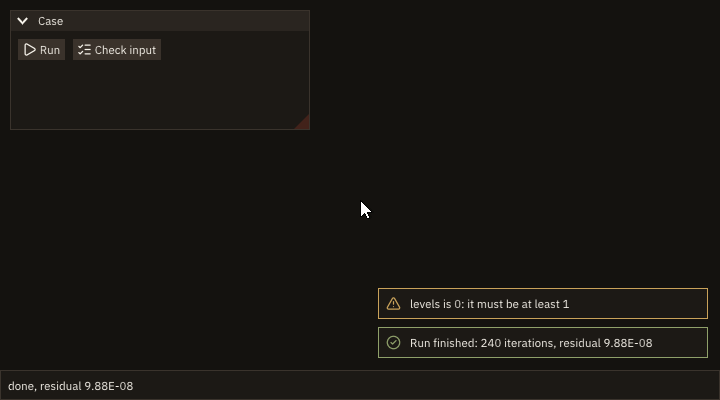
The user may be looking at another window, or another program: a notification stays in the corner for its time (here the default 5 s; seconds=0 until clicked), in the colour and with the icon of its kind, and the last 100 are kept (app%notifications). Notifications has the details.
Used in context: chapter 12 of the tutorial.
Read a large file without freezing the window
recursive subroutine read_field(h, data)
!< Read the field block by block: report the progress after each block, stop at a cancel.
type(task_handle_object), intent(inout) :: h          !< The task's handle.
class(*),                 intent(inout) :: data       !< A field_stats.
integer(int64), parameter               :: BLOCK = 65536_int64 !< Values per block.
real(real64)                            :: chunk(BLOCK) !< One block.
integer(int64)                          :: bytes, n, k, blocks, m !< File size, values, block, blocks, values in it.
integer                                 :: u, ios     !< Unit, I/O status.
character(len=40)                       :: msg        !< Progress message.
real(real64)                            :: total      !< Sum of the values.

select type (data)
type is (field_stats)
   open(newunit=u, file=trim(data%file), access='stream', form='unformatted', action='read', status='old', &
        iostat=ios)                                     ! a unit of its own: never shared with the main thread
   if (ios /= 0) then
      call h%fail('cannot open '//trim(data%file))
      return
   endif
   inquire(unit=u, size=bytes)
   n = bytes / 8_int64
   blocks = (n + BLOCK - 1_int64) / BLOCK
   total = 0.0_real64
   do k = 1_int64, blocks
      if (h%cancelled()) exit                           ! a safe point: the statistics so far are consistent
      m = min(BLOCK, n - (k - 1_int64) * BLOCK)
      read(u, iostat=ios) chunk(1:m)
      if (ios /= 0) then
         call h%fail('cannot read '//trim(data%file))
         exit
      endif
      data%values = data%values + m
      data%vmin = min(data%vmin, minval(chunk(1:m)))
      data%vmax = max(data%vmax, maxval(chunk(1:m)))
      total = total + sum(chunk(1:m))
      write(msg, '(A,I0,A,I0)') 'block ', k, ' of ', blocks
      call h%report(real(k, real64) / real(blocks, real64), trim(msg))
      call slow_disk()
   enddo
   close(u)
   if (data%values > 0_int64) data%mean = total / real(data%values, real64)
endselect
endsubroutine read_fieldcall ig_begin_disabled(reader%running())
if (ig_button(ICON_FOLDER_OPEN//' Read')) call reader%start(read_field, field_stats(file=FILE))
call ig_end_disabled()
call ig_same_line()
call ig_begin_disabled(.not. reader%running())
if (ig_button(ICON_X//' Cancel')) call reader%cancel() ! the task stops at its next block
call ig_end_disabled()
if (reader%running()) then
call reader%progress(fraction, msg)
write(line, '(F5.1,A,A)') 100.0_real64 * max(fraction, 0.0_real64), ' % ', msg
call ig_text(trim(line))
elseif (reader%done()) then ! ended: take the result once
call reader%result(data)
select type (data)
type is (field_stats)
stats = data
have = .true.
endselect
endif
call ig_separator()
if (have) then
write(line, '(A,I0,A)') 'values ', stats%values, ' read'
call ig_text(trim(line))
write(line, '(A,F8.4,A,F8.4,A,F8.4)') 'min ', stats%vmin, ' max ', stats%vmax, ' mean ', stats%mean
call ig_text(trim(line))
else
call ig_text_disabled('no field read yet')
endifThe reading runs as a task, on a thread of its own: the window keeps drawing, in remote mode the browser keeps receiving frames. The task opens its own unit, reports after each block and checks h%cancelled() there, so Cancel stops it between two blocks with consistent statistics. Every frame the program shows the progress; once the task is done it takes the result, once. The task never draws: the threading rule.
Used in context: chapter 15 of the tutorial.
Redraw when a worker has news
recursive subroutine solve(h, data)
!< Five blocks of steps; after each, the residual in a snapshot file, a mark that it is complete, and a wake-up.
type(task_handle_object), intent(inout) :: h        !< The task's handle.
class(*),                 intent(inout) :: data     !< Nothing: the news goes out in files.
type(app_object)                        :: app      !< The application: its wake acts on the one frame loop.
integer(int32)                          :: k, u     !< Block, unit.
real(real64)                            :: residual !< The solver's residual.

residual = 1.0_real64
do k = 1_int32, 5_int32
   if (h%cancelled()) exit
   residual = residual / 10.0_real64                    ! the block's work
   open(newunit=u, file=snapshot_name(k, .false.), action='write', status='replace')
   write(u, '(I0,1X,ES10.3)') 100_int32 * k, residual
   close(u)
   open(newunit=u, file=snapshot_name(k, .true.), action='write', status='replace')
   close(u)                                             ! the snapshot is complete
   call app%wake()                                      ! news: the loop draws now, not after max_wait
enddo
endsubroutine solvecall app%set_lazy(.true., max_wait=60.0_real64) ! idle: one frame a minute, unless woken
call solver%start(solve, 0_int32)
seen = 0_int32
running = .true.
do while (running)
running = app%next_frame()
do ! every complete snapshot not shown yet
inquire(file=snapshot_name(seen + 1_int32, .true.), exist=ready)
if (.not. ready) exit
seen = seen + 1_int32
open(newunit=u, file=snapshot_name(seen, .false.), action='read', status='old')
read(u, *) step, residual
close(u, status='delete')
open(newunit=u, file=snapshot_name(seen, .true.), status='old')
close(u, status='delete')
write(output_unit, '(A,I0,A,ES10.3)') 'step ', step, ': residual ', residual
enddo
if (solver%done() .and. seen == 5_int32) running = .false.
enddo$ ./cb_wake
step 100: residual 1.000E-01
step 200: residual 1.000E-02
step 300: residual 1.000E-03
step 400: residual 1.000E-04
step 500: residual 1.000E-05The loop is lazy with a long max_wait: idle, it draws one frame a minute. The solver runs as a task and leaves a snapshot file after each block of steps, then a mark that the snapshot is complete, then calls app%wake(): the loop starts its next frame at once and shows the snapshot. News sent with the task's progress report (h%report) wakes the loop by itself; wake is for news left elsewhere, such as a file, and for threads FIGURE did not start (OpenMP, MPI). app%request_frames(n) does the same and asks for n frames. The output above is from headless mode, which never waits; in a window and in remote mode each snapshot is drawn when it is written. Waking the loop has the details.
Testing
Click a button in a test
See tutorial chapter 5: init_headless, ig_item_rect (or test_item_center) to find the button, test_click from figure_testing, then a few frames before checking. Headless testing has drags, keys and typing.
Used in context: chapter 17 of the tutorial.
Click through a menu and type into a field by their paths
Name the items by where they are instead of measuring them: 'File/Recent/channel.toml' opens File, then Recent once it has opened, then picks the file; 'Solver/CFL' is the field labelled CFL in the window Solver. test_run draws frames until the input has landed and the interface is idle, so the test counts no frames. The interface is the application's own procedure, draw:
call test_menu_click('File/Recent/channel.toml')  ! File, then Recent once it opens, then the file
call settle()
call test_item_type_text('Solver/CFL', '0.8')     ! a click with the shortcut key, select all, type, Enter
call settle()
call test_item_click('Solver/Options')            ! a tree node: its arrow opens it
call settle()
call test_item_click('Solver/Options/Implicit')
call settle()subroutine settle()
!< Draw frames until the interface is idle: no input queued, no frame asked for (at most 60).
do while (test_run(60_int32))
if (.not. app%next_frame()) exit
call draw(s)
enddo
endsubroutine settleThen check what the interface shows, the ids two items share and the items with no name; a typo in a path is refused with the nearest item named:
write(output_unit, '(A)') 'file: '//trim(s%file)
write(output_unit, '(A,L1)') 'Implicit checked: ', test_item_checked('Solver/Options/Implicit')
write(output_unit, '(A,L1)') 'CFL shows 0.80: ', test_item_value('Solver/CFL', '0.80')
write(output_unit, '(A,I0)') 'id conflicts: ', test_id_conflicts()
write(output_unit, '(A,I0)') 'unnamed items: ', test_unnamed_items()
call test_item_click('Solver/Options/Implcit', stat=stat) ! a typo: the message names the nearest item
if (stat == FIG_ERR_ARGUMENT) write(output_unit, '(A)') figure_last_error()$ ./cb_paths
file: channel.toml
Implicit checked: T
CFL shows 0.80: T
id conflicts: 0
unnamed items: 0
test_item_click: no item 'Solver/Options/Implcit' in the last frame: nothing named 'Implcit' in '//Solver/Options'; nearest: '//Solver/Options/Implicit'Finding items by path has the path syntax and the statuses, Running until idle and Checks the rest (docs/examples/src/cb_paths.F90).
Test what a window looks like
Capture the window in a headless test and compare it with a picture committed beside the test (a golden): FIGURE's CPU renderer draws headless frames the same way on every machine, so the comparison needs no GPU and no display. test_capture asks for the frame being drawn and writes it when the frame is rendered, at the next next_frame; test_compare_image lets each channel differ by 2 levels and no pixel more, and leaves out what is not deterministic, here the line of a clock:
call test_capture('solver.png')             ! the whole frame, written when it is rendered
if (app%next_frame()) call draw(s)          ! ... now
masks(:, 1) = [s%clock(1), s%clock(2), s%clock(1) + 200.0_real64, s%clock(4)] ! the clock's line: not deterministic
same = test_compare_image('solver.png', trim(golden), masks=masks)
write(output_unit, '(A,L1)') 'the window looks as committed: ', same
A change that shows fails, with the count, the largest difference and where; the picture is written beside the reference as <stem>.new.png, with <stem>.diff.png marking the failed pixels in red:
s%omega = 1.2_real64                        ! a change that shows: the slider's grab moves
call settle()
call test_capture('changed.png')
if (app%next_frame()) call draw(s)
same = test_compare_image('changed.png', 'solver.png', masks=masks, failed=failed)
write(output_unit, '(A,L1,A,I0,A)') 'after the change: ', same, ' (', failed, ' pixels)'
write(output_unit, '(A)') figure_last_error()$ ./cb_golden ../../../docs/examples/data/cb_golden.png
the window looks as committed: T
after the change: F (494 pixels)
test_compare_image: 494 pixels of changed.png differ from solver.png by more than 2 (0 allowed), the most by 186 at (104, 52): see solver.diff.pngTo make the golden, run the test once and keep its capture (solver.png here); when the window changes on purpose, copy the .new.png over the golden in the same commit. Pictures as tests has the rule, the masks and the statuses (docs/examples/src/cb_golden.F90).