

Frame loop and redraw
The application
A program has one app_object. Its life is one loop:
call app%init('FIGURE: first window', 640_int32, 360_int32)
do while (app%next_frame())
   if (ig_begin('Hello')) then
      call ig_text('Hello from Fortran.')
   endif
   call ig_end()
enddo
call app%destroy()
init(title, width, height [, vsync] [, stat] [, ini_file] [, decorations] [, buttons])opens a resizable window (withdecorations='figure', a window whose frame FIGURE draws: below) and creates the Dear ImGui and ImPlot contexts, with thesealstyle, docking and keyboard navigation enabled.vsync(default.true.) synchronizes the buffer swap with the display refresh. A secondinitwithoutdestroyfails withFIG_ERR_STATE; a non-positive size withFIG_ERR_ARGUMENT; a system without a display, or without OpenGL 3, withFIG_ERR_FAILED.init_headless(width, height [, stat] [, decorations] [, buttons])creates the contexts on a virtual display, without window or GPU: see Headless testing.init_remote([port] [, host] [, width, height] [, ...] [, url] [, stat])creates them without a window and serves the interface to a web browser, the program needing no display or GPU (a cluster node): see Remote mode.destroy()closes the window and destroys the contexts. It is safe in any state, also without a previousinitand inside an open frame.
Window positions and sizes are not saved between runs: FIGURE turns off Dear ImGui's imgui.ini, so a layout left in the working directory by an earlier run never overrides what the program sets with ig_set_next_window. To keep the layout, name the file: app%init(title, width, height, ini_file='my_tool.ini'). Dear ImGui reads it at the first frame and rewrites it while the program runs. Headless mode never uses one, nor does a capture. The preferences (app%open_prefs) keep the arrangement too, with the window's own place and size and the user's settings: a program uses one or the other.
next_frame
next_frame([stat]) is the only call that advances time. Each call:
- renders the frame opened by the previous call, if any, and presents it;
- processes input, sleeping first if lazy redraw says so;
- opens the next frame and returns
.true., or returns.false.if the user closed the window.
Between two calls the program declares the interface: widget calls, plot calls, and its own computation. Widgets return what happened in the frame they belong to: ig_button is .true. on the frame it is clicked, and the input that clicked it was processed by the next_frame that opened the frame.
When next_frame returns .false., no frame is open: leave the loop and call destroy. In headless mode next_frame returns .false. only after app%quit() or a test_quit() (there is no window to close): the program decides how many frames to run.
app%quit() ends the loop from the program: the next next_frame returns .false., in every mode. With app%set_confirm_quit(.true.) the window's close button no longer ends the loop: app%quit_requested() reports the request, once, and the program answers it, typically with a "Discard changes?" dialog (Ask before quitting). set_confirm_quit and quit_requested may be called from any thread, a task included; one caller gets each request. In remote mode closing the browser's tab never ends the program.
Usage checks
A usage error is a begin/end pair used wrongly or a drawing call with no frame open; app%set_checks(mode [, stat]) chooses what it does, 'abort' (stop at the call), 'report' (the default: refuse the call and have the next next_frame(stat) return FIG_ERR_STATE with the messages) or 'recover' (go on, the messages in a notification). The rules, the modes, their statuses and every message are in The three modes:
call app%set_checks('recover')                 ! repaired where it happens, shown in a notification
call grid(pop=.false.)
ok = app%next_frame(stat=stat)
write(output_unit, '(A,L1,A)') 'recover: stat == FIG_OK is ', stat == FIG_OK, ', the message:'// &
                               new_line('a')//figure_last_error()
Lazy redraw
Lazy redraw is on by default. After the last input event, FIGURE draws three more frames (Dear ImGui settles in a few frames); then next_frame sleeps until an input event arrives or max_wait seconds elapse, whichever comes first. The timeout is a periodic refresh: it lets data the program changes on its own (a computation, a file it reads) appear without input.
| Call | Effect |
|---|---|
app%set_lazy(.true., max_wait=s) | sleep at most s seconds once the UI settles (default 0.5 s) |
app%set_lazy(.false.) | never sleep: draw continuously, at the display rate with vsync |
app%request_frames(n) | draw at least n more frames without waiting for input |
app%wake() | the next frame starts without waiting for input or max_wait, from any thread |
set_lazy may be called from any thread, a task included; without max_wait it sets the wait back to 0.5 s. request_frames(n) raises the count of frames still to draw to n (it never lowers it; an input event does not lower it either): call request_frames(1) in every frame in which something is changing, such as an animation or a computation that advances inside the loop, and the loop keeps drawing; stop calling it and the next next_frame sleeps again (the three-frame tail follows input events, not request_frames).
if (running) then
   do i = 1_int32, steps
      call jacobi_step()
      if (.not. running) exit
   enddo
   call app%request_frames(1_int32) ! draw the next frame without waiting for input
endif
Choose between them by who changes the data:
- data changed inside the loop, every frame:
request_frames(1)in those frames (chapter 4 of the tutorial); - data changed outside the loop's knowledge, at its own pace:
max_waitequal to the refresh period you want (cookbook); - continuous animation regardless of input:
set_lazy(.false.)(cookbook).
Waking the loop
A lazy loop that waits ends its wait at the first of:
- input: a mouse or keyboard event, the window resized or closed (in remote mode, a message from the browser);
max_wait: the periodic refresh;app%request_frames(n)orapp%wake()from another thread than the loop's (a FIGURE task, an OpenMP thread, an MPI progress thread);app%quit()too, and the loop then ends;- a task's progress report and its end (Tasks);
- a process's output and its end (Processes).
From another thread these calls take effect at once: measured in figure_test_tasks, a lazy loop with max_wait 10 s starts its next frame within 0.1 s of a task's request_frames, wake or quit on a desktop (the test allows 1 s, for loaded CI runners). From the loop's own thread nothing is waiting: request_frames(n) and wake() make the next next_frame go on without waiting. Every one of these calls is thread-safe (Calling the application from a task).
- Window: a wake-up is an event pushed to SDL's queue (the event ends the wait; it counts as input for the frames that follow, as a task's report does).
- Headless: the loop never waits; a wake-up changes nothing.
- Remote: a wake-up is a datagram to a socket of the loopback that the loop waits on with the network's.
A worker that computes and wakes the loop when it has news, and the lazy loop that draws it (docs/examples/src/cb_wake.F90, run headless by the documentation's build):
recursive subroutine solve(h, data)
!< Five blocks of steps; after each, the residual in a snapshot file, a mark that it is complete, and a wake-up.
type(task_handle_object), intent(inout) :: h        !< The task's handle.
class(*),                 intent(inout) :: data     !< Nothing: the news goes out in files.
type(app_object)                        :: app      !< The application: its wake acts on the one frame loop.
integer(int32)                          :: k, u     !< Block, unit.
real(real64)                            :: residual !< The solver's residual.

residual = 1.0_real64
do k = 1_int32, 5_int32
   if (h%cancelled()) exit
   residual = residual / 10.0_real64                    ! the block's work
   open(newunit=u, file=snapshot_name(k, .false.), action='write', status='replace')
   write(u, '(I0,1X,ES10.3)') 100_int32 * k, residual
   close(u)
   open(newunit=u, file=snapshot_name(k, .true.), action='write', status='replace')
   close(u)                                             ! the snapshot is complete
   call app%wake()                                      ! news: the loop draws now, not after max_wait
enddo
endsubroutine solvecall app%set_lazy(.true., max_wait=60.0_real64) ! idle: one frame a minute, unless woken
call solver%start(solve, 0_int32)
seen = 0_int32
running = .true.
do while (running)
running = app%next_frame()
do ! every complete snapshot not shown yet
inquire(file=snapshot_name(seen + 1_int32, .true.), exist=ready)
if (.not. ready) exit
seen = seen + 1_int32
open(newunit=u, file=snapshot_name(seen, .false.), action='read', status='old')
read(u, *) step, residual
close(u, status='delete')
open(newunit=u, file=snapshot_name(seen, .true.), status='old')
close(u, status='delete')
write(output_unit, '(A,I0,A,ES10.3)') 'step ', step, ': residual ', residual
enddo
if (solver%done() .and. seen == 5_int32) running = .false.
enddoBefore v0.3.1, request_frames and quit from a task did not wake the loop: their frame came at the next input or after max_wait. Redraw on a worker's news: cookbook.
What ended a wait
Set FIGURE_DEBUG_WAKE (any value) before running a program: init (every mode) reads it, and from then on the glue prints a line to standard error for each wake-up sent and, in window and remote modes (headless mode never waits), for each frame that begins, timed by figure_time. With illustrative values (remote mode, a task's app%wake ending a 10 s wait):
figure wake: 0.971644 send from another thread
figure wake: 0.972652 frame remote: waited 0.201 s (max_wait 10000 ms), frames left 0: datagrams(1)| Part | Meaning |
|---|---|
send from … | a wake-up sent (request_frames, wake, quit from another thread, a task's report or end, a process's output or end), from the loop's thread or another; merged: one is already on its way for this wait, none is sent |
frame remote: / frame window: | a frame begins; waited and how long, or no wait (frames were left to draw, a test's input, a capture) |
frames left | the frames still owed (an input or a wake-up gives 3, request_frames(n) gives n), counted as the frame begins: the loop waits only at 0 |
| after the colon | what ended the wait, or, after no wait in remote mode, what arrived while the frame waited for its turn (60 frames a second at most): max_wait; in remote mode datagrams(N) (wake-ups, N bytes), accept (a browser connected), read (a message), closed (a browser left), frame-ready (a frame skipped for a slow browser can go out); in window mode wake event or SDL event TYPE (SDL's event type code, decimal); -: no wait |
It prints a line per frame: a diagnostic for a few seconds of a run, not for a session.
A frame that begins with no wait while frames left is above 0 is not an early wake-up: it is a frame still owed to the last input. A program (or a test) that wants the loop idle before it measures a wait asks test_run whether frames are still owed, not how long the last frame took: on a slow machine a frame that does not wait can take longer than max_wait (0.07 to 0.15 s on CI's macOS runner, where figure_test_tasks once took two owed frames for early wake-ups).
What idle costs
With lazy redraw on and no input, a FIGURE program draws 1 / max_wait frames per second: exactly 2 frames/s with the default 0.5 s, each one ended by the timeout, with no spurious events after startup (checked with FIGURE_DEBUG_REDRAW on X11 and Wayland). Measured on one machine (WSL2/WSLg, RTX 4070 through GALLIUM_DRIVER=d3d12, SDL 3.4.20), 60 s samples of a one-window program:
| Configuration | Idle CPU, one core |
|---|---|
max_wait 0.5 s (default) | 0.37% |
max_wait 2 s | 0.15% |
max_wait 5 s | 0.13% |
figure_hello, default | 0.40% |
| lazy redraw off (vsync, 60 frames/s) | 37% |
That is about 1.5 ms of CPU per idle frame, on a floor of about 0.08%. These are measurements on that machine, not guarantees: the cost per frame depends on the platform, the driver and the interface. With software rendering (llvmpipe, the WSLg default without GALLIUM_DRIVER=d3d12) every frame costs much more.
The default max_wait is 0.5 s: a longer one saves about 0.2% of one core and makes data that changes without request_frames appear correspondingly later. What a frame costs with live data, large plots and fields, in a window and in remote mode: Performance.
Redraw diagnostics
Set FIGURE_DEBUG_REDRAW (any value) before running a program: in window mode (not headless), init reads it, and from then on the glue prints one line per second to standard error. The format, with illustrative values (a second with some mouse motion):
figure redraw: 1.02 s frames=5 timeouts=1 wait=960.3ms build=0.6ms render=0.3ms swap=24.1ms events: 0x400=3| Field | Meaning |
|---|---|
1.02 s | length of the interval the line covers (at least 1 s: a line is printed at the first frame after it) |
frames | frames drawn |
timeouts | sleeps that ended by max_wait, without an event |
wait | time spent waiting for and polling events |
build | from opening the frame to the end of ImGui::Render: the program's code between two next_frame calls and the ImGui calls |
render | OpenGL drawing of the frame |
swap | SDL_GL_SwapWindow, wall time (includes the wait for vsync) |
events: 0xTYPE=COUNT | events received, by SDL event type code, in hexadecimal |
The event codes are SDL3's SDL_EventType values, defined in SDL_events.h: for example 0x100 quit, 0x202 and following window events, 0x300 key down, 0x400 mouse motion.
Measuring idle cost
scripts/measure_idle.py (Linux) runs a program, waits for it to settle, measures its CPU time over a window, then terminates it; nobody must touch the window meanwhile.
python3 scripts/measure_idle.py [--warmup S] [--seconds S] [--env VAR=value ...] -- program [args]
python3 scripts/measure_idle.py --seconds 60 --env GALLIUM_DRIVER=d3d12 -- exe/examples/figure_hello
It reports the renderer (the WSL GPU through D3D12, or Mesa software rendering) and the idle CPU as a percentage of one core, with its resolution. The kernel counts CPU time in clock ticks, usually 10 ms: use windows of 60 s or more (the default is 10 s, after a 4 s warm-up) to resolve sub-percent costs.
Time
| Procedure | Notes |
|---|---|
figure_time() → real(real64) | Seconds since the first call of figure_time in the program, on a monotonic clock. |
(The system's monotonic clock: Linux's CLOCK_MONOTONIC; on macOS and Windows SDL's SDL_GetPerformanceCounter.)
t0 = figure_time()
total = 0.0_real64
do k = 1_int32, 1000000_int32 ! the work
   total = total + real(k, real64)
enddo
step_time = figure_time() - t0 ! seconds, on a clock the system does not step- Monotonic: never decreasing, and not stepped when the system sets its time: on Linux
clock_gettime(CLOCK_MONOTONIC), on macOSmach_absolute_time, on WindowsQueryPerformanceCounter. - Not SDL's clock on Linux: SDL's counter (and
SDL_GetTicksNS) readsCLOCK_MONOTONIC_RAW, the counter without the kernel's rate correction. On WSL2 it runs fast: a sleep of 0.200 s lasted 0.2145 s to 0.2223 s by it, and 0.200 s byCLOCK_MONOTONIC(measured on 2026-11-10, againstusleep). - Why not
system_clock: nvfortran 26.9'ssystem_clock(any integer kind) readsgettimeofday, the wall clock, which the system steps: WSL2 steps it by +2.56 s every 32 s, so an interval measured across a step is 2.56 s too long (Known issues). gfortran'ssystem_clockwith anint64count is monotonic, but the program then times differently under each compiler.figure_timeis the same clock under every compiler. - Origin: the first call, wherever it is made: before
init*(no window or context is needed), in a task, afterdestroy. The first call returns (about) 0;destroyand a secondinitdo not reset it (SDL_GetTicksNS's origin starts again from 0 afterSDL_Quit, whichdestroycalls in window mode). - Resolution: the counter's tick: 1 ns on Linux, 1 ns (Intel) or about 42 ns (Apple silicon) on macOS, usually 100 ns on Windows. A
real64keeps 1 ns over 100 days of seconds. - Status: none; it cannot fail.
- Modes: the same in window, headless and remote mode. It is the real time, not the frame clock: headless frames advance Dear ImGui's clock by 1/60 s each whatever the time (Headless testing), and
figure_timekeeps the real time between them. - Threads: any thread, a task included: one clock, one origin for every thread.
An animation that keeps its speed whatever the frame rate takes its position from the clock, not from a count of frames:
phase = modulo(figure_time() - started, 1.0_real64) ! once per second, at any frame rateThe program checks itself headless (it prints facts about the times, which change with every run):
$ ./cb_time --check
the clock never went back over 30 frames: T
a step takes more than 0 s: T
the marker is in [0, 1): T
the sum is right: T
What it does not do: no date or time of day (the origin is the first call, not an epoch: for a time stamp use date_and_time); no timers or callbacks (FIGURE calls no Fortran but a task's work procedure: poll the clock, and keep the loop running with app%set_lazy(.false.) or app%request_frames while something moves, as lazy redraw explains); no pause of the clock. A sleep or a frame wait measured with it is as long as the system made it, which on a loaded machine is longer than asked.
Files and folders
Standard Fortran opens, reads and writes files, and inquire tests one; it cannot make a folder, remove one or set a file's time. execute_command_line('mkdir -p ...') does where a POSIX shell runs it, not on Windows, where it runs cmd.exe, which refuses mkdir -p, rm -f and touch. These procedures do it in the native layer, the same on Linux, macOS and Windows: figure_make_folder makes a folder, figure_remove removes a path, figure_set_file_time sets a modification time that figure_file_time reads back, and figure_file_exists tells whether a file or a folder is there. They need no window, so they work before init* and from any thread.
| Procedure | Notes |
|---|---|
figure_make_folder(path [, parents] [, stat]) | make a folder and its missing parents (parents=.false.: not them); a folder already there is no error |
figure_remove(path [, recursive] [, stat]) | remove a file or an empty folder (recursive=.true.: a folder and its content); a missing path is no error |
figure_set_file_time(path, time [, stat]) | set a file's or folder's modification time to a local time 'YYYY-MM-DD hh:mm' or 'YYYY-MM-DD hh:mm:ss' |
figure_file_time(path [, stat]) → character(len=19) | its modification time, local, 'YYYY-MM-DD hh:mm:ss'; blank on a failure |
figure_file_exists(path) → logical | a file or a folder is there (what inquire(file=) says of a folder is the compiler's choice) |
A solver's case prepared by a GUI (docs/examples/src/cb_files.F90, run by the documentation's build):
call figure_make_folder(CASES//'/plate/results')     ! the case and its missing parents
open(newunit=u, file=CASES//'/plate/heat.inp', status='replace', action='write')
write(u, '(A)') "&heat title = 'Heated plate' /"
close(u)
call figure_set_file_time(CASES//'/plate/heat.inp', '2026-10-15 09:10') ! local time, as touch -t
call figure_remove(CASES//'/plate/results', recursive=.true.)          ! an earlier run's results
A recipe for this: the cookbook.
- Paths: UTF-8, with
/separators everywhere (Windows also takes\); a relative path starts at the working folder, asopendoes. - Times: local, as
touch -ttakes them and as a file browser shows them: a time set on one machine reads the same on another in the same time zone. Seconds are kept; a time that is not a date (2026-02-30) is refused withFIG_ERR_ARGUMENT. Both the access and the modification time are set. - Statuses:
FIG_ERR_FAILEDwith the system's reason (a parent missing withparents=.false., a folder not empty withoutrecursive, a file where a folder is asked for, a path that cannot be read);FIG_ERR_ARGUMENTfor an empty path or a malformed time. Withoutstata failure stops the program (Errors). - Not covered: permissions; copying and renaming (read the file and write the copy); symbolic links are not followed by
figure_remove, which removes the link, not its target.
File dialogs
Two kinds of dialog choose a file to open, where to save, or a folder: the system's own (window mode only), and FIGURE's file browser, drawn by FIGURE in Dear ImGui, the same in every mode. Both are answered through app%file_dialog_result, so a program switches from one to the other by changing one call:
if (ig_button('Open...')) then
   call app%open_file_dialog('open', FILTERS, stat=stat)
   if (stat /= FIG_OK) call app%open_file_browser('open', FILTERS) ! remote: no system dialog, FIGURE's browser
endif
call app%file_dialog_result('open', chosen, done, cancelled, stat=stat) ! either one answers here
if (done .and. .not. cancelled .and. stat == FIG_OK) path = chosen| Procedure | Notes |
|---|---|
app%open_file_dialog(id [, filters] [, default_path] [, stat] [, prefer]) | The system's dialog: choose an existing file. |
app%save_file_dialog(id [, filters] [, default_path] [, stat] [, prefer]) | The system's dialog: choose where to save, a new or an existing file. |
app%open_folder_dialog(id [, default_path] [, stat] [, prefer]) | The system's dialog: choose a folder. |
app%open_file_browser(id [, filters] [, default_path] [, folders] [, stat]) | FIGURE's browser: choose an existing file, or with folders=.true. a folder. |
app%save_file_browser(id [, filters] [, default_path] [, stat]) | FIGURE's browser: choose where to save; replacing a file is asked first. |
app%file_dialog_result(id, path, done [, cancelled] [, stat]) | The answer to either kind: done once the user answered, then path, or cancelled. |
Which one. The system's dialog looks like the rest of the desktop and knows its bookmarks, but needs a desktop: in remote and headless modes it is refused. The browser works everywhere: in remote mode it is the way to choose a file on the machine the program runs on, and in headless tests it is driven like any other part of the interface (Testing). A program that runs in both modes asks for the system's dialog and opens the browser when it is refused, as above.
prefer='figure'. The three system's dialogs take prefer: 'system' (the default) or 'figure', which opens FIGURE's browser of the same kind instead (open_file_browser, save_file_browser, open_file_browser with folders=.true.), in every mode, answered by file_dialog_result as before. A program, or a setting of its own, then chooses the browser everywhere with one argument, keeping the system's dialog as the default:
call ig_same_line()
if (ig_button('Open with FIGURE''s browser...')) call app%open_file_dialog('open', FILTERS, prefer='figure')
Another value of prefer is FIG_ERR_ARGUMENT; with 'figure' the statuses are the browser's (FIG_ERR_STATE from a task too).
Common rules.
- Asynchronous. Neither blocks the program: the interface keeps drawing, and the answer arrives on a later frame. Poll
file_dialog_resultevery frame; it isdoneonce per answer, with nothing to report before or after.idis any text: it names the dialog whose answer is read. Anidwhose dialog or browser is still open is refused withFIG_ERR_STATE. - Filters are entries
'name|pattern', the pattern being extensions separated by;:'Input files|input;inp','All files|*'. The first is in effect when the dialog opens. The system's dialogs may let the user ignore them. - Where it starts.
default_pathis a folder, or a file (a save dialog proposes its name, the browser's open selects it); a relative one is taken from the program's working directory, and without one the dialog starts there. (On Linux the system's dialog is shown by another process, the desktop portal orzenity, which would otherwise start from its own directory, the home.) - Statuses.
FIG_ERR_STATEbeforeinit*, from a task, or for anidalready open;FIG_ERR_ARGUMENTfor a filter without|. Thestatargument is optional (absent:error stopwith the message).
The system's dialogs
- Window mode only. In remote and headless modes there is no desktop to show a dialog on: the calls return
FIG_ERR_STATE. - Platforms. SDL3 shows the platform's dialog: Windows' and macOS' own; on Linux the desktop portal or
zenity(run-time needs). A dialog that cannot be shown answersdonewithFIG_ERR_FAILEDand the reason. The portal draws on the session's desktop, even for a program with no display of its own (known issues).
FIGURE's file browser
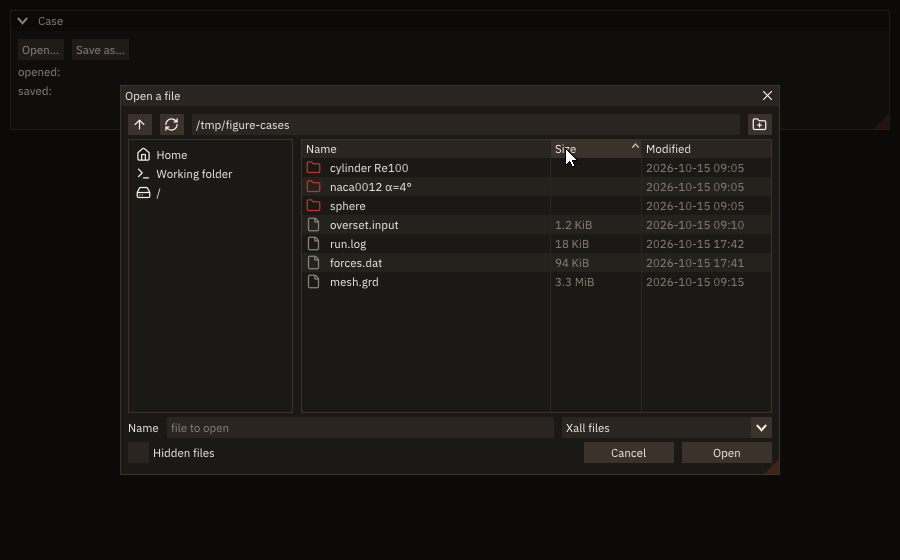
if (ig_button('Open...')) call app%open_file_browser('open', [character(len=32) :: &
                                                     'Xall files|input;grd;log;dat', 'All files|*'], &
                                                     default_path=trim(cases))
call ig_same_line()
if (ig_button('Save as...')) call app%save_file_browser('save', default_path=trim(cases)//'/copy.input')
call app%file_dialog_result('open', chosen, done, cancelled, stat=stat)
if (done .and. .not. cancelled .and. stat == FIG_OK) path = chosen
call app%file_dialog_result('save', chosen, done, cancelled, stat=stat)
if (done .and. .not. cancelled .and. stat == FIG_OK) saved = chosen
A modal drawn by FIGURE (Dear ImGui's popup modal) over the program's windows, in the colours of the palette's roles: the accent for folders, the error role for what went wrong.
- The folder's entries, folders first, with their sizes (bytes, KiB, MiB, ...) and modification times (local time,
YYYY-MM-DD hh:mm). A click on a column's header sorts by it (again: the other way); folders stay first. Only the rows in view are drawn (list clipper), so a folder of many thousand files scrolls as fast as a short one. - A click selects an entry (a file's name goes into the name field); a double-click enters a folder or chooses a file. Open (Save, Choose) or Enter in the name field confirms; Cancel, the modal's close button or Escape cancels.
- The path field shows the folder. Type a path and press Enter to go there (a file's path chooses it); Tab completes the last part of the path to the longest prefix common to the names that start with it, and a single folder gets its separator. The arrow goes to the parent folder; the second button reads the folder again.
- Places on the left: the home folder, the working directory, the file systems' roots (
/; the drives on Windows) and up to eight recent folders, those of the last answers, newest first. The recent folders are kept between runs in FIGURE's settings file,settings.iniin the folder SDL gives programs for their settings (SDL_GetPrefPath):~/.local/share/figure/on Linux,~/Library/Application Support/figure/on macOS,%APPDATA%\figure\on Windows. The file is shared by every program built with FIGURE. In headless mode and while capturing the recent folders are kept in memory only: nothing of the user's is read, nothing written. - Filters in a list beside the name field; hidden files (names starting with a dot, and on Windows the hidden attribute) on request; a new folder made in the folder shown (the third button).
- Saving takes the name typed (as typed: no extension is added) in the folder shown; an existing file is replaced only after the user answers Replace to the question; a name that is a folder enters it.
- Folders (
folders=.true.): the files are shown dimmed and cannot be chosen; Choose takes the selected folder, or the one shown. - Errors are shown in the browser, under the path field, never fatal: a folder that cannot be read (permissions), one that vanished meanwhile, a path that does not exist, a folder that cannot be made. The browser stays open.
- The answer is an absolute path, in UTF-8, with the platform's separators. Names with spaces and non-ASCII characters are listed and returned as they are (known issues for Fortran's own
openon Windows). - One at a time. Browsers opened together are shown one after the other, in the order opened. Opening one closes the program's popups and menus open at that moment, as Dear ImGui does for any modal opened at the top level.
Modes. Window and remote: the same browser, listing the files of the machine the program runs on (in remote mode, the server's, not the browser's computer). Headless: the same, driven by figure_testing, where test_file_browser reads the browser as it stands after the last frame (the folder listed, the entries shown, the error, the fields, the recent folders); the recent folders in memory, or in a file a test names (test_settings_file).
The window's frame
app%init(..., decorations='figure') opens the window without the system's frame (borderless and resizable) and FIGURE draws one, in the back buffer with everything else: a title bar on top with the window's icon, the program's main menu bar inside it, the title centred, and the minimize, maximize (restore) and close buttons. The system's frame stays the default (decorations='native').
call app%init('FIGURE: frame', 900_int32, 520_int32, decorations='figure') ! no system frame: FIGURE draws it
call app%set_icon(ICON_CHART_LINE, stat=stat)                              ! the task bar's icon, and the bar's
call app%set_confirm_quit(.true.) ! the bar's close button asks too| Procedure | Does |
|---|---|
app%init(title, width, height [, ...] [, decorations] [, buttons]) | decorations: 'native' (default) or 'figure'; buttons: 'right' or 'left' (default: left on macOS, right elsewhere) |
app%set_icon(image [, stat]) | the window's icon from an image, integer(int8) :: image(4, width, height) (R, G, B, A of pixel (i, j), j = 1 the top row), 1 to 1024 pixels a side |
app%set_icon(icon [, stat]) | the window's icon from one ICON_* constant |
The bar is Dear ImGui's main menu bar: FIGURE opens it at the start of each frame (with the icon), the program's ig_begin_main_menu_bar / ig_end_main_menu_bar append its menus to it, and FIGURE closes it at the end of the frame (with the title and the buttons). A program written for the system's frame needs no change: its menus move into the title bar, and a dock space or a side bar starts below it. The title (app%set_title) is centred in the bar, moved right of the menus when they reach the centre, and clipped before the buttons; it is dimmed while the window does not have the keyboard focus.
The bar's height is the menu bar's by default (Dear ImGui's frame height). A look or a theme file makes it taller with TitleBarHeight in [figure.vars] (styles): the bar takes that height (logical pixels, times the content scale), the icon, the menus and the title stay centred in it, the buttons are as tall as the bar, and a dock space or a side bar starts below it. The bar never gets shorter than the menu bar.
The colours are the palette's roles in effect: the bar in the surface colour, the title and the buttons' marks in the text colour, a hovered button in a mix of the surface toward the text, the close button in the error colour when hovered. With a style that has no palette, the roles are read from Dear ImGui's colours.
if (ig_begin_main_menu_bar()) then                    ! inside the title bar, after the icon
   if (ig_begin_menu('File')) then
      if (ig_menu_item('Open...', shortcut='Ctrl+O')) continue
      if (ig_menu_item('Save', shortcut='Ctrl+S')) continue
      call ig_separator()
      if (ig_menu_item('Quit')) running = .false.
      call ig_end_menu()
   endif
   if (ig_begin_menu('View')) then
      if (ig_menu_item('Residuals', selected=viscous)) continue
      call ig_end_menu()
   endif
   call ig_end_main_menu_bar()
endif
Hit testing. The system asks the program what each point of a borderless window does (SDL_SetWindowHitTest); FIGURE answers from the rectangles of the last frame drawn:
- the empty part of the bar, the title and the icon drag the window;
- the edges and the corners (6 pixels, times the content scale; a corner takes twice that along each side) resize it;
- the buttons, the menus and everything below the bar are the program's (clicks go to Dear ImGui).
test_frame_hit(x, y) (from figure_testing) gives the same answer, so a test checks it point by point.
Interactions.
- A double-click on the part of the bar that drags toggles maximize. On Windows the system handles the drag area as a caption and maximizes on a double-click itself, without sending the clicks to the program, so the window is not toggled twice (to be verified on Windows, S11).
- A maximized window has no resize edges.
- Close takes the quit path of the system's close button: the loop ends, or, after
app%set_confirm_quit(.true.),app%quit_requested()returns.true.and the program asks first (Ask before quitting). - Minimize and maximize are the window's (
SDL_MinimizeWindow,SDL_MaximizeWindow,SDL_RestoreWindow).
The icon. set_icon sets the window's icon for the task bar or the dock (SDL_SetWindowIcon) and the bar's: an image as given, or an ICON_* rendered at 64 x 64 pixels with the bundled icon font, in the palette's text on accent colour on a rounded square of its accent (the bar shows the glyph in the accent colour). Something other than one icon is FIG_ERR_ARGUMENT; an image of the wrong shape too. A system without window icons (a Wayland compositor without the xdg-toplevel-icon protocol, SDL's offscreen driver) refuses the window's with FIG_ERR_FAILED and SDL's reason; the bar's icon is set all the same, so a program that passes stat keeps its bar.
Modes.
- Window: as above. The Platforms workflow opens
figure_hello --frame(the example with this frame) in a real window on Linux, macOS and Windows and checks its bar in the captured frame (verified platforms). - Headless:
init_headless(..., decorations='figure')draws the bar the same way, for tests; the buttons' actions are recorded as state (test_frame_state(minimized, maximized)), close is a quit request as in a window.set_iconis refused withFIG_ERR_STATE("set_icon: there is no window in headless mode"). - Remote: no frame (the browser's page is the window);
set_iconis refused withFIG_ERR_STATE.
An unknown decorations or buttons value is FIG_ERR_ARGUMENT from init. What the system's frame does that this one does not: Known issues.
Notifications
| Procedure | Notes |
|---|---|
app%notify(text [, kind] [, seconds] [, stat]) | Tell the user something without a dialog: a notification drawn by FIGURE. |
app%notifications(list [, kinds] [, shown]) | The notifications kept, the last 100, oldest first. |
A notification tells the user what happened while they looked elsewhere: a run that ended, a check that failed, a file written. FIGURE draws the notifications after the program's windows, above them:
- in the bottom-right corner of the work area (above a bottom side bar, so a status bar stays visible), the newest at the bottom, the older ones stacked above it, 22 times the font size wide, the text wrapped;
- each in its kind's palette role with its icon, so that the colour is not the only carrier:
'info'(default) the accent andICON_INFO,'success'the success colour andICON_CIRCLE_CHECK,'warning'the warning colour andICON_TRIANGLE_ALERT,'error'the error colour andICON_CIRCLE_X; - for
seconds(default 5; 0 or less: until clicked), fading out in their last half second; the time is the frame time, so in headless mode and in recordings (a fixed frame time) a notification lasts a fixed number of frames; - a click dismisses one; they take no keyboard focus and do not move.
The last 100 are kept, shown or not: app%notifications(list, kinds, shown) gives their texts (padded with blanks to the longest), their kinds and whether each is still shown, for a "messages" panel or a log. notify asks for the frames that draw it, even with lazy redraw, and for the frames of the fade.
write(line, '(A,I0,A,ES8.2)') 'Run finished: ', ITERATIONS, ' iterations, residual ', residual
call app%notify(trim(line), kind='success')     ! the user may be looking elsewhere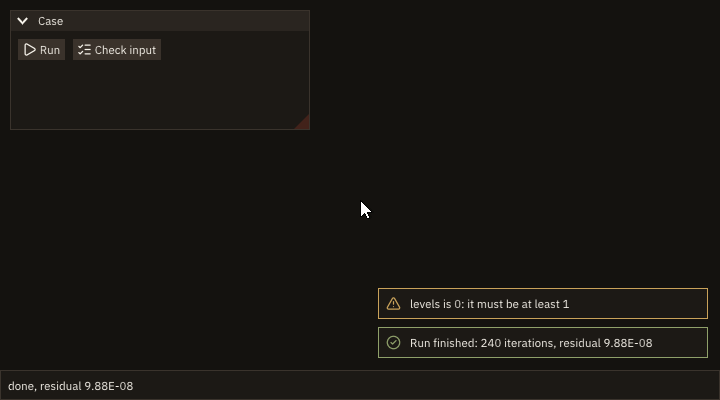
Statuses: FIG_ERR_STATE before init* and from a task (a task does not draw: the program notifies when it sees the task done), FIG_ERR_ARGUMENT for an unknown kind; stat is optional (absent: error stop with the message). The same in window, headless and remote modes. A headless test finds a notification on the screen with test_notification_rect (Testing): its rectangle in the last frame and its alpha, which falls to 0 as it fades.
Drops
| Procedure | Notes |
|---|---|
app%dropped(paths [, x] [, y] [, stat]) → logical | The files and folders dropped on the window since the last frame, and where; .true. on that frame only. |
Dropping a case folder or a file on the window is the shortest way to open it. FIGURE collects SDL's drop events while it waits for the next frame and hands them to that frame: app%dropped is .true. on the frame after the drop, and .false. on every other one, so a drop is reported once.
paths(character(len=:), allocatable, intent(out) :: paths(:)): the absolute paths, in the order the system gave them, UTF-8, padded with blanks to the longest (passtrim(paths(k))). A folder is a path like a file's; the program tells them apart (inquire, or FIGURE's file browser for what is inside). Empty when nothing was dropped.x,y, in pixels: the point of the drop, in the coordinates ofig_item_rectand of the mouse. Several files dropped at once come together, at one point. The point tells which window or region received the drop: keep the rectangle of each region from the frame before (ig_item_rectafterig_end_child, or afterig_endfor a window's last item) and test the point against them. During a drag the system may not send pointer moves, so Dear ImGui's hover state does not follow it: the point is the way.- Dropped text (a selection dragged from an editor) is not a drop: only files and folders are.
Modes: in window mode, the system's drag and drop (from a file manager, the desktop, another program); headless mode has none of its own: test_drop(paths, x, y) of figure_testing queues one, in every mode; remote mode has none: a browser gives a page the contents of the files dropped on it, never a path on the server, and the page refuses them (dropped files would otherwise replace the page). The server's files are opened with FIGURE's file browser. Status: FIG_ERR_STATE before init* and from a task (a task does not draw: the task's status becomes FIG_ERR_STATE too), with the result .false.; without stat, nothing stops: the result is .false., as on a frame with no drop.
if (app%dropped(paths, x, y)) then              ! this frame only; the panes' rectangles are the last frame's
   if (inside(case_rect, x, y)) then
      case_dir = trim(paths(1))                 ! the case: the first path dropped on its pane
      copied = .false.
   elseif (inside(files_rect, x, y)) then
      do k = 1_int32, size(paths, kind=int32)   ! the files: every path dropped on theirs
         if (nfiles == MAX_FILES) exit
         nfiles = nfiles + 1_int32
         files(nfiles) = paths(k)
      enddo
   endif
endif
if (ig_begin_child('case', width=340.0_real64, height=-40.0_real64, border=.true.)) then
   call ig_text(ICON_FOLDER//' Case')
   if (len(case_dir) == 0) then
      call ig_text_disabled('drop a case folder here')
   else
      call ig_text(case_dir)
   endif
endif
call ig_end_child()
call ig_item_rect(case_rect(1), case_rect(2), case_rect(3), case_rect(4))
call ig_same_line()
if (ig_begin_child('files', height=-40.0_real64, border=.true.)) then
   call ig_text(ICON_FILE//' Files')
   if (nfiles == 0_int32) call ig_text_disabled('drop files here')
   do k = 1_int32, nfiles
      call ig_text(trim(files(k)))
   enddo
endif
call ig_end_child()
call ig_item_rect(files_rect(1), files_rect(2), files_rect(3), files_rect(4))Preferences
A tool remembers what the user set: the case last opened, a tolerance, a palette, where the window was, which panels were closed. FIGURE keeps these in one file per program, read at the start and written while the program runs.
call app%open_prefs('cb-prefs', file='cb_prefs.ini') ! in a window: app%open_prefs('cb-prefs'), the platform's folderfound = app%load_pref('case', case_file, default='naca0012.inp')
found = app%load_pref('cfl', cfl, default=0.8_real64)
found = app%load_pref('grid', grid, default=.true.)call app%save_pref('case', trim(case_file)) ! kept: written within 30 s and at destroy
call app%save_pref('cfl', cfl)
call app%save_pref('grid', grid)| Procedure | Notes |
|---|---|
app%open_prefs(name [, file] [, stat]) | Keep the preferences in the program's file from now on; read those of the last run. |
app%prefs_file() → character(len=:), allocatable | The file in use ('': none, kept in memory). |
app%save_pref(key, value [, stat]) | Keep a value: character, integer(int32), integer(int64), real(real32), real(real64), logical. |
app%load_pref(key, value [, default] [, stat]) → logical | .true. when key is kept and is of value's kind: value takes it; otherwise value takes default if given. |
app%set_size_limits(min_width, min_height [, max_width] [, max_height] [, stat]) | The least and greatest size of the window [logical pixels]. |
What is kept. The values of save_pref; the registered windows' visibility (those with remember); the current layout and each layout's arrangement (Dear ImGui's settings, as save_layout writes them: the docking, the floating windows' places, the tables' columns); the style set by set_style (its name, look, palette, line colours); in window mode the window's position, size and maximized state (the position only when it falls on a display that exists: a monitor unplugged since). The style and the window are applied by open_prefs, the arrangement before the next frame: call open_prefs after init* and after the program's own defaults (set_style), before the first frame, and load_pref after it. A value saved before open_prefs is kept over the file's.
What is read. open_prefs of a file that does not exist yet is no error: the program starts from its defaults. load_pref into a character variable gives the text kept, cut to the variable's length or padded with blanks. app%prefs_file() names the file in use: '' before open_prefs, when the preferences are kept in memory only, and from a task.
When it is written. When something changed, every 30 s of frame time (the frame time of notifications: fixed in headless mode) and at destroy. Each write goes to <file>.tmp, which is then renamed over the file, so a crash leaves the file of the last save whole, never a half-written one; figure_test_app checks it with a run that stops after its save without destroy. A save that fails (a full disk, a folder without write permission) is printed once on standard error and the program goes on.
Where. file, or preferences.ini in the platform's folder for the program name (SDL's SDL_GetPrefPath("", name), created if missing): ~/.local/share/<name>/ on Linux ($XDG_DATA_HOME), %APPDATA%\<name>\ on Windows, ~/Library/Application Support/<name>/ on macOS. name is a folder's name: letters, digits, blanks, ., _, -, not starting with .. Headless mode without file keeps the preferences in memory only, and a capture reads and writes nothing (a recording does not depend on earlier runs).
The file is text, one key = value a line, in sections, with # comments; the escapes \n, \t, \\ (and \= in a key) keep any text on one line. Numbers are written in the shortest form that reads back exactly (7.0E-1, 1.0000000000000001E-1), logicals as true and false. Edit it with the program closed: the program rewrites it.
$ ./cb_prefs
preferences kept in cb_prefs.ini
run 1: case naca0012.inp, cfl 0.80, grid T
run 2: case rae2822.inp, cfl 1.20, grid F
cb_prefs.ini, without the arrangement:
  [figure]
  style = seal
  palette = nord

  [preferences]
  case = rae2822.inp
  cfl = 1.2E0
  grid = false
Keys. Any text without a newline, without a blank at either end, not starting with [, # or ;: dotted names (mesh.cells) group them. A key holds one value; saving it again replaces it, of whatever kind.
Size limits. set_size_limits stops the user from making the window smaller (or larger) than the program's layout can take; 0, or an absent maximum, is no limit. Window mode; in headless and remote modes it does nothing (the display is the test's or the browser's).
call app%set_size_limits(640_int32, 400_int32) ! a window no smaller than this (headless: nothing)Status. stat is optional (absent: error stop with the message).
| Failure | Status | Message |
|---|---|---|
open_prefs with a name that is not a folder's | FIG_ERR_ARGUMENT | app%open_prefs: the name '<name>' is a folder's name: letters, digits, blanks and . _ - (not first a .) |
open_prefs a second time | FIG_ERR_STATE | app%open_prefs: the preferences are open already (<file>) |
| a malformed key | FIG_ERR_ARGUMENT | app%save_pref: the key '<key>' is empty, has a newline, a blank at an end, or starts with [ # ; (app%load_pref: ...) |
| a negative size, a maximum below its minimum | FIG_ERR_ARGUMENT | app%set_size_limits: a negative size, ... a maximum below its minimum |
| the system refuses the limits | FIG_ERR_FAILED | app%set_size_limits: <SDL's message> |
before init*, from a task | FIG_ERR_STATE | app%open_prefs: figure is not initialized (and the others'); a task: as every drawing call |
A value that is not of the kind asked (a text read as an integer, a number edited into a word) is not an error: load_pref returns .false. and gives the default.
Modes. The same in window, headless and remote modes, but for the window's geometry and the size limits (window mode) and the file of headless mode (none unless named). Threads: the frame loop's thread; a task's call is refused (FIG_ERR_STATE).
What the preferences do not keep. A theme file (load_style: the program loads it again), the style editor's changes, colours and variables set by name, the fonts (set_font); a value's kind (an integer saved is read back as any kind that parses); the program's own state that is not saved with save_pref (the windows it opens on demand that are not registered). A program that ends without destroy (a crash, error stop) loses what changed since the last 30-second save.
Content scale
content_scale() returns the display content scale FIGURE read at init (1 on standard displays, 2 on most high-DPI ones; 1 in headless mode), and may be called from any thread, a task included. FIGURE applies it at init: the window is created width * scale by height * scale, and the Dear ImGui style (spacing, fonts) is scaled by it. Positions and sizes the program passes (ig_set_next_window, button and plot sizes) are not scaled: multiply them by content_scale() to keep their proportion to the window (cookbook):
s = app%content_scale()
do while (app%next_frame())
   call ig_set_next_window(10.0_real64 * s, 10.0_real64 * s, 780.0_real64 * s, 580.0_real64 * s)
   if (ig_begin('Scaled')) then
      if (ip_begin_plot('Diagonal', height=400.0_real64 * s)) then
         call ip_line('y = x', x, y)
         call ip_end_plot()
      endif
   endif
   call ig_end()
enddo
Styles
The colours and sizes of the interface: see Styles.