

3-D views
A 3-D view (view3d_object) shows meshes in perspective: triangles, quads, structured surfaces (a grid's face, a body's patch) and lines. Each mesh is coloured by a field through a colormap or drawn in one colour. The user turns, moves and zooms the camera with the mouse, and clicks an element to pick it. The view is a widget: it is drawn inside any window, beside other widgets.
FIGURE renders the view itself, on the CPU: a software rasterizer in the native layer draws the triangles into an image, which is shown as a texture. So the pixels are the same in window, remote and headless modes, and tests check them one by one. This rasterizer is the view's own, not the CPU renderer that draws a whole frame in headless and remote modes (Modes and renderers tells them apart).
For a figure that is a plot with a third axis (a trajectory, probes, a small surface over labelled axes), the 3-D plots of ImPlot3D are lighter; 3-D plots has the rule for choosing.
Procedures
| Procedure | Notes |
|---|---|
v%init([threads] [, fast_moves] [, lighting] [, background] [, stat]) | create the view, after app%init*: threads in [1, 16] (default 1), half resolution while the user moves the camera (default .true.), shading by a light at the eye (default .true.), background [r, g, b] (default: the style's window background) |
v%destroy(), v%is_initialized() → logical | release the view and its textures (any state); whether it exists |
v%triangles(xyz, tri [, scalar] [, cell_scalar] [, colormap] [, color] [, edges] [, flat] [, stat]) → int32 | add triangles: real(real64) :: xyz(3, nv), integer(int32) :: tri(3, nt) (from 1); the mesh's id |
v%quads(xyz, quad [, ...]) → int32 | add quadrilaterals, quad(4, nq), each drawn as two triangles |
v%surface(xyz [, scalar] [, cell_scalar] [, ...]) → int32 | add a structured surface, xyz(3, ni, nj); scalar(ni, nj) per node, cell_scalar(ni-1, nj-1) per cell (rank 2 here, rank 1 in set_mesh); edges draws its grid lines |
v%lines(xyz [, seg] [, scalar] [, cell_scalar] [, colormap] [, color] [, stat]) → int32 | add lines: the segments seg(2, ns), or the polyline through the points |
v%set_mesh(mesh [, scalar] [, cell_scalar] [, no_scalar] [, colormap] [, vmin, vmax] [, auto_range] [, color] [, edges] [, edge_color] [, flat] [, visible] [, stat]) | change a mesh's field (scalar(:), cell_scalar(:): rank 1 for every kind of mesh), colormap, range, colours, edges and their colour, shading or visibility (Fields and colours) |
v%changed([mesh] [, stat]) | the program changed the mesh's arrays in place: derive it again and render |
v%remove(mesh [, stat]), v%clear([stat]) | remove a mesh, every mesh |
v%set_camera([target] [, distance] [, azimuth] [, elevation] [, fov] [, stat]), v%get_camera(...) | the camera: the point looked at, the distance to it, the direction [degrees], the vertical field of view [degrees] |
v%fit([stat]), v%view(name [, stat]) | fit the meshes in the view; a standard view, '+x', '-x', '+y', '-y', '+z', '-z' |
v%orbit(azimuth [, elevation] [, stat]), v%pan(right, up [, stat]), v%zoom(factor [, stat]) | turn the camera [degrees], move it across the screen [world units], bring it closer (factor > 1) |
v%clip(normal, point [, stat]), v%unclip([stat]) | cut away what lies behind a plane (up to 6); remove the planes |
v%draw(id [, width] [, height] [, stat]) | draw the view as a widget, width x height pixels (0: the available region; negative: up to that distance from its edge) |
v%pick(x, y, mesh, element [, point] [, stat]) → logical | the element under a pixel of the view (from its top-left corner) |
v%hovered(mesh, element [, point] [, stat]) → logical, v%clicked(...) → logical | the element under the mouse, the element clicked, in the last draw |
v%image(rgba [, stat]) | the pixels of the last render, integer(int8), allocatable :: rgba(:,:,:), as tex%update takes them: half the view's size when that render was made while the camera moved (fast_moves), unallocated before the first render |
v%render_info([count] [, milliseconds] [, width] [, height] [, half] [, cache_bytes] [, stat]) | the renders so far, the time and size of the last one, whether it was at half resolution, the bytes the vertex caches hold (int64; see Meshes) |
v%view_cube([size] [, corner] [, stat]) | a view cube over the view, after draw: a click on a face, an edge or a corner turns the camera to it, a drag orbits (Gizmos) |
v%gizmo(id, matrix [, mode] [, space] [, snap] [, stat]) → logical | handles over the view, after draw, moving matrix (real(real64) :: matrix(4, 4)): 'translate', 'rotate' or 'scale'; .true. on the frames the user moved it (Gizmos) |
v%view_matrix(m [, stat]), v%projection_matrix(m [, stat]) | the camera's view and projection matrices, real(real64) :: m(4, 4), column-major as OpenGL's (Matrices) |
Every procedure is refused from a task (FIG_ERR_STATE), as the other drawing procedures are. v%destroy releases the view and its textures in any state, leaving the program's arrays as they are; v%is_initialized tells whether the view exists.
Meshes
call view%init()                                                   ! after app%init
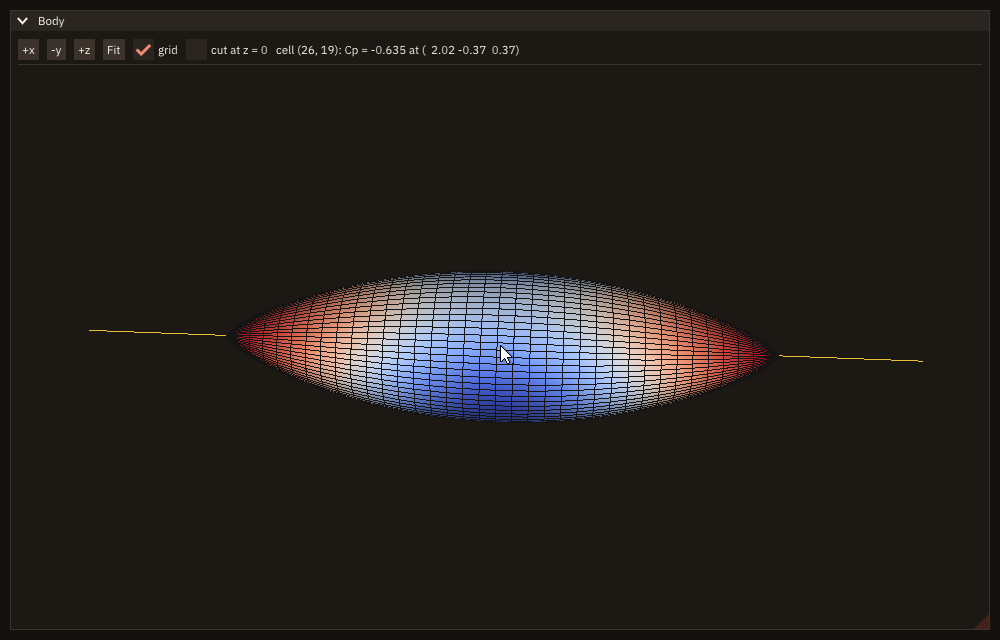
hull = view%surface(body, scalar=cp, colormap='cool-warm', edges=.true.) ! the arrays are read in place
stream = view%lines(axis, color=[0.9_real64, 0.75_real64, 0.2_real64])
call view%set_camera(azimuth=-55.0_real64, elevation=25.0_real64)
Data in place. A mesh keeps the addresses of the program's arrays (coordinates, connectivity, scalars) and reads them at every render: nothing is copied per frame. So the arrays must:
- have the
target(orpointer) attribute; - be contiguous (a non-contiguous section is refused with
FIG_ERR_ARGUMENT); - stay allocated while the mesh exists:
v%removethe mesh before deallocating them.
Mesh ids. Each mesh added gets the next id, from 1, for the life of the view: v%remove and v%clear give no id back. A program that builds its meshes again after v%clear (a new field, a new plane) gets ids past the ones it had, so a table indexed by mesh id is sized by the ids returned (grown when one exceeds it), not by the count of meshes.
When the program changes their values (a new time step, a moved grid), it calls v%changed(mesh). The view then derives, once, what it keeps beside them:
- the triangle list, 0-based (the connectivity's indices are checked there);
- the edges;
- the vertex normals;
- the scalar's range.
It renders at the next draw. These derived arrays take about 12 bytes per vertex and 24 per triangle.
A render also transforms every vertex into a cache of 64 bytes a vertex. The view keeps the caches while renders follow one another (a drag, a field changed every frame) and frees them after 30 draws without a render; on glibc it then returns the freed memory to the system (malloc_trim). A mesh of 3.4 M vertices thus holds 206 MiB more while it moves than while it rests. v%render_info(cache_bytes=b) reports what they hold.
Kinds.
- Triangles (
v%triangles) and quads (v%quads) take a connectivity from 1,tri(3, nt)orquad(4, nq); a quad's vertices go around it in order. - A structured surface (
v%surface)xyz(3, ni, nj)joins node(i, j)to its neighbours: a face of a structured block, an OverSet patch. Its cell(i, j)lies between nodes(i, j)and(i+1, j+1). - Lines (
v%lines) are one pixel wide. They are drawn after the surfaces, slightly in front of them so that a line lying on a surface shows, and neither hide anything nor are picked.
Coordinates are real(real64) in any units; connectivity is integer(int32).
Edges. edges=.true. draws a surface's grid lines (the cells' sides), in edge_color (default near black), which only v%set_mesh sets: v%triangles, v%quads and v%surface take edges alone.
Fields and colours
A mesh with scalar (one value per vertex) is coloured by the colormap at each vertex, and the colours are blended across the triangles. With cell_scalar (one value per cell: triangle, quad, structured cell, segment) each cell has one colour. The colormap is any name ip_colormap knows (default 'cividis'; <name>_r reversed, levels not taken here). The range mapped onto it is the data's (finite values) unless vmin, vmax are given; values outside it take the map's end colours, NaN is grey. Without a scalar the mesh is drawn in color (default light grey).
v%set_mesh(mesh, ...) changes a mesh after it was added; an argument absent leaves its property as it is. Its scalar and cell_scalar are rank 1 for every kind of mesh: a structured surface, added with scalar(ni, nj), passes ni*nj contiguous values ((ni-1)*(nj-1) per cell), through a rank-1 pointer onto the same storage rather than a copy, since the mesh keeps the address (Meshes). no_scalar=.true. drops the scalar, the mesh then drawn in its color; vmin and vmax, given together, fix the range, and auto_range=.true. gives it back to the data's; visible=.false. hides the mesh and keeps it, with its id.
Light. By default a light at the eye shades the surfaces: a face seen straight on has its colour, a face seen edge-on a quarter of it. Both sides of a surface are lit the same (grid faces are open). Shading is smooth (the light blended from the vertices' normals) or flat (one per triangle, showing the facets). lighting=.false. at init gives the colours exactly as mapped: use it when the colours must match a legend.
call view%init(lighting=.false.)                              ! the colours exactly as mapped, for a legend
bump = view%surface(xyz, cell_scalar=f, colormap='batlow')    ! one colour per cell
call view%set_mesh(bump, vmin=0.0_real64, vmax=5.0_real64)    ! a fixed range: 0 to 5, whatever the data
The camera
The camera looks at a target from a distance, from a direction given by its azimuth (around z, from +x toward +y) and elevation (above the x-y plane), with a vertical field of view fov (default 30°). z is up. A view never given a camera is fitted to its meshes at its first draw, from azimuth -60° and elevation 25°.
Mouse
| The mouse in the view | Moves |
|---|---|
| left drag | orbit: 0.4° per pixel |
| right or middle drag, or shift + left drag | pan |
| wheel | zoom: the distance divided by 1.1 per step |
| double click | fit |
While the pointer is over the view, the wheel zooms the view and nothing else: the view claims the wheel (Dear ImGui's key ownership, SetItemKeyOwner of ImGuiKey_MouseWheelY and ImGuiKey_MouseWheelX), so a window or child that holds the view and scrolls does not scroll on the same turn. Beside the view, the wheel scrolls its container as usual. Before v0.3.1 the container scrolled instead: in a scrolling child, the wheel over the view moved the view from under the pointer and did not zoom it (figure_test_view3d). The same in every mode: window, headless (the wheel of test_wheel) and remote (the browser's wheel).
if (ig_button('+x')) call view%view('+x')
call ig_same_line()
if (ig_button('-y')) call view%view('-y')
call ig_same_line()
if (ig_button('+z')) call view%view('+z')
call ig_same_line()
if (ig_button('Fit')) call view%fit()
call ig_same_line()
if (ig_checkbox('grid', edges)) call view%set_mesh(hull, edges=edges)
call ig_same_line()
if (ig_checkbox('cut at z = 0', cut)) then
   call view%unclip()
   if (cut) call view%clip([0.0_real64, 0.0_real64, -1.0_real64], [0.0_real64, 0.0_real64, 0.0_real64])
endif
call ig_same_line()
call ig_text(trim(text))
call ig_separator()
v%fit aims at the centre of the visible meshes' bounding box from the distance at which their bounding sphere fills the view; the direction is kept. v%view('+x') puts the eye on the +x side looking toward -x, with z up; '+z' looks down with x to the right and y up, '-z' looks up. The standard views are fitted.
v%orbit, v%pan and v%zoom move the camera as the mouse does, from the program; v%set_camera and v%get_camera set and read it. The elevation stays in [-90°, 90°].
Picking
call view%draw('view')                                       ! the rest of the window
if (view%clicked(mesh, cell, point)) then
   if (mesh == hull) then
      i = int(mod(cell - 1_int64, int(NI - 1, int64)), int32) + 1_int32  ! cell (i, j) of the surface
      j = int((cell - 1_int64) / (NI - 1), int32) + 1_int32
      write(text, '(A,I0,A,I0,A,F6.3,A,3F6.2,A)') 'cell (', i, ', ', j, '): Cp = ', cp(i, j), ' at (', point, ')'
   endif
endif
The view keeps, beside each render's colours, which triangle covers each pixel. So picking costs nothing: v%pick(x, y, ...) reads it at a pixel, v%hovered at the mouse, v%clicked at a click (the left button released less than 3 pixels from where it was pressed, so that a drag is not a click). Each gives:
- the mesh's id,
integer(int32)(0: none); - the element, from 1,
integer(int64)(0: none): the triangle, the quad, or the structured celli + (j - 1) * (ni - 1); - the point hit,
real(real64) :: point(3), in world units, from the depth of that pixel.
v%clicked is true only in the frame of the click.
Clipping planes
v%clip(normal, point) keeps what lies on the side of the plane the normal points to. Up to 6 planes cut together. Surfaces are cut exactly, per pixel; lines per segment. The cut shows the inside of a surface, lit as its outside. v%unclip() removes every plane.
call view%clip([1.0_real64, 0.0_real64, 0.0_real64], [0.0_real64, 0.0_real64, 0.0_real64]) ! keep x >= 0Gizmos
Two kinds of handles are drawn over the view's image, in the same window, after v%draw in the same frame: a view cube, which turns the camera, and gizmos, which move a placement of the program's: a clipping plane, a box, a probe. Both are ImGuizmo's (ViewManipulate and Manipulate), vendored in FIGURE (THIRD_PARTY.md); they draw through Dear ImGui's draw lists, so they look and work the same in window, headless and remote modes. They are polled, as every widget: no callback.
plane = 0.0_real64                                   ! columns: the plane's two in-plane axes, its normal, its point
plane(1:3, 1) = [0.0_real64, 1.0_real64, 0.0_real64]
plane(1:3, 2) = [0.0_real64, 0.0_real64, 1.0_real64]
plane(1:3, 3) = [1.0_real64, 0.0_real64, 0.0_real64] ! the normal: the part toward +x is kept
plane(1:4, 4) = [2.0_real64, 0.0_real64, 0.0_real64, 1.0_real64]
call outline_of(plane)
outline = view%lines(frame, color=[1.0_real64, 0.85_real64, 0.3_real64])
call cut(view)subroutine draw(view)
!< The window: the mode buttons, the plane's point and normal, the view with its cube and the gizmo.
type(view3d_object), intent(inout) :: view !< The view.
character(len=96) :: text !< The plane, as text.
call ig_set_next_window(10.0_real64, 10.0_real64, 700.0_real64, 520.0_real64)
if (ig_begin('Cut')) then
if (ig_button('Move')) mode = 'translate'
call ig_same_line()
if (ig_button('Turn')) mode = 'rotate'
call ig_same_line()
write(text, '(A,3F6.2,A,3F6.2)') 'point', plane(1:3, 4), ' normal', plane(1:3, 3) / norm2(plane(1:3, 3))
call ig_text(trim(text))
call ig_separator()
call view%draw('view') ! the rest of the window
call ig_item_rect(view0(1), view0(2), view1(1), view1(2))
call view%view_cube() ! top-right: a click on a face looks at it
if (view%gizmo('plane', plane, mode=trim(mode))) call cut(view) ! the user moved the plane
endif
call ig_end()
endsubroutine drawsubroutine cut(view)
!< The body cut by the plane: what lies behind its normal is cut away; the outline follows it.
type(view3d_object), intent(inout) :: view !< The view.
real(real64) :: n(3) !< The normal, unit.
n = plane(1:3, 3) / norm2(plane(1:3, 3)) ! a scale gizmo may have stretched it
call view%unclip()
call view%clip(n, plane(1:3, 4))
call outline_of(plane)
call view%changed(outline) ! the outline's array changed in place
endsubroutine cutThe view cube. v%view_cube([size] [, corner]) draws a cube of size pixels (default 96, at most the view's side) in a corner of the view: 'top-right' (default), 'top-left', 'bottom-right', 'bottom-left'. Its faces turn with the camera and take the gizmos' axis colours: red the two faces of x, green of y, blue of z. Each face is cut into nine panels: a click on a face's middle turns the camera to look at that face (the eye on its side), a click on an edge or a corner panel to look along the diagonal between the faces it touches; the camera turns there over 40 frames, rendered at half resolution as a drag is, and its target and distance are kept. A drag on the cube orbits the camera, z kept up. The camera then reads as v%get_camera gives it: the +x face gives azimuth 0 and elevation 0, the top face elevation 90°.
A gizmo. v%gizmo(id, matrix [, mode] [, space] [, snap]) draws handles at the point matrix places and returns .true. on the frames the user drags one, matrix updated; it is untouched on the others. Call it every frame the handles are shown; id tells the gizmos of a window apart.
mode | Handles | A drag |
|---|---|---|
'translate' (default) | three arrows, three squares, the centre | along an axis, in a plane, in the screen's plane |
'rotate' | three rings, one circle facing the eye | about an axis, about the line of sight |
'scale' | three handles, the centre | along an axis, all three together |
space:'world'(default) puts the handles along the world's axes,'local'along the matrix's own columns (scale is always local).- The arrows point along +x, +y and +z, whatever side the eye is on. An axis seen nearly end-on, or a plane edge-on, is hidden: it cannot be dragged with any precision (Known issues).
snap: a drag moves by whole steps from where it started: world units for'translate', degrees for'rotate', a factor step for'scale'.- The size: the arrows are about a fifth of the view's shorter side, between 40 and 120 pixels, at any distance.
The mouse. While the pointer is over the cube, over a gizmo's handle, or a drag of either goes on, the view does not take the mouse (no orbit, no pick): the handles do. A gizmo takes the mouse from the frame after the pointer reaches its handle, the cube at once. A drag that starts on the view and crosses a handle stays the view's.
A clipping plane by hand. Keep the plane as a matrix: its third column the normal, its fourth the point (the first two the plane's own axes, for an outline). When the gizmo moves it, cut again: v%unclip(), then v%clip(normal, point) (above). In 'rotate' the rings turn the normal; in 'translate' the arrow along the normal moves the cut.
Matrices
v%view_matrix(m) and v%projection_matrix(m) give the camera's matrices as real(real64) :: m(4, 4), m(i, j) the row i and column j, column vectors: a world point p lands at the clip coordinates matmul(P, matmul(V, [p, 1.0_real64])), and at the view's pixel ((1 + x/w) / 2 * width, (1 - y/w) / 2 * height) from its top-left corner.
V = v%view_matrix | P = v%projection_matrix | |
|---|---|---|
| maps | world to the eye's coordinates | the eye's coordinates to clip coordinates |
| content | V(1:3, 1:3): rows the screen's right, up, and the direction from the target to the eye; V(1:3, 4) the translation | a perspective of the vertical field of view fov and the view's aspect (its size at the last draw) |
| conventions | right-handed, the eye looking down its -z (OpenGL's) | clip z in [-w, w], P(4, 3) = -1 (OpenGL's) |
subroutine to_pixel(view, p, x, y)
!< The pixel of the display where the view shows the world point `p`: projection * view, then the view's rectangle.
type(view3d_object), intent(in)  :: view    !< The view.
real(real64),        intent(in)  :: p(3)    !< World point.
real(real64),        intent(out) :: x, y    !< Pixel [pixels].
real(real64)                     :: v(4, 4) !< View matrix.
real(real64)                     :: q(4, 4) !< Projection matrix.
real(real64)                     :: c(4)    !< Clip coordinates.

call view%view_matrix(v)
call view%projection_matrix(q)
c = matmul(q, matmul(v, [p, 1.0_real64]))
x = view0(1) + (0.5_real64 + 0.5_real64 * c(1) / c(4)) * (view1(1) - view0(1))
y = view0(2) + (0.5_real64 - 0.5_real64 * c(2) / c(4)) * (view1(2) - view0(2))
endsubroutine to_pixel
These are FIGURE's matrices and ImGuizmo's alike: column-major float[16], column vectors, translation in the fourth column (indices 12 to 14 counted from 0), OpenGL's handedness and depth range. The difference is the precision: FIGURE's camera is real(real64), ImGuizmo computes in real(real32). FIGURE hands it the matrices rounded, with the world moved so that the camera's target is at the origin, so that its numbers are of the scene's size and not of its distance from the origin (a body at x = 10⁶ is placed as well as one at the origin). A matrix the user moved comes back rounded to single precision in that frame: about 10⁻⁷ of the scene's size; one the user did not move is not touched. The near and far planes enclose the visible meshes' bounding sphere, so P changes when meshes are added, moved or hidden; the gizmos get P with a wider depth range, the same pixels (Known issues). The camera's z is up; ImGuizmo's view cube has y up, and FIGURE turns the camera into its frame and back (the cube's faces show FIGURE's axes).
How a view is rendered
A view is rendered again only when something changed since its last render:
- the camera;
- the size;
- a mesh, its style or its data (
v%changed); - the clipping planes;
- the background.
A frame drawn because another widget changed costs only the image's draw. v%render_info(count) counts the renders: three idle frames add none, a clipping plane one, data changed in place and announced with v%changed one (docs/examples/src/cb_view3d_render.F90, run headless by the documentation's build):
xyz(3, :, :) = 0.5_real64 * xyz(3, :, :)                      ! the program changes the data in place ...
call view%changed(bump)                                       ! ... and says so: the next draw renders
call frames(3_int32)
call view%render_info(count=renders(4), width=w, height=h)$ ./cb_view3d_render
renders after: the first draw, 3 idle frames, a clip, a change: 1 1 2 3
the last render: 624 x 443 pixels
at the centre: mesh 1 (the bump is 1), element 230, at -0.42 1.42 1.75
read back: 624 x 443 pixelsA render runs in three steps:
- Vertices: the vertices are projected and coloured.
- Triangles: each triangle is clipped against the eye's near plane, then filled with a depth test, pixel by pixel.
- Lines: the lines are drawn last.
The image is uploaded into a texture and drawn by Dear ImGui as any image.
Fast moves. While the user drags or turns the wheel, the view is rendered at half its width and height: a quarter of the pixels to fill, and to send in remote mode. The meshes' grid lines (edges) are left out until the move ends: on a fine grid seen whole they are several to a pixel, the larger part of a render (a level of 6.6 M grid-line segments: about 130 ms a render with them, 25 ms without), and draw only a tint; lines meshes are still drawn. It renders at full size again in the frame where the move ends: the button released, or a frame without a wheel step. A drag held still keeps the half-size image, without rendering, until it moves again or ends. fast_moves=.false. at init keeps full size.
Threads. threads (1 to 16) splits each render over that many threads: the vertices in ranges, then blocks of rows shared out among the threads (no pixel drawn by two). It pays for large views and many triangles; the table below measures 1 and 4 (the first split, one band of rows per thread, gained nothing beyond 4; the blocks let more threads help a large model).
Performance
The time of one render, measured on an Intel i9-13900KF under WSL2:
- the faces of the 6 blocks of a real OverSet grid (an H2-air jet) at its three multigrid levels;
- the camera turning around them, the mesh filling about a quarter of the view;
- median of 72 renders, coloured by a scalar per vertex.
| Triangles | 800x600, 1 thread | 800x600, 4 threads | 1600x1000, 1 thread | 1600x1000, 4 threads |
|---|---|---|---|---|
| 9.2 thousand | 2.0 ms | 1.1 ms | 4.7 ms | 2.6 ms |
| 148 thousand | 5.2 ms | 2.8 ms | 9.3 ms | 4.6 ms |
| 590 thousand | 14 ms | 7.1 ms | 19 ms | 9.5 ms |
| 2.4 million | 45 ms | 25 ms | 52 ms | 28 ms |
A view filled by its mesh (zoomed in) costs more: in the spike, about four times as much at 9 thousand triangles, the time going into the pixels. Fast moves divide that part by four.
Per mode:
| Mode | Cost of a render | The image |
|---|---|---|
| window | as the table | uploaded to the GPU: about 1 ms at 1600x1000, at most |
| headless | as the table | not uploaded; v%image reads it |
| remote | as the table, plus 2 to 5 ms per 800x600 image to encode it as JPEG while the camera moves | sent to the browser: as JPEG while the camera moves, then exact (4 * width * height bytes, 6.4 MB at 1600x1000, or deflated) once it is still |
Remote mode while the camera moves. The view's image changes at every frame, and would go as raw RGBA: 1.6 MB per frame at 1600x1000 with fast moves, 91 MB/s at 59 frames a second, fine on the same machine but not through an SSH tunnel to a cluster node, which carries a few MB/s. So the remote UI sends an image updated in consecutive frames as a JPEG, and the exact image once the camera has been still for 150 ms. Turning cb_view3d for 5 s, measured with scripts/remote_client.py --measure:
| The view (the image while moving) | before: raw | deflated (compress='always') | now: JPEG |
|---|---|---|---|
| 964 x 553, fitted (482 x 276) | 520 KB per frame, 30 MB/s | 6.6 KB, 0.38 MB/s | 5.0 KB, 0.29 MB/s |
| 1604 x 1013, fitted (802 x 506) | 1585 KB, 91 MB/s | 29 KB, 1.7 MB/s | 14 KB, 0.81 MB/s |
| 1604 x 1013, zoomed in on the grid (802 x 506) | 1585 KB, 91 MB/s | 267 KB, 15 MB/s | 118 KB, 6.8 MB/s |
KB and MB are of 1024 bytes. The fitted body leaves most of the view background, which deflates well; grid lines filling the view are JPEG's worst case. On the spike's OverSet grid coloured by a field, JPEG was 6 to 18 times smaller than deflate, and 30 to 190 times smaller than raw. A still view costs nothing; when a move ends, one exact image goes. init_remote(lossy=.false.) sends every image exact. See Known issues.
Statuses and modes
Statuses. stat is optional; absent, a failure stops the program with its message (Error handling).
FIG_ERR_ARGUMENT:threadsoutside [1, 16];- an array of the wrong shape, or not contiguous;
- a connectivity index outside [1, nv];
- a scalar of the wrong size;
- an unknown colormap;
vminwithoutvmax, orvmax <= vmin;- a distance or zoom factor ≤ 0, a field of view outside (0°, 180°), an elevation outside [-90°, 90°];
- an unknown standard view;
- a seventh clipping plane or a zero normal;
- an unknown mesh id;
- a view cube's size not above 0 or an unknown corner; a gizmo's unknown mode or space, a snap not above 0, a matrix not finite or whose last row is not (0, 0, 0, 1).
FIG_ERR_STATE:- a view not initialized;
- a call from a task;
view_cubeorgizmobefore the view was drawn in this frame, in this window (or outside a frame).
A failed v%triangles (or the other kinds) adds nothing and returns 0.
Modes.
- window: drawn as above, the image on the GPU.
- headless: the same pixels, read with
v%image. Synthetic input (Headless testing) turns and picks as the mouse does. - remote: the same pixels, sent to the browser as a texture at each render: as JPEG while the camera moves, exact once it is still (above). The mouse in the browser turns and picks as in a window.
Limits
- No transparency, no textures on the surfaces, one light (at the eye). No axes, labels or colour bar inside the view: put a legend beside it.
- Lines are one pixel wide, without antialiasing; surfaces are not antialiased either.
- The image has the view's size in logical pixels. On a display scaled 2x it is magnified, not rendered at the display's resolution.
- Picking finds surfaces only, not lines.
- Gizmos are single precision and lose precision on an axis seen at a grazing angle: Known issues.
- Large meshes on one thread: above a million triangles a render takes tens of milliseconds (the table above). Read large grids off the frame loop with a task, then hand the arrays to the view.
Why a software renderer
FIGURE's three modes do not all have a GPU: remote mode runs where there is no display, and headless tests have no OpenGL context. Three designs were weighed (issue #3, S15):
| Design | What it would add | |
|---|---|---|
| A | the software rasterizer, in every mode (this page) | one renderer, exact pixels in tests and recordings |
| B | OpenGL into an offscreen buffer in window mode, A elsewhere | renders of about 1 ms up to millions of triangles on a real GPU; a second renderer to keep matching A, and A still used where OpenGL is Mesa's software one (WSL by default, X forwarding) |
| C | OpenGL in a window and WebGL in the browser, the geometry sent once | remote orbiting without sending images; a third renderer, in the browser, and no pixels on the program's side |
The spike measured A's costs (the table above) against B's on this machine: on the GPU, B stays near 1 ms where A takes 5 to 50; under Mesa's llvmpipe, B is two to four times slower than A. The decision (S15, closed for v0.3.0):
- A is FIGURE's renderer in every mode.
- B only when an application needs it: when one draws more than about 10⁶ triangles in a window, where A falls under 30 renders a second. It would then render on the GPU only behind a check of the OpenGL renderer (not Mesa's llvmpipe or softpipe, where A is faster), with A everywhere else.
- No C. It would add a third renderer and take the pixels away from tests and captures; JPEG images while the camera moves (above) answer its bandwidth argument.