

Widgets
figure_imgui binds a first set of Dear ImGui widgets (Dear ImGui 1.93.1 WIP, docking branch). Call them between next_frame and the next next_frame, inside a window.
Values are your variables
Widgets that edit a value take it as an intent(inout) argument and write the new value back before returning. The binding copies the value into a local C variable for the call: the actual argument needs no target attribute, nothing keeps a pointer to it after the call, and any variable works (a local, a component of a derived type, an array element).
Every such widget returns a logical: .true. in the frame in which the user changed the value. When you only need the value, discard the result with continue:
if (ig_slider('cells', cells, 10_int32, 1000_int32)) continue
if (ig_slider('relaxation', relax, 0.1_real32, 1.0_real32)) continue
if (ig_slider('CFL', cfl, 0.1_real64, 2.0_real64)) continue
if (ig_input('final time', t_end, step=0.1_real64, format='%.3f')) then
   t_end = max(t_end, 0.0_real64)
endif
if (ig_checkbox('viscous', viscous)) continue
call ig_separator()
if (ig_button('Run')) runs = runs + 1_int32
call ig_same_line()
write(line, '(A,I0,A,I0,A,F5.2)') 'runs: ', runs, ', cells: ', cells, ', CFL: ', cfl
call ig_text(trim(line))
Labels and identifiers
Dear ImGui identifies a widget by a hash of its label and of the id stack: the window it is drawn in, then every id scope open around it. Two widgets with the same label in the same scope are the same widget to Dear ImGui: clicking one activates both, or neither. Make labels unique; when the visible text must repeat, add ## and a suffix: the text after ## is part of the identifier but is not shown.
if (ig_button('Reset##cfl')) cfl = 0.5_real64
call ig_same_line()
if (ig_button('Reset##time')) t_end = 1.0_real64
A label that starts with ## is invisible altogether (used by plots to hide the title).
###: an identifier that stays while the text changes. In a label with ###, only the part after ### is the identifier; the part before it is shown. A window titled 'Case '//trim(name)//'###case' is one window whatever name holds, so its place, size and docking stay when the title changes; chapter 13 of the tutorial titles a plot that way.
Id scopes. ig_push_id(id) opens a scope on the id stack, named by a character or numbered by an integer(int32), and ig_pop_id() closes it: the widgets in between get identifiers of their own, whatever their labels. A loop that draws the same widgets for every item (the rows of a table, the entries of a list) opens one scope per item with its number, ig_push_id(i) ... ig_pop_id(), so that row 2's field is not row 1's (Tables shows it). Scopes are always paired, nest, and close innermost first (Pairing and frames). A popup or a context menu is named in the scope it is opened in, as a widget is.
Strings are passed verbatim, trailing blanks included: 'Run' and 'Run ' are different identifiers.
Windows
| Procedure | Notes |
|---|---|
ig_begin(name [, open] [, flags]) → logical | name is the title and the identifier. Returns .false. when the window is collapsed or clipped: skip its content. flags combine ImGuiWindowFlags_* with ior (below). |
ig_end() | Call it after every ig_begin, whatever ig_begin returned. |
ig_set_next_window(x, y [, width, height] [, always]) | Position, and size if both width and height are given, of the next ig_begin, in pixels. Applied on first use only (the user can move the window afterwards; with app%init(..., ini_file=...) the layout is remembered across runs), or every frame with always=.true.. |
ig_focus_window(name) → logical | Brings window name forward and gives it the keyboard; a docked window's tab is shown. While a popup or a modal is open it does nothing and returns .false. (focusing another window would close the popup): ask again on a later frame. The window must have been drawn (ig_begin) this frame or before. |
Widgets called outside any ig_begin/ig_end pair go to Dear ImGui's implicit "Debug" window; called with no frame open (before the first app%next_frame, after the loop), they are refused. A broken pairing (an ig_end while a table or a tree node is still open, a window left open at the end of the frame) is reported by the next app%next_frame, naming the calls: Pairing and frames.
Window flags, exported by figure and combined with ior: ImGuiWindowFlags_NoTitleBar, NoResize, NoMove, NoScrollbar, NoScrollWithMouse, NoCollapse, AlwaysAutoResize, NoBackground, NoSavedSettings, NoMouseInputs, HorizontalScrollbar, NoFocusOnAppearing, NoBringToFrontOnFocus, AlwaysVerticalScrollbar, AlwaysHorizontalScrollbar, NoNav, NoDecoration (no title bar, resize, scrollbars, collapse), NoInputs, NoDocking, MenuBar (a bar of the window's own: Menus). An overlay, for example:
call ig_set_next_window(420.0_real64, 30.0_real64)
if (ig_begin('##overlay', flags=ior(ImGuiWindowFlags_NoDecoration,                     &
                                    ior(ImGuiWindowFlags_AlwaysAutoResize, ImGuiWindowFlags_NoBackground)))) then
   call ig_text('no title, no frame,')
   call ig_text('no background')
endif
call ig_end()
With open, the window gets a close button in its title bar that sets open to .false.. Dear ImGui shows a window as long as ig_begin is called for it, so guard the call with the same variable:
if (show_tools) then
   call ig_set_next_window(460.0_real64, 20.0_real64, 300.0_real64, 120.0_real64)
   if (ig_begin('Tools', show_tools)) then
      call ig_text('Close me with the x in the title bar.')
   endif
   call ig_end()
endif
if (show_demo) call ig_show_demo_window(show_demo)
A window registered with app%add_window gets the close button without open: the button hides it, and the program draws it while app%window_visible(name) is .true. (Windows and layouts).
Controls
| Procedure | Value | Returns .true. |
|---|---|---|
ig_button(label [, width] [, height]) | none | on the frame it is clicked |
ig_tool_button(label, icon [, width] [, height] [, selected] [, accent]) | none | on the frame it is clicked |
ig_checkbox(label, value) | logical | when toggled |
ig_slider(label, value, vmin, vmax [, format] [, scale] [, clamp] [, stat]) | int32, int64, real32 or real64, scalar or vector (Numbers) | when changed |
ig_input(label, value [, step] [, format] [, enter_returns] [, read_only] [, stat]) | int32, int64, real32 or real64, scalar or vector (Numbers) | on commit: the frame the field is left after a change (enter, tab, a click elsewhere), or a -/+ button is pressed |
ig_input_text(label, value [, hint] [, flags]) | character(len=*) | on each keystroke that changes the text |
ig_combo(label, current, items) | integer(int32): index into the character array items | when an item is picked |
ig_buttonsizes are in pixels; the default fits the label.ig_checkboxflipsvalueon a click and returns.true.on that frame.ig_sliderandig_input, with the drag boxes, angles, ranges and vectors, are in Numbers; radio buttons and list boxes, the other ways to choose, in Choices.ig_input_textedits acharactervariable in place. Its length is the field's capacity: acharacter(len=64)holds at most 64 characters, and typing stops there. Trailing blanks are not part of the text (Fortran pads with them), so the field starts withtrim(value).hintis grey text shown while the field is empty (it is never the value).flagscombineImGuiInputTextFlags_*withior:CharsNoBlank(names, file paths),CharsDecimal,CharsScientific,CharsUppercase,ReadOnly,Password,AutoSelectAll,EnterReturnsTrue(.true.only when enter is pressed). Its result is.true.while the text is half-typed: check a value once the user leaves the field (Leaving a field).ig_comboshowsitems(current)and opens the list on a click;currentoutside1:size(items)shows nothing chosen. Items may repeat a text: they are told apart by their index. Trailing blanks of the items are not shown, so an array constructor padded to a common length is fine.
Tooltips and widths
| Procedure | Notes |
|---|---|
ig_tooltip(text) | On the widget just drawn: text shows while the pointer rests on it, after Dear ImGui's tooltip delay. A tooltip with more than one line of text: Tooltips. |
ig_set_next_item_width(width) | Width of the next widget's field, in pixels; negative: up to that distance from the window's right edge (-1.0 fills a table cell). |
ig_tool_button is a workspace button of a toolbar, as Fusion 360 draws them: icon (an ICON_*, see Icons) above the label and larger than it, on a framed, rounded button that shades under the pointer. With selected, the button is framed and tinted in the accent colour and the icon drawn in it: accent [r, g, b] in [0, 1] (three components, no alpha), default the style's CheckMark colour. The default size fits the label (at least 4.6 font sizes wide) and the icon above it; the text before ## is shown, as for any label. Put the buttons in a bar along a side (ig_begin_side_bar), one per workspace, and keep which one is selected yourself.
if (ig_tool_button('Input', ICON_FILE_PEN, selected=tool == 1)) tool = 1
call ig_tooltip('the input files')
call ig_same_line()
if (ig_tool_button('Monitor', ICON_ACTIVITY, selected=tool == 2)) tool = 2
call ig_tooltip('the residuals of the run')
docs/examples/src/cb_controls.F90 is a headless program: it clicks the Monitor button and edits a field as a user does (Headless testing), and the documentation's build runs it:
$ ./cb_controls
workspace: 2, CFL: 0.800
Text and layout
| Procedure | Notes |
|---|---|
ig_text(text) | Plain text, no formatting: compose numbers with an internal write. Trailing blanks are shown: pass trim(line). |
ig_same_line([offset]) | The next item goes on the same line as the previous one; with offset, at that distance in pixels from the left edge of the window or region (a column of values). |
ig_align_text_to_frame_padding() | The text that follows on the line is lowered to the text of framed widgets: a label before a field, a line number in a table row of fields. Text after a field on the same line is level already. |
ig_text_size(text) → real(real64)(2) | Width and height of text in the current font, in pixels; for a label, of the part before ##. Buttons of one width (the widest label), a column as wide as its longest value. |
ig_text_wrapped(text) | Text wrapped at the right edge of the window or region: help, long messages. |
ig_text_disabled(text) | Text in the style's disabled colour: a default, a hint, something that does not apply. |
ig_text_colored(text, color) | Text in color, [r, g, b] or [r, g, b, a] in [0, 1]. Pair the colour with a mark or a word ([!!]), so that the meaning does not rest on colour alone. The size is not checked: fewer than three components draw white text, components after the fourth are ignored. |
ig_separator() | A horizontal line. |
ig_item_rect(xmin, ymin, xmax, ymax) | Screen rectangle of the last item, in pixels: for tests and custom layout. |
ig_show_demo_window([open]) | The Dear ImGui demo, a live catalogue of every Dear ImGui widget (most are not bound yet). |
A label level with its field, a field at a fixed distance from the left edge, a hint, a warning that carries a mark besides its colour, two buttons of one width (the widest label's), and a paragraph of help:
call ig_separator()
call ig_align_text_to_frame_padding()                   ! the label level with the field's text
call ig_text('CFL')
call ig_same_line(ig_em(5))                             ! the field at 5 em from the left edge
call ig_set_next_item_width(ig_em(8))
if (ig_input('##cfl', cfl, format='%.3f')) continue
call ig_item_rect(r(1), r(2), r(3), r(4))
cfl_at = [0.5_real64 * (r(1) + r(3)), 0.5_real64 * (r(2) + r(4))]
call ig_same_line()
call ig_text_disabled('default 0.5')
if (cfl > 1.0_real64) call ig_text_colored('[!!] above 1: the explicit scheme is unstable', &
                                           [0.90_real64, 0.35_real64, 0.25_real64])
r(1:2) = ig_text_size('Apply')                          ! width, height [pixels]
r(3:4) = ig_text_size('Restore defaults')
w = max(r(1), r(3))                                     ! the widest label
if (ig_button('Apply', width=w + ig_em(1))) continue    ! two buttons of one width
call ig_same_line()
call ig_align_next(w + ig_em(1), 'right')               ! the next one at the right edge: its width is known
if (ig_button('Restore defaults', width=w + ig_em(1))) cfl = 0.5_real64
call ig_text_wrapped('The CFL number bounds the time step: dt = CFL dx / max|u|. Values above 1 make the ' // &
                     'explicit scheme unstable; 0.5 is a safe start for a new case.')
ig_text draws its text as it is, ig_text_wrapped wraps it, ig_text_disabled dims it and ig_text_colored colours it; ig_separator draws a line between two parts of a window. ig_align_text_to_frame_padding lowers the text that follows on the line to the level of a field's text, for a label before a field. ig_show_demo_window opens Dear ImGui's own demo window, a live catalogue of its widgets, bound or not. Gaps, groups, alignment, widths and sizes that follow the font: Layout.
Layout
| Procedure | Notes |
|---|---|
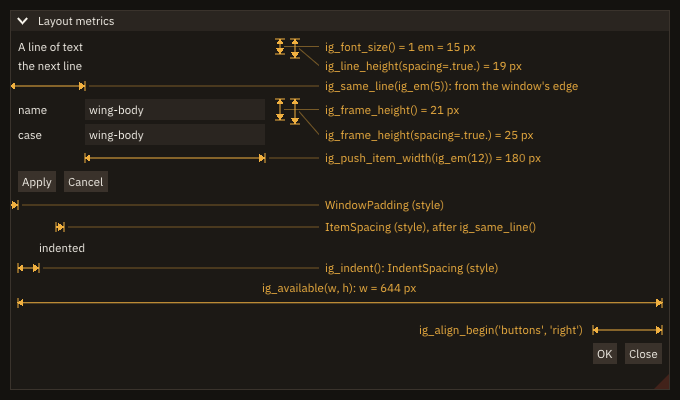
ig_font_size() → real(real64) | The current font's size [pixels]: the size set by app%set_font (or pushed by ig_push_font) times the display's content scale. One em. |
ig_em(x) → real(real64) | x em [pixels], x real64 or int32: x * ig_font_size(). |
ig_line_height([spacing]) → real(real64) | A line of text's height [pixels] (the font size); with spacing=.true., plus the vertical item spacing: from one line's top to the next one's. |
ig_frame_height([spacing]) → real(real64) | A framed widget's height [pixels] (a button, a field: the font size and the frame padding above and below); with spacing=.true., the distance between two rows of fields. |
ig_available(w, h) | The space left [pixels] from where the next item goes to the right edge (w) and the bottom (h) of the window or region's content; in a table cell, to the cell's edge. |
ig_spacing() | A gap of the vertical item spacing. |
ig_dummy(w, h) | An empty item w x h [pixels]: a gap of a given size, a place kept. |
ig_new_line() | End the line after ig_same_line, or an empty line. |
ig_indent([w]), ig_unindent([w]) | Move the left edge of the lines that follow by w [pixels] (default, or 0: the style's IndentSpacing), and back. |
ig_begin_group(), ig_end_group() | Always paired: the items in between count as one item, their bounding rectangle. |
ig_align_begin(id, where [, stat]), ig_align_end() | Always paired: a group centred (where='centre') or right-aligned ('right') in the space left on the line. id names it in its window. |
ig_align_next(width, where [, stat]) | Centre or right-align the next item, width [pixels] wide. |
ig_separator_text(label) | A separator with a title at its left. |
ig_push_item_width(w), ig_pop_item_width() | Always paired: the fields' width [pixels] for every widget up to the pop (negative: up to that distance from the right edge; 0: the window's default). ig_set_next_item_width sets the next one's alone (Tooltips and widths). |
(Dear ImGui's GetFontSize, GetTextLineHeight/GetTextLineHeightWithSpacing, GetFrameHeight/GetFrameHeightWithSpacing, GetContentRegionAvail, Spacing, Dummy, NewLine, Indent/Unindent, BeginGroup/EndGroup, SeparatorText, PushItemWidth/PopItemWidth; ig_em and the alignment calls are FIGURE's, built on BeginGroup and Dear ImGui's storage of the window.)
Sizes in em. A length written in pixels stays the same when the user picks a larger font, and the form's labels outgrow their column. A length written in em, ig_em(12), is twelve times the current font size: it follows app%set_font, ig_push_font and the display's content scale. A form sized in em keeps its proportions at any font size: the column where the fields start (ig_same_line(ig_em(7))), the fields' width (ig_push_item_width(ig_em(12))), the window's width (ig_set_next_window(..., ig_em(24), ...)). The rule: lengths that hold text in em, gaps in the style's own spacing (ig_spacing, ig_same_line()), the window's height left to its content (0 to ig_set_next_window). The style's paddings and spacings are pixels scaled by the display's content scale, not by the font: a window whose height is given in em gets too small for its content at small fonts. ig_font_size() is one em in pixels, and ig_line_height() a line of text's height (with spacing=.true., the distance from one line's top to the next one's).
Gaps and space. ig_dummy(w, h) is an empty item of a given size: a gap, or a place kept for something drawn later; ig_new_line() ends a line begun with ig_same_line, or adds an empty one; ig_available(w, h) gives the space left from where the next item goes to the right and bottom edges, for an item that fills it; ig_separator_text(label) is a separator with a title at its left, the heading of a part of a form.
subroutine label(text)
!< A label, then the next item 7 em from the window's left edge, level with it.
character(len=*), intent(in) :: text !< Label.
call ig_align_text_to_frame_padding()
call ig_text(text)
call ig_same_line(ig_em(7))
endsubroutine labelcall ig_push_item_width(ig_em(12)) ! every field 12 em wide
call ig_separator_text('Grid')
call label('name')
if (ig_input_text('##name', case_name)) continue
call label('cells')
if (ig_input('##cells', cells, step=16_int32)) continue
call ig_separator_text('Run')
call label('CFL')
if (ig_input('##cfl', cfl)) continue
call label('end time [s]')
if (ig_input('##t_end', t_end)) continue
call label('viscous')
if (ig_checkbox('##viscous', viscous)) continue
call ig_pop_item_width()
call ig_spacing()
call ig_align_begin('buttons', 'right') ! at the right edge, whatever their width at this font
if (ig_button('Reset')) continue
call ig_same_line()
if (ig_button('Run')) continue
call ig_align_end()$ ./cb_layout --check
font 15 px: window 24.0 em wide, fields 12.0 em wide from 7.0 em, buttons end 8 px from the right edge (the window padding)
font 24 px: window 24.0 em wide, fields 12.0 em wide from 7.0 em, buttons end 8 px from the right edge (the window padding)Groups. ig_begin_group ... ig_end_group lays its items out as usual and then makes them one item: ig_same_line after the end puts the next item beside the whole group (a column of labels, then a column of fields), and ig_last_item reports the group's rectangle, rect, and its states: hovered when one of its items is, edited when one of them changed. A group may hold any items, groups included; it does not scroll or clip (that is a region).
Alignment and its first frame. A group's width is known only once it is drawn, and its place depends on it. ig_align_begin places the group with the width it had on the previous frame, kept in Dear ImGui's storage of the window under id: on the first frame the group appears at the left, where a group starts, and FIGURE asks for one more frame (with the lazy redraw too), which draws it in place. The same happens on the frame its width changes (a font size, a longer label): one frame drawn with the old width, corrected on the next. A program that draws only when asked sees the correct frame, since the correction is drawn at once; a test that measures the group measures it from the second frame. ig_align_next(width, where) places one item of a width the program knows (a button given a width, a text measured with ig_text_size): right on the first frame. A group or an item wider than the space left is not moved.
Pairing. ig_begin_group/ig_end_group, ig_align_begin/ig_align_end and ig_push_item_width/ig_pop_item_width are always paired, in the same window, and close innermost first, as ig_push_id/ig_pop_id: an end that is not the end of the innermost open scope is refused and reported, and one left open is closed by FIGURE at the end of the frame (Pairing and frames). ig_indent and ig_unindent are not a scope: the program keeps them balanced (each window's indent starts at 0 when it is begun).
Status: an unknown where ('center', 'left'): FIG_ERR_ARGUMENT, ig_align_begin: where is 'centre' or 'right', not 'center' (the group is begun, not moved): the group is begun all the same, so ig_align_end still follows; for ig_align_next, a negative or NaN width too (ig_align_next: width <w> is negative, ig_align_next: width NaN is not a width), and nothing is done. stat is optional (absent: error stop with the message, Error handling). With no frame open or from a task, every call is refused with FIG_ERR_STATE (ig_em: no frame open; the metrics give 0): a size computed before the first next_frame is 0, so compute sizes inside the loop. A refused ig_align_begin begins nothing, so no ig_align_end follows it.
- Window: as described. Headless: the same, content scale 1. Remote: the same; the browser shows the frames as drawn, content scale 1.
- Threads: the frame loop's thread only; a task is refused (
FIG_ERR_STATE), as every drawing call. - What it does not do: no layout engine: no columns or grids that share space by weight (a table does that), no vertical alignment, no automatic wrapping of items onto the next line. The style's paddings and spacings do not follow the font. An aligned group's first frame is drawn at the left (see above).
ig_align_beginaligns within the space left on the current line, not in the window: afterig_same_lineit aligns in what is left of that line.
Progress bars
| Procedure | Notes |
|---|---|
ig_progress_bar(fraction [, label] [, width]) | A bar (ProgressBar) filled to fraction, in [0, 1] (clamped). |
ig_progress_barwriteslabelover the bar (default: the percentage);widthin pixels (default: the width left, negative: up to that distance from the right edge); the height is a field's.- Indeterminate:
fraction< 0 draws a band sliding along the bar, for work whose length is not known (a tool that prints no progress, a task before its first report). FIGURE animates it with the frame clock (Dear ImGui'sGetTime), so it moves only while frames are drawn: request frames while it shows (app%request_frames), or show it while something else keeps the loop busy (a task's reports wake it). An indeterminate bar has no default label: it showslabelonly when one is given. - The fill is in the style's
PlotHistogramcolour, the bar inFrameBg. - The same in window, headless and remote modes; no failure status.
A status bar with a progress bar, along the bottom of the window (bar along a side):
if (ig_begin_side_bar('status', 'bottom', 30.0_real64)) then ! the status bar: a bar along the bottom
   if (running) then
      write(line, '(A,I0,A,I0)') 'running: iteration ', iteration, ' of ', ITERATIONS
      call ig_text(trim(line))
      call ig_same_line(offset=260.0_real64)
      call ig_progress_bar(real(iteration, real64) / real(ITERATIONS, real64), width=200.0_real64)
   elseif (iteration == ITERATIONS) then
      write(line, '(A,ES8.2)') 'done, residual ', residual
      call ig_text(trim(line))
   else
      call ig_text_disabled('ready')
   endif
endif
call ig_end()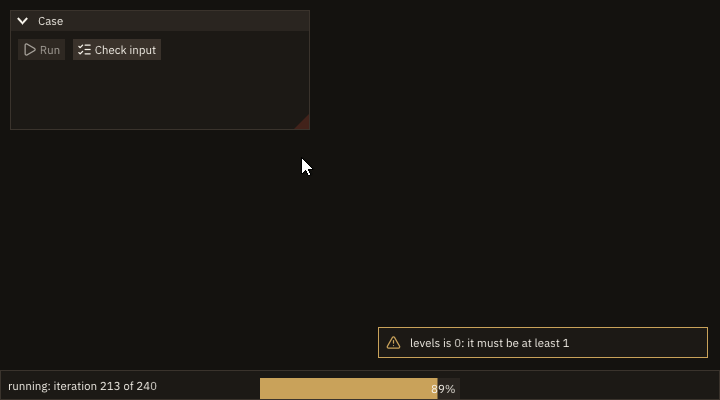
Lists and regions
| Procedure | Notes |
|---|---|
ig_selectable(label, selected [, index] [, stat]) → logical | A line of a list, highlighted when selected; .true. on the frame it is clicked. The program keeps the selection: the line does not change selected. With index, an item of a multi-selection. |
ig_begin_child(id [, width] [, height] [, border]) → logical, ig_end_child() | A region of the window that scrolls on its own. Always paired, like ig_begin/ig_end. width and height in pixels: absent or 0 fills what is left, negative leaves that much. |
A list of thousands of rows draws only those in view with a list_clipper_object, rows of equal height (lines of text, selectables, a table's rows of fields): call clip%begin(n), then do while (clip%step()) draws rows clip%first to clip%last. The loop ends by itself (a few steps); left early, the clipper is closed by the next begin or when it goes out of scope. clip%begin(n [, item_height] [, keep]): clip%item_height is the distance between rows [pixels], given to begin or measured on the first row: Scrolling and focus reaches a row not drawn with it. keep (a row, 0 none) is drawn wherever it is: a multi-selection's sel%keep.
if (ig_begin_child('rows', height=ig_em(6))) then        ! a region that scrolls on its own
   call clip%begin(size(names, kind=int32))
   do while (clip%step())                               ! only the rows in view are drawn
      do i = clip%first, clip%last
         if (ig_selectable(trim(names(i)), i == current)) current = i
      enddo
   enddo
endif
call ig_end_child()
An input-file editor's layout: a list of sections in a narrow region, the section's values and its help in the region beside it. Each region scrolls under the wheel on its own; the window does not move.
if (ig_begin_child('sections', width=160.0_real64, border=.true.)) then
   do k = 1_int32, size(SECTIONS, kind=int32)
      if (ig_selectable(trim(SECTIONS(k)), k == current)) current = k  ! the program keeps the selection
   enddo
endif
call ig_end_child()
call ig_same_line()
if (ig_begin_child('section')) then                ! the rest of the window
   call ig_text(trim(SECTIONS(current)))
   call ig_separator()
   call ig_text('grid file')
   call ig_same_line(offset=160.0_real64)            ! the values in one column
   call ig_text_disabled('CC/cc (default)')
   call ig_text('levels')
   call ig_same_line(offset=160.0_real64)
   call ig_text_colored('[!!] 0: must be at least 1', [0.90_real64, 0.35_real64, 0.30_real64])
   call ig_separator()
   call ig_text_wrapped(trim(HELP(current)))         ! wraps at the region's width
endif
call ig_end_child()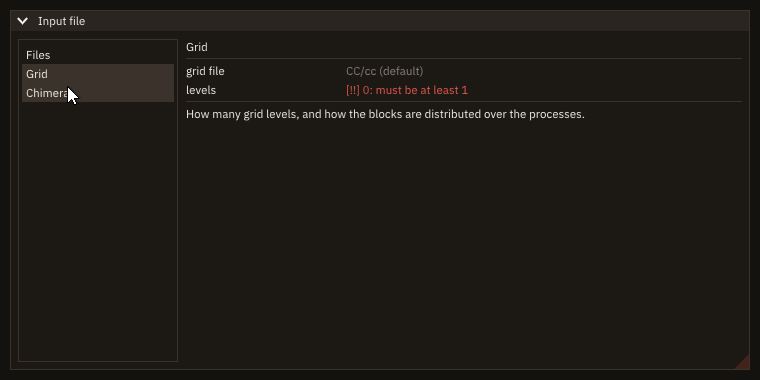
Splitters
Two regions side by side (a tree and a file, a list and its plot) or one above the other share the space through a bar between them that the user drags:
if (ig_begin('Files')) then
   if (ig_begin_child('tree', sizes(1), 0.0_real64, border=.true.)) call ig_text('the tree')
   call ig_end_child()
   call ig_same_line()
   if (ig_splitter('split', sizes)) continue          ! true while dragged: sizes changed
   call ig_same_line()
   if (ig_begin_child('view', sizes(2), 0.0_real64, border=.true.)) call ig_text('the file')
   call ig_end_child()
endif
call ig_end()| Procedure | Notes |
|---|---|
ig_splitter(id, sizes [, vertical] [, min_size] [, stat]) → logical | A bar between two panes; .true. on the frames a drag changes sizes. |
sizes(2),real(real64)[pixels]: the panes' widths (side by side, the default) or heights (vertical=.true.: one above the other), the program's variables, which the drag changes: their sum is kept and neither goes belowmin_size(default: the frame height,ig_frame_height()). The program sizes the panes with them (ig_begin_child(id, sizes(1), 0.0_real64)).- Where. At the cursor, between the panes: side by side, after the first pane and
ig_same_line(), thenig_same_line()again before the second; one above the other, between the two. The bar is the style's item spacing thick and runs to the end of the region in the other direction (give the panes the region's other extent: 0 for a child fills it). It is drawn in the separator's colours; the pointer becomes a resize arrow over it. - Three panes or more: a splitter between each pair, each with its two sizes (
sizes(1:2),sizes(2:3)). idnames the bar in its window: a path finds it ('Files/split'), so a test drags it withtest_dragfrom the centre oftest_item_rect's rectangle.
(Dear ImGui's SplitterBehavior, internal to Dear ImGui: FIGURE's glue calls it.)
docs/examples/src/cb_splitter.F90 drags its bar 60 pixels, headless:
$ ./cb_splitter
panes after a drag of 60 pixels:  300.0  400.0
Status. stat is optional (absent: error stop with the message). FIG_ERR_ARGUMENT: ig_splitter: sizes has two values, the panes on either side; with no frame open, a usage error (FIG_ERR_STATE, ig_splitter: no frame open); from a task, refused (FIG_ERR_STATE). Modes: the same in window, headless and remote modes. Threads: the frame loop's thread.
What it does not do. The window's size is not followed: when the window shrinks, the second pane is what gets narrower (the program rescales sizes if it wants proportions kept). The panes' sizes are not kept between runs (save them with app%save_pref).
Scrolling and focus
| Procedure | Notes |
|---|---|
ig_scroll_here([ratio] [, axis] [, stat]) | After an item: scroll its window or region so that the item's line is at ratio of the visible height (0 top, 0.5 centre, the default, 1 bottom). |
ig_scroll_to_pos(pos [, ratio] [, axis] [, stat]) | Scroll so that the point pos [pixels] of the content, measured from where its first item starts, is at ratio of the visible height: reaches a row that is not drawn. |
ig_get_scroll(y, ymax [, x] [, xmax]) | The scroll [pixels]: y from 0 (top) to ymax (bottom; 0 when nothing scrolls), x from 0 to xmax. |
ig_set_scroll([y] [, x]) | Scroll to y and/or x [pixels], clamped to [0, the largest scroll]. |
ig_focus_here([offset] [, stat]) | Before an item: give it the keyboard focus; a field is then edited as if clicked. offset 1 is the item after the next, -1 the item drawn last. |
ig_default_focus() | After an item: the item that has the focus when its window (a modal, a popup) appears. |
(Dear ImGui's SetScrollHereY/SetScrollHereX, SetScrollFromPosY/SetScrollFromPosX, GetScrollY, GetScrollMaxY, GetScrollX, GetScrollMaxX, SetScrollY/SetScrollX, SetKeyboardFocusHere, SetItemDefaultFocus.) axis is 'y' (the default) or 'x': with 'x', ratios are of the visible width and pos is measured from the content's left edge.
Every one acts on the current window or region: call it between ig_begin and ig_end, or inside the region (ig_begin_child ... ig_end_child) whose content scrolls, not after its end.
One frame late. A scroll asked for is applied when its window or region is begun on the next frame, when its size is known: on the frame of the call nothing moves, ig_get_scroll still gives the old values, and an item's visible and rect (What happened to an item) are the old ones. One frame later the item is in place. ig_set_scroll(y, x) sets the scroll directly, in pixels (clamped to [0, the largest scroll] when applied), and is one frame late in the same way: restoring a list's place read earlier with ig_get_scroll. ig_focus_here is one frame late too: typed keys go into the field from the next frame. Ask once, on the frame something happens (a pick, a button, a dialog that opens), not on every frame: a scroll asked on every frame holds the list still against the user's wheel.
if (ig_selectable(trim(label), i == body_of(block))) call select(first_of(i))
if (reveal .and. i == body_of(block)) call ig_scroll_here(0.5_real64) ! this row to the middle
A list clipper draws only the rows in view (see Lists and regions), so the row to reveal may not be drawn at all, and ig_scroll_here has no item to follow. ig_scroll_to_pos scrolls to a place of the content instead: rows of a clipper are clip%item_height pixels apart (the height of a row and the spacing below it, measured by the clipper on its first row; 0 before the first step), so row i starts at (i - 1) * clip%item_height and its middle is near (i - 0.5) * clip%item_height. Call it after the clipper's loop, inside the region; on the next frame the clipper draws the rows around it.
if (ig_begin_child('blocks')) then
   call clip%begin(BLOCKS)
   do while (clip%step())                                ! the rows in view, not the selected one
      do i = clip%first, clip%last
         write(label, '(A,I0,A,I0)') 'block ', i, '   body ', body_of(i)
         if (ig_selectable(trim(label), i == block)) call select(i)
      enddo
   enddo
   if (reveal .and. block > 0_int32) &                 ! row `block` starts (block - 1) rows down
      call ig_scroll_to_pos((real(block, real64) - 0.5_real64) * clip%item_height, 0.5_real64)
   if (ig_shortcut('ctrl+home', scope='global')) call ig_set_scroll(y=0.0_real64) ! the top, on the next frame
   call ig_get_scroll(scroll, scroll_max)               ! where the list is: 0 (top) to scroll_max (bottom)
endif
call ig_end_child()
Focus and dialogs. ig_focus_here before a field makes it the field being edited, as a click would, and scrolls its window to show it: the user types at once. Call it on one frame (a dialog's first frame, or the frame a button asks for it). ig_default_focus after an item marks the item a modal or a popup starts from: on the frame the window appears it gets the keyboard focus (on other frames the call does nothing, so it may be made on every frame). It is focused, not activated: enter or space presses a button (Dear ImGui's keyboard navigation, on in FIGURE), and a field is edited after enter. Put it on the safe choice of a dialog that destroys something ("Keep", not "Delete"); without it, the first item of the window has the focus. A modal ignores the input of the windows behind it, so a field outside the modal cannot be focused while it is open. Shortcuts follow the focus: a chord with the default 'focused' scope fires in the window that has it (Shortcuts).
subroutine goto_dialog()
!< The "Go to block" dialog: its field has the focus when it opens; enter goes to the block typed.
integer(int32) :: k !< The block typed.
if (ig_begin_popup_modal('Go to block')) then
   call ig_text_disabled('a block from 1 to 2000, then enter')
   if (focus_field) call ig_focus_here()                ! once: the next item takes the keys
   focus_field = .false.
   if (ig_input_text('block', goto_text)) continue
   s = ig_last_item()
   if (s%deactivated_after_edit) then                   ! enter (or a click elsewhere)
      read(goto_text, *, iostat=ios) k
      if (ios == 0 .and. k >= 1_int32 .and. k <= BLOCKS) call select(k)
      call ig_close_current_popup()
   endif
   if (ig_button('Cancel')) call ig_close_current_popup()
   call ig_end_popup()
endif
endsubroutine goto_dialog
The program checks itself headless (cb_reveal --check picks and types):
$ ./cb_reveal --check
frame 8: block 0 (body 0): not drawn, the list 0% down
frame 9: block 1240 (body 19): not drawn, the list 0% down
frame 10: block 1240 (body 19): in the middle, the list 62% down
frame 25: block 1873 (body 29): in the middle, the list 94% down
frame 50: block 333 (body 5): in the middle, the list 16% down
frame 60: block 333 (body 5): not drawn, the list 0% down
Frame 9 is the frame of the pick: the selection is set and the scroll asked for, and block 1240 is not drawn; on frame 10 the clipper draws it in the middle of the list.
Status: a ratio outside [0, 1] (NaN included), an unknown axis, or an offset below -1: nothing is done, FIG_ERR_ARGUMENT in stat, with the messages ig_scroll_here: ratio 1.5 is not in [0, 1], ig_scroll_to_pos: unknown axis "z" ('y' or 'x'), ig_focus_here: offset -2 is below -1; stat is optional (absent: error stop with the message, Error handling). With no frame open, or from a task, each is refused with FIG_ERR_STATE (ig_scroll_here: no frame open): ig_get_scroll gives zeros; without stat the error is reported by the next app%next_frame (Pairing and frames). None of them opens a scope.
- Window: as described. Headless: the same; the focus takes the keys of
test_type,test_key. Remote: the same, the browser's keyboard. - Threads: the frame loop's thread only; a task is refused (
FIG_ERR_STATE), as every drawing call. - What it does not do: no scroll to an item by its label, or to a row of a clipper by its index (the program computes the place); no smooth scrolling (the list jumps); no scroll of a window other than the current one; no focus of a window (that is
ig_focus_window).ig_scroll_herefollows the last line, not the last item: afterig_same_line, the line of both. A table withImGuiTableFlags_ScrollYscrolls inside itself: call these betweenig_begin_tableandig_end_tableto scroll it.
Groups: headers, tabs, tables
| Procedure | Pairing |
|---|---|
ig_collapsing_header(label [, default_open]) | .true. while open: draw what it hides inside the if. No end call. |
ig_begin_tab_bar(id), ig_end_tab_bar() | End only when the begin returned .true.. |
ig_begin_tab(label [, open]), ig_end_tab() | .true. for the selected tab: draw its content, then end it; end only then. With open, a close button. |
ig_begin_table(id, columns [, ...]), ig_end_table() | End only when the begin returned .true.; the rest in Tables. |
ig_push_id(id), ig_pop_id() | Always paired: an id scope, by character or int32. |
ig_begin_disabled([disabled]), ig_end_disabled() | Always paired: the widgets in between are greyed out and ignore input. |
ig_collapsing_header shows or hides what follows it, a section of a form folded away; ig_begin_tab_bar opens a bar whose tabs (ig_begin_tab, true for the selected one) each hold a page of widgets, one shown at a time; a disabled block (ig_begin_disabled ... ig_end_disabled) holds settings that do not apply now, and with disabled=.false. draws them as usual, so one pair serves both states.
Tabs and tables follow Dear ImGui's rule, which differs from windows: ig_end follows every ig_begin, whatever it returned, while ig_end_tab, ig_end_tab_bar and ig_end_table follow only a begin that returned .true.. FIGURE checks both rules, and the nesting of the scopes, at every end: Pairing and frames.
if (ig_begin_tab('Files')) then
   if (ig_input_text('grid file', grid_file, flags=ImGuiInputTextFlags_CharsNoBlank)) continue
   call ig_tooltip('Root name of the grid files (no blanks)')
   if (ig_input_text('output directory', output_dir, hint='OUT/')) continue
   if (ig_input('blocks', blocks, step=1_int32)) blocks = max(blocks, 1_int32)
   if (ig_combo('scheme', scheme, ['centred 2nd', 'TVD        ', 'WENO 5     '])) continue
   if (ig_collapsing_header('Restart')) then
      if (ig_checkbox('restart from a solution', restart)) continue
      call ig_begin_disabled(.not. restart)     ! greyed out until the box is ticked
      if (ig_input_text('restart file', restart_file)) continue
      call ig_end_disabled()
   endif
   call ig_end_tab()
endif
Tables
| Procedure | Notes |
|---|---|
ig_begin_table(id, columns [, flags] [, height] [, freeze_rows] [, freeze_cols] [, sortable] [, hideable] [, reorderable] [, scroll_x] [, stat]) → logical | A table of columns columns (1 to 511); .true.: fill it, then ig_end_table(). |
ig_table_setup_column(label [, width] [, stretch] [, sort] [, default_sort] [, descending] [, hidden] [, no_hide] [, stat]) | Declares the next column, before the first row: its header label, a fixed width [pixels] or a stretch weight, how it sorts and hides. |
ig_table_headers_row() | A row with the labels of the declared columns: a click sorts, a drag reorders, a right click opens the columns' menu. |
ig_table_next_row(), ig_table_next_column(), ig_table_set_column(column) | Starts a row; moves to the next cell, or to cell column (1-based); the widgets that follow go in it. |
ig_table_sort(column, descending [, stat]) → logical | .true. on the frame the user asks a new order; column (1-based) and descending give it, on every frame. The program sorts. |
ig_table_row_color(rgba [, cell] [, stat]) | A colour behind the current row, or behind its cell cell, on this frame. |
ig_table_hovered_column([stat]) → integer(int32) | The column under the pointer, headers included; 0 when none. |
ig_table_column_enabled(column, enabled [, stat]) | Shows or hides a column of a hideable table from the program, from the next frame. |
ig_tree_node(... [, span_all_columns]) | A tree node whose row is its hit area across every column (Trees). |
(Dear ImGui's BeginTable, TableSetupColumn, TableSetupScrollFreeze, TableHeadersRow, TableGetSortSpecs, TableSetBgColor, TableGetHoveredColumn, TableSetColumnEnabled; freeze_rows and freeze_cols are TableSetupScrollFreeze's rows and columns.)
Filling a table. Row by row: ig_table_next_row, then ig_table_next_column before each cell's widgets (or ig_table_set_column(column), 1-based). Before the first row, one ig_table_setup_column per column, in order, then ig_table_headers_row for their labels. A column is fixed (width [pixels]) or stretched (stretch, a weight [relative, > 0]: the stretched columns share the width left in proportion; default weight 1). Widgets repeated on every row repeat their labels: open an id scope per row with ig_push_id(row), so that row 2's field is not row 1's (see Labels and identifiers).
if (ig_begin_tab('Boundary conditions')) then
   if (ig_begin_table('patches', 3_int32)) then
      call ig_table_setup_column('face', width=90.0_real64)
      call ig_table_setup_column('condition')
      call ig_table_setup_column('block', width=70.0_real64)
      call ig_table_headers_row()
      do r = 1_int32, nrows
         call ig_push_id(r)                     ! every row repeats the same widgets
         call ig_table_next_row()
         call ig_table_next_column()
         call ig_set_next_item_width(-1.0_real64)
         if (ig_combo('##face', face(r), FACES)) continue
         call ig_table_next_column()
         call ig_set_next_item_width(-1.0_real64)
         if (ig_combo('##kind', cond(r), KINDS)) continue
         call ig_table_next_column()
         call ig_set_next_item_width(-1.0_real64)
         if (ig_input_text('##block', block_id(r))) continue
         call ig_pop_id()
      enddo
      call ig_end_table()
   endif
   if (ig_button('add a row') .and. nrows < MAX_ROWS) nrows = nrows + 1_int32
   call ig_end_tab()
endif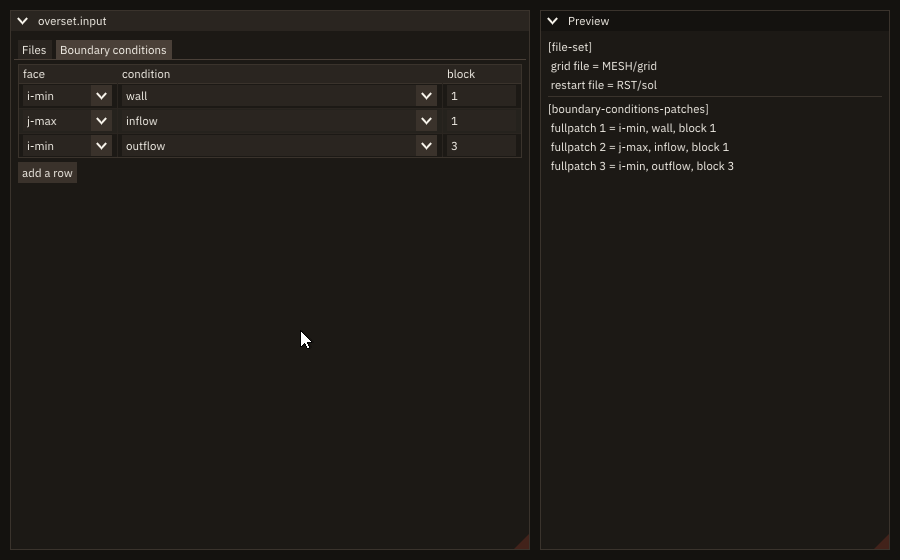
Flags. The default flags give borders, alternating row colours and resizable columns. flags replaces them with ImGuiTableFlags_* combined by ior (every one of Dear ImGui's is exported: Borders, BordersInnerV, RowBg, Resizable, ScrollY, ScrollX, Sortable, SortMulti, SortTristate, Hideable, Reorderable, HighlightHoveredColumn, NoSavedSettings, the Sizing* policies, ...); the logical arguments then set (.true.) or clear (.false.) one flag each, over the default or over flags: sortable, hideable, reorderable, scroll_x.
Sizing policies. ImGuiTableFlags_SizingFixedFit gives each column its content's width, SizingFixedSame the widest content's, SizingStretchSame an equal share of the table, and SizingStretchProp a share in proportion to its content. A SizingStretchProp table works with the floating-point traps of a debug build (-ffpe-trap=invalid): in its first frame, before its columns have widths, Dear ImGui divides 0 by 0, a line FIGURE patches (Known issues); the columns then start equal and take their proportions from the second frame.
A fixed header. freeze_rows=1 keeps the headers row in view while the rows scroll; freeze_cols=n keeps the first n columns in view while the table scrolls sideways. A frozen row turns ImGuiTableFlags_ScrollY on and a frozen column ImGuiTableFlags_ScrollX (Dear ImGui freezes only what scrolls). A table that scrolls is a region of its own: height [pixels] sets its height; without it, it fills the height left in the window. Long tables draw only the rows in view with a list_clipper_object between the headers row and ig_end_table: the clipper counts the rows below the frozen header, so row 1 is the first row of data.
if (ig_begin_table('blocks', 5_int32, height=ig_em(18.0_real64), freeze_rows=1_int32, sortable=.true., &
                   hideable=.true.)) then
   call ig_table_setup_column('block', width=ig_em(4.0_real64), default_sort=.true.)
   call ig_table_setup_column('body', stretch=1.0_real64)
   call ig_table_setup_column('cells', width=ig_em(6.0_real64), descending=.true.) ! largest first
   call ig_table_setup_column('residual', width=ig_em(7.0_real64), descending=.true.)
   call ig_table_setup_column('patch', width=ig_em(6.0_real64), hidden=.true.)
   call ig_table_headers_row()                           ! frozen: it stays while the rows scroll
   if (ig_table_sort(column, descending)) call sort_rows(column, descending) ! a new order asked
   call clip%begin(ROWS)
   do while (clip%step())
      do i = clip%first, clip%last
         k = order(i)                                    ! the row shown i is block k
         call ig_table_next_row()
         if (residual(k) > TOLERANCE) call ig_table_row_color(WARN)
         call ig_table_next_column()
         write(text, '(I0)') k
         call ig_text(trim(text))
         call ig_table_next_column()
         call ig_text(trim(bodies(k)))
         call ig_table_next_column()
         write(text, '(I0)') cells(k)
         call ig_text(trim(text))
         call ig_table_next_column()
         write(text, '(ES9.2)') residual(k)
         if (residual(k) > TOLERANCE) then
            call ig_text('! '//trim(adjustl(text)))      ! a mark with the colour, not the colour alone
         else
            call ig_text_disabled(trim(adjustl(text)))
         endif
         call ig_table_set_column(5_int32)                ! a cell by its column: the patch
         call ig_text(trim(patches(k)))
      enddo
   enddo
   over_column = ig_table_hovered_column()               ! 0 when the pointer is over no column
   call ig_end_table()
endif
Sorting is the program's job. A click on a header asks an order; ig_table_sort reports it and FIGURE moves nothing. It returns .true. on the frame the order is asked: on the first frame (the default order: the column declared default_sort, or the first one), and after each click on a header (the same header again: the other direction; descending on a column makes its first click largest first). column is the column's place in the declaration, whatever order the user dragged the columns into. With ImGuiTableFlags_SortTristate a third click on the header asks for no order: column is 0, and the program shows its rows in their own order. A column declared with ig_table_setup_column(..., sort=.false.) does not sort on a click of its header. On a .true. frame the program sorts, then draws the rows in the new order. Sort a permutation of the row indices, not the data: the arrays stay where they are (other code indexes them, the selection is a block number, not a row), only order(:) moves, and the rows are drawn as k = order(i). A stable sort (rows equal in the key keep their order) makes the column sorted before a second key.
subroutine sort_rows(key, down)
!< Sort the permutation `order` by column `key` (`down`: largest first); the data do not move. An insertion sort,
!< stable: rows equal in `key` keep the order they had, so a second key is the column sorted before.
integer(int32), intent(in) :: key  !< Column, 1-based (0: no order, the blocks' own).
logical,        intent(in) :: down !< Descending.
integer(int32)             :: a    !< Position.
integer(int32)             :: b    !< Position.
integer(int32)             :: moving !< The index being placed.

if (key == 0_int32) then
   order = [(a, a = 1_int32, ROWS)]
   return
endif
do a = 2_int32, ROWS
   moving = order(a)
   b = a - 1_int32
   do while (b >= 1_int32)
      if (.not. before(moving, order(b), key, down)) exit
      order(b + 1_int32) = order(b)
      b = b - 1_int32
   enddo
   order(b + 1_int32) = moving
enddo
endsubroutine sort_rows

logical function before(p, q, key, down)
!< Block `p` goes before block `q` in the order of column `key`.
integer(int32), intent(in) :: p    !< A block.
integer(int32), intent(in) :: q    !< Another block.
integer(int32), intent(in) :: key  !< Column.
logical,        intent(in) :: down !< Descending.

select case (key)
case (1_int32)
   before = merge(p > q, p < q, down)
case (2_int32)
   before = merge(bodies(p) > bodies(q), bodies(p) < bodies(q), down)
case (3_int32)
   before = merge(cells(p) > cells(q), cells(p) < cells(q), down)
case (4_int32)
   before = merge(residual(p) > residual(q), residual(p) < residual(q), down)
case default
   before = merge(patches(p) > patches(q), patches(p) < patches(q), down)
endselect
endfunction before
The program checks itself headless (clicks on the header, then the wheel):
$ ./cb_table_sort --check
frame 5: first frame, the default order: column 1, descending F; blocks 1, 2, 3, 4, 5
frame 13: click on cells: column 3, descending T; blocks 107, 182, 24, 73, 102
   cells of the first row: 118016, the largest: 118016
frame 21: second click on cells: column 3, descending F; blocks 25, 72, 97, 39, 58
frame 40: the wheel scrolled to row 24, the header in place: T
frame 40: the pointer over column 3
frame 50: the patch column shown, the pointer over column 5
Row colours. ig_table_row_color(rgba) in a row colours it on this frame, over the alternating background; cell=c colours only its cell in column c. rgba is [r, g, b] or [r, g, b, a] in [0, 1]. Pair the colour with a mark or a word (the residual's ! above): a colour alone does not reach every reader.
Hidden columns. In a hideable table, a right click on the headers row opens Dear ImGui's menu of the columns, where the user shows and hides them. hidden=.true. hides a column the first time the table is shown, no_hide keeps one shown, and ig_table_column_enabled(column, enabled) shows or hides one from the program (from the next frame). A hidden column draws nothing: the widgets in its cells are skipped. Dear ImGui keeps the widths, the order, the sort and the hidden columns from frame to frame, by the table's id, and across runs in the settings file when the program keeps one (app%init(..., ini_file=...); none by default): default_sort and hidden act only on a table it has not seen. ImGuiTableFlags_NoSavedSettings keeps a table out of the file.
The column under the pointer. ig_table_hovered_column() inside the table: 1 to columns over a column (its header included; the column's place in the declaration, as ig_table_sort's), 0 elsewhere. With ig_begin_popup_context after a cell's widget it tells which column a right click was on (Context menus).
- Pairing:
ig_end_tableonly after a trueig_begin_table; the scope record checks it, and the trees, popups and id scopes inside it close first (Pairing and frames).ig_table_setup_columnbefore the first row;ig_table_sortafter the lastig_table_setup_column(before or after the headers row);ig_table_row_colorafterig_table_next_row, in the row it colours. - Status: the
statof each call is optional. An argument out of range (columnsoutside 1 to 511,freeze_rowsoutside 0 to 127,freeze_colsoutside 0 tocolumns,widthandstretchtogether, a negative width, a weight not above 0, a colour of the wrong size or outside [0, 1], acellorcolumnoutside 1 to the columns) givesFIG_ERR_ARGUMENT, nothing done (a begin returns.false.): absentstat,error stopwith the message. A call out of its place (ig_table_sort,ig_table_row_color,ig_table_hovered_column,ig_table_column_enabledwith no table open;ig_table_sortin a table notsortableor before every column is declared;ig_table_column_enabledin a table nothideable;ig_table_row_colorbefore the first row) is a usage error,FIG_ERR_STATE: absentstat, reported by the nextapp%next_frameas the pairing errors are. The messages are in Error handling. - Window, headless, remote: the same; headless,
test_clickon a header sorts andtest_wheelover the rows scrolls them. - Threads: the frame loop's thread only; a task is refused (
FIG_ERR_STATE). - What it does not do: no sorting of the program's rows (FIGURE reports the order; the program sorts); with
ImGuiTableFlags_SortMultionly the first key is reported (the others: rawigTableGetSortSpecs); no row selection (anig_selectablein the first cell, as in Lists and regions); no editing of a cell in place (put a field in it); the clipper needs rows of equal height.
Trees
| Procedure | Notes |
|---|---|
ig_tree_node(label [, default_open] [, selected] [, leaf] [, span_full_width] [, clicked] [, span_all_columns] [, index] [, stat]) → logical | A node of a tree (TreeNodeEx); .true. while open: draw its children, then ig_tree_pop. |
ig_tree_pop() | Closes the children of a node: only after ig_tree_node returned .true.. |
ig_set_next_item_open(open [, always]) | Opens or closes the next node from the program: the first time it is shown, or with always on this frame whatever its state. |
The pairing rule is the tabs' and the tables': ig_tree_pop follows only a node that returned .true.. A leaf (leaf=.true.) has no arrow and is always open, so it too is popped: if (ig_tree_node(name, leaf=.true.)) call ig_tree_pop().
Choosing is not expanding. The arrow, or a double-click on the label, opens and closes a node; a single click on the label sets clicked (Dear ImGui's IsItemClicked without IsItemToggledOpen) and leaves the node as it was. The program keeps what is chosen, as with ig_selectable, and shows it with selected. default_open opens a node the first time it is shown; span_full_width makes the highlight and the click area as wide as the window, or as the cell in a table. ig_set_next_item_open also opens a collapsing header; an "expand all" button calls it with always=.true. before each node, on the frame of the press.
Values in columns. A tree goes in a table's first column: each node and each child is a row (ig_table_next_row), the node's values in the next cells, and the children's rows come between the node and its pop, so the first column keeps their indentation. span_all_columns=.true. (Dear ImGui's ImGuiTreeNodeFlags_SpanAllColumns) makes the node's whole row its hit area and its highlight: a click on a value chooses the node, and selected colours the row across every column, as in a file manager's tree view. Text in the other cells leaves the click to the node; the node covers the row, so a row whose cells hold widgets (a field, a button) keeps the node to its own cell (span_full_width, or no span).
if (ig_begin_table('grids', 3_int32)) then
   call ig_table_setup_column('grid')
   call ig_table_setup_column('cells', width=90.0_real64)
   call ig_table_setup_column('first patch', width=110.0_real64)
   call ig_table_headers_row()
   expand = ig_shortcut('ctrl+e')                         ! ctrl+e: every body open
   do b = 1_int32, BODIES
      call ig_table_next_row()
      call ig_table_next_column()
      if (expand) call ig_set_next_item_open(.true., always=.true.) ! on this frame, whatever its state
      open = ig_tree_node(trim(BODY(b)), default_open=(b == 1_int32), span_all_columns=.true.)
      call ig_table_next_column()
      write(line, '(I0)') sum(CELLS(FIRST(b):LAST(b)))     ! the body's values, open or not
      call ig_text(trim(line))
      if (open) then
         do k = FIRST(b), LAST(b)                          ! the children: one row each
            call ig_push_id(k)
            call ig_table_next_row()
            call ig_table_next_column()
            write(line, '(A,I0)') 'block ', k
            if (ig_tree_node(trim(line), leaf=.true., selected=(k == chosen), span_all_columns=.true., &
                             clicked=clicked)) call ig_tree_pop()
            if (clicked) chosen = k                         ! a click on the row chooses, the arrow expands
            call ig_table_next_column()
            write(line, '(I0)') CELLS(k)
            call ig_text(trim(line))
            call ig_table_next_column()
            call ig_text(trim(PATCH(k)))
            call ig_pop_id()
         enddo
         call ig_tree_pop()                                ! only after a true node
      endif
   enddo
   call ig_end_table()
endif
if (chosen > 0_int32) then
   write(line, '(A,I0,A,I0,A)') 'block ', chosen, ' chosen: ', CELLS(chosen), ' cells'
   call ig_text(trim(line))
else
   call ig_text_disabled('click a block to choose it')
endif
Large trees. A list_clipper_object needs rows of equal height in one run, and an open node in the middle of the list breaks the run: a tree cannot be clipped as a whole. The children of one node can: a node with thousands of blocks clips them between the node and its pop. A deep tree with many open nodes is flattened by the program: it keeps the open state of each node, builds the list of the visible rows (node or child, with its depth) when a node opens or closes, and clips that list.
if (ig_tree_node('background, 20000 blocks')) then
   if (ig_begin_child('background', height=110.0_real64)) then
      call clip%begin(BACKGROUND)                           ! children of equal height: only those in view
      do while (clip%step())
         do k = clip%first, clip%last
            write(line, '(A,I0)') 'block ', k
            if (ig_tree_node(trim(line), leaf=.true.)) call ig_tree_pop()
         enddo
      enddo
   endif
   call ig_end_child()
   call ig_tree_pop()
endif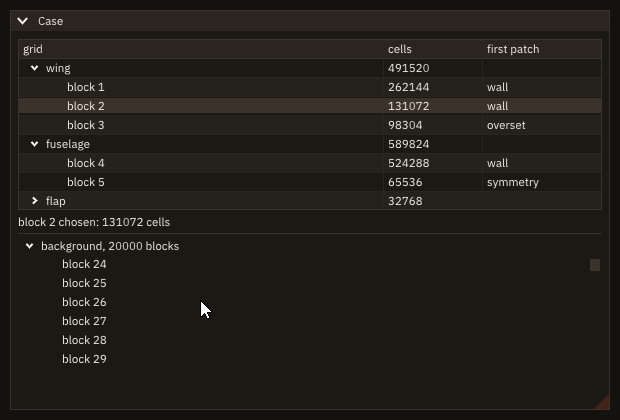
Trees are drawn the same in window, headless and remote modes; they have no failure status.
Numbers
| Procedure | Notes |
|---|---|
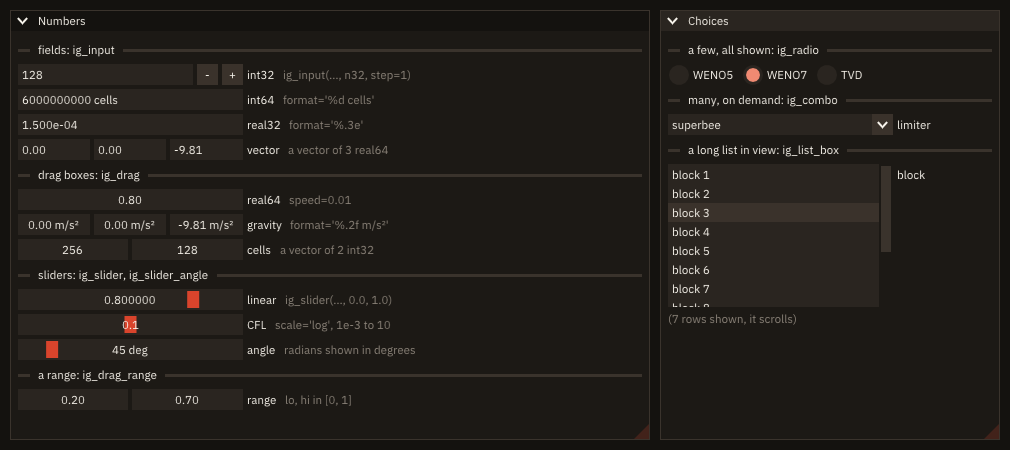
ig_input(label, value [, step] [, format] [, enter_returns] [, read_only] [, stat]) → logical | A field, typed (InputScalar, InputScalarN); step adds - and + buttons. |
ig_drag(label, value [, speed] [, vmin] [, vmax] [, format] [, scale] [, clamp] [, stat]) → logical | A drag box: dragged sideways, or typed after a double click (DragScalar, DragScalarN). |
ig_slider(label, value, vmin, vmax [, format] [, scale] [, clamp] [, stat]) → logical | A slider from vmin to vmax; ctrl-click types a value (SliderScalar, SliderScalarN). |
ig_slider_angle(label, radians [, deg_min] [, deg_max] [, format] [, stat]) → logical | An angle kept in radians, shown and set in degrees (SliderAngle). |
ig_drag_range(label, lo, hi [, speed] [, vmin] [, vmax] [, format] [, stat]) → logical | Two drag boxes for the ends of a range, lo <= hi kept (DragFloatRange2, DragIntRange2, for every kind). |
Each returns .true. on the frame the user changed the value, and writes the value back in place (Values are your variables).
Kinds. value is integer(int32), integer(int64), real(real32) or real(real64): the kind selects the specific procedure, and Dear ImGui edits the value in that kind (no conversion through another one: an int64 holds 6000000000, a real64 keeps its 15 digits). step, vmin, vmax, lo and hi have the kind of value (vmin=0.0_real32 for a real32); speed is real(real64) for every kind. ig_slider_angle takes real32 or real64, its ends of the same kind.
Vectors. A value of rank 1 is one widget of size(value) boxes side by side, sharing the item width (Tooltips and widths) and one label: a direction, a point, the cells of a grid. The bounds and the step are the same for every component; the call is .true. when any component changed, and a component typed into changes only itself. A vector of no components is refused.
call ig_set_next_item_width(width)
if (ig_drag('gravity', g, speed=0.01_real64, vmin=-50.0_real64, vmax=50.0_real64, format='%.2f m/s²')) then
   continue                                     ! g changed: the program reacts here
endif
call ig_item_rect(g_at(1), g_at(2), g_at(3), g_at(4))
call ig_set_next_item_width(width)
if (ig_input('probe', probe, format='%.3f m')) continue
call ig_item_rect(probe_at(1), probe_at(2), probe_at(3), probe_at(4))
call ig_set_next_item_width(width)
if (ig_slider_angle('wind from', wind, 0.0_real64, 360.0_real64)) continue ! radians, shown in degreesFormats. format is a C printf format of one value of the kind's family, checked before Dear ImGui sees it: for a real, one conversion f, e, g or a (or F, E, G, A); for an integer, one conversion d, i or u; flags, width and precision as digits, and any other text around it, which is printed as it is: '%.2f m/s²' shows a unit in every box. An int64 takes the formats of an int32 ('%d'): FIGURE adds the length modifier C needs ('%lld'), and refuses one written by the program (length modifiers are refused for every kind). A format of the other family ('%f' for an integer, '%d' for a real), with no conversion, with more than one, or with a conversion longer than 24 characters is refused with FIG_ERR_ARGUMENT: nothing is drawn and the value is left alone. The full rule: Formats.
| Format | Shows 42, 1234.5678 | Resembles Fortran's |
|---|---|---|
'%d' | 42 | I0 |
'%5d', '%05d' | 42, 00042 | I5, I5.5 |
'%+d' | +42 | SP, I0 |
'%d cells' | 42 cells | I0, ' cells' |
'%.3f' | 1234.568 | F0.3 |
'%10.3f' | 1234.568 | F10.3 |
'%.2e' | 1.23e+03 | ES9.2 (C writes the exponent with a lower-case e and at least two digits) |
'%.4g' | 1235 | G0.4, roughly (C drops trailing zeros) |
'%.0f%%' | 1235% | F0.0, '%' |
Default formats: ig_input '%d' for integers and '%.6g' for reals; the drags and sliders Dear ImGui's, '%d' for integers, '%.3f' for real32 and '%f' (6 decimals) for real64. Drags and sliders round a real to the precision the format shows ('%.2f': to hundredths): the value set is the value shown. A field does not round what is typed into it.
Speed, bounds, scale, clamp. A drag changes value by speed per pixel [value units / pixel] (default 1: pass the step the value needs, speed=0.01 for a value of order 1); shift multiplies it by 10, alt divides it by 100. vmin and vmax stop a drag (vmin <= vmax); without them a drag runs to half the range of the kind. A slider goes from vmin at its left end to vmax at its right one; vmin > vmax reverses it. scale='log' spaces the values logarithmically: equal distances multiply the value by equal factors, and the middle of a slider from 1e-3 to 10 is 0.1, the geometric mean of its ends (a CFL number, a tolerance); a drag needs vmin and vmax for it. Ends of opposite signs go through a small band around zero, whose width follows the format's precision (Dear ImGui's logarithmic zero). A drag or a slider stops at its ends, but a value typed into it (a double click on a drag box, a ctrl-click on a slider) is kept as typed unless clamp=.true. (Dear ImGui's ImGuiSliderFlags_AlwaysClamp). The ends of a slider are within half the range of the kind (Dear ImGui's limit: ±1073741823 for an int32).
Fields. step (> 0) adds - and + buttons; ctrl with a button steps by 10 * step. A typed value is applied when the field is left (enter, tab, a click elsewhere), and the call is .true. on that frame or when a button is pressed. With enter_returns=.true. it is .true. only on the frame enter is pressed; a field left otherwise still changes its value, so read the value, or take ig_last_item()'s deactivated_after_edit to act on it (What happened to an item). read_only=.true. shows the value, which the user can select and copy, not edit; the buttons are disabled.
Angles. ig_slider_angle keeps the angle in radians in the program and shows it in degrees, '%.0f deg' by default (format is a format of the degrees); deg_min and deg_max are in degrees, default -360 and 360. Dear ImGui edits it in single precision: a real64 angle is written only on the frames the user changes it, so an angle the user does not touch keeps all its digits.
Ranges. ig_drag_range draws two drag boxes, lo and hi, then the label: lo stays between vmin and hi, hi between lo and vmax, values typed into the boxes too. Given with lo > hi, it is refused.
- Pairing and frame rules: none opens a scope; call them in a window, between
next_frameand the next one.ig_last_item()after one describes it (a vector or a range: the whole group of boxes). - Status: the
statof each call is optional. A wrong argument givesFIG_ERR_ARGUMENT, nothing drawn, the value untouched (absentstat:error stopwith the message): a format refused as above, an unknownscale, a'log'drag without both bounds, a bound NaN or beyond half the range of the kind,vmin > vmaxfor a drag,lo > hi, a speed not above 0 or beyond single precision, an angle or an end in degrees beyond single precision, a vector of no components. The messages are in Error handling. With no frame open, or from a task, each call is refused withFIG_ERR_STATE, as every drawing call. - Window, headless, remote: the same; headless,
test_dragdrags a box or a slider,test_clickandtest_typetype into a field (Testing). - Threads: the frame loop's thread only; a task is refused (
FIG_ERR_STATE). - What they do not do: no bounds per component (one
vminandvmaxfor the whole vector); no unit conversion (the format shows a unit; the value is in the unit the program keeps); no unsigned or 8- and 16-bit integers, no vertical sliders, no wrap-around drags, no colour markers on the components (rawigDragScalar,igVSliderScalarwith theImGuiDataType_*andImGuiSliderFlags_*constants, Raw bindings);ig_inputdoes not round what is typed;ig_slider_angleis single precision while it is dragged.
Changed in v0.4.0
ig_input and ig_slider were int32 and real64 fields and int32, real32 and real64 sliders with no format; the old calls compile and behave as before. New: every kind, vectors, format (checked) and stat for every kind, scale and clamp. A slider whose ends are beyond half the range of the kind was passed to Dear ImGui, whose check is an assertion: the program aborted inside imgui_widgets.cpp. From v0.4.0 it is refused first, FIG_ERR_ARGUMENT. The procedures moved from figure_imgui to figure_numbers: a program that names figure_imgui in a use for them takes them from figure instead.
Choices
| Procedure | Notes |
|---|---|
ig_radio(label, current, value [, stat]) → logical | One option of a group sharing current: drawn chosen when current == value; a click sets current = value (RadioButton). |
ig_combo(label, current, items) → logical | The chosen item of items, in a list that opens on a click (Controls). |
ig_list_box(label, current, items [, height] [, stat]) → logical | items in a box that stays open and scrolls; current the index chosen (BeginListBox, ListBox). |
Radio buttons, a combo or a list box. Radio buttons show every option at once and take one click: a few options (two to five), each worth seeing, as the reconstruction scheme of a solver. A combo takes one line whatever the number of options, and two clicks: many options, or a form short of space, as a limiter among seven. A list box keeps several options in view and scrolls through the rest: a long list the user picks from again and again, as the blocks of a grid or the cases of a study.
call ig_separator_text('scheme')
if (ig_radio('WENO5', scheme, 1_int32)) call said('scheme')
call ig_same_line()
if (ig_radio('WENO7', scheme, 2_int32)) call said('scheme')
call ig_same_line()
if (ig_radio('TVD', scheme, 3_int32)) call said('scheme')Radio buttons. One call per option, all with the same current and each with its own value; ig_same_line puts them on one row. A click sets current = value and returns .true. on that frame, also when the option was chosen already (as Dear ImGui's RadioButton); the click is reported as an edit by ig_last_item. current equal to no value shows none chosen.
List boxes. current is the index of the chosen item, 1 to size(items); any other value shows none chosen. A pick sets it and returns .true. on that frame, reported as an edit by ig_last_item. height [pixels] sets the box's height; 0 (default) fits up to 7 items (a list of 3 items gets 3 rows and a quarter); a negative height fills the window's height left but -height pixels. Only the rows in view are drawn, so a list of thousands costs what the rows on screen cost; the chosen item is always submitted, so that keyboard navigation starts from it. Trailing blanks of the items are not shown, and items may repeat a text (they are told apart by their index), as in ig_combo.
if (scheme == 3_int32) then                          ! a limiter only for TVD
   call ig_set_next_item_width(ig_em(10.0_real64))
   if (ig_combo('limiter', limiter, limiters)) call said('limiter')
endif
call ig_separator_text('applied to')
call ig_set_next_item_width(ig_em(10.0_real64))
if (ig_list_box('block', block, blocks, height=ig_em(9.0_real64))) call said('block')
The program checks itself headless (a click on TVD, the wheel over the list, a click on its top row):
$ ./cb_scheme --check
frame 9: scheme TVD
frame 29: block 17 (scrolled, then picked)- Pairing and frame rules: none opens a scope (the list box's begin and end are inside
ig_list_box). - Status:
statis optional.ig_list_boxwith a NaNheight, or one beyond single precision, givesFIG_ERR_ARGUMENT(absentstat:error stop);ig_radiocannot fail. With no frame open, or from a task, each is refused withFIG_ERR_STATE. - Window, headless, remote: the same; headless,
test_clickclicks an option andtest_wheelscrolls a list box. - Threads: the frame loop's thread only; a task is refused (
FIG_ERR_STATE). - What they do not do: one choice only (no multiple selection: a list of
ig_selectable, Lists and regions); no filter or search over the items; one line per item. Passitemsas a whole array or as a section of a fixed-length one: a section of a deferred-length array arrives wrong with gfortran and nvfortran (Known issues).
Multi-line text
| Procedure | Notes |
|---|---|
ig_input_text_multiline(label, buffer [, width] [, height] [, read_only] [, tab_input] [, flags]) → logical | A field of several lines (InputTextMultiline) over a text_buffer_object; .true. on the frame the user edited the text. |
buf%set(text [, stat]) | Replaces the text of buf; CRLF line ends become LF. |
buf%text() → character(len=:), allocatable | A copy of the text ('' before any set or edit). |
buf%length() → integer(int64) | The length of the text, in bytes (UTF-8). |
ig_input_text_multiline draws the field, a box of several lines over the text of a buffer. A text_buffer_object holds text of any length: a file shown or edited as text, notes, a log kept for reading. The text is kept by FIGURE's native layer, not in a Fortran variable, and grows while the user types or pastes (through Dear ImGui's resize callback): there is no capacity to choose, as there is for ig_input_text, and nothing is copied per frame. buf%text() copies it out when the program needs it (to save it, to parse it). The object releases its text when it goes out of scope. Do not copy it with =: the copy would share the text, and the first of the two to end would take it away from the other.
- Keys. Enter inserts a newline; ctrl+z undoes and ctrl+y or ctrl+shift+z redo (Dear ImGui's undo history, kept across a
set); ctrl+a selects all; ctrl+c, ctrl+x and ctrl+v copy, cut and paste. On macOS cmd takes ctrl's place. - Size.
widthandheightin pixels; absent or 0, the item width (ig_set_next_item_width) and 8 lines; negative, up to that distance from the right or bottom edge of the window or region (-1.0fills it). The field scrolls when the text is longer or wider than it;flags=ImGuiInputTextFlags_WordWrapwraps the lines at its width instead. read_only: the text can be selected and copied, not changed. A view of a file or of a tool's output.tab_input: Tab inserts a tab character; without it, Tab moves to the next widget.flagsaddImGuiInputTextFlags_*withior(WordWrap,NoUndoRedo).- Set while edited. A
setwhile the user edits the field shows the new text at once, the cursor kept where it was (or at the end, if the text is shorter). - Lines end with LF.
setturns CRLF into LF;text()returns LF line ends whatever the platform: write it to a file in stream access to keep them so. A NUL byte ends the text. - The font. Text in columns (input files, tables of numbers) lines up in a monospace font:
ig_push_font('plex-mono')before the field andig_pop_font()after it (Fonts).
Status: buf%set fails only for a text of 2 GiB or more (FIG_ERR_ARGUMENT, Dear ImGui's limit); stat is optional (absent: error stop with the message). buf%set, buf%text() and buf%length() may be called before init* and from a task; the field itself, from a task, draws nothing and returns .false. (FIG_ERR_STATE for the task).
Modes: the same in window, headless and remote modes; copy and paste go through the clipboard of each mode.
if (ig_button(ICON_SAVE//' Save')) then
   call write_text(trim(file), buffer%text())
   write(output_unit, '(A,I0,A)') 'saved '//trim(file)//': ', buffer%length(), ' bytes' ! UTF-8: bytes, not characters
   modified = .false.
endif
call ig_same_line()
if (modified) then
   call ig_text('(!) modified: '//trim(file))
else
   call ig_text('saved: '//trim(file))
endif
call ig_push_font('plex-mono')         ! columns line up: every character as wide
if (ig_input_text_multiline('##text', buffer, width=-1.0_real64, height=-1.0_real64, tab_input=.true.)) &
   modified = .true.
call ig_pop_font()What it is not: an editor for code. There are no line numbers, no syntax highlighting, no search and replace; for a large text Dear ImGui goes through all of it on every frame the field is drawn, so a log that grows without end belongs in a log view, which draws only the lines in view.
Clipboard
| Procedure | Notes |
|---|---|
ig_set_clipboard(text [, stat]) | Puts text on the clipboard, as a copy in a field does: a value, a table, a finding. |
ig_get_clipboard() → character(len=:), allocatable | The clipboard's text, as a paste in a field reads it ('' when empty). |
The text is UTF-8; trailing blanks are part of it (pass trim of a padded variable), and lines end with LF. The fields' own copy and paste (ctrl+c, ctrl+x, ctrl+v; cmd on macOS) use the same clipboard, so a text set by ig_set_clipboard is what ctrl+v pastes into a field, and what the user copies from a field or a log view is what ig_get_clipboard returns.
call ig_begin_disabled(len(case_dir) == 0)
if (ig_button(ICON_COPY//' Copy the case path')) then
   call ig_set_clipboard(case_dir)              ! pasted elsewhere with ctrl+v
   copied = .true.
endif
call ig_end_disabled()
Modes:
- window: the system's clipboard (SDL's): other programs paste what FIGURE copies, and the reverse.
- headless: a clipboard of the program's own, the same on every platform: tests set and read it.
- remote: the program keeps its own clipboard on the server, joined to the browser's where the browser allows it. A copy (a field's, or
ig_set_clipboard) is sent to the page, which writes it to the browser's clipboard: browsers allow it only in a secure context (anhttpspage, orlocalhost, as through an SSH tunnel), and some (Safari) only within a click or a key; when the browser refuses, the page's status line says so and the copy stays in the program. A page reads the browser's clipboard only in the paste event of ctrl+v (cmd+v): the page sends the text to the program before the key, so a field pastes what the user copied elsewhere on their computer, andig_get_clipboardreturns it from then on. Nothing else reads the browser's clipboard: a "paste" button in the program pastes the program's own clipboard.
Status: ig_set_clipboard is refused with FIG_ERR_STATE before init* and from a task; stat is optional (absent: error stop with the message). ig_get_clipboard cannot fail: '' before init* and from a task.
What happened to an item
| Procedure | Notes |
|---|---|
ig_last_item() → item_status_object | What happened to the item drawn last, all its states at once: a snapshot. |
ig_item_hovered([delay] [, stat]) → logical | The pointer is over the item drawn last; with delay, only after it has been there 'short' (0.15 s) or 'normal' (0.40 s). |
ig_any_item_hovered() → logical | The pointer is over some item (a click there goes to a widget, not to the window). |
ig_any_item_active() → logical | Some item is active: a text field edited, a slider dragged, a button held. |
(Dear ImGui's IsItemHovered, IsItemActive, IsItemFocused, IsItemVisible, IsItemActivated, IsItemEdited, IsItemDeactivated, IsItemDeactivatedAfterEdit, IsItemToggledOpen, IsItemClicked, IsMouseDoubleClicked, GetItemRectMin/GetItemRectSize, IsAnyItemHovered, IsAnyItemActive.)
A widget's return value says one thing (a button was clicked, a field's text changed); ig_last_item says the rest: the user left the field, double-clicked a row, holds the pointer over a button. Its components:
| Component | True |
|---|---|
hovered | while the pointer is over the item, and no other item is held (a slider being dragged keeps the others from being hovered) |
active | while the item is held (a button pressed, a slider dragged) or edited (a text field with the cursor in it) |
focused | while the item has the keyboard focus (the cursor of keyboard navigation) |
visible | while the item is not clipped: inside the visible part of its window or region |
activated | on the frame the item becomes active |
edited | on each frame the item changes its value |
deactivated | on the frame the item stops being active |
deactivated_after_edit | on the frame the item stops being active, if its value changed while it was: the user left the field (a click elsewhere, tab, enter) |
toggled_open | on the frame a tree node or a header opens or closes |
clicked(b) | on the frame mouse button b (1 left, 2 right, 3 middle) goes down over the item |
double_clicked(b) | on the frame of the second press of a double click of button b over the item |
rect | [x, y, w, h]: top-left corner, width and height, in pixels (the coordinates of ig_item_rect and of the mouse) |
if (ig_input_text('CFL', cfl_text)) continue           ! the text changes on every key
s = ig_last_item()
if (s%deactivated_after_edit) call commit_cfl() ! once, when the user leaves the fieldsubroutine commit_cfl()
!< The user left the CFL field after changing it: keep a positive number, or show the last good value again.
real(real64) :: value !< The number typed.
integer(int32) :: ios !< Status of the read.
read(cfl_text, *, iostat=ios) value
if (ios /= 0 .or. value <= 0.0_real64) then
call said('CFL: "'//trim(cfl_text)//'" is not a positive number')
else
cfls(opened) = value
call said('CFL of '//trim(cases(opened))//' set')
endif
write(cfl_text, '(F0.2)') cfls(opened) ! the field is not edited now: it shows this
endsubroutine commit_cfl- The snapshot rule. Call
ig_last_itemright after the item: the next item drawn (a text, a tooltip's content, any widget) becomes "the last item", and a later call answers about that one. Theitem_status_objectthe call returns is a plain value: it keeps the states of the item it was taken after, whatever is drawn next, so take it once and test its components where the program needs them.ig_item_hoveredhas no snapshot: it answers at once, about the item drawn last.ig_any_item_hoveredandig_any_item_activeanswer about every item of the frame so far: the pointer is over some widget, or some widget is held or edited, so that a click or a key on the window's background, or a shortcut of the program's own, can be told apart from one that goes to a widget. - The one-frame rule.
activated,edited,deactivated,deactivated_after_edit,toggled_open,clickedanddouble_clickedare events: true on the one frame the event happens, false on the next. Test them on every frame, as a button's result.hovered,active,focusedandvisibleare states: true on every frame while they hold. - Leaving a field.
deactivated_after_editis true once per edit, on the frame the user leaves the field, and only when the value changed: a field clicked and left as it was reportsdeactivatedwithout it. It is the place to check a value, convert it, or save it: the field's result (andedited) are true on every keystroke, when the value is still half-typed. Escape ends an edit too, after putting the text back as it was: on that frame the field reportseditedanddeactivated_after_editwith the old text in the variable, so the check sees the old value. - A field the user is editing keeps its text. While a text field is active, Dear ImGui keeps the text the user is typing and writes it into the Fortran variable on every key: an assignment to the variable from the program is overwritten on the next frame. Correct the text once the field is left, as the example does on
deactivated_after_edit(the field then shows the program's value). clickedis the press, as Dear ImGui'sIsItemClicked: a button's own result is the release over it (a press dragged off the button is not a click of the button), soig_buttonandclicked(1)can differ by a frame or two.clicked(2)(the right button) is the usual way to open a context menu on an item.ig_item_hoveredwith a delay counts the time on the frames that call it with a delay: call it every frame, as a tooltip is declared. The time is shared between items (moving to a neighbour keeps it) and cleared about 0.25 s after the last such call over an item.
Which widgets report which states, measured with FIGURE's widgets (hovered, visible, rect, clicked and double_clicked are reported by every one):
| Widget | active, activated, deactivated, focused | edited | deactivated_after_edit | toggled_open |
|---|---|---|---|---|
ig_text, ig_text_wrapped, ig_text_disabled, ig_text_colored | never: text has no id | no | no | no |
ig_button, ig_tool_button | yes | no | no | no |
ig_checkbox, ig_selectable | yes | on the click | on the release of the click | no |
ig_slider, ig_input, ig_input_text, ig_input_text_multiline, ig_color_edit | yes (ig_color_edit: any of its fields) | on each frame the value changes | when left after a change | no |
ig_combo | yes, while pressed | on the pick | no: the combo is left when its list opens, before the pick | no |
ig_tree_node, ig_collapsing_header | yes | no | no | on the arrow, or a double click on the label |
A combo's list takes the second click of a double click, so ig_combo reports no double_clicked. Ending a window or a region changes the last item (after ig_end_child it is the region itself): take the status of an item inside before the end.
if (ig_selectable(trim(cases(k)), k == sel)) sel = k
s = ig_last_item()
if (s%double_clicked(1)) call open_case(k)          ! a double click opens the row
The program checks itself headless (cb_commit_on_leave --check clicks and types):
$ ./cb_commit_on_leave --check
frame 17: opened fuselage
frame 38: CFL: "abc" is not a positive number
frame 59: CFL of fuselage set
frame 74: mesh: "fuse.dat" is not a .grd file
Before frame 17 a single click on tail selected it without opening it; after frame 80 the CFL field was clicked and left with enter, unchanged: nothing was checked, nothing printed.
Status: ig_item_hovered with an unknown delay returns .false. with FIG_ERR_ARGUMENT in stat: ig_item_hovered: unknown delay "later" ('none', 'short' or 'normal'); stat is optional (absent: error stop with the message, Error handling). With no frame open, or from a task, each procedure is refused with FIG_ERR_STATE (ig_last_item: no frame open): ig_last_item returns a status with every component false and rect zero, the others .false.; without stat the error is reported by the next app%next_frame (Pairing and frames). None of them opens a scope.
- Window: the user's mouse and keyboard. Headless: the input of
test_click,test_mouse_move,test_type. Remote: the browser's mouse and keyboard; a double click is two clicks of the browser within Dear ImGui's 0.30 s. - Threads: the frame loop's thread only; a task is refused (
FIG_ERR_STATE), as every drawing call. - What it does not do: no callbacks: the program asks after each item it cares about. No state of an item drawn earlier in the frame (take its snapshot then) or of an item by its label.
ig_item_rectremains for the corners(xmin, ymin, xmax, ymax);rectgives the same rectangle as corner and size.
Tooltips
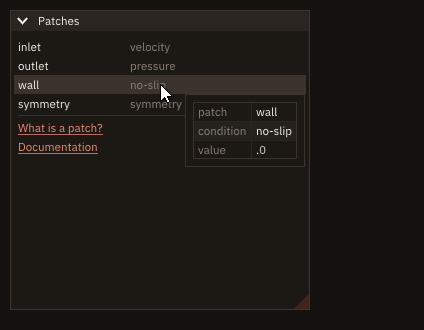
| Procedure | Notes |
|---|---|
ig_begin_item_tooltip() → logical | On the item drawn just before: .true. while the pointer rests on it, after the tooltip delay; declare the content, then ig_end_tooltip(). |
ig_begin_tooltip() → logical | A tooltip now, at the pointer, whatever it is over: .true.; declare the content, then ig_end_tooltip(). |
ig_end_tooltip() | End the tooltip, only after a true begin. |
(Dear ImGui's BeginItemTooltip, BeginTooltip, EndTooltip.) A tooltip is a small window that follows the pointer: anything a window holds goes in it, a table, a plot, an image, coloured text. ig_tooltip(text) is the one-line case.
if (ig_begin_item_tooltip()) then                ! the pointer rests on the row
   if (ig_begin_table('values', 2_int32)) then
      call cell('patch', trim(names(i)))
      call cell('condition', trim(kinds(i)))
      write(label, '(F0.1)') values(i)
      call cell('value', trim(label))
      call ig_end_table()
   endif
   call ig_end_tooltip()
endif- The delay.
ig_begin_item_tooltipis.true.once the pointer has been still for 0.15 s and over the item for 0.15 s (Dear ImGui'sHoverStationaryDelayandHoverDelayShort, style fields): a pointer passing over a list does not flash a tooltip on every row. At 60 frames a second that is about 18 frames after the pointer stops. ig_begin_tooltiphas no delay and no item: call it on the frames the tooltip must show, for instance whenig_last_item()says the item is hovered with the delay of your choice (ig_item_hovered(delay)), or over a plot while the program shows a value. Dear ImGui's begin is.true.in every frame today, but the rule stays: end only after a true begin.- Two tooltips in one frame add to the same window, one below the other (Dear ImGui appends them).
- Pairing: a wrong end, or a scope left open inside the tooltip, is refused and reported, naming
ig_begin_item_tooltip()(Pairing and frames). A font or a disabled block opened in a tooltip is closed beforeig_end_tooltip. - Status: no
stat: with no frame open, or from a task, the begin returns.false.and the error is reported by the nextapp%next_frame(FIG_ERR_STATE,ig_begin_tooltip: no frame open). - Window, headless, remote: the same; headless,
test_mouse_moveputs the pointer on the item and the frames that follow give the delay. - Threads: the frame loop's thread only; a task is refused (
FIG_ERR_STATE). - What it does not do: a tooltip takes no input (no button in it can be clicked: the pointer moves it away); no tooltip of its own position (it follows the pointer); no delay per tooltip (the delay is the style's).
Links
| Procedure | Notes |
|---|---|
ig_text_link(label) → logical | Text drawn as a link (the style's TextLink colour, underlined, a hand pointer over it): .true. on the frame it is clicked. |
ig_text_link_url(label, url) | A link that opens url when clicked; the pointer resting on it shows the URL, a right click offers "Copy Link". |
(Dear ImGui's TextLink, TextLinkOpenURL.) The text before ## is shown; all of label is the id.
call ig_separator()
if (ig_text_link('What is a patch?')) help = .not. help
if (help) call ig_text_wrapped('A patch is a set of faces of the grid that share one boundary condition.')
call ig_text_link_url('Documentation', 'https://szaghi.github.io/figure/')
ig_text_link is a button that looks like a link: it shows a help line, opens a panel, jumps to a row. ig_text_link_url hands the URL to the platform:
- Window: the system's handler opens it (SDL's
SDL_OpenURL: the default browser forhttps://, the program a file's type is given to for afile://path). - Remote: the page opens it in a new tab of the browser (the program sends it to the page as message 9). A browser may block the tab as a pop-up: the page then says so, and the user allows pop-ups for the page (Known issues). The browser is the user's: a
file://URL names a file of the user's machine, not of the machine the program runs on. - Headless: nothing is opened.
test_opened_url()returns the URL the last click asked to open, in every mode, so a test checks the link without a browser. The documentation's recordings open nothing either.
url is passed as it is: give links the program owns, not text a user typed (xdg-open and the browser decide what a URL does). Status: no stat: with no frame open, or from a task, nothing is drawn and the error is reported by the next app%next_frame. Threads: the frame loop's thread only. What it does not do: no link inside a wrapped paragraph (a link is an item of its own: put text before it with ig_same_line); no visited state.
Players
| Procedure | Notes |
|---|---|
ig_player(id, player [, labels] [, stat]) → logical | A player for player%count snapshots on one line: previous, play/pause, next and a slider over the snapshots; a right click opens its menu (speed and mode). .true. on the frame it changed player%index. |
player_object | The player's state, a plain value the program keeps: %index, %count, %playing, %speed, %mode. |
A player steps through saved solutions: the snapshots of a run written every so many iterations, the frames of an animation, the cases of a parameter sweep. The program keeps the snapshots (in memory or as files) and a player_object; ig_player draws the player and says which snapshot to show. It is built from Dear ImGui's Button, SliderInt, BeginPopupContextItem, InputScalar and RadioButton inside a group (BeginGroup); Dear ImGui has no player of its own (the idea is ImGuiExtra.jl's scrubber).
player%count = NS                                   ! the snapshots saved
player%speed = 8.0_real64                           ! snapshots per second while playing
player%mode = 'bounce' ! back and forthif (ig_player('snapshots', player, labels=times)) then
if (check) write(output_unit, '(A,I0,A,I0,A)') 'frame ', frame, ': snapshot ', player%index, &
' ('//trim(times(player%index))//')'
endif
call ig_item_rect(at(1), at(2), at(3), at(4))
call ig_text_disabled('right click on the player: speed and mode')
if (ip_begin_plot('u(x)', height=-1.0_real64)) then
call ip_setup_axes('x [m]', 'u [m/s]')
call ip_setup_axes_limits(0.0_real64, 1.0_real64, -0.1_real64, 1.1_real64)
call ip_line('u', x, u(:, player%index)) ! the snapshot the player shows
call ip_end_plot()
endifThe state. The components are public: the program sets them when it likes (a new run loaded: count; a jump to a snapshot picked elsewhere: index; a key that plays: playing), and the player sets them when the user acts on it.
| Component | Meaning | Default |
|---|---|---|
index | the snapshot shown, 1 to count (outside: moved to the nearest end, and .true. returned) | 1 |
count | snapshots, at least 1 | 1 |
playing | advancing by itself | .false. |
speed | snapshots per second while playing, > 0 [1/s] | 10 |
mode | at the last snapshot: 'once' stops (and playing becomes .false.), 'loop' goes on from the first, 'bounce' turns back, and again at the first | 'loop' |
The controls. Previous and next step one snapshot and stop the playing; in mode 'loop' they wrap around (previous at the first shows the last), in the others they stop at the ends. Play starts from the snapshot shown (in mode 'once' at the last snapshot, from the first) and turns into pause. A click or a drag on the slider shows that snapshot and stops the playing. The slider shows labels(index) (a time, a file name; % is shown as it is) or, without labels, index / count. A right click anywhere on the player opens its menu: the speed, typed (a value <= 0 is not taken), and the mode, three radio buttons; a click outside closes it.
Time. While playing, the player advances speed snapshots per second of the frame clock (Dear ImGui's time, GetTime): the time between the frames in a window, 1/60 s per frame headless (so a test knows how many snapshots 60 frames step), the time between frames in remote mode, the fixed frame time of a recording. A frame that takes longer steps more snapshots at once, so the player keeps time when frames are slow. The clock runs on the frames the player is drawn: hidden (a collapsed header, a tab not shown) it pauses, and goes on from there when shown again. While playing, ig_player asks for one more frame on every frame (app%request_frames(1)), so a lazy loop keeps drawing and the program needs no set_lazy(.false.); paused, it asks for nothing and the loop sleeps again.
Layout. The player is as wide as the current item width: ig_set_next_item_width before it, or ig_push_item_width (Layout); the buttons are square, a field's height; the slider takes the rest. The player is one group: ig_same_line, ig_item_rect and ig_last_item after it refer to the whole player, and its id scope (id) keeps its buttons apart from the window's other items; two players in one window need two ids.
The program checks itself headless (play, at 8 snapshots per second a step every 7.5 frames of 1/60 s; pause 60 frames later; next; previous):
$ ./cb_player --check
frame 5: play (8 snapshots per second, 1/60 s per headless frame)
frame 17: snapshot 2 (t = 0.05 s)
frame 24: snapshot 3 (t = 0.10 s)
frame 32: snapshot 4 (t = 0.15 s)
frame 39: snapshot 5 (t = 0.20 s)
frame 47: snapshot 6 (t = 0.25 s)
frame 54: snapshot 7 (t = 0.30 s)
frame 62: snapshot 8 (t = 0.35 s)
frame 65: pause
frame 69: snapshot 9 (t = 0.40 s)
frame 80: next
frame 84: snapshot 10 (t = 0.45 s)
frame 95: previous
frame 99: snapshot 9 (t = 0.40 s)- Pairing and frame rules: call it every frame, inside a window; it opens no scope the program closes (its group, id scope and menu are begun and ended inside, and the scope record of the frame sees them balanced). Valid on the frame it returns
.true.: drawplayer%indexthen. - Units:
speedin snapshots per second;indexandcountare counts (1-based). - Status:
statis optional (absent:error stopwith the message). Refused withFIG_ERR_ARGUMENT, nothing drawn and.false.returned:count< 1 (ig_player: count must be at least 1 (got 0)),speed<= 0, NaN or infinite (ig_player: speed must be > 0 snapshots per second), an unknownmode(ig_player: unknown mode "ping" ('once', 'loop' or 'bounce')),labelsnot ofcountentries (ig_player: labels has 2 entries, not count). No frame open or from a task:FIG_ERR_STATE(Errors). - Window, headless, remote: the same. Headless,
test_clickpresses its buttons and the slider (the buttons are squares of sideig_frame_height(),ItemSpacingapart, from the left ofig_item_rect),test_click(..., button='right')opens its menu, and every frame advances the clock by 1/60 s. In remote mode the frames come at the rate the page draws them, and the player keeps time by the clock between them. - Threads: the frame loop's thread only; a task is refused (
FIG_ERR_STATE). Aplayer_objectitself may be set from anywhere the program owns it. - What it does not do: it does not load or keep the snapshots (the program draws
player%index); it does not skip a snapshot that takes long to load or draw (a slow frame steps more at once, it does not wait); no keyboard shortcuts of its own (bind keys withig_shortcutand setplayingorindex); no reverse play other than mode'bounce'; speeds and modes are not saved between runs.
Colour editing
| Procedure | Notes |
|---|---|
ig_color_edit(label, rgba [, alpha] [, stat]) → logical | A colour editor (ColorEdit4) bound to rgba, real(real64), components in [0, 1]: one field per component and a swatch that opens a picker when clicked. .true. on the frames the user changes the colour. |
ig_color_picker(label, rgba [, alpha] [, wheel] [, inputs] [, stat]) → logical | The picker drawn in place (ColorPicker4), bound to rgba as ig_color_edit: a saturation-value square and a hue bar, or with wheel=.true. a hue wheel around a saturation-value triangle; an alpha bar for 4 components; a preview of the colour beside them; below, unless inputs=.false., the fields of the components. .true. on the frames the user changes the colour. |
if (ig_color_edit('contour lines', line_color)) then ! true on the frames the user changes it
   write(text, '(A,4F6.2)') 'changed to', line_color  ! line_color is updated: the lines below use it
endif
call ig_text(trim(text))rgbahas 3 components (RGB, no alpha) or 4 (RGBA). With 4, the alpha has a field and a bar in the picker;alpha=.false.hides them and leavesrgba(4)alone.
A picker of its own, always open in a panel, is ig_color_picker. Its width is the item width (ig_push_item_width), and its height follows; wheel given chooses its form and ignores the one the user picks in its right-click menu (absent: the hue bar, or the user's choice):
if (ig_checkbox('hue wheel', wheel)) continue           ! the picker's form, chosen by the program
call ig_push_item_width(260.0_real64)                    ! the picker's width; its height follows
if (ig_color_picker('##surface', surface, wheel=wheel)) then ! true on the frames the user changes it
   write(text, '(A,4F6.2)') 'RGBA', surface
endif
call ig_pop_item_width()
call ig_text(trim(text))- The fields show 0-255 and are dragged, or typed after a double-click; right-click on the swatch offers Dear ImGui's options (RGB, HSV or hexadecimal fields, copy the colour as text).
- Dear ImGui edits single-precision values:
rgbais written only on the frames the user changes it, so an untouched colour keeps its double-precision bits; a changed one has single precision. - Statuses (both):
FIG_ERR_ARGUMENTfor a size other than 3 or 4,FIG_ERR_STATEfrom a task;statis optional (absent:error stopwith the message). - Modes: the same in window, headless and remote mode (
ig_color_edit's picker is a popup drawn by Dear ImGui;src/tests/figure_test_picker.F90drivesig_color_pickerheadless).
Markdown
| Procedure | Notes |
|---|---|
ig_markdown(text [, link] [, stat]) → logical | Draws text, Markdown, at the cursor, as wide as the window: .true. on the frame one of its links is clicked, its URL in link. |
md%init([toc] [, search] [, stat]), md%destroy(), md%is_initialized() → logical | A document (markdown_view_object): its text kept by FIGURE, drawn in a scroll area of its own, with a table of contents (toc, default on) and a find bar (search, default on). |
md%set_text(text [, stat]), md%load(path [, stat]), md%text() → character | Its text, given or read from a file (UTF-8); a copy of it. |
md%draw(id [, link] [, width] [, height] [, stat]) → logical | Draws the document as a widget; .true. on the frame one of its links is clicked, its URL in link. |
md%find(text [, stat]), md%matches() → int32, md%current_match() → int32 | Searches text as the find bar does ('' ends the search); the matches, and the current one (from 1), at the last draw. |
md%scroll_to(heading [, stat]) | Scrolls to a heading, by its text or by its anchor after #. |
The renderer is imgui_rich_md (MIT, with md4c, its parser), vendored (Third-party software). It draws through Dear ImGui only: a help page looks the same in a window, headless and in a browser (remote mode).
if (ig_begin('Help', open=shown)) then
   if (help%draw('page', url, height=-30.0_real64)) last = url ! nothing is opened: the program decides
   call ig_text('Last link: '//last)
endif
call ig_end()- What a text may hold. Headings (
#to######, larger as they rise), paragraphs,**bold**,*italic*(_text_is underlined, not italic),~~strikethrough~~,`code spans`, links and bare URLs, lists (-,*with a bullet,1.), task lists (- [x]), quotes, GitHub's admonitions (> [!NOTE],[!TIP],[!IMPORTANT],[!WARNING],[!CAUTION]), tables (columns sized by their content, aligned by:---:, resizable), fenced and indented code blocks with a Copy button, horizontal rules, collapsible sections (<details><summary>), and the HTML tags<u>,<mark>,<kbd>,<sub>,<sup>,<br>. Lines end with LF or CR LF. - Fonts. The text in IBM Plex Sans (regular, bold, italic, bold italic: the four styles are bundled), headings larger by 5 % (
######) to 42 % (#); code spans and blocks in IBM Plex Mono. The icons and the fallback fonts (Noto Sans Math, the program's own) are merged into all of them, as into every FIGURE font:∇·u,ρand anICON_*show in a page. The body text is 15 pixels, the interface's default size. - Links are reported, never opened. A click on a link returns
.true.from the call that drew it, on that frame, with its URL inlink(''on the other frames): the program decides what it means (another page, a section, a file, a browser throughig_text_link_url's platform handler or its own). A link to a heading of the same text ([units](#units)) scrolls there instead and is not reported; one to a heading the text lacks is, as'#units'. The pointer resting on a link shows its URL; a right click offers Copy, Copy as Markdown, Select All and Copy Link. - Anchors. A heading's anchor is GitHub's: lower case, blanks as
-, punctuation dropped (Boundary conditions→#boundary-conditions; a repeated title's second is-1). - Selection. The text is selected with the mouse (a double click a word, a triple click a paragraph) and copied with ctrl+c (cmd+c on macOS).
- Images from files:
, a PNG or a JPEG, read relative to the working directory (not to a filemd%loadread), at its size in pixels (<img src="path" width="200">for another). Not from a URL. - A document's life.
md%initcreates the view, empty (a view initialized already is destroyed first, its text with it);md%is_initialized()tells whether it exists;md%destroy()releases it.md%set_textreplaces the text from the next draw and keeps the scroll and the search. - Documents.
md%drawdraws its text in a child regionwidth×heightpixels (0: the available region; negative: up to that distance from its edge), which scrolls on its own. The table of contents appears from three headings: a panel beside the text whose edge the reader drags, or a line above a narrow document (under 40 em); it shows the current section, and a click scrolls to one. The find bar (ctrl+f, cmd+f on macOS, or/while the document has the focus) highlights the matches in the text, the code blocks and the collapsed sections, counts them per section, ticks them on the scrollbar; enter goes to the next one, shift+enter to the previous one, escape closes it.md%findandmd%scroll_todo the same from the program; they act at the nextmd%draw. ig_markdownor a document.ig_markdownis a few lines inside a window (a description above a form, an About box): the text is passed, and converted, at every frame, and the window scrolls it with the rest. A document keeps its text (no copy per frame), and has its own scroll, its contents and its search: a help page, release notes.
if (ig_markdown('**Case** cylinder, *Re* = 100'//new_line('a')//new_line('a')//'Keys and units: [help](help)', &
                url)) then
   if (url == 'help') shown = .true.                           ! the program's own link
endif
Status: ig_markdown and md%draw return FIG_ERR_STATE with no frame open and from a task, md%* before md%init; FIG_ERR_ARGUMENT for an empty id (md%draw), a search longer than 255 bytes or of two lines (md%find), an empty heading (md%scroll_to), an empty file name (md%load); FIG_ERR_FAILED for a file that cannot be read (md%load, the text kept). Absent stat: error stop with the message (Errors). Threads: the frame loop's thread only; md%set_text, md%load, md%find and md%scroll_to may be called before app%init*, after md%init (they draw nothing). Modes: the same in window, headless and remote modes. What it does not do: no LaTeX formulas ($...$ is text), no images from URLs, no Mermaid diagrams (a ```mermaid block is code), no syntax highlighting in code blocks, no file included into a page (![[file]]), no footnotes; nothing is opened by a click (Known issues).
Drag and drop
| Procedure | Notes |
|---|---|
ig_drag_source(type, payload [, preview] [, stat]) → logical | Makes the last item a source (BeginDragDropSource): pressed and dragged, it carries the text payload under the type type, shown under the pointer as preview (default: the payload). .true. in the frames it is dragged. |
ig_drop_target(type, payload [, stat]) → logical | Makes the last item a target of payloads of type type (BeginDragDropTarget, AcceptDragDropPayload): .true. on the frame one is dropped on it, payload (character(len=:), allocatable) then holding it. |
ig_dragging(type) → logical | .true. while a payload of type type is dragged, wherever: a program shows its drop zones then. |
ig_drag_source makes an item draggable, ig_drop_target makes one receive what is dropped on it, and ig_dragging tells while a drag of a type is under way, anywhere. The payload is text: an id, a name, a path, what the target needs to find the thing in the program's own data; the program, not Dear ImGui, keeps the things themselves. The type pairs sources with targets: a target receives only the payloads of its type, and outlines itself while one of them is held over it. A plot is a target too, of its area, an axis or its legend (ip_drop_target). Each is called right after its item, on every frame; any item is a source, text and other items without an id included.
if (ig_tree_node('cases', default_open=.true.)) then
   do c = 1_int32, CASES
      if (ig_tree_node(trim(NAME(c)), leaf=.true., selected=shown(c))) call ig_tree_pop()
      if (ig_drag_source('case', trim(NAME(c)))) continue   ! the node carries its name
   enddo
   call ig_tree_pop()
endif
if (ig_button('Bin')) shown = .false.                        ! a click empties the plot
if (ig_drop_target('case', payload)) call show(payload, .false.) ! a case dropped here leaves it
if (ig_dragging('case')) call ig_text_disabled('drop on the plot')A recipe for this: Drag a case onto a plot.
- A drop is one frame. The target returns
.true.once, on the frame of the release; the payload stays in the variable until the next drop. A release anywhere else, or over a target of another type, delivers nothing. - Types. 1 to 32 characters, not starting with
_(Dear ImGui's own types, as its colour drags'). Two parts of a program that should not exchange things use two types. - Within the program. A payload moves between the items of one program: files dragged in from the system are dropped files (
app%dropped), a drag out of the window carries nothing to other programs. - Statuses:
FIG_ERR_ARGUMENTfor a type of no or more than 32 characters, or starting with_;FIG_ERR_STATEoutside a frame or from a task.statis optional (absent:error stopwith the message). - Modes: the same in window, headless (
test_mouse_buttonandtest_mouse_movedrag, a frame apart:src/tests/figure_test_dnd.F90) and remote mode (the browser's pointer).
Selecting many items
| Procedure | Notes |
|---|---|
selection_object | What is selected among n items: call sel%resize(n) (the flags of the first items kept), sel%is_selected(i), sel%set(i, on), sel%clear(), sel%selected_count(), sel%indices() (the items selected, in order), sel%flags() (one logical per item); sel%keep, the item a shift+click extends from. |
ig_begin_multi_select(sel [, single] [, box_select] [, clear_on_escape] [, no_select_all] [, stat]), ig_end_multi_select(sel [, stat]) | A multi-selection (BeginMultiSelect, EndMultiSelect) over the items drawn in between with index=: what the user does on them is in sel after the end. Always paired; one at a time. |
ig_selectable(label, selected [, index] [, stat]) → logical, ig_tree_node(... [, index] [, stat]) → logical | With index (from 1), the line or node is item index of the multi-selection open (SetNextItemSelectionUserData); selected is then sel%is_selected(index). |
The user selects as in a file manager: a click selects one item, shift+click the range from the last one clicked, ctrl+click (cmd on macOS) adds or removes one, ctrl+a selects all (no_select_all refuses it), the arrow keys move with shift extending; box_select adds a box dragged from an empty part of the window or region, clear_on_escape lets escape deselect all, single keeps one item at most. Dear ImGui turns these into requests ("all", "the range a to b"); FIGURE applies them to sel's flags at the begin and at the end, so the program reads plain logicals and draws selected from them.
if (ig_begin_child('blocks', height=-60.0_real64, border=.true.)) then
   call ig_begin_multi_select(sel, box_select=.true., clear_on_escape=.true.)
   call clip%begin(BLOCKS, keep=sel%keep)           ! a shift+click extends from a line out of view
   do while (clip%step())
      do i = clip%first, clip%last
         write(line, '(A,I5,A,I7,A)') 'block ', i, ': ', cells(i), merge(' cells, frozen', ' cells        ', &
                                                                        frozen(i))
         if (ig_selectable(trim(line), sel%is_selected(i), index=i)) continue
      enddo
   enddo
   call ig_end_multi_select(sel)                    ! the clicks, keys and box are in sel
endif
call ig_end_child()
write(line, '(I0,A,I0,A)') sel%selected_count(), ' blocks selected, ', sum(cells, mask=sel%flags()), ' cells'
call ig_text(trim(line))
if (ig_button('Freeze')) frozen(sel%indices()) = .true.  ! act on what is selected
call ig_same_line()
if (ig_button('Clear')) call sel%clear()
call ig_same_line()
call ig_text_disabled('shift, ctrl, ctrl+a, a drag in the void')A recipe for this: Select many rows at once.
- Clipped lists. A
list_clipper_objectdraws only the lines in view, but a shift+click extends from the range source,sel%keep, which may have scrolled away:clip%begin(n, keep=sel%keep)keeps that one line drawn wherever it is. Dear ImGui forgets a source that was not drawn, and the next range then starts at the line with the keyboard focus. The clipper always draws the focused line, so after a plain click (source and focus on one line) nothing is lost; after a click on 2 and a shift+click on 4 (source 2, focus 4) scrolled out of view, a shift+click on 25 selects 2..25 withkeepand 4..25 without it (src/tests/figure_test_select.F90). - Tables and trees. In a table the selectable spans its row (
ig_selectablein the first column, the values in the next); tree nodes takeindexthe same way, numbered in the order they are drawn, and a range selects the nodes between, open or not as drawn. - Keys act on the focused selection. ctrl+a, escape and the arrows apply to the selection whose window or region has the keyboard focus: after a click elsewhere (a button) the user clicks back into the list first.
- The program's own changes.
sel%set,sel%clearandsel%resizebetween frames are what the next frame draws; a list that changes length resizes its selection first (new items unselected). Aselection_objecttakes nostat: for an index outside 1 to its items,sel%is_selected(i)is.false.andsel%set(i, on)does nothing. - Statuses:
FIG_ERR_STATEforig_begin_multi_selectinside another, an end with none open (as the other pairs),indexwith no multi-selection open;FIG_ERR_ARGUMENTfor anindexoutside 1 to the selection's items.statis optional (absent:error stopwith the message). - Modes: the same in window, headless (
test_click,test_key('shift', down=.true.),test_key('shortcut', ...)for ctrl+a:src/tests/figure_test_select.F90) and remote mode.
Not bound yet
The Dear ImGui functions without a wrapper are listed as "raw only" in Dear ImGui names. The generated raw layer (figure_cimgui, figure_cimplot, figure_cimplot3d and their _enums) is internal (Raw bindings): programs call the wrappers. Menus are on their own page, Menus and shortcuts.