

Showcase: tools for a CFD solver
FIGURE's first application outside this repository is a set of tools for Xall, a CFD solver, and for OverSet, the code that prepares its overset (chimera) grids. Each tool is a FIGURE program that opens a window on a workstation or, with --remote, serves its interface to a web browser from a cluster node, through an SSH tunnel (Remote mode). The tools live in a private repository; this page shows what they look like and which parts of FIGURE they are built from.
The pictures are xall_figure's own recordings, of synthetic cases. Seven are drawn by FIGURE's CPU renderer, headless, as every other picture of this site (xall_figure d8acb5f, 2026-11-14; the solvers run from the window again on 2026-11-19, each run waited for with the capture's wait). One was recorded in a window on a GPU, before xall_figure recorded headless: the run checker following growing files (2f9dbf5, 2026-11-06). Its files grow by a writer of their own, outside the program, by the wall clock, and the checker looks at them by the wall clock: a headless recording, faster than a window, keeps neither in step, and wait sees only the program's own processes.
The Xall input editor
xall_edit edits the solver's input file, data.input: 14 sections, about 220 parameters, blocks of parameters that repeat as many times as a counter says (one per level-set file), parameters that take as many values as another parameter says (one per multigrid level, per actuator disk, per species). It replaces a Tkinter editor and writes byte for byte what that editor writes; a search field finds a parameter among all the sections.
Built from: a laid-out dock space (Docking); the main menu bar with ctrl+s and ctrl+o (Menus and popups); tables of check boxes, text fields with the default as a hint, combos and tooltips (Widgets); modals for unsaved changes and for the problems found before saving, and the question asked when the window is closed with unsaved changes (Menus and popups); the system's file dialogs, with a path field in remote mode (File dialogs); the window's title showing the file and a mark while it is edited (app%set_title).
The OverSet input editor
overset_edit edits overset.input, the pre-processor's input: scalar sections like the solver's, and two list sections, the boundary-condition patches and boxes, edited as tables with a row per line of the file.
Built from the same parts, plus tables whose rows are added, copied, moved and deleted with buttons.
The run checker
xall_evol follows the history files a run writes (residuals, forces and moments, time step, timings) while the run goes on, and checks them for what goes wrong (NaN, residuals that grow, a time step that collapses), every file's findings in one table with the errors first. How many files a run writes is not known in advance (one per force group: hundreds with many groups), so the files are a navigator, grouped by kind, filtered by name, the worst first, and the plots show one file, or several ticked to compare, overlaid; what they show is saved as a PNG image or as CSV data. It reads only the lines appended since the last look: a refresh of a 10⁶-line residual file takes 0.02 s instead of the 6.4 s of reading it again.
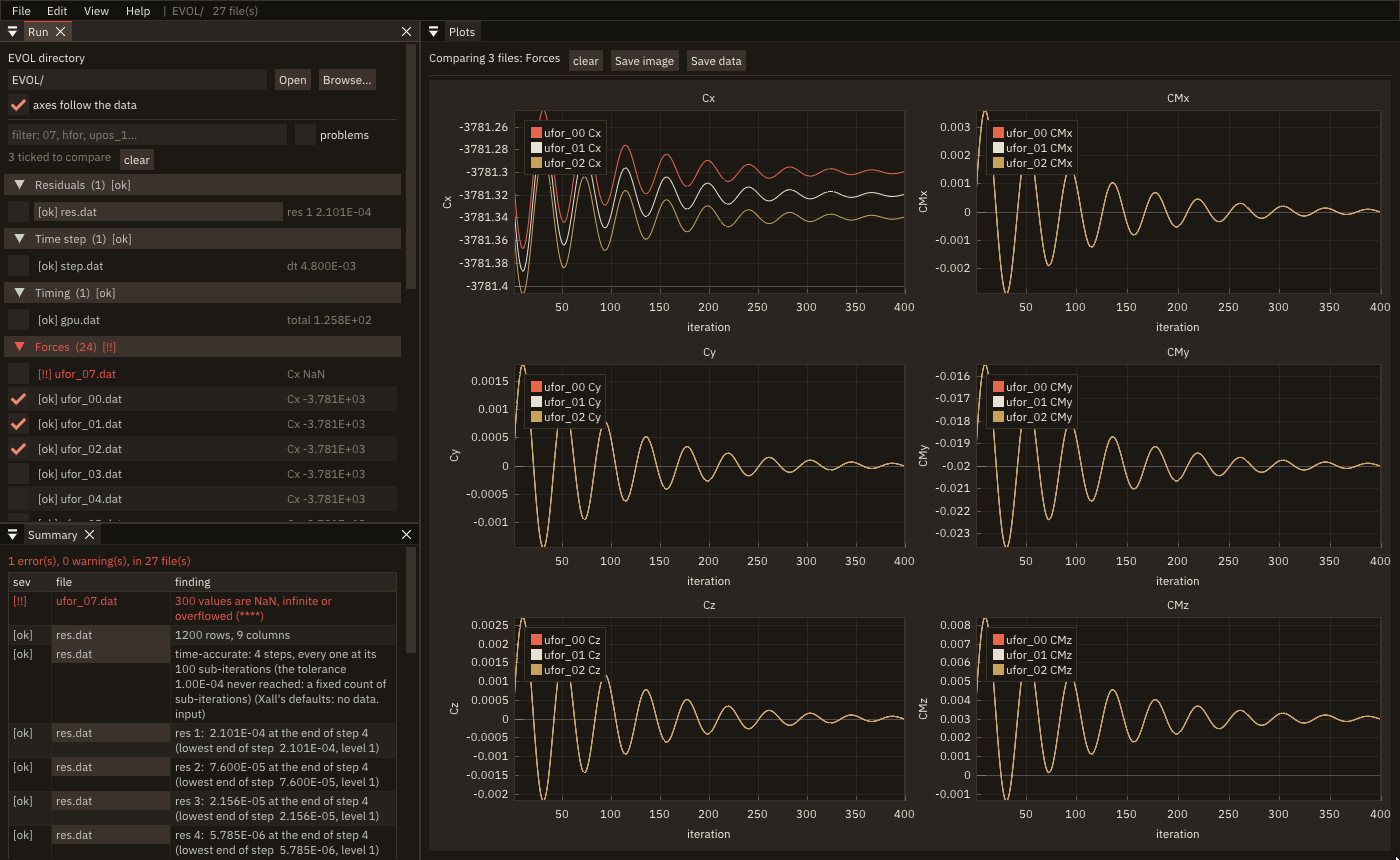
Built from: plots on logarithmic axes (Plots), subplots sharing the abscissa with formatted tick labels for the forces and moments (Several plots in one figure), a navigator of collapsing headers and tables of selectable rows with check boxes, a filter field (Widgets), a laid-out dock space and a window per file popped out on demand (Docking), the plots saved with app%save_image (Save an image), the system's folder dialog (File dialogs), and lazy redraw: the checker sleeps between looks at the files (Frame loop and redraw).
A case in one window
xall_gui puts the mesh phase, the Xall input editor and the run checker of a case in one window, as three workspaces (Mesh, Input, Monitor) picked on a toolbar (left, top, right or bottom): each keeps its menu bar, its windows and its state while another is shown, and the run is followed meanwhile. Opening a case opens its input file and follows the history files it names. The toolbar's buttons carry a mark each: the input edited or with errors, the run's worst finding.
Built from: a bar along a side of the window that the dock space leaves free (ig_begin_side_bar, A bar along a side), Lucide icons in the labels (ICON_*, Icons), and the two tools' own frames drawn in turn, each with its dock space.
The Input workspace also holds the case's other input files: the block-to-process map and the optional tables the solver reads (periodic faces, blocks at rest, boundary values and their histories), listed under the sections with their state, each opened in a tab of its own. A table is edited as cells and checked as the solver reads it: the line where its read stops and the lines it never reads, values out of range, a line short of values, the processes the run needs.
Built from: tables of input fields with a row's finding beside it (ig_begin_table, ig_input_text), windows docked under and beside the editor's in its layout (ig_dock_window), and a confirmation before quitting that asks about each kind of unsaved file in turn.
The mesh phase and its grid in 3-D
The Mesh workspace holds the mesh phase's tool, chosen by the case's files: OverSet's editor, or the editor of cc.par, the input of the older Xnavis overset preprocessor ("overset legacy"). cc.par is positional: values are read by position, its comments and layout must survive, so its editor is a table per list with a field per value, and an edit changes only that value, in its columns, in the file.
Its Grid tab is a real application of the 3-D view: the six faces of every block of the case's grid, each a structured surface (v%surface), with a tree of the grid's groups, bodies and blocks beside it. The faces are coloured by block, group, body, process or boundary condition, each colouring a stepped map registered with ip_load_colormap (User maps); a click on a face gives the block, the face, the cell and the condition there (v%clicked, Picking); a clipping plane cuts the grid to show the blocks inside (Clipping planes). The grid files are read in a task, with a progress bar and Cancel, the window answering meanwhile: on a grid of 28.3 M cells (753 MB) the read takes 0.38 to 0.45 s and no frame drawn during it takes more than 1.6 ms.
The same tab shows the chimera connectivity the preprocessor computes: each face cell coloured by the type of the cell along it (active, chimera, damping, ...), a plane of cells drawn through a block instead of its faces, and, for a chimera cell clicked, its donor cells with their weights. Its files are read in a task of their own.
Built from: view3d_object with structured surfaces and lines for the boxes (3-D views), stepped colormaps from a file (Colormaps), a tree of blocks with check boxes in table columns (Trees), task_object for every read and a progress bar while it runs (Tasks, Progress bars).
Running the solvers
Each workspace runs its solver from the window: the preprocessor in Mesh, Xall in Input and Monitor; OverSet and Xall through mpirun -np N and, when set, an environment script, overset legacy serially. The Run solver panel shows the command, the output as it comes, and the state; a status bar along the bottom says that a run goes on, and a notification tells how it ended. A run is refused, with the reason, while its input has unsaved changes or errors. Stop asks the run to end, then ends it by force after 5 s.
Built from: process_object, its arguments passed with no shell, and log_view_object for the output (Processes, The log view); p%kill and p%kill(force=.true.) for Stop; a status bar and app%notify (Feedback, Notifications).
Shared by the three tools
Each tool has a menu bar (File, Edit, Help; xall_evol also View) and the same Edit > Preferences window: the font (the bundled IBM Plex Sans, Proggy, or any TrueType/OpenType file), its size and the style, applied at once with app%set_font and app%set_style (Fonts, Named styles) and kept in one preferences file for the three tools.
How they are tested
The editors are modules whose frame procedure draws one frame: the program calls it in its loop, and a headless test calls the same procedure (Headless testing). The test drives the editor as a user does, with the synthetic input of figure_testing (clicks, keys, typed text, the platform's shortcut key): it opens a file through the path field, searches, types values, adds rows and blocks, saves with ctrl+s, and compares the file saved with the one the Python editor writes after the same edits. The pictures on this page are recorded by FIGURE's capture with a scripted input (Screenshots and videos), so they are redone when the interface changes. They are the tools' own recordings, made in their repository: the only pictures of this site that the documentation's check (docs_media.py --check) does not render again.
What the tools asked of FIGURE
Writing them found what FIGURE lacked, and each gap was filled in FIGURE first, as a wrapper with a headless check and its documentation, never with a raw binding in the tool: selectables, wrapped text and child regions; menus and shortcuts; popups, modals and the question before quitting; the system's file dialogs; plot tick formats, subplots and docking a window that appears later; the testing module in the static library and the window's title after app%init.
v0.5.0 adds what the next round of the tools needs, each with its headless test: input files in a code editor that highlights them and marks each mistake on its line (asked for by the tools' input files); help pages in Markdown; a window registry with a View menu, layouts and preferences kept between runs (Windows and layouts); a clip plane or a probe placed by hand with a gizmo; small 3-D plots of probes and trajectories; and tests that find items by path and compare what a window looks like. The tutorial's studio uses them all (chapters 24 to 26).