
Use the feature curves of an STL
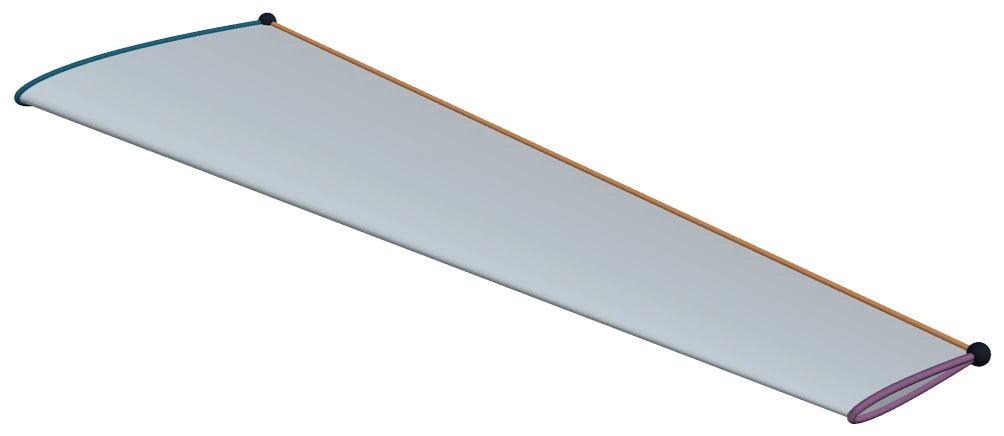
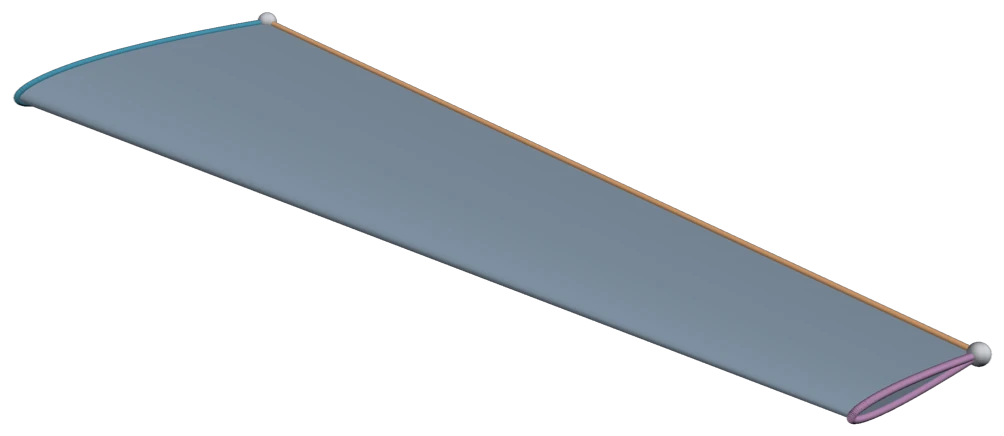
An STL has no CAD edges, but its sharp edges and open boundaries carry the same information: trailing edges, wing–tip outlines, the rim of a cut. SHORE extracts them as CURVE entities and their junctions as POINT entities, so you can associate grid edges and vertices with them as you would with CAD edges and vertices.
The code is examples/cookbook/stl_curves.py (about 1 s).
List the curves and points
# A blunt-TE NACA 0012 wing, span 2 along z, with flat end caps.
wing = shapes.extrude_section(
    profiles.naca("0012", 60, closed_te=False), span=2.0, n_stations=21, end_caps=True
)
wing.export("wing.stl")

geo = load_geometry("wing.stl")  # StlGeometry, crease_deg = 30
curves, points = geo.features()
print(f"{len(geo.entities(EntityKind.CURVE))} curves, {len(points)} points")
for k, c in enumerate(curves):
    lo, hi = c.min(axis=0), c.max(axis=0)
print(f" curve {k}: {len(c):3d} nodes, x {lo[0]:.3f}..{hi[0]:.3f}, z {lo[2]:.1f}..{hi[2]:.1f}")6 curves, 4 points
curve 0: 21 nodes, x 1.000..1.000, z 0.0..2.0
curve 1: 119 nodes, x 0.000..1.000, z 0.0..0.0
curve 2: 2 nodes, x 1.000..1.000, z 0.0..0.0
curve 3: 21 nodes, x 1.000..1.000, z 0.0..2.0
curve 4: 119 nodes, x 0.000..1.000, z 2.0..2.0
curve 5: 2 nodes, x 1.000..1.000, z 2.0..2.0The blunt-TE wing gives the two trailing-edge corner lines (curves 0 and 3, one node per span station), the root and tip outlines (1 and 4, the 119 section points from the upper TE corner round the LE to the lower one) and the two TE bases (2 and 5). The four TE corners, where three feature edges meet, are the points.
- A feature edge is a mesh edge whose two facets' normals differ by more than
crease_deg(default 30°), or an open-boundary edge (a cut root, the rim of a half model). - Feature edges are chained into polylines and split at every vertex where other than two of them meet; those vertices are the points. A closed loop with no junction is one curve and no point.
- Curves are ordered by their lowest mesh-vertex index, so an index is stable for one file but not across edits. Associations survive an edited STL through fingerprints (length-weighted centroid, length, bounding box), not through the index.
- A smooth sphere has no curves at all; the smooth leading edge of a wing has none either. Plane sections and smooth-feature curves are out of scope (ADR 0049).
Choose the crease angle
The crease angle decides which facet edges count as sharp. On a 32-sided cylinder, neighbouring side facets meet at 11.25°:
# A 32-sided cylinder: neighbouring side facets meet at 360/32 = 11.25 degrees.
cylinder = shapes.cylinder(radius=0.5, height=1.0, sections=32)
for crease in (30.0, 10.0):
    curves_c, points_c = StlGeometry(cylinder, crease_deg=crease).features()
print(f"crease {crease:4.1f} deg: {len(curves_c)} curves, {len(points_c)} points")crease 30.0 deg: 2 curves, 0 points
crease 10.0 deg: 96 curves, 64 points- At 30° only the two rims are features. At 10° every facet edge along the side is one too, and each rim breaks into 32 segments at the 64 points: the faceting of a coarse STL turns into geometry.
- Keep the angle above the largest facet-to-facet angle of the smooth regions and below the smallest real edge. The corners of a blunt trailing edge and of a flat end cap are close to 90°.
crease_degis an argument ofStlGeometry(mesh, crease_deg=...)andStlGeometry.from_file(path, crease_deg=...), in(0, 180]; it also bounds the corner-normal averaging of ADR 0014.load_geometryandProject.load_geometryuse the default 30°.
Snap a grid edge onto a feature curve
# The upper trailing-edge line: x = 1 along the whole span, y > 0.
upper = next(
    k
    for k, c in enumerate(curves)
    if np.allclose(c[:, 0], 1.0) and np.all(c[:, 1] > 0) and np.ptp(c[:, 2]) > 1.0
)
p = Project()
p.load_geometry("wing.stl", name="wing")
p.build_primitive("box", vmin=(1.0, 0.0, 0.1), vmax=(1.5, 0.5, 1.9), ni=3, nj=3, nk=9)
p.associate("box", "i_lo_j_lo", "wing", "curve", [upper])  # the k-edge at i = 0, j = 0
p.snap()
edge = p.mesh.blocks[0].nodes[0, 0, :]
dist = geo.project(edge, geo.entities(EntityKind.CURVE)[upper]).distances
print(f"edge on curve {upper}: max distance {dist.max():.1e}")edge on curve 0: max distance 0.0e+00- Find the curve by its geometry (here:
x = 1,y > 0, spanning the wing), not by a hard-coded index. associate(block, edge, geometry, "curve", [k])records the association with its fingerprint;snap()projects the edge's nodes onto the polyline. A vertex associates with a point the same way (associate("box", "v0", "wing", "point", [k])).- Projection onto a curve returns NaN normals and no parameters: an STL curve has no parametrisation (
evaluateis refused). - An index out of range raises
ParameterErrorand leaves the journal unchanged.
See also
- Geometry and Association.
- Associate with geometry: faces, edges and vertices on CAD and STL.
- ADR 0049: feature curves and points.
- API:
StlGeometry.features.