

D4. Colored and lit surfaces
Goal: the surface as colored faces, lit, so its shape reads at a glance.
gnuplot
# a colored, lit surface: pm3d quadrilaterals sorted by depth, the palette on the height, a light from the viewer
set terminal svg size 600,420
set output 'pd04.svg'
set view 55, 35
set pm3d depthorder lighting primary 0.5 specular 0.3
set palette viridis
set xlabel 'x'; set ylabel 'y'; set cblabel '{/Symbol f}'
set ticslevel 0
splot 'field.dat' using 1:2:3 with pm3d notitle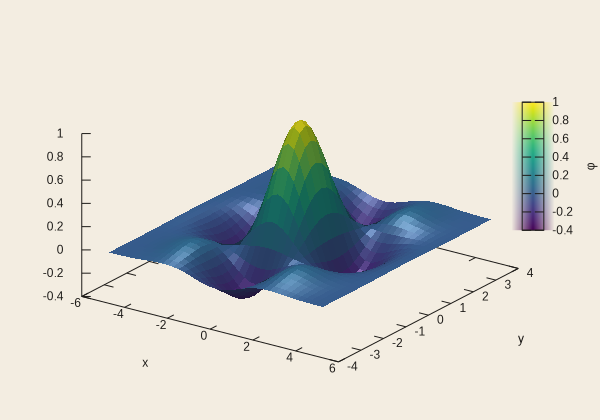
Why it works
with pm3dfills each grid cell with the palette color of its height (the mean of its corners by default,set pm3d corners2colorfor others).set pm3d depthorderdraws the cells from the back to the front, so a nearer cell hides a farther one: the painter's algorithm, gnuplot's.lighting primary 0.5 specular 0.3shades each cell by its angle to a light from the viewer, with highlights: the slopes and the dips become visible without contour lines.
Try this
set pm3d at b: the colors on the base plane under a mesh, the map and the surface together.splot ... with pm3d fc 'light-blue'and lighting: a single color, the shape from the light alone.set pm3d border lc 'black' lw 0.3: the grid lines over the faces.
Pitfalls
- Depth sorting is per cell: surfaces that cut through each other show the cut in steps of a cell.
- Lighting darkens the colors: a reader cannot read values off a lit surface, keep the color box for the values or add contours.
Reference: 3D plots. Next: D5. Vector fields.