

Building
fobis build compiles a Fortran project without a makefile: it reads the sources, finds which file defines each module and which files use it, compiles them in that order and links every program. A fobos file in the project root holds the configurations (modes) when the defaults are not enough. This page covers building programs; libraries, external libraries, Makefile export and editor integration are in Libraries and other build systems, dependencies in Dependencies, tests in Testing.
How it works:
- Settings. The command line's options, then one mode of the fobos:
--mode, else the first one listed in[modes], else the[default]section. The mode's templates are applied, then its$variablessubstituted. A key the mode sets replaces the command line's value, exceptcflags,lflagsandpreprocgiven on the command line, which are appended, and an explicit--targetor--build-dir, which wins. A key FoBiS does not know is ignored without a word. - Sources. The source directories are walked and every Fortran file is read for what matters to a build:
moduleandsubmoduledefinitions,usestatements,includelines,programstatements. Intrinsic modules (iso_fortran_env,iso_c_binding,ieee_*,omp_lib,openacc,mpi, the compiler's own) are skipped. The files are read in the same order on every machine. - Graph. A
useof a project module makes the file depend on the file defining it, anincludeon the included file. Every module is compiled before its users; the files of one level do not depend on each other and compile in parallel with-j. A circular dependency stops the build. A module no project file defines is left to the compiler, which must find its.modin an include directory. - Rebuilds. A file is compiled again when its object is missing or older than the source, or when a file it depends on, directly or not, changed. Changing the flags recompiles nothing unless
cflags_heritageis on; changing the compiler recompiles everything. - Link. Each program is linked with the objects of the files it reaches through
use, plus the files that define no module (external procedures, C files) and the submodules it needs: with atarget, only the files whose procedures the target's files name (see files without modules); without one, every such file. A module no program uses is compiled but not linked. - Outputs. Objects in
<build_dir>/<obj_dir>, module files in<build_dir>/<mod_dir>, programs in<build_dir>.
Tutorial: a first build, a fobos, templates and variables, profiles and features, one fobos, many machines. Reference: build, clean, run, check, introspect, new, every mode key, compilers.
Start a new project
fobis new demo                  # ./demo: a module, a program, a test
fobis new kit --lib             # a library: lib<name>.a in release, lib<name>.so in shared
fobis new . --name my_tool      # fill the current directory
fobis new demo --compiler intel_nextgen
fobis new demo --scaffold # then fobis scaffold init --yes: CI, docs, release script$ cd ~ && fobis new demo
Created project demo in demo/ (git: initialised)
src/demo.f90
app/main.f90
test/test_demo.f90
fobos
.gitignore
Next: cd demo && fobis build && fobis test$ cd ~/demo && fobis build --quiet && ./build/debug/demo && fobis test --quiet
Compiling src/demo.f90 [1/2]
Compiling app/main.f90 [2/2]
Building app/main.f90
Nothing to compile, all objects are up-to-date
Linking build/debug/demo
Target app/main.f90 has been successfully built
mean of 1, 2, 3, 4: 2.5
Building test suite (1 target(s))...
PASS test_demo (0.00 s)
Results: 1 passed, 0 failed, 0 skipped
Total: 0.00 sWhat it writes: src/NAME.f90 (a module), app/main.f90 (program main, linked as build/<mode>/NAME; not with --lib), test/test_NAME.f90, a .gitignore (/build/, /.fobis_deps/, /.fobis/, /compile_commands.json) and a fobos: [project] (name, version 0.1.0, authors from git config user.name/user.email), modes debug (sources and tests, build_profile = debug) and release (build_profile = release; with --lib the static library, plus a shared mode), [test] test_dir = test.
- NAME is the directory's name, or
--name; it must be a Fortran name (a letter, then letters, digits,_). - Any compiler family: the modes use build profiles, so
--compilergets that compiler's flags. - Never overwrites. When any of the files exists, nothing is written and the files are listed (exit 2).
- git: a repository is initialised, nothing committed, unless the directory is inside one or
--no-gitis given. - Exit codes: 0 created, 2 invalid name or existing files, 1
--scaffoldfailed (the project is written).--jsonprintsstatus,name,path,files,git.
Build without a fobos
In a project with no fobos, fobis build scans the source directory, compiles every module in order and links every program it finds:
$ fobis build
[auto-discover] src not set; scanning: ./src
Builder options
  Directories
    Root of source files directory: "src"
    Building directory: "."
    Compiled-objects .o   directory: "obj"
    Compiled-objects .mod directory: "mod"
  Compiler options
    Vendor: "gnu"
    Compiler command: "gfortran"
    Module directory switch: "-J"
    Compiling flags: "-c"
    Linking flags: ""
    Preprocessing flags: ""
    Coverage: False
    Profile: False
  Archiver: ar -rcs
  Ranlib: ranlib
  Preprocessor used: None
  Preprocessor args:
  Preprocessor output directory: None
  Preprocessor extensions processed: []

Compiling src/quad_rules.F90 [1/3]
Compiling src/integrands.F90 [2/3]
Compiling src/integrate.F90 [3/3]
Building src/integrate.F90
Nothing to compile, all objects are up-to-date
Linking ./integrate
Target src/integrate.F90 has been successfully built$ find . -type f | sort
./integrate
./mod/integrands.mod
./mod/quad_rules.mod
./obj/.fobis-compiler.json
./obj/.fobis-links.json
./obj/.fobis-parse-cache.json
./obj/integrands.o
./obj/integrate.o
./obj/quad_rules.o
./src/integrands.F90
./src/integrate.F90
./src/quad_rules.F90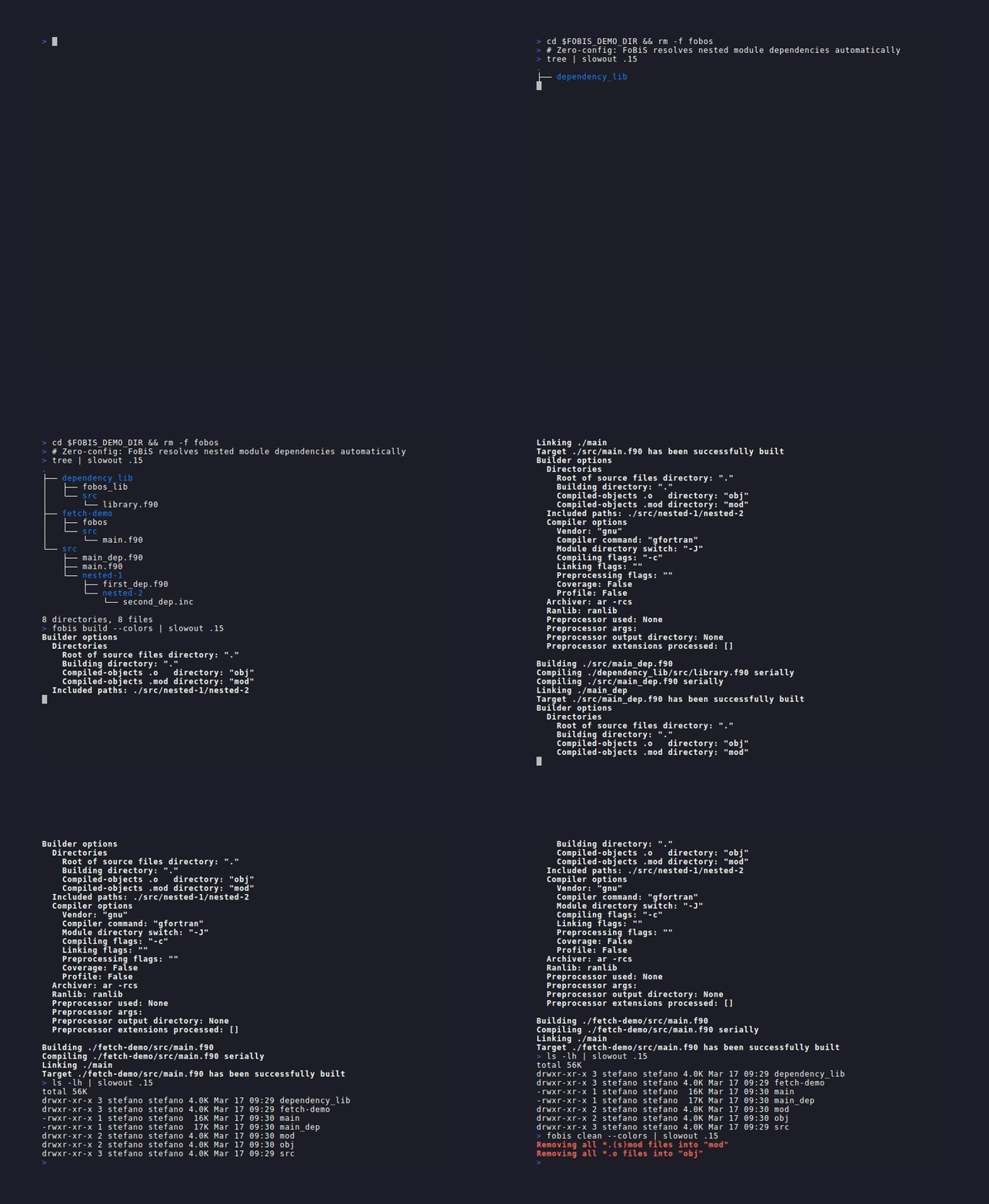
No fobos: the sources found, compiled in dependency order and linked, then fobis clean.
- Source discovery. Without
src(in the mode or on the command line), FoBiS scans every one ofsrc/,source/andapp/that holds a Fortran file, and says so ([auto-discover] src not set; scanning: ./src); none of them, the current directory.--no-auto-discover(mode keyno_auto_discover = True) scans the current directory instead. A project laid out asfobis newmakes (src/andapp/) is found as a whole. - Defaults:
gnu(gfortran),cflags = -c, objects in./obj/, modules in./mod/, programs in./, named after their file. - Everything on the command line works too:
fobis build --compiler intel_nextgen --cflags "-c -O2" -j 4.
Write a fobos
One configuration, in a section named [default]:
[default]
compiler  = gnu
cflags    = -c -O2
src       = ./src/
build_dir = ./build/
target    = src/main.f90
output    = myapp
Several configurations, each a mode, listed in [modes]:
[modes]
modes = debug release

[debug]
help      = Checks on, no optimisation
compiler  = gnu
cflags    = -c -O0 -g -fcheck=all -Wall
src       = ./src/
build_dir = ./build/debug/
target    = src/integrate.F90

[release]
help      = Optimised
compiler  = gnu
cflags    = -c -O2
src       = ./src/
build_dir = ./build/release/
target = src/integrate.F90fobis build # the first mode listed: debug
fobis build --mode release
fobis build --lmodes # the modes, with their help line
fobis build -f fobos.intel # a fobos with another name or path$ fobis build --lmodes
The fobos file defines the following modes:
- "debug" Checks on, no optimisation
- "release" Optimised$ find build -type f | sort
build/debug/integrate
build/debug/mod/integrands.mod
build/debug/mod/quad_rules.mod
build/debug/obj/.fobis-compiler.json
build/debug/obj/.fobis-links.json
build/debug/obj/.fobis-parse-cache.json
build/debug/obj/integrands.o
build/debug/obj/integrate.o
build/debug/obj/quad_rules.o
build/release/integrate
build/release/mod/integrands.mod
build/release/mod/quad_rules.mod
build/release/obj/.fobis-compiler.json
build/release/obj/.fobis-links.json
build/release/obj/.fobis-parse-cache.json
build/release/obj/integrands.o
build/release/obj/integrate.o
build/release/obj/quad_rules.o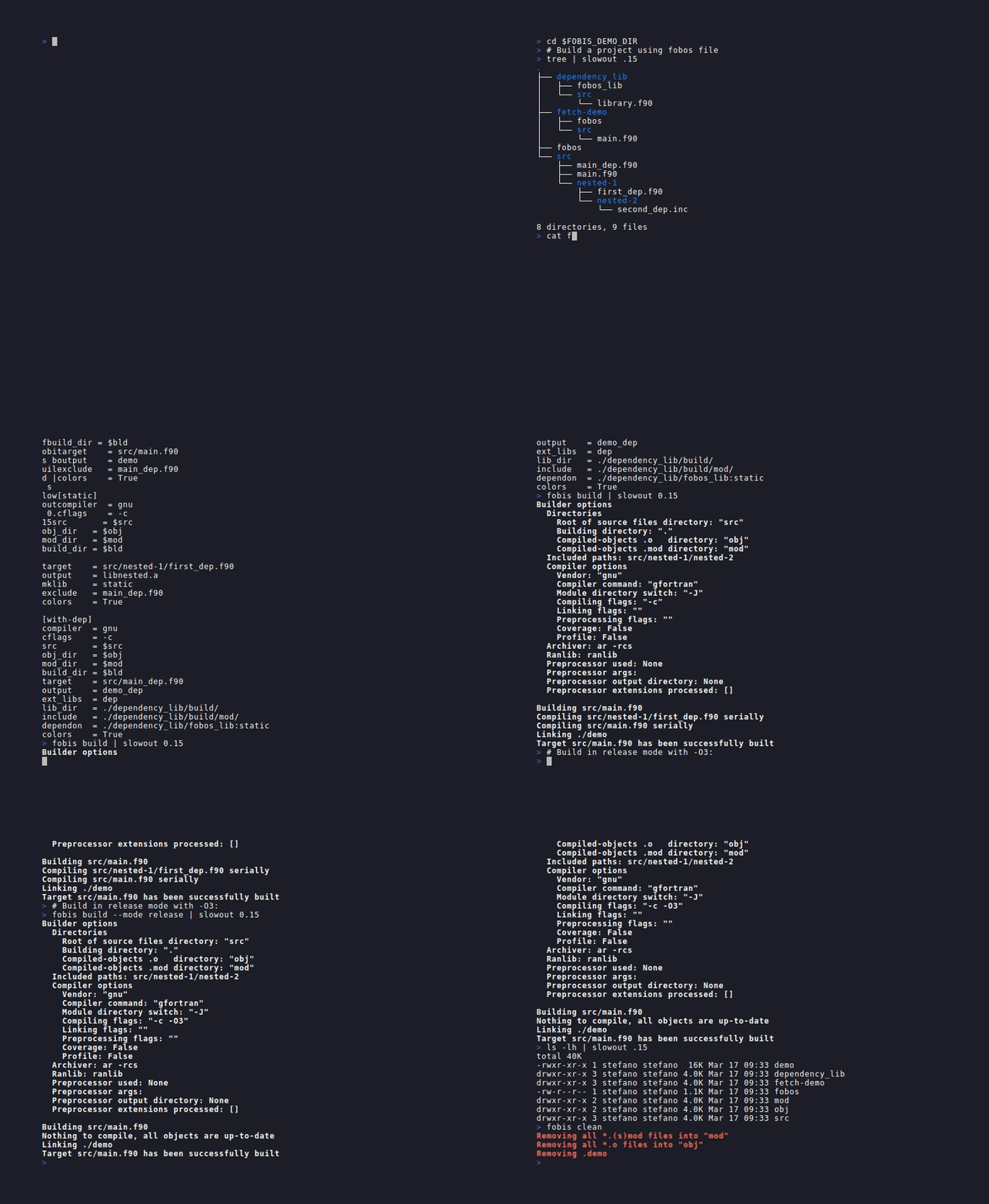
A fobos with two modes: fobis build in the first one, then --mode release.
- Mode keys are the command-line options without the leading
--and with underscores (--build-dirisbuild_dir). Every key is in the fobos reference. - A misspelt key is ignored without a warning. Check it with
fobis introspect --buildoptions(below). cflagsmust hold-c: a mode writingcflags = -O2compiles and links each file, and the build fails at the first module. A mode withoutcflagsgets-c.- Comments go on lines of their own, starting with
;or#. A comment after a value is part of the value:compiler = gnu ; laptopnames a compilergnu ; laptop. FoBiS warns when a value holds;or#, except in the shell commands run by bash:[rule-*]sections and thesetupandcheckkeys. The same holds for the user configuration. - Values span lines when the next lines are indented (a long
modeslist, severalsrcdirectories). - Key names are case-sensitive.
--fcimakes them case-insensitive (values stay as written). - Which section is used:
--mode NAMEneeds a[modes]section listing NAME. Without[modes]only[default]is read; a fobos with neither warnsfobos file has not "modes" section neither "default" one. - An unknown
--modeprints an error and the defined modes, and exits 1.
Debug and release builds
One mode per configuration; a build profile writes the flags for the mode's compiler:
[modes]
modes = debug release

[debug]
compiler      = gnu
build_profile = debug
cflags        = -c
src           = ./src/
build_dir     = ./build/debug/

[release]
compiler      = gnu
build_profile = release
cflags        = -c
src           = ./src/
build_dir = ./build/release/fobis build --list-profiles # every compiler's flags for each profile
fobis build --mode debug
fobis build --mode debug --build-profile release # the command line's profile wins over the mode's$ fobis build --list-profiles | grep -E "compiler|----|gnu"
compiler profile cflags
-------- ------- ------
gnu asan -O1 -g -fsanitize=address,undefined -fno-omit-frame-pointer [link: -fsanitize=address,undefined] [C: -O1 -g -fsanitize=address,undefined -fno-omit-frame-pointer]
gnu coverage -O0 -g --coverage [link: --coverage] [C: -O0 -g --coverage]
gnu debug -O0 -g -fcheck=all -fbacktrace -ffpe-trap=invalid,zero,overflow -Wall -Wextra [C: -O0 -g -Wall -Wextra]
gnu release -O3 -funroll-loops [C: -O3 -funroll-loops]- Four profiles:
debug(checks, backtrace, floating-point traps, warnings),release,asan(address and undefined-behaviour sanitizers),coverage(forfobis coverage). - Compilers:
gnu,intel,intel_nextgen,nvfortran,nag,amd,lfortran(--list-profilesshows which pairs exist). A missing pair gives a warning and no flags, never gfortran's. Some are missing because the compiler refuses or ignores the flags, as measured: ifort ignores-fsanitize=address, nvfortran rejects-fsanitize=addressand--coverage, ifx does not support-ipor-prof-gen=srcpos. Acustomcompiler gets thegnuflags, with a warning; an unknown profile name, a warning and no flags. - The profile comes first: its flags are put before the mode's
cflags, so the mode's own flags win on a conflict (-O0 -g -fcheck=all ... -c -DDEBUG). The profile's link flags go beforelflags. - C files too: each profile has flags for the family's C compiler (
[C: ...]above), beforec_cflags. - Not
--profile: that one adds profiling instrumentation (-pg).
Choose the sources
[release]
compiler     = gnu
cflags       = -c -O2
src          = ./src/
               ./vendor/lib/src/
exclude_dirs = ./src/experimental/
exclude = old_solver.f90fobis build --src ./src --src ./vendor/lib/src # repeat the option for several
fobis build --exclude old_solver.f90 --disable-recursive-searchsrclists directories, walked recursively unlessdisable_recursive_search = True.excludematches file names:exclude = src/old_solver.f90excludes everyold_solver.f90.exclude_dirsexcludes a directory and those below it, matched by whole path components wherever they appear:docsskipssrc/dep/docs/(notsrc/mydocs/),FOSSIL/docsskipssrc/third_party/FOSSIL/docs/. An absolute entry, or one starting with.., skips that directory only. (Older releases matched any part of the path:oldalso skipped./src/older.)- On the command line,
--exclude-dirs,--exclude,--include,--lib-dir,--libs,--vlibs,--ext-libs,--ext-vlibsadd to the mode's lists;--srcand--dependonreplace the mode's. extensionssets which files are read (default: every Fortran extension, the include extensions and.c); a mode setting it must list everything it wants,.cincluded.- Fetched dependencies used as sources join
srcby themselves: see Dependencies.
Build one program out of many
fobis build --target src/solver.f90                 # this program and what it uses
fobis build --target src/solver.f90 --output solver
or target and output in the mode. Only the files the program reaches through use are compiled.
$ fobis build --mode release --target test/odd_intervals.F90 --output odd --quiet

Error: the target "test/odd_intervals.F90" is not among the sources of this build (src: src .fobis_deps/penf): add its directory to the mode's src
[exit status 1]- A target outside the mode's
srcis an error (exit 1), as the output shows: add its directory to the mode's sources. - A path or a name:
--target src/main.f90names that file;--target main.f90names every file called so. - An explicit
--targetkeeps its own target and output over the mode's: this is howfobis testbuilds each test in a mode that names a program. - Without a target, every program found is built;
--build-allcompiles every source, programs or not.
Several programs of one mode, each with its own flags, are [target.NAME] sections; [example.NAME] sections are built with --examples:
[target.solver]
source = src/solver.f90
cflags = -c -O3 -DSOLVER

[example.demo]
source = examples/demo.f90fobis build # every [target.NAME]
fobis build --target-filter solver # only that one
fobis build --examples # the targets and the examples- The mode must not set
targetwhen[target.NAME]sections exist (an error). - A key of the section replaces the mode's (
cflagsabove is the whole set, not an addition). - The targets share the mode's object directory: a target with other flags does not recompile objects another target already built. Use one mode per flag set when the flags must reach every object.
output,mklib,track_buildandlogapply to their own target: one section can name its program, another build a library.--exampleswithout[target.NAME]sections builds the examples, then the mode's program as usual.- A target without
outputis named after its file ([target.solver]ofsrc/solver.f90givessolver).
Keep build products out of the sources
[release]
compiler  = gnu
cflags    = -c -O2
build_dir = ./build/release/
obj_dir   = obj/
mod_dir   = mod/
obj_dir and mod_dir (default ./obj/ and ./mod/) are inside build_dir (default ./); the program goes to build_dir, named after its file or output. One build_dir per mode keeps the modes' objects apart.
fobis build --mode release --build-dir /scratch/me/quad # wins over the mode's build_dirShadow builds (--shadow, in Testing) and the variants of fobis assess keep their objects under .fobis/, apart from yours.
Build and run
fobis run --mode release                  # build the mode, then run its program
fobis run --mode release -- input.nml     # arguments after -- go to the program, untouched
fobis run --no-build                      # run what the last build left
fobis run --dry-run                       # print the build and run commands
fobis run ./build/release/other           # build the mode, run this binary
fobis run --example demo # build the [example.demo] section alone, run it$ fobis run --mode release
Builder options
Directories
Root of source files directory: "src"
Building directory: "build/release"
Compiled-objects .o directory: "build/release/obj"
Compiled-objects .mod directory: "build/release/mod"
Compiler options
Vendor: "gnu"
Compiler command: "gfortran"
Module directory switch: "-J"
Compiling flags: "-c -O2"
Linking flags: ""
Preprocessing flags: ""
Coverage: False
Profile: False
Archiver: ar -rcs
Ranlib: ranlib
Preprocessor used: None
Preprocessor args:
Preprocessor output directory: None
Preprocessor extensions processed: []
Building src/integrate.F90
Nothing to compile, all objects are up-to-date
Target build/release/integrate is up to date: link skipped
n trapezoid error simpson error
4 1.0388E-01 4.5598E-03
8 2.5768E-02 2.6917E-04
16 6.4297E-03 1.6591E-05
32 1.6066E-03 1.0334E-06
64 4.0161E-04 6.4530E-08- The program is the mode's
output(or its target's name) in itsbuild_dir; the mode needs one of the two. A name given afterrunis the binary to start, not a target to build: the build is the mode's, whole. - Exit status: the program's; a program killed by a signal gives 128 + the signal (139 for a segmentation fault). A failed build stops before running.
- Launchers:
--launcher "gdb --args",--launcher "valgrind --error-exitcode=1",--ranks 4formpirun -np 4; a mode can keeplauncher = mpirun -np {ranks}. More in HPC and clusters. --shadow checksruns the mode rebuilt with runtime checks;--explainexplains a crash (AI assistance).- Unknown options before
--are an error, not passed to the program.
Clean
fobis clean --mode debug        # objects, module files and the mode's program
fobis clean --only-obj          # objects and module files, keep the program
fobis clean --only-target # the program, keep the objects$ fobis clean --mode debug
Removing all *.(s)mod files into "build/debug/mod"
Removing all *.o files into "build/debug/obj"
Removing build/debug/integrate- It reads the same mode as
build, so the same directories are cleaned: give it the same--modeand-f. - The program is removed only when there is a target (the mode's
target, or--target): without one, as in a build with no fobos, the programs stay (see the tutorial's cleaning). - Also removed: the target's build log (
<build_dir>/build_<file>.log),<build_dir>/.cflags.heritageand the compilation database with its root link. The compiler record and a.<target>.cflags.heritagestay. --only-objand--only-targetexclude each other.
Share settings between modes: templates
A template is any section a mode names in template; the mode gets every key of the template it does not set itself:
[project]
name    = quad
version = 0.1.0
authors = Ada Fortran

[modes]
modes = debug release static shared coverage

[common-variables]
$PROGRAM = src/integrate.F90
$LIBRARY = src/quad_rules.F90
$OPT     = -O2

[template-gnu]
compiler = gnu
src      = ./src/

[template-library]
template    = template-gnu
target      = $LIBRARY
track_build = True

[debug]
help      = Checks on, no optimisation
template  = template-gnu
cflags    = -c -O0 -g -fcheck=all -Wall
src       = ./src/ ./test/
build_dir = ./build/debug/
target    = $PROGRAM

[release]
help      = Optimised
template  = template-gnu
cflags    = -c $OPT
build_dir = ./build/release/
target    = $PROGRAM

[static]
help      = The library, static
template  = template-library
cflags    = -c $OPT
build_dir = ./build/static/
mklib     = static
output    = libquad.a

[shared]
help      = The library, shared
template  = template-library
cflags    = -c $OPT -fPIC
build_dir = ./build/shared/
mklib     = shared
output    = libquad.so

[coverage]
help      = Instrumented for coverage
template  = template-gnu
cflags    = -c -O0 -g
coverage  = True
src       = ./src/ ./test/
build_dir = ./build/coverage/
target    = $PROGRAM

[dependencies]
penf = https://github.com/szaghi/PENF :: tag=v2.0.1$ fobis build --lmodes
The fobos file defines the following modes:
- "debug" Checks on, no optimisation
- "release" Optimised
- "static" The library, static
- "shared" The library, shared
- "coverage" Instrumented for coverage- Several templates:
template = template-gnu template-mpi. The mode wins over all of them, an earlier template over a later one. - Templates of templates are expanded depth first:
[template-library]above gets[template-gnu]'s keys after its own. - A template is not a mode unless
[modes]lists it. - Errors: a circular reference (A -> B -> A), or a template that is not defined, stop the build (exit 1).
Reuse values: variables
A key starting with $, in any section, defines a variable; $NAME in the selected mode's values (and what its templates gave it) is replaced by its value. The fobos above uses $PROGRAM, $LIBRARY and $OPT.
- Variables are global: the section holding them does not matter (
[common-variables]is a convention), except[varset:NAME]sections (next recipe). A variable defined twice takes the later value. - Plain text replacement, several per value, no expressions; names are matched whole, so
$HDF5and$HDF5_PREFIXcoexist. - Do not build a variable from another:
$A = -c $Bis replaced only when$Bis defined after$Ain the file. - A variable nobody defines stays in the value as written (
$NAME).
Choose machine paths at build time: varsets
When modes would differ only in a few values (library prefixes, a GPU architecture), keep one mode and put the values in named varsets:
[varsets]
default = local

[varset:local]
$HDF5 = /usr/lib/x86_64-linux-gnu/hdf5/serial

[varset:cluster]
$HDF5 = /opt/spack/hdf5-1.14.3
$ARCH = cc80

[solver]
compiler = nvfortran
cflags   = -c -fast -gpu=$ARCH
include  = $HDF5/include
lib_dir  = $HDF5/lib
ext_libs = hdf5_fortran hdf5
target = src/solver.F90fobis build --mode solver # [varsets] default: local
fobis build --mode solver --varset cluster
fobis build --mode solver --varset cluster,a30 # several: the last one wins on a name both define
fobis introspect --varsets # every varset, its bindings and the default- A varset's variables apply only when it is selected, by
--varsetor by[varsets] default(a list too). They override the global variables of the same name. - Which varsets apply:
--varset, else the mode'svarsetkey, else[varsets] default; each replaces the next, it does not add to it. - Errors and warnings: an undefined varset (on the command line or as the default) stops the build (exit 1) and lists the defined ones; a key without
$is ignored with a warning; a varset whose keys all lack the$, a warning. - With other options:
check,introspectandtesttake--varsettoo; varsets and features compose (--varset cluster --features prod).
Flags that differ by compiler or system
A key qualified by a compiler family or an operating system applies only there, so one mode serves several:
[release]
compiler         = gnu
cflags           = -c -O2
cflags.gnu       = -march=native
cflags.intel     = -xHost
cflags.windows   = -static
ext_libs.windows = ws2_32fobis introspect --buildoptions --mode release # which qualified keys applied, and the result- Qualifiers: a
compilervalue (gnu,intel,intel_nextgen,nvfortran, ...) or a system (linux,macos,windows,freebsd). The compiler is the mode's, after its templates (a mode'scompilerreplaces--compiler). - Flag keys are appended:
cflags,lflags,preproc,c_cflags,c_preprocget the base, then the compiler's, then the system's (gfortran on Linux above:-c -O2 -march=native). A command-line--cflagscomes last. - Any other key is replaced, so two qualified keys replacing the same key that both apply (
ext_libs.gnuandext_libs.linuxwith gfortran on Linux) are an error, as is an unknown qualifier (exit 2). - They work in templates, and
$variablesare substituted in them. introspect --buildoptionslists every qualified key, whether it applied, how (appended,replaced) and the value it gave.
Which mechanism: a qualified key when the value follows the compiler or the system by itself; a varset when it follows the machine (a cluster's library paths, a GPU architecture) and you choose it with --varset; a named mode when the build itself differs (another target, a library, other sources). A build profile when the flags are the usual debug or release ones.
Switch options on and off: features
A feature is a named set of flags, activated per build:
[project]
name    = quad
version = 0.1.0
authors = Ada Fortran

[modes]
modes = debug release static shared coverage

[features]
checks = -DQUAD_CHECKS

[common-variables]
$PROGRAM = src/integrate.F90
$LIBRARY = src/quad_rules.F90
$OPT     = -O2

[template-gnu]
compiler        = gnu
src             = ./src/
cflags_heritage = True

[template-library]
template    = template-gnu
target      = $LIBRARY
track_build = True

[debug]
help          = Checks on, no optimisation
template      = template-gnu
build_profile = debug
features      = checks
cflags        = -c
src       = ./src/ ./test/
build_dir = ./build/debug/
target    = $PROGRAM

[release]
help          = Optimised
template      = template-gnu
build_profile = release
cflags        = -c
build_dir = ./build/release/
target    = $PROGRAM

[static]
help      = The library, static
template  = template-library
cflags    = -c $OPT
build_dir = ./build/static/
mklib     = static
output    = libquad.a

[shared]
help      = The library, shared
template  = template-library
cflags    = -c $OPT -fPIC
build_dir = ./build/shared/
mklib     = shared
output    = libquad.so

[coverage]
help      = Instrumented for coverage
template  = template-gnu
cflags    = -c -O0 -g
coverage  = True
src       = ./src/ ./test/
build_dir = ./build/coverage/
target    = $PROGRAM

[dependencies]
penf = https://github.com/szaghi/PENF :: tag=v2.0.1fobis build --mode debug # [features] default + the mode's features (checks)
fobis build --features hdf5,mpi # more, comma or space separated
fobis build --mode debug --features -checks # drop one, wherever it came from
fobis build --no-default-features # ignore [features] default$ fobis build --mode debug --features -checks --target test/odd_intervals.F90 --output odd --quiet && ./build/debug/odd
The present cflags are different from the heritages one: forcing to (re-)compile all
Compiling src/quad_rules.F90 [1/3]
Compiling test/polynomials.F90 [2/3]
Compiling test/odd_intervals.F90 [3/3]
Building test/odd_intervals.F90
Nothing to compile, all objects are up-to-date
Linking build/debug/odd
Target test/odd_intervals.F90 has been successfully built
integral of x**3 on [0, 2] (exact 4): 3.094650- Active set:
[features] default, then the mode'sfeatures, then--features; a-NAMEdrops NAME after everything is expanded. The build printsActive features: .... - Routing:
-l...,-L...,-Wl,...go to the link flags; an OpenMP flag (-fopenmp,-qopenmp,-fiopenmp,-mp,-qsmp=omp,-openmp) to both; anything else (-D,-I,-O3) to the compile flags, after the mode's and the command line's. - Implicit features need no definition:
openmp(omp),mpi,coarray,coverage,profile,openmp_offload(omp_offload) switch the compiler's own option, as--openmpdoes, for any family. They add no-Dmacro: pair them with a feature of your own (omp_defs = -DUSE_OMP). A definition in[features]replaces the implicit one. - Composites:
prod = @release @hdf5 -DEXTRAactivates both features and adds its own flag. Only@NAMErefers to a feature; a cycle is ignored with a warning. - Unknown names and a
-NAMEmatching no active feature give a warning, not an error. - Dropping the default features:
--no-default-features, orno_default_features = Truein the mode.
Constraints between features, in sections of their own:
[feature:hdf5]
requires = mpi

[feature:static]
flags     = -static
conflicts = shared

[feature-group:precision]
members = single double quad
default = doublerequiresactivates the others too, transitively (Activating 'mpi' required by 'hdf5'.).conflictsstops the build (exit 1) when both are active, naming the feature that pulled each one in.- A group allows at most one active member (two stop the build, exit 1); with a
default, exactly one: the default fills the group when no member is active, unless the default was dropped with-NAME. flagsin[feature:NAME]is an alternative to the[features]line: two different flag sets for one feature are an error.
Features and profiles compose: fobis build --build-profile debug --features hdf5.
Preprocessor macros
[debug]
compiler = gnu
cflags   = -c -O0 -g
preproc  = -DDEBUG -DUSE_MPI
src      = ./src/
preproc reaches every Fortran compile command, after cflags; files the compiler preprocesses are the usual .F90, .F (or any file with -cpp). Groups of macros switched by name are features. The analysis commands evaluate #if lines with the mode's -D macros.
Split a fobos into files
[include]
paths = templates.fobos
        ../shared/compilers.fobos
        ?fobos.local
The sections of the listed files are merged into the fobos before anything else, key by key. Typical uses: one file per kind of section, compiler templates shared by sibling projects, and a git-ignored fobos.local with a developer's own paths ($HDF5 = /home/me/hdf5).
- Paths are relative to the including file, after
${VAR}and~expansion. A?prefix makes a file optional: silently skipped when missing; without it, a missing file stops the build (exit 1) and suggests the?. - Who wins: the including file over its includes; among the includes, the later one. A key the parent does not set flows through.
- Lists are merged:
[modes] modes,[features] defaultand[varsets] defaultget the names of every file. - Includes may include, depth first, up to 16 levels; a cycle (a file including itself, directly or not) stops the build (exit 1). Two paths reaching the same file are not a cycle.
- Everything works across files: variables, templates, features, varsets.
- One path per line, no comment after it: words on the
pathsline are file names, so?fobos.local ; mineincludes a file named;. .fobosis a convention for included files, not a rule. Includes have no parameters and no conditions: for values chosen at build time use varsets or features.
Compile in parallel
fobis build --jobs 8or jobs = 8 in the mode; -j on the command line wins over the mode's jobs, and without either FoBiS uses every CPU the process may run on. A file starts as soon as the files it uses are compiled, the longest chain of dependent files first (weighted by the compile times of the last --timings build when there is one); each file's compiler output is printed in one block when it ends, with its rank:
$ fobis build --mode release --force-compile --jobs 4 --quiet

Compiling .fobis_deps/penf/src/lib/penf_global_parameters_variables.F90 [1/8]
Compiling src/quad_rules.F90 [2/8]
Compiling src/integrands.F90 [3/8]
Compiling .fobis_deps/penf/src/lib/penf_b_size.F90 [4/8]
Compiling .fobis_deps/penf/src/lib/penf_stringify.F90 [5/8]
Compiling .fobis_deps/penf/src/lib/penf_allocatable_memory.F90 [6/8]
Compiling .fobis_deps/penf/src/lib/penf.F90 [7/8]
Compiling src/integrate.F90 [8/8]
Building src/integrate.F90
Nothing to compile, all objects are up-to-date
Linking build/release/integrate
Target src/integrate.F90 has been successfully built
Executing rule "smoke"
   Command => ./build/release/integrate | tail -n 1
Simpson, 64 intervals: 2.0000000645300013
The speed-up is bounded by the longest chain: a chain of modules each using the previous one compiles serially whatever -j (--timings reports that chain as the critical path). --interfaces-first (or interfaces_first = True) shortens that chain: a module that other files of the build use is compiled twice, first with the compiler's syntax-only switch (-fsyntax-only, -Msyntax-only), which writes its module files in a fraction of the time and is all the files using it wait for, then for its object, which nothing waits for. The module files of the second compile go to a directory of their own (<obj_dir>/.fobis-object-mods/) and are compared with the first ones: if they differ, the build fails and removes its objects (build again without the option). gfortran and nvfortran only (measured: the module files of both compiles are equal on PENF); not for submodules nor the modules that have some. It costs more CPU time (each such module is read and checked twice) to finish sooner with enough -j. --scheduler levels (or scheduler = levels) restores the scheduler of FoBiS 3.18 and earlier, which compiled the graph level by level; it will be removed after two releases. Tutorial: rules and parallel compiling.
Measure a build
fobis build --jobs 16 --timingsEvery compile and link is measured (wall time, and peak memory where the system reports it) and written to <obj_dir>/.fobis-timings.json; the build ends with a summary:
- serial sum: the time of every compile added up, what the compilers cost;
- makespan: from the first compile to the end of the last one;
- critical path: the longest chain of compiles that depend on each other, a floor no
-jcan beat; - lower bound: the larger of the critical path and serial sum / jobs; a makespan well above it is time lost in waiting, not in compiling;
- link time, the peak memory of one compiler process and the slowest files.
A failed build writes its timings too. The file holds one record per call (file, kind compile or link, status, start from the beginning of the build, seconds, peak_rss_kib).
What is compiled again
| Change | Recompiled |
|---|---|
| A source file | the file, and every file using its modules, directly or not |
| An included file | the files including it |
A .mod from outside the project (a dependon project, a library), newer than an object | the files using it |
The compiler (another path, or another --version) | everything, once |
| The flags | nothing, unless cflags_heritage = True |
--force-compile, or force_compile = True in the mode | everything |
A program (or library) is linked again only when an object or a library it links is newer than it, or when the link command changed (other objects, flags, libraries); otherwise the build says Target ... is up to date: link skipped. The last command is kept in <obj_dir>/.fobis-links.json. A library given as -lNAME is followed when it lies in a lib_dir; one found elsewhere (a system library) is not: after rebuilding it, use --force-compile.
$ touch src/quad_rules.F90 && fobis build --quiet
[auto-discover] src not set; scanning: ./src

Compiling src/quad_rules.F90 [1/3]
Compiling src/integrands.F90 [2/3]
Compiling src/integrate.F90 [3/3]
Building src/integrate.F90
Nothing to compile, all objects are up-to-date
Linking ./integrate
Target src/integrate.F90 has been successfully built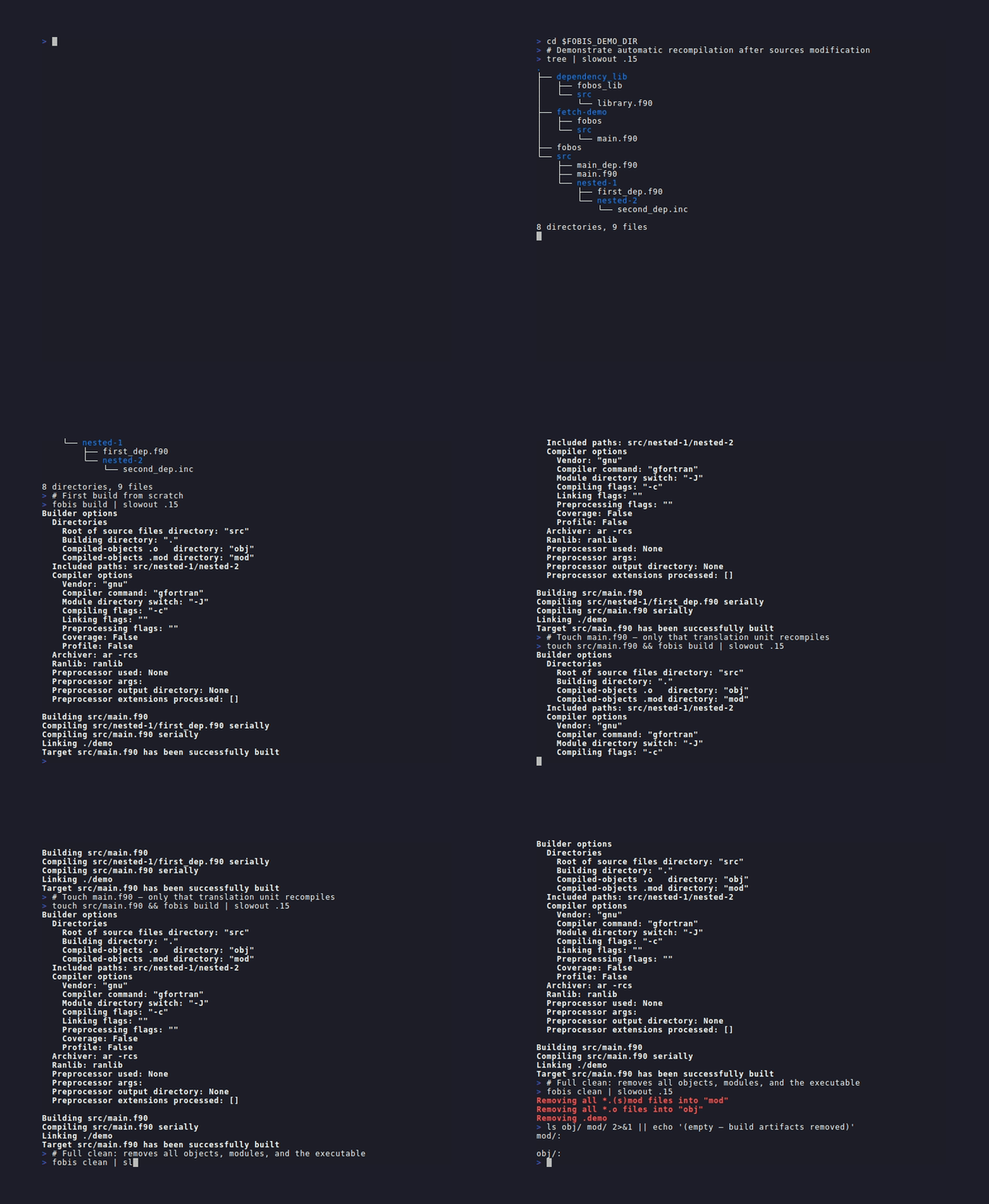
A build from scratch, a touched file compiled again, then fobis clean.
The cascade follows timestamps: touching a low-level module recompiles every file above it, even when its interface did not change. --interface-cutoff (or interface_cutoff = True in the mode) stops it there: a file whose own source did not change is compiled only when a module interface it reads changed, compared on the module files (.mod) the compiler writes. An edit of a procedure body then compiles that file alone, and the program is linked again:
- Compilers: gfortran and nvfortran, whose module files were measured (gfortran writes the same
.modafter a body edit; nvfortran's differs only in its date line). Another compiler gets a warning and the full cascade. - Off with cross-file optimisation of the host code (
-flto,-Mipa,-Mextract,-Minline=lib...,-ipo,-fwhole-program): an object may then hold code of other modules' bodies. Device LTO (-gpu=...,lto) happens at the link and keeps it on. - Conservative: a file compiles again when a module anywhere in its dependency closure changed interface (not only those it uses directly), and submodules always compile.
- The first build with it compiles as usual and records the interfaces in
<obj_dir>/.fobis-interfaces.json.
A build with nothing to do
Every build reads its sources for their modules, uses and includes. The facts of each file are kept in <build_dir>/<obj_dir>/.fobis-parse-cache.json and used again while the file (and every file the preprocessor included into it) keeps its size and modification time, and the settings the reading depends on (preprocessor flags, include directories, compiler, FoBiS version) are the same. --no-parse-cache (or no_parse_cache = True) reads every file afresh. An upper-case file (.F90) goes through cpp only when it holds a directive or a name defined by -D: otherwise cpp would give it back unchanged.
Rebuild after changing the flags
[template-gnu]
compiler        = gnu
src             = ./src/
cflags_heritage = True
or --cflags-heritage (--ch). The mode's compile flags (with the macros, and the C command when the mode sets a C key) are saved in <build_dir>/.cflags.heritage, or <build_dir>/.<target>.cflags.heritage with a target; when the next build's differ, everything is recompiled:
The features output above shows it: dropping the checks feature changed the flags, and every file was compiled again.
- The file is written when the build starts, before compiling: a build that fails after a flag change leaves the objects it did not reach with the old flags, and the next build no longer sees a change. Rerun with
--force-compile. - Link flags are not compared.
Rebuild after changing the compiler
Nothing to do. Every build records, in <obj_dir>/.fobis-compiler.json, the compiler behind the mode's command: its resolved path and the first line of its --version (and the C compiler's, with C files). When the next build finds another one, typically a module load of another release that keeps the name gfortran, it prints The compiler changed since the last build (path '...' -> '...'; version '...' -> '...'): rebuilding everything and recompiles everything, instead of linking objects and reading .mod files of two compilers.
- The record is written only after a build without compile failure: a failed build leaves the next one forced.
- No record (the first build, objects of an older FoBiS): nothing is forced.
Modules from outside the project
[release]
compiler          = nvfortran
cflags            = -c -O3
include           = /opt/hdf5/include
intrinsic_modules = hdf5 h5lt mpi_f08
A use of a module no project file defines warns the file 'X' depends on 'NAME' that is unreachable and is left to the compiler, which must find NAME.mod in an include directory. intrinsic_modules silences the warning for modules that come from outside (case-insensitive, for that mode). The standard intrinsics and the compiler's own modules (cudafor with nvfortran, ifport with Intel, the list in compilers) are skipped already. Libraries found through pkg-config or a wrapper: Libraries and other build systems.
Files without modules
A file that defines no module (external subroutines and functions, block data, a C source) is linked into the program as external procedures: no use says which target needs it. The mode key or option nomodlibs decides:
[release]
target    = main.f90
# reachable (default with a target), all (default without one, and for libraries), none
nomodlibs = reachablereachable: a file is compiled and linked when one of the procedures it defines is named in a file the target uses, directly or through another file kept; a submodule when the target uses its ancestor module.all: every file without modules and every submodule of the sources, into every program (what older FoBiS releases always did).none: no Fortran file without modules.
The build says what it left out, and --verbose lists the files with the reason; fobis introspect --sources gives the reason of each file in its left_out field.
- Fragments are never compiled: a file that defines no procedure at all (a code snippet of a dependency's documentation, a file of statements) is left out under
reachableandnone. - C sources,
block dataandbind(c)procedures are always kept: their callers name them in ways FoBiS does not follow. - The test is on names, not on calls: a name in a comment keeps a file (more is compiled, never less). A name the preprocessor builds by pasting tokens is missed: the link then fails with an undefined reference, and
--explainnames the file left out. Setnomodlibs = allfor such a target. - An override of a library routine is kept: a file defining a routine that a library of the link calls (an error hook like
xerbla) is kept when the library is linked by path (libs,vlibs) or as-lNAMEfound in alib_dir(FoBiS reads its undefined symbols withnm). A library found elsewhere is not read: setnomodlibs = allfor such a target, or the library's own version is linked. - A file that does not compile is not linked, and not compiled again until it, a file it includes, a module it uses (directly or not) or its compile command changes (
<obj_dir>/.fobis-failed.json);--force-compileretries it. The build reports such files once,--verbosewith the compiler's messages. A module that fails while such a file is built is compiled again by the target that needs it.
Fortran include files
include 'kernel.inc' makes the file depend on kernel.inc: changing it recompiles the files including it. Include files (extensions inc, default .inc .INC .h .H) are never compiled; FoBiS finds them in the source directories and the include directories, and passes their directory to the compiler.
Files named alike
Two files with the same name in different directories (lib/one/util.f90, lib/two/util.f90) are both compiled and linked: their objects are named after their path (lib_one_util.f90.o, lib_two_util.f90.o); a file whose name is unique keeps util.o. Two programs named alike would write one executable: FoBiS warns; build each with its own --target and --output.
C files with the Fortran ones
[release]
compiler  = gnu
cflags    = -c -O2
c_cflags  = -c -O2 -std=c11
c_preproc = -DNDEBUG
src       = ./src/
.c files among the sources are compiled with the family's C compiler and linked into every program and library, with nothing in the fobos naming them (a timer through clock_gettime, a wrapper of a C library called through bind(c)). Tutorial: a timer in C.
compiler | C compiler | with mpi | OpenMP |
|---|---|---|---|
gnu, opencoarrays-gnu, nag | gcc | mpicc | -fopenmp |
intel | icx | mpiicc -cc=icx | -qopenmp |
intel_nextgen | icx | mpiicx | -qopenmp |
nvfortran | nvc | mpicc | -mp |
pgi | pgcc | mpicc | -mp |
amd | amdclang | mpicc | -fopenmp |
ibm | xlc_r | mpicc | -qsmp=omp |
g95, lfortran, custom | gcc (g95), cc | mpicc | none |
Measured: gcc 16 with gfortran, nvc 26.5 with nvfortran, icx 2026.1 with ifx 2025.3, Open MPI 5.0 mpicc; the others are the vendors' documented names.
- The Fortran flags never reach C.
c_cflags(default-c, added when missing) andc_preprocdo;ccnames another C compiler.openmp,coverageandprofileadd the C compiler's own flag; a build profile adds its C flags beforec_cflags. A shared library needs-fPICin bothcflagsandc_cflags. - Dependencies: a C file is read for its
#include "..."lines only (every one, whatever#ifholds it); a project header that changes recompiles it.#include <...>headers are the system's."sys/clock.h"is found by the end of its path, and the directory it is relative to joins the include path. - Headers: a
.hfile written in C (a/* */comment,typedef,extern,#include <...>) is a C header: never compiled, never read as a Fortran include file. - Objects:
clock.ccompiles toclock.c.o, so aclock.f90beside it keepsclock.o. - Errors: a C file that does not compile fails the build (a Fortran file defining no module that fails is dropped from the link with a warning).
build --jsonreports its error with file and line,tool: "c". - Elsewhere: the compilation database and the Makefile export have the C files; the compiler record holds the C compiler;
introspect --compilershowsccandc_cflags. - Left out:
lint,query,reviewand the other analysis commands,--explain(it stops at a C error), shadow modes andassessvariants (Fortran flags only), and PreForM.
Preprocess with PreForM or another tool
[gnu-preform]
compiler          = gnu
cflags            = -c -O2
preprocessor      = PreForM.py
preprocessor_ext  = .pfm .F90
preprocessor_dir  = pfm/
preprocessor_args = -DDEBUG
extensions        = .f90 .F90 .pfm
src = ./src/fobis build --preprocessor # PreForM.py on every Fortran file
fobis build --preprocessor fypp --npp # another tool; --npp drops the -o before its output
fobis build --preprocessor --epp .pfm --dpp pfm/Each selected file is passed through preprocessor ARGS FILE -o <name>.pp.f90 and the result compiled; the preprocessed file is deleted after compiling unless preprocessor_dir (--dpp, inside build_dir) keeps it.
preprocessor_ext(--epp, repeatable) restricts the preprocessor to those extensions; without it every Fortran file goes through. C files never do.- A file must be read to be preprocessed: a non-Fortran extension such as
.pfmmust be inextensionstoo. preprocessor_args(--app) go to the preprocessor;preprocgoes to the compiler.- A preprocessor not on the PATH is reported (
... is not in your PATH!) and the compiles fail. - PreForM.py expands templates and
cpp-like directives.
Check the dependency graph
fobis check                 # no compile: unresolved modules and includes, cycles
fobis check --strict        # any other analysis warning fails too
fobis check --json$ fobis check --json
{
"status": "ok",
"files": 241,
"unresolved": [],
"cycles": [],
"warnings": []
}It scans the sources as build would (fetched and test-only dependencies included) and exits 1 on a use nothing provides, an include no source directory holds, or files depending on each other in a cycle. A module found as a .mod in an include directory, or defined by a dependon project, is provided. fobis build stops on a cycle with the same message (error: circular dependency: a -> b -> a). A fast first step in CI: see CI and machine output.
Inspect the resolved settings
fobis introspect --compiler --buildoptions --mode shared   # the flags as FoBiS will pass them
fobis introspect --sources                                 # every file: modules, uses, program, language
fobis introspect --all --format toml
fobis introspect --all --write # one .fobis-info/intro-*.json per section$ fobis introspect --compiler --buildoptions --mode shared
{
"compiler": {
"name": "gnu",
"binary": "gfortran",
"cflags": "-c -O2 -fPIC",
"lflags": "-shared",
"preproc": "",
"cc": "gcc",
"c_cflags": "-c"
},
"buildoptions": {
"mode": "shared",
"build_dir": "./build/shared/",
"obj_dir": "./obj/",
"mod_dir": "./mod/",
"mklib": "shared",
"jobs": 1
}
}Sections: --sources, --compiler, --dependencies, --targets (the mode's program or library), --include-dirs, --buildoptions (with the qualified keys), --projectinfo, --varsets, --all; --varset and --shadow apply before resolving. A call with no section prints {}. --compile-commands prints the compilation database of the mode, alone (Libraries and other build systems).
Two build options leave files to look at: --log writes <build_dir>/build_<file>.log (the dependencies of each built program), --graph its dependency graph (graphviz). --verbose is the most detailed output.
Name and version the project
[project]
name       = quad
summary    = Quadrature rules
version    = VERSION
repository = https://github.com/me/quad
website    = https://me.github.io/quad
email      = me@example.org
year       = 2020
authors    = Ada Fortran
             Charles Babbage
Every key is optional; authors go one per line. fobis introspect --projectinfo, fobis tree, pkg-config files, fobis fpm export and fobis scaffold (, default the current year) read it.
versionis a literal, or a file holding it: a path relative to the git repository root (outside a git repository, next to the fobos). The result gets a leadingv(1.2.3->v1.2.3).- Without
version, the latest git tag (git describe --tags --abbrev=0) is the version. - Both set and different: a warning names both and the two fixes (change the fobos, or tag).