Usage
Basic search
mosaic search "transformer attention mechanism"Queries all enabled sources and prints a results table:
 #   Title                          Authors          Year   Source            OA    PDF
 1   Attention Is All You Need      Vaswani et al.   2017   Semantic Scholar  yes   ✓
 2   Attention Is All You Need      Vaswani et al.   2017   arXiv             yes   ✓
 ...
10 result(s)
Duplicate entries (same DOI) are merged automatically.

Limit results per source
mosaic search "CRISPR gene editing" -n 25The -n / --max flag controls how many results are requested from each source (default: 10).
Open-access filter
mosaic search "quantum computing" --oa-onlyHides papers that have neither is_open_access=true nor a known PDF link.
Search a single source
mosaic search "RNA velocity" --source epmc
mosaic search "neural ODE" --source arxiv
mosaic search "drug discovery" --source ss| Shorthand | Source |
|---|---|
arxiv | arXiv |
ss | Semantic Scholar |
sd | ScienceDirect |
doaj | DOAJ |
epmc | Europe PMC |
pubmed | PubMed |
pmc | PubMed Central |
rxiv | bioRxiv / medRxiv |
Download PDFs
mosaic search "diffusion models image generation" --oa-only --downloadFor each result that has a PDF link (or a DOI that Unpaywall can resolve), the file is saved to ~/mosaic-papers/ with the naming pattern:
{FirstAuthorLastName}_{Year}_{Title_slug}.pdfAlready-downloaded files are skipped automatically.

Download by DOI
mosaic get 10.48550/arXiv.1706.03762MOSAIC checks the local cache first. If the paper was seen in a previous search and a PDF URL is already known, the download starts immediately — no Unpaywall round-trip. Otherwise it falls back to Unpaywall, then a saved browser session.

Bulk download from BibTeX or CSV
# Download all DOIs found in a BibTeX export (Zotero, JabRef, Mendeley…)
mosaic get --from refs.bib

# Download from a CSV with a 'doi' column
mosaic get --from references.csv

# Mark unresolvable papers as skipped instead of failed
mosaic get --from refs.bib --oa-only

# Save to a custom directory
mosaic get --from refs.bib --download-dir ~/papers
MOSAIC extracts every doi = {…} field from .bib files (no extra dependency) or reads the doi column from .csv files, deduplicates, and prints a per-entry result followed by a summary:
Found 42 DOI(s) in refs.bib
  ✓ 2017_arXiv_Vaswani_Attention_Is_All_You_Need.pdf
  ✓ 2019_Semantic_Scholar_Devlin_BERT.pdf
  – 10.1016/j.celrep.2020.107834 (no OA copy)
  …

Done: 35 downloaded, 4 failed, 3 skipped (no OA copy)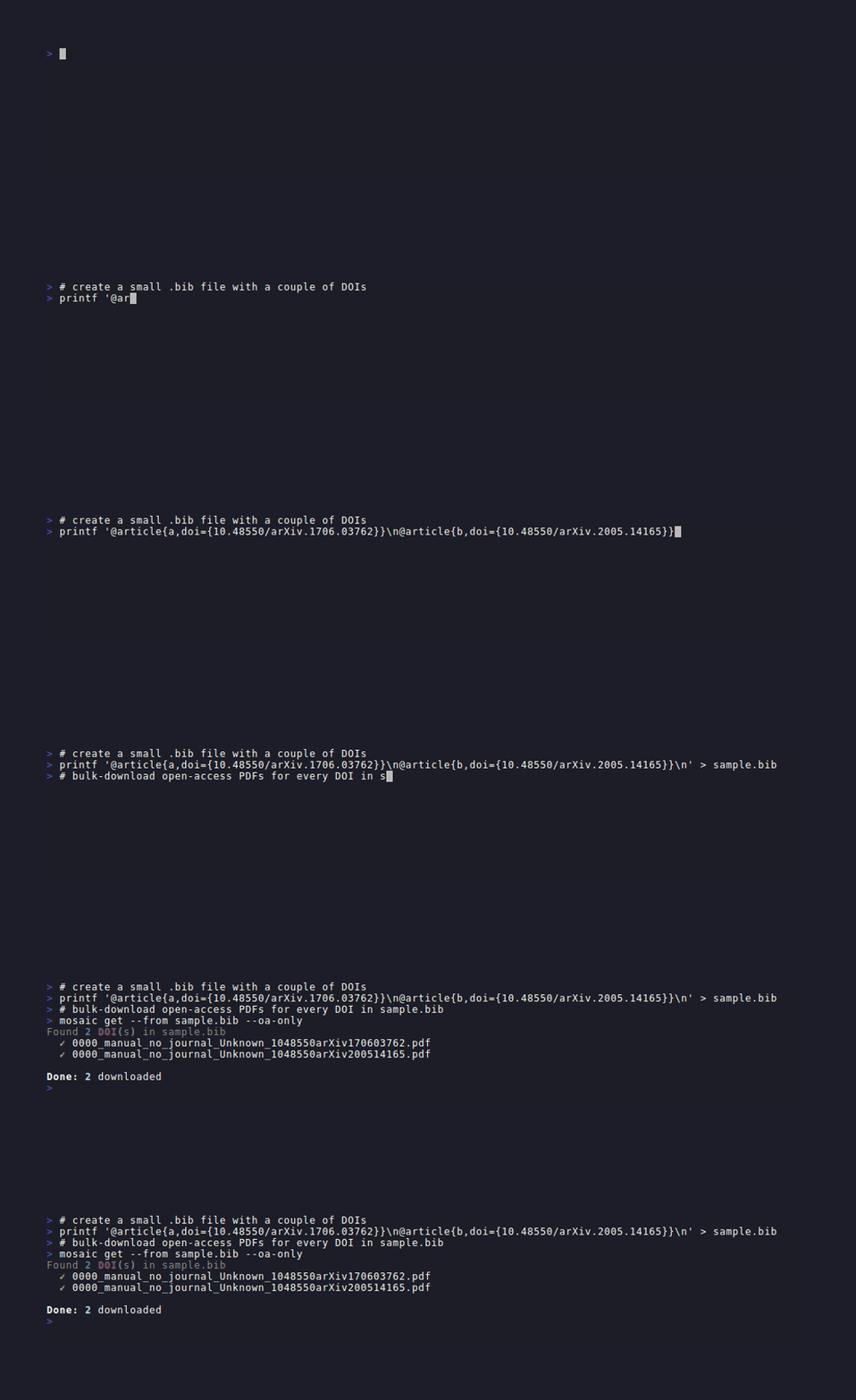
Filter by year
# Exact year
mosaic search "transformer" --year 2017

# Inclusive range
mosaic search "diffusion models" -y 2020-2023

# Explicit list of years
mosaic search "BERT" -y 2019,2020,2021
The year filter is passed to each source's native API where supported (arXiv, Semantic Scholar, ScienceDirect, Europe PMC, DOAJ), and applied as a post-processing step on all results as a safety net.
Filter by author
# Single author substring match
mosaic search "attention" --author Vaswani

# Multiple authors (OR logic — paper must match at least one)
mosaic search "graph neural" -a Kipf -a Velickovic
Author matching is case-insensitive and substring-based, so --author Hinton matches "Geoffrey E. Hinton".
Filter by journal
# Substring match against the journal name
mosaic search "protein structure" --journal "Nature"
mosaic search "RNA sequencing" -j "Nucleic Acids"
Combining filters
Filters compose with AND logic (year AND author AND journal must all match):
# Papers by Vaswani from 2017, open-access, download PDFs
mosaic search "attention mechanism" -y 2017 -a Vaswani --oa-only --download

# Papers in Nature between 2020 and 2023, from Europe PMC
mosaic search "CRISPR" -j Nature -y 2020-2023 --source epmc -n 25

# Broad search, open-access only, download everything, from arXiv
mosaic search "large language model" -n 50 --source arxiv --oa-only --download
Cache-first search
Pass --prefer-cache to substitute rich cached records for freshly fetched ones:
mosaic search "transformer attention" --prefer-cacheWhen a fetched paper has a matching UID already in the local cache and that record is considered rich (has abstract + year + at least one author), MOSAIC uses the cached version instead of the freshly fetched one. This avoids redundant Unpaywall lookups and preserves metadata accumulated across earlier runs.
Combine with any other flags:
# Cache-enriched records, open-access only, sorted by citations
mosaic search "protein folding" --prefer-cache --oa-only --sort citations
See Cache Management for how records are enriched when the same paper arrives from multiple sources.
Offline / cached search
Use --cached to search only the papers already stored in the local cache — no network requests, no API keys needed, instant results:
mosaic search "attention mechanism" --cachedAll the usual filters, sort, and export options still apply:
# Filter cached papers by year and author, open-access only
mosaic search "CRISPR" --cached -y 2020-2024 -a Zhang --oa-only

# Sort cached results by citation count and export to BibTeX
mosaic search "diffusion models" --cached --sort citations --output refs.bib
The cache is populated automatically by every regular search, similar, and get run — so the more you use MOSAIC, the richer your local library becomes.
Relevance-ranking your local library
Combine --cached with --sort relevance to re-rank your collected bibliography against any query — with no network access and no API keys required:
mosaic search "transformer attention" --cached --sort relevanceThis is the fastest way to sift a bibliography you have already built. To load a .bib or .csv file into the cache first:
mosaic get --from refs.bib            # populate cache from a BibTeX export
mosaic search "your query" --cached --sort relevance   # then rank offline
To rank every paper in the cache (not pre-filtered by keyword), pass an empty query:
mosaic search "" --cached --sort relevanceSee the Relevance Ranking guide for the full reference including filters, export, and LLM setup.

Warnings
By default MOSAIC suppresses per-source warnings (rate-limits, timeouts, 5xx errors) to keep the output clean. Pass --verbose as a global flag (before the subcommand) to reveal them:
mosaic --verbose search "transformer attention"Warning: Source Semantic Scholar failed: 429 Too Many Requests
Warning: Source DBLP failed: 500 Internal Server ErrorUseful when debugging connectivity or API key issues.
Search stats
Add --stats to a search command to print a per-source breakdown and deduplication report after the search completes:
mosaic search "transformer attention" --stats Search stats
Source Results
───────────────────────────
arXiv 12
Semantic Scholar 18
OpenAlex 15
Crossref 9
───────────────────────────
Total raw 54
Merged 23
Unique 31Useful for tuning source selection and understanding which sources contribute unique results. Both flags can be combined:
mosaic --verbose search "protein folding" --statsSort results
Use --sort to rank results after the search:
# Most-cited papers first (citation count from Semantic Scholar and OpenAlex)
mosaic search "transformer attention" --sort citations

# Newest papers first
mosaic search "diffusion models" --sort year

# Most relevant to the query first (BM25 or LLM scoring)
mosaic search "transformer attention" --sort relevance

# Combine with other flags
mosaic search "protein folding" --oa-only --sort citations -n 20
When --sort citations is active, the results table gains a Cited column showing the citation count for each paper. Papers from sources that do not return citation data (arXiv, DOAJ, …) show – and are placed after all papers with known counts.
When --sort relevance is active, the results table gains a Rel. column (0.00 – 1.00) showing each paper's normalised relevance score. The highest-scoring paper always shows 1.00.
Relevance scoring uses BM25 by default (fast, local, no setup) and upgrades to an LLM when one is configured — enabling semantic understanding, synonym matching, and conceptual relevance that keyword overlap alone cannot capture.
See the Relevance Ranking guide for setup instructions, local LLM options (Ollama, LM Studio, llama.cpp), and configuration details.
Save results to a file
Use --output / -o to write results to disk in any of five formats. The format is inferred from the file extension:
mosaic search "transformer attention" --output results.csv
mosaic search "diffusion models" -y 2022-2024 --oa-only --output refs.bib
mosaic search "CRISPR" --output papers.json
mosaic search "protein folding" --output summary.md
mosaic search "RNA velocity" --output report.markdown
mosaic search "CRISPR" --output refs.ris
Supported formats
| Extension | Format | Best for |
|---|---|---|
.csv | CSV table | Excel, Google Sheets, data analysis |
.json | JSON array | Scripting, pipelines, custom tooling |
.bib | BibTeX | LaTeX, Zotero, JabRef, Mendeley |
.ris | RIS | EndNote, Mendeley, Papers, RefWorks, any reference manager |
.md | Markdown table | Quick README or wiki table |
.markdown | Markdown sections | Detailed per-paper notes, static-site generators |
Format details
.csv — 14 columns: title, authors (semicolon-separated), year, doi, arxiv_id, journal, volume, issue, pages, source, is_open_access, citation_count, pdf_url, url.
.json — JSON array of objects; authors is a native JSON array; null for missing fields; pretty-printed with 2-space indentation.
.ris — standard RIS format accepted by virtually every reference manager (EndNote, Mendeley, Papers, RefWorks, Zotero, JabRef). Entry type JOUR for journal papers, GEN for preprints. One AU line per author; pages split into SP/EP; UR set from url, falling back to pdf_url.
.bib — @article for papers with a journal, @misc for preprints. Auto-generated cite key: LastName + Year + FirstTitleWord (e.g. Vaswani2017Attention). ArXiv papers get eprint and eprinttype=arXiv fields. Open-access papers get note={Open Access}.
.md — a single compact Markdown table (columns: #, Title, Authors, Year, DOI, Source, OA, PDF).
.markdown — one ## Title section per paper, each containing a key/value table of all available fields (abstract included); empty fields are omitted.
Export multiple formats in one command
--output is repeatable — pass it more than once to write several files simultaneously without re-running the search:
# Write BibTeX, CSV, and a Markdown summary in one go
mosaic search "large language models" -n 30 --oa-only \
  --output refs.bib \
  --output results.csv \
  --output summary.md
Combine with other flags
# Open-access papers from 2020–2024, sorted by citations, saved as BibTeX
mosaic search "diffusion models" -y 2020-2024 --oa-only --sort citations \
  --output diffusion.bib

# Single-source search saved as JSON for scripting
mosaic search "RNA splicing" --source epmc -n 50 --output splicing.json

# Author filter + journal filter, saved as detailed Markdown notes
mosaic search "graph neural" -a Kipf -j "ICLR" --output gnns.markdown
Works with mosaic similar too
--output is available on the similar command with the same formats:
# Find related papers and export to BibTeX for LaTeX
mosaic similar 10.48550/arXiv.1706.03762 --output related.bib

# Export to multiple formats at once
mosaic similar arxiv:1706.03762 -n 30 --sort citations \
  --output related.bib \
  --output related.json
Export to Zotero
Push results directly into your Zotero library — no copy-paste required.
# Local API (Zotero must be running)
mosaic search "CRISPR" --oa-only --zotero

# Push to a named collection
mosaic search "transformers" --zotero --zotero-collection "Deep Learning"

# Download PDFs and link them in Zotero
mosaic search "diffusion models" --download --zotero --zotero-collection "Generative AI"
For the web API (Zotero not running locally), configure once:
mosaic config --zotero-key YOUR_API_KEYThen use --zotero as normal — MOSAIC will talk to api.zotero.org.

See the Zotero Integration guide for the full setup and all options.
Find similar papers
mosaic similar discovers related literature from any DOI or arXiv ID — no search query needed.
mosaic similar 10.48550/arXiv.1706.03762Similar to: Attention Is All You Need
# Title Authors Year Source OA PDF
1 BERT: Pre-training of Deep Bidirectional… Devlin et al. 2019 OpenAlex yes ✓
2 Language Models are Few-Shot Learners Brown et al. 2020 OpenAlex no –
...# arXiv prefix, sort by citations, open-access only
mosaic similar arxiv:1706.03762 -n 20 --sort citations --oa-only
# Save to BibTeX for Zotero / LaTeX
mosaic similar 10.48550/arXiv.1706.03762 --output related.bibTwo sources contribute results:
- OpenAlex
related_works— always queried, no key required - Semantic Scholar recommendations — used when
ss-keyis set in config (dramatically increases recall)
See the Find Similar Papers guide for the full reference, identifier formats, and workflow tips.