📐
Every VTK XML dataset
Image data, rectilinear, structured and unstructured grids (polyhedra included), polygonal data with vertices, lines, strips and polygons.
Topologies
Write the VTK XML formats that ParaView and VisIt read: image, rectilinear, structured and unstructured grids, polygonal data, parallel pieces, multi-block assemblies, time series. ASCII, binary, raw or zlib compressed. Then read them back. Pure Fortran 2008, no VTK to install.
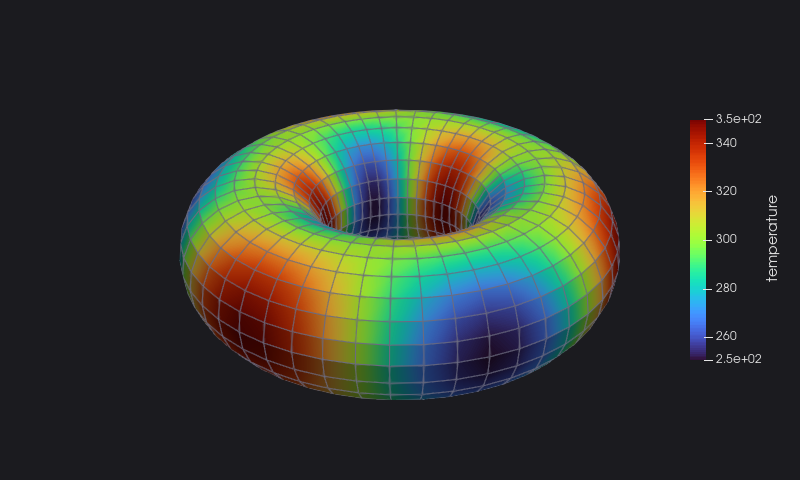
A real session: a short program writes a torus as a structured grid with a temperature and a velocity field, then a second one reads the file back and prints what it holds.

This is the whole program: compute the points and the fields, then one call for each part of the file. The torus above is torus.vts opened in ParaView.
program quickstart
!< Write a torus, a structured grid with a temperature field and a velocity field, ready for ParaView.
use penf, only : I4P, R8P
use vtk_fortran, only : vtk_file
implicit none
integer(I4P), parameter :: nu=48, nv=24, nw=3           ! points around the torus, around the tube, across it
real(R8P),    parameter :: pi=acos(-1._R8P)
real(R8P)               :: x(nu,nv,nw), y(nu,nv,nw), z(nu,nv,nw), t(nu,nv,nw), u(nu,nv,nw), v(nu,nv,nw), w(nu,nv,nw)
real(R8P)               :: a, b, r
type(vtk_file)          :: torus
integer(I4P)            :: i, j, k, error

do k=1, nw ; do j=1, nv ; do i=1, nu
  a = 2*pi*(i - 1)/(nu - 1) ; b = 2*pi*(j - 1)/(nv - 1) ; r = 0.3_R8P + 0.1_R8P*(k - 1)
  x(i,j,k) = (1 + r*cos(b))*cos(a) ; y(i,j,k) = (1 + r*cos(b))*sin(a) ; z(i,j,k) = r*sin(b)
  t(i,j,k) = 300 + 50*sin(3*a)*cos(b)                    ! temperature
  u(i,j,k) = -sin(a) ; v(i,j,k) = cos(a) ; w(i,j,k) = 0  ! velocity, around the torus
enddo ; enddo ; enddo

error = torus%initialize(format='raw', filename='torus.vts', mesh_topology='StructuredGrid', &
                         nx1=1, nx2=nu, ny1=1, ny2=nv, nz1=1, nz2=nw)
error = torus%xml_writer%write_piece(nx1=1, nx2=nu, ny1=1, ny2=nv, nz1=1, nz2=nw)
error = torus%xml_writer%write_geo(n=nu*nv*nw, x=x, y=y, z=z)
error = torus%xml_writer%write_dataarray(location='node', action='open')
error = torus%xml_writer%write_dataarray(data_name='temperature', x=t, one_component=.true.)
error = torus%xml_writer%write_dataarray(data_name='velocity', x=u, y=v, z=w)
error = torus%xml_writer%write_dataarray(location='node', action='close')
error = torus%xml_writer%write_piece()
error = torus%finalize()
print '(A,I0,A,I0,A)', 'torus.vts written: ', nu*nv*nw, ' points, ', (nu-1)*(nv-1)*(nw-1), ' cells'
endprogram quickstart
Reading is as short: initialize with action='read', then ask for what you need. The inspect program of the session:
program inspect
!< Print what a VTK file holds: its dataset, pieces and arrays, with the range of each array.
use penf, only : I4P, I8P, R8P
use vtk_fortran, only : vtk_file
implicit none
character(len=256)            :: filename
character(len=:), allocatable :: topology, compressor, names(:), data_type
character(len=5), parameter   :: locations(3)=['node ', 'cell ', 'field']
real(R8P),        allocatable :: values(:)
integer(I8P),     allocatable :: ids(:)
type(vtk_file)                :: a_file
integer(I8P)                  :: np, nc
integer(I4P)                  :: npieces, ncomp, p, l, a, error

call get_command_argument(1, filename)
error = a_file%initialize(filename=trim(filename), action='read')
if (error /= 0) error stop 'cannot read the file'
error = a_file%xml_reader%get_info(mesh_topology=topology, npieces=npieces, compressor=compressor)
print '(A,A,I0,A,A)', trim(filename)//': ', topology//', pieces: ', npieces, ', compressor: ', compressor
do p=1, npieces
  error = a_file%xml_reader%read_piece(piece=p, np=np, nc=nc)
  print '(A,I0,A,I0,A,I0,A)', '  piece ', p, ': ', np, ' points, ', nc, ' cells'
  do l=1, size(locations)
    if (l == 3 .and. p > 1) cycle ! field data belong to the dataset
    error = a_file%xml_reader%get_dataarray_names(location=trim(locations(l)), names=names, piece=p)
    do a=1, size(names)
      error = a_file%xml_reader%get_dataarray_info(location=trim(locations(l)), data_name=trim(names(a)), piece=p, &
                                                   data_type=data_type, n_components=ncomp)
      if (data_type(1:1) == 'F') then
        error = a_file%xml_reader%read_dataarray(location=trim(locations(l)), data_name=trim(names(a)), x=values, piece=p)
      elseif (data_type /= 'String') then
        error = a_file%xml_reader%read_dataarray(location=trim(locations(l)), data_name=trim(names(a)), x=ids, piece=p)
        values = real(ids, R8P)
      else
        cycle
      endif
      print '(4X,A6,A16,A8,I2,A,2(1X,ES11.4))', locations(l), trim(names(a))//repeat(' ', 16), data_type, ncomp, &
            ' comp., range', minval(values), maxval(values)
    enddo
  enddo
enddo
error = a_file%finalize()
endprogram inspect
Every example on these pages is a program compiled and run to produce the output and the images shown.
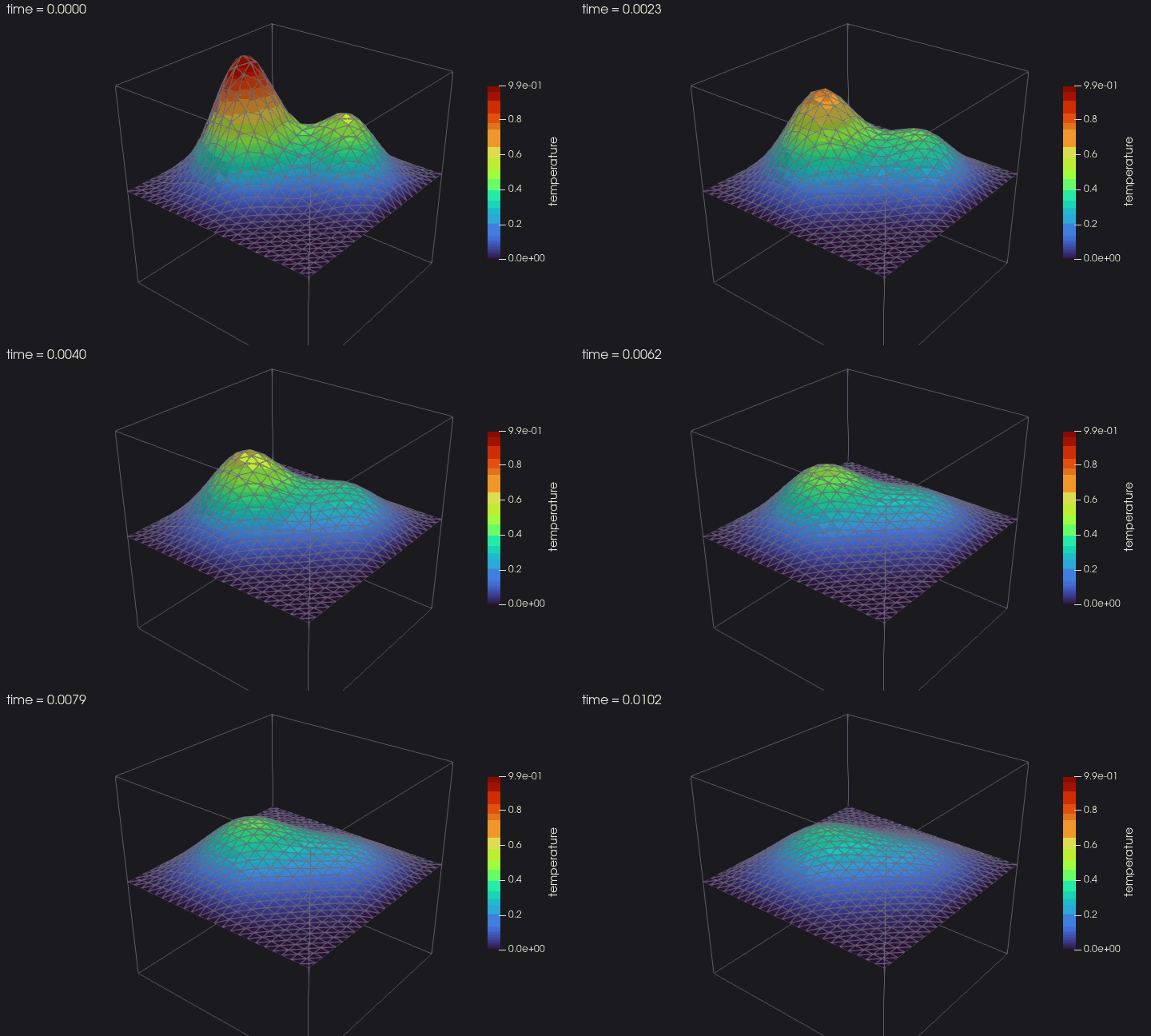
From a first file to a parallel, restartable time series: the tutorial builds heat, a small solver of the heat equation, chapter by chapter. This is its time series played in ParaView: two hot blobs merging and cooling down, on the middle plane of the cube.
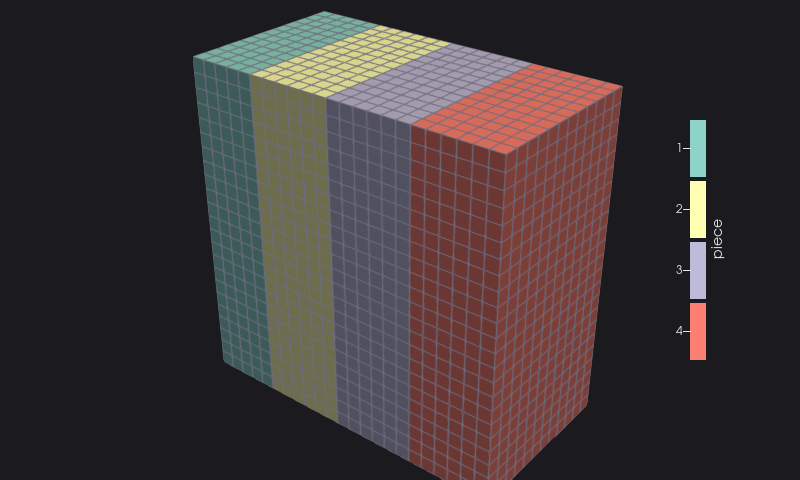 | 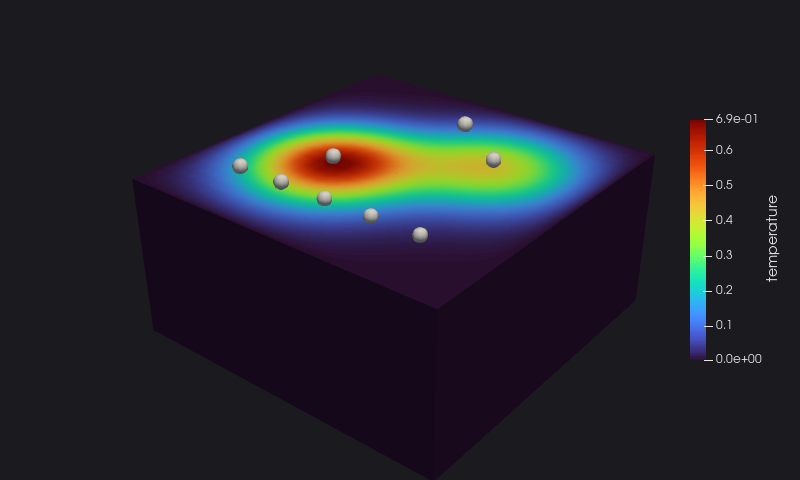 |
| Parallel pieces, ghost cells and a checked header | An assembly of the domain and its probes |
Quick answers in the cookbook: every kind of dataset, data and format, parallel and composite files, reading.
Contributions are welcome — see the Contributing page.
VTKFortran is distributed under a multi-licensing system:
| Use case | License |
|---|---|
| FOSS projects | GPL v3 |
| Closed source / commercial | BSD 2-Clause |
| Closed source / commercial | BSD 3-Clause |
| Closed source / commercial | MIT |
Anyone interested in using, developing, or contributing to VTKFortran is welcome — pick the license that best fits your needs.