Ecosystem: Managing Interconnected Projects
FoBiS builds one project at a time. Real Fortran work rarely stops at one project: a portability layer is used by a string library, which is used by a command-line parser, which is used by your application. Each lives in its own repository, with its own tags, CI and boilerplate — and every change at the bottom of the stack ripples upwards.
fobis ecosystem manages such a set of interconnected FoBiS projects as a whole:
- know the state of every repository at a glance — branch, uncommitted changes, unreleased commits and the version they call for, CI result, scaffold drift, and whether each project is built against the current head of its dependencies;
- act across all of them in dependency order — run a command everywhere, refresh the fetched dependencies, sync the boilerplate, and check before releasing that a change does not break the projects downstream;
- release them as a train — every project that needs it, dependencies first, each with the version its commits call for, stopping safely at the first failure.

Read-only by default
Knowing never changes anything: discover, graph and dashboard only read (the dashboard runs git fetch, which only updates remote-tracking refs). Nothing ever commits or pushes except release, and only after you confirm the plan.
Concepts
The registry
An ecosystem is an explicit list of local repositories, kept in your user configuration (~/.config/fobis/config.ini, or $XDG_CONFIG_HOME/fobis/config.ini):
[ecosystem]
root     = ~/fortran
projects = PENF FACE BeFoR64 StringiFor FLAP
Nothing is managed by accident: a directory full of archives and experiments stays out of the ecosystem until you register a project with fobis ecosystem add. Every project is a git repository with a fobos file; its name is its directory name.
The dependency graph
There is no extra graph file: the edges come from each project's own fobos [dependencies] section — the one fobis fetch already uses. A dependency is an ecosystem dependency when its key, or the repository name of its URL, matches a registered project (case-insensitively); any other dependency (say stdlib) is external: listed, not managed.
flowchart LR
    PENF --> BeFoR64
    PENF --> StringiFor
    FACE --> StringiFor
    BeFoR64 --> StringiFor
    PENF --> FLAP
    FACE --> FLAP
From the graph FoBiS derives the release order: projects are grouped in levels, each one level above its deepest dependency. Level 0 has no ecosystem dependency; releasing level by level never releases a project before one of its dependencies. Every acting command walks the projects in this order.
| Level | Projects | Why |
|---|---|---|
| 0 | PENF, FACE | no ecosystem dependency |
| 1 | BeFoR64, FLAP | depend on level-0 projects only |
| 2 | StringiFor | depends on BeFoR64 (level 1) |
A dependency cycle is reported, never looped on: the projects on it are left out of the order.
Pins: following the heads
Ecosystem projects typically track the default branch of their dependencies rather than pinning a release, so that a fix at the bottom of the stack reaches the dependents without a cascade of version bumps. What a project is actually built against is recorded by fobis fetch in the lock file <deps_dir>/fobos.lock. A pin compares that locked commit with the dependency's remote default-branch head:
| Pin | Meaning | Fix |
|---|---|---|
current | built against the dependency's head | — |
stale | the head has moved on since the last fetch | fobis ecosystem fetch |
ahead | the lock is newer than the head FoBiS knows | git fetch the dependency (drop --no-fetch) |
diverged | lock and head on unrelated histories | inspect the dependency |
unlocked | the dependency was never fetched | fobis fetch in the project |
unknown | the dependency has no remote head | push the dependency |
The release rule
Whether a project needs a release is decided by the files its commits change; how big a release by their Conventional Commits type.
- A commit since the latest tag is releasable when it changes at least one file outside the release-excluded globs — by default
docs/*,.github/*,*.mdandscripts/*. A docs-only or CI-only commit is unreleased, but calls for no release, whatever its type. - The bump comes from the releasable commits only: a
!after the type/scope or aBREAKING CHANGEfooter means major,featmeans minor, anything else (including a non-conventional message) means patch.
| Commit | Files changed | Releasable | Bump |
|---|---|---|---|
fix(docs): target es2022 | docs/package.json, scripts/release.sh | no | — |
build(fpm): track default branches | fpm.toml | yes | patch |
feat(core): add halve() | src/core_m.f90 | yes | minor |
refactor(api)!: rename twice | src/core_m.f90 | yes | major |
Commit types are written by hand and are sometimes wrong; the files a commit touches are not. A project replaces the default globs in its own fobos:
[ecosystem]
release_exclude = docs/* .github/* *.md scripts/* examples/*
Try it in one minute
The documentation ships a script that builds a small, private ecosystem — three real Fortran projects (core ← mathx ← app) with history, tags, local remotes and fetched dependencies. Nothing leaves the directory you give it, so you can release, break and repair at will:
bash docs/demo/ecosystem-demo/setup.sh ~/eco-demo
source ~/eco-demo/env.sh          # selects the demo registry; the demo URLs resolve locally
cd ~/eco-demo

fobis ecosystem graph
fobis ecosystem dashboard --no-ci
fobis ecosystem check core
fobis ecosystem release --dry-run
It needs git and gfortran, plus git-cliff for the release pre-flight. Remove it with rm -rf ~/eco-demo. All the animations on this page are recorded on it.
1. Register the projects
discover scans one directory (the configured root, or --root) for git repositories with a fobos file that are not registered yet, and prints the command that would register them. It only reads: pick the candidates you actually want to manage.
fobis ecosystem discoverUnregistered FoBiS projects under /home/me/fortran:
adam
FiNeR
FLOw
...
Register the ones you want to manage (not necessarily all):
fobis ecosystem add adam FiNeR FLOw ...add and remove edit the registry for you:
fobis ecosystem add FiNeR FOODIE          # names under root
fobis ecosystem add ~/work/MyLib          # or any path
fobis ecosystem remove FOODIE # the repository itself is not touchedaddaccepts only git repositories with a fobos file, whose directory name no registered project has (the name identifies the project). An already registered one is reported and skipped.- A project directly under
rootis written as its bare name, any other as a~/...path. removetells you which registered projects still depend on the one you remove (it becomes an external dependency for them).- Both are all-or-nothing — one invalid argument and the configuration is not touched — and rewrite only the
projectskey: the rest of the file, comments included, stays as it is.
2. Know: graph and dashboard
The graph
fobis ecosystem graphRelease order (dependencies first)
1. PENF (level 0)
2. FACE (level 0)
3. BeFoR64 (level 1)
4. FLAP (level 1)
5. StringiFor (level 2)
Dependency tree
StringiFor
|-- BeFoR64
| `-- PENF
|-- FACE
`-- PENF
FLAP
|-- FACE
`-- PENFThe terminal dashboard
fobis ecosystem dashboardProject Branch Tree Upstream Version / tag Unreleased CI Drift Pins
---------- ------ ----- -------- ----------------- --------------------------------- ------- ----- ----------------------
PENF master clean in sync v2.0.1 / v2.0.1 1, none to release passing 3 -
FACE master clean in sync v1.1.16 / v1.1.16 1, none to release passing 3 -
BeFoR64 master clean in sync v1.2.1 / v1.2.1 3 (patch -> v1.2.2) passing 3 PENF stale
StringiFor master clean in sync v1.3.0 / v1.3.0 6 (patch -> v1.3.1) passing 3 BeFoR64 stale
FLAP master clean in sync v2.5.1 / v2.5.1 2, 1 to release (patch -> v2.5.2) passing 3 FACE stale, PENF staleHow to read a row:
| Column | Shows | Needs attention when |
|---|---|---|
| Tree | clean, or the number of changed and untracked files | anything but clean |
| Upstream | in sync, +ahead/-behind, or no upstream | not in sync |
| Version / tag | the VERSION file against the latest tag | they differ (highlighted) |
| Unreleased | commits since the tag; how many are releasable; the bump and next version | something to release |
| CI | GitHub Actions result for HEAD: passing, failing, running, none, not pushed, unknown | failing |
| Drift | scaffold-managed files not in sync (project-owned ones excluded) | non-zero |
| Pins | ecosystem dependencies not at their head | stale, unlocked, diverged |
The dashboard runs git fetch in every project first (quietly; it only updates remote-tracking refs), because ahead/behind, CI at HEAD and the dependency heads are only right after a fetch. All projects are examined concurrently. --no-fetch gives a fast, offline view of the last fetch; --no-ci skips GitHub entirely. CI goes through the gh CLI: without it, or unauthenticated, the column reads unknown and nothing fails.
The HTML dashboard
fobis ecosystem dashboard --format htmlwrites a self-contained page (default ~/.cache/fobis/ecosystem.html) and opens it in the browser: the same table, links to every repository, its Actions and its releases, the release order, and the dependency diagram with every node coloured by the most severe state of its project — CI failing, stale pins, changes to release, up to date.
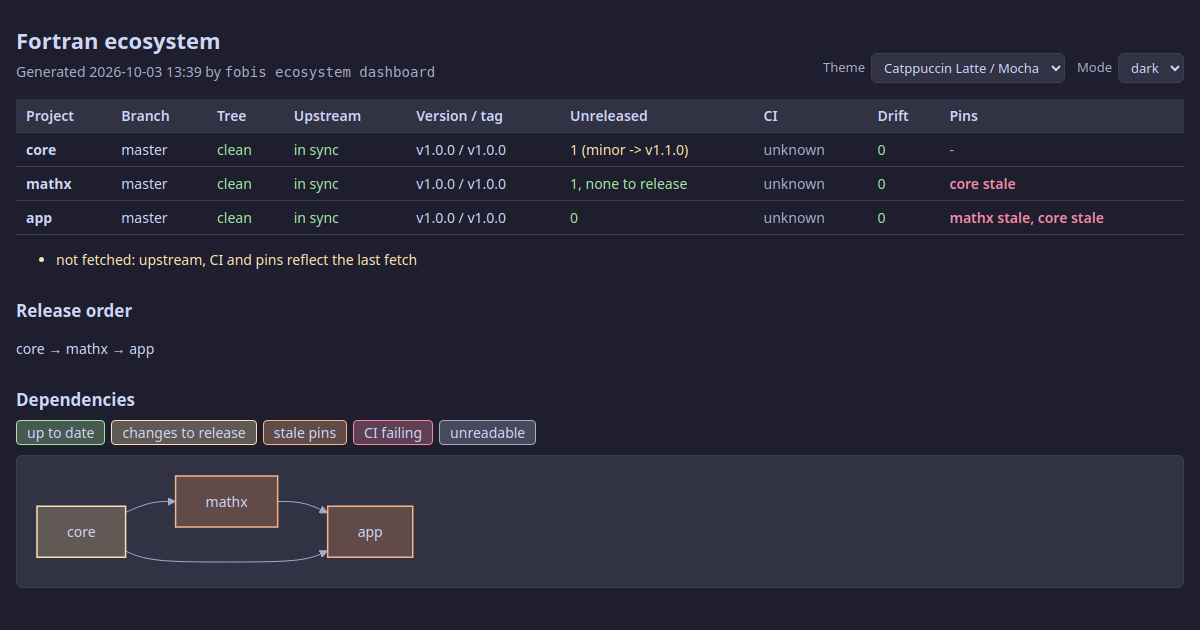
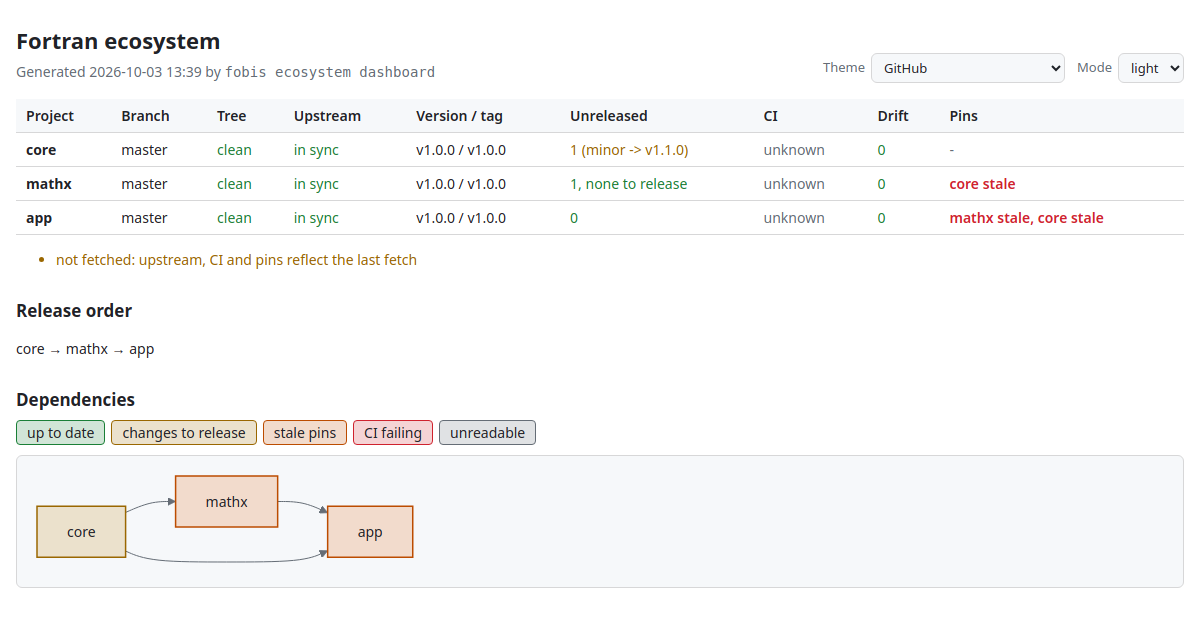
The page has Theme and Mode selectors that switch live and are remembered by the browser. Nine popular palettes are built in, each with a light and a dark variant:
theme | Light | Dark |
|---|---|---|
github (default) | GitHub Light | GitHub Dark |
solarized | Solarized Light | Solarized Dark |
dracula | Alucard | Dracula |
nord | Snow Storm | Nord |
tokyo-night | Tokyo Night Day | Tokyo Night |
catppuccin | Latte | Mocha |
gruvbox | Gruvbox Light | Gruvbox Dark |
one | One Light | One Dark |
rose-pine | Rosé Pine Dawn | Rosé Pine |
mode is auto (follow the system, live), light or dark. Set your defaults once in the user configuration (theme = nord, mode = auto in [ecosystem]), or per run with --theme/--mode. Every colour derives from the palette, and secondary, link and status text is darkened or lightened — keeping its hue — until it reaches a 4.5:1 contrast with the background.
On WSL
A Windows browser cannot open a file:///home/... path. Write the page and open it from Windows: fobis ecosystem dashboard --format html --no-open && explorer.exe "$(wslpath -w ~/.cache/fobis/ecosystem.html)"
For scripts and agents
dashboard --json and graph --json print everything above as JSON: one object per project with every field, plus the levels, the release order and any cycle. See the JSON reference.
# projects with something to release
fobis ecosystem dashboard --no-ci --json | jq -r '.projects[] | select(.releasable > 0) | .name'
3. Act across the projects
Every acting command walks the projects in release order, streams each command's output live under a ==> PROJECT: command header, and ends with a summary table; it exits 1 when a project failed. --only A,B restricts the projects, --from X resumes after a failure, --fail-fast stops at the first one.
Run a command everywhere: exec
fobis ecosystem exec -- git status -s
fobis ecosystem exec -- 'fobis clean && fobis build'
fobis ecosystem exec --only PENF,FACE --fail-fast -- fobis test
==> PENF: git log -1 --format=%h && test $(basename $PWD) != FLAP
34e10af
==> FLAP: git log -1 --format=%h && test $(basename $PWD) != FLAP
7f5ec8e
Project Result Time Detail
PENF passed 0.0s
FLAP failed 0.0s exit 1
1 passed, 1 failed: FLAPA single argument is a shell command line (quote it), several form one command. A non-zero exit is a failure, a death by signal a crash (reported with the signal, e.g. SIGSEGV). fobis and FoBiS.py inside the command — and inside the fobos rules it runs — resolve to the FoBiS running exec, not to whichever one the PATH finds first.
Refresh the dependencies: fetch
fobis ecosystem fetchruns fobis fetch --update in every project with a [dependencies] section, dependencies first, so that each lock ends at the current heads: the Pins column turns current.
Check before you release: check
The question before releasing a library is not does it pass its own tests — its CI answers that — but does it break the projects that use it. check answers it with your local, unreleased working copy, uncommitted changes included, without touching any repository:
fobis ecosystem check core
For every project that depends on core, directly or transitively, in release order:
flowchart LR
    A["dependent's working copy<br/>(no build products)"] --> S[("temporary<br/>staging dir")]
    B["its fetched dependencies<br/>(as they are)"] --> S
    C["core's local working copy<br/>(uncommitted changes included)"] --> S
    S --> R["check commands<br/>from scratch"]
    R --> V{passed?}
    V -- yes --> D["staging removed"]
    V -- no --> K["staging kept,<br/>path printed"]
- its working copy (tracked and untracked files; ignored files such as build products excluded) is copied to a temporary directory;
- its dependencies are copied in as it has fetched them — except the checked project, taken from its local working copy;
- its check commands run there, from scratch: no stale object can leak into the result.
The check commands come from the dependent's fobos, in order of precedence:
| Source | Commands |
|---|---|
[ecosystem] check | one command per line |
a [rule-makecoverage] | fobis rule --ex makecoverage — what the CI runs |
| otherwise | fobis build |
[ecosystem]
check = fobis build --mode tests-gnu
        ./scripts/run_tests.sh
The staging directories are removed after a full pass and kept — their path printed — when a check fails, for inspection (--keep keeps them always). A dependent whose dependencies were never fetched is reported as skipped; check exits 1 unless every dependent passed.
Sync the boilerplate: scaffold
fobis ecosystem scaffold status                    # what drifts, project by project (exit 1 if any)
fobis ecosystem scaffold sync                      # show the changes: writes nothing
fobis ecosystem scaffold sync --apply              # confirm and write, project by project
fobis ecosystem scaffold sync --files 'scripts/*' --apply --yes
These are the scaffold commands, run across every project. A file a project has deliberately customised is declared in its fobos and never written:
[scaffold]
# release.sh also bumps the CMake project version: owned here, never synced
skip = scripts/release.sh
It shows as SKIPPED (project-owned) and does not count as drift, here and in plain fobis scaffold alike. With --apply each project's changes are confirmed (default no); when no answer is possible — no terminal — nothing is written.
4. Release: the release train
fobis ecosystem release --dry-run          # the plan, nothing else
fobis ecosystem release                    # the train
flowchart TD
    P["plan: releasable projects,<br/>release order, versions"] --> F{any blocker?}
    F -- yes --> X(["refuse: nothing runs"])
    F -- no --> C{confirm the plan?}
    C -- no --> N(["nothing released"])
    C -- yes --> R["release.sh vX.Y.Z<br/>(asks its own confirmation)"]
    R --> T{"tag local and<br/>on the remote?"}
    T -- no --> S(["stop, print the resume command"])
    T -- yes --> W["wait for the GitHub release"]
    W --> U["fobis fetch --update<br/>in the dependents"]
    U --> M{more projects?}
    M -- yes --> R
    M -- no --> D(["done"])
1. The plan. After a fetch and a CI query, every project with releasable commits is listed in release order with the version it will get. Override a suggestion with --bump NAME=major|minor|patch or an explicit --bump NAME=vX.Y.Z (repeatable); --bump also brings into the plan a project with nothing releasable.
Release plan (dependencies first)
   1. BeFoR64     v1.2.1 -> v1.2.2        ready  (patch, 3 releasable commit(s))
   2. FLAP        v2.5.1 -> v2.5.2        BLOCKED  (patch, 1 releasable commit(s))
        x working tree not clean (1 changed)
   3. StringiFor  v1.3.0 -> v1.3.1        ready  (patch, 6 releasable commit(s))
2. Pre-flight, for every project before anything runs. A single blocker refuses the whole train — no half-released ecosystem:
| Blocks the train | Only warns |
|---|---|
no executable scripts/release.sh | unpushed commits (CI has not seen them) |
git-cliff missing | CI not passing yet (running, none, unknown) |
| not on the trunk branch | not fetched (--no-fetch) |
| uncommitted changes | not on GitHub (the release cannot be awaited) |
| behind the upstream, or no upstream | |
| CI failing at HEAD | |
| no previous tag and no explicit version | |
| version not above the current tag, or already tagged |
3. Confirmation of the plan as a whole (default no). Then each project's own scripts/release.sh runs with the planned version — the version you approved is exactly the one tagged — and asks its own confirmation, as when you run it by hand.
4. For each project, after release.sh:
- the tag must exist locally and on the remote —
release.shexits successfully when you decline its prompt, and that is reported asaborted, never as a release; - the GitHub release published by the project's release workflow is awaited (
--timeout, default 900 s;--no-waitskips it); fobis fetch --updateruns in its dependents, so they build against the new release.
5. On failure the train stops and prints the command that resumes it:
Stopped at FLAP. Fix it, then resume with: fobis ecosystem release --from FLAP --bump FLAP=minorProjects already released drop out of the plan by themselves (their new tag leaves them nothing to release), so resuming never releases anything twice.
--yes
--yes approves the plan and answers every release.sh prompt. Use it only for an unattended run of a plan you have already reviewed with --dry-run.
Recipes
Morning check
fobis ecosystem dashboard                  # what changed, what is red, what is stale
fobis ecosystem fetch                      # bring every pin to the current heads
Upgrading FoBiS: re-sync the boilerplate
pip install -U FoBiS.py
fobis ecosystem scaffold status
fobis ecosystem scaffold sync              # review the diffs
fobis ecosystem scaffold sync --apply      # write, project by project
fobis ecosystem exec -- git status -s      # then review and commit in each repository
Changing a library at the bottom of the stack
# hack on PENF, do not commit yet
fobis ecosystem check PENF                 # do BeFoR64, FLAP, StringiFor still build and pass?
git -C ~/fortran/PENF commit -am "feat(io): ..." && git -C ~/fortran/PENF push
fobis ecosystem release --dry-run          # PENF, and anything else that needs a release
fobis ecosystem release
Clean builds everywhere
FoBiS skips up-to-date objects, so an object built with other flags can survive a flag change. To rule that out across the ecosystem:
fobis ecosystem exec -- 'fobis clean && fobis build'In CI or a cron job
fobis ecosystem dashboard --json > ecosystem.json
fobis ecosystem scaffold status            # exit 1 on drift
fobis ecosystem release --dry-run          # exit 1 when a planned release is blocked
Configuration summary
User configuration (~/.config/fobis/config.ini):
[ecosystem]
root     = ~/fortran                      ; where the projects live
projects = PENF FACE BeFoR64 StringiFor   ; names under root, or paths
           FLAP                           ; (continuation lines are fine)
theme    = catppuccin                     ; HTML dashboard palette
mode     = auto                           ; auto | light | dark
Per project (its fobos):
[ecosystem]
check           = fobis build --mode tests-gnu      ; check commands, one per line
                  ./scripts/run_tests.sh
release_exclude = docs/* .github/* *.md scripts/*   ; changes that call for no release

[scaffold]
skip = scripts/release.sh                           ; customised files scaffold never writes
Safety guarantees
- Nothing is managed by accident: only registered projects, registered explicitly.
- Knowing never writes:
discover,graphanddashboardonly read (plusgit fetch). - No commit, no push outside
release;releaseonly after you confirm the plan, and eachrelease.shasks again. - No consent, no write: a confirmation that cannot be answered (no terminal) counts as no — for
release,scaffold sync --applyand plainfobis scaffold syncalike. checknever touches a repository: it builds copies.- The configuration keeps its comments:
addandremoverewrite only theprojectskey, atomically. - Failures stop the train with an exact resume command; a declined release is never mistaken for a successful one.
Troubleshooting
CI reads unknown everywhere. gh is missing or not authenticated (gh auth status), or the origin remote is not on GitHub.
A pin stays stale after fobis ecosystem fetch. Pins compare with the dependency's remote head: commits you have not pushed to the dependency do not count.
check reports skipped: dependency X not fetched. The dependent never ran fobis fetch: run fobis ecosystem fetch, or fobis fetch in that project.
A release is aborted. release.sh did not create the tag — usually its prompt was declined. Nothing was pushed; re-run the train.
release refuses with git-cliff not found. The scaffolded release.sh regenerates the changelog with git-cliff: pipx install git-cliff.
See also
fobis ecosystemcommand reference — every option, exit code and JSON field- Fetch dependencies and Lock file — the
[dependencies]section andfobos.lock - Scaffold — the boilerplate the ecosystem keeps in sync